Crafting SEO-friendly content isn’t just about peppering your articles with keywords. It’s not about writing the most words either (yes, it isn’t).
The best SEO-friendly content is that which combines relevance, readability, and thorough research. As SEO specialists and writers, mastering this can significantly enhance your content’s reach and effectiveness.
This guide will equip you with actionable tips and data-driven insights to refine your writing skills, ensuring each page appeals to your audience and climbs the ranks in search results.
What is SEO Writing?
Any content you create to attract visitors from search engines is SEO content, including anything people can read or consume online.
SEO writing creates compelling, informative, and optimised content for search engines. The primary goal is to enhance visibility in search engine results, ensuring the content reaches its target audience and effectively engages them.
At its core, SEO writing involves integrating keywords and phrases that potential readers are actively searching for. These keywords should be seamlessly woven into the content, maintaining natural readability and relevance to the topic without compromising quality.
Effective SEO writing balances engaging readers and satisfying search engine algorithms.
So, when thinking about your title, you must consider how attention-grabbing it is as well as if it incorporates your target keyword. Your H1 should follow a similar pattern.
The next part is the introduction, which should hook the reader immediately, promising them value and insights. Each paragraph should build on this promise, delivering valuable information clearly and concisely.
The purpose of this is simple: without a great intro, people drop off.
The more people drop off your site, the less Google sees your page as relevant to that term. The less relevant Google sees you to that term, the less likely you are to rank for it.
I would explain how to write SEO-friendly content in more depth in the sections that follow.
While SEO content can take many different forms, the following are the most popular ones:
- Glossaries
- Blogs
- Web pages
- Product pages
- Website articles
- Videos and explainers
The Basics of SEO Content Writing
There are a few steps to writing SEO-friendly content:
- Keyword research and use
- Contextually-relevant terms
- Content Research
- Content Structure
- Content Writing
I have explained them in-depth below.
Step 1: Do Some Keyword Research
Before writing any content, it is imperative to identify the right keywords.
Your target audience frequently uses these terms when searching for information or products online. You would need a keyword research tool for this.
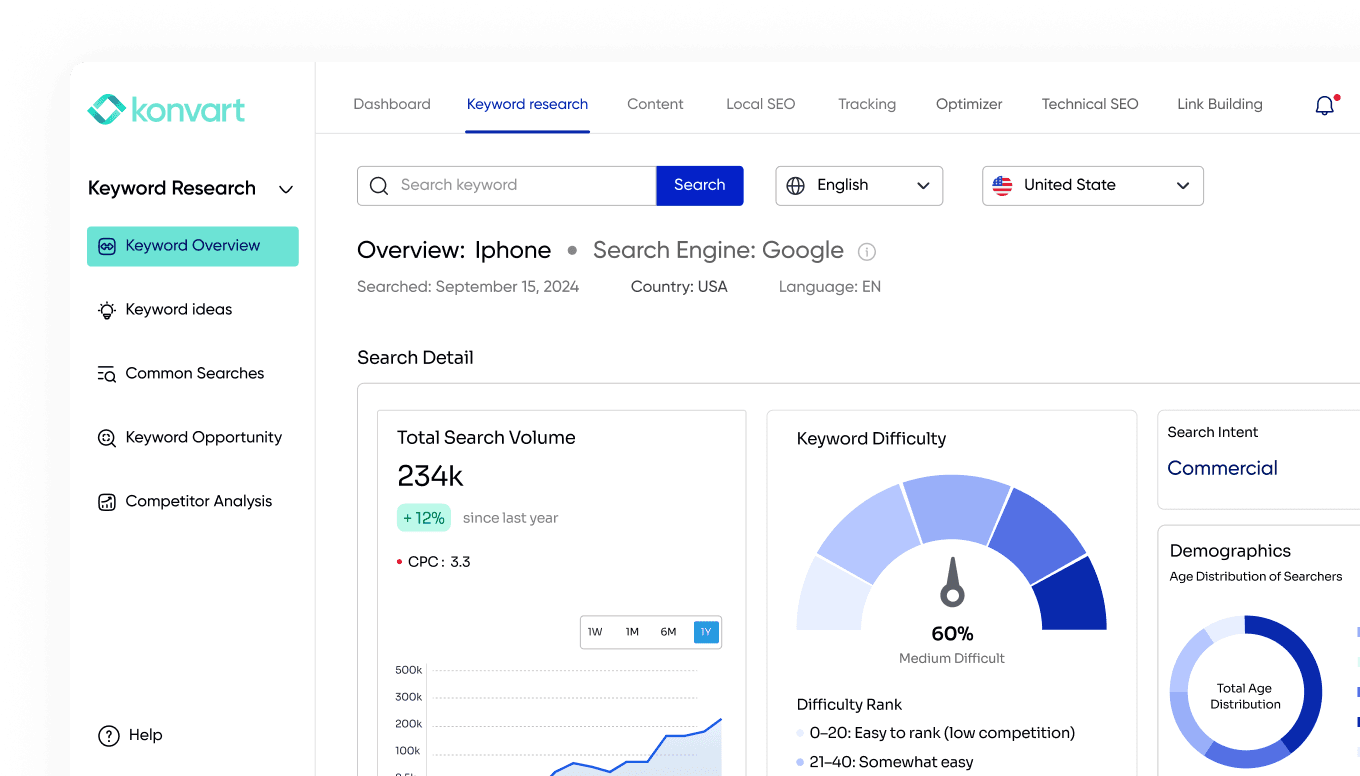
Use Konvart’s keyword research tool to gather insights into popular search terms within your niche.
It provides 5 keyword research tools, but the Keyword Overview tool should be sufficient here.
Enter your seed phrase to review potential interest.
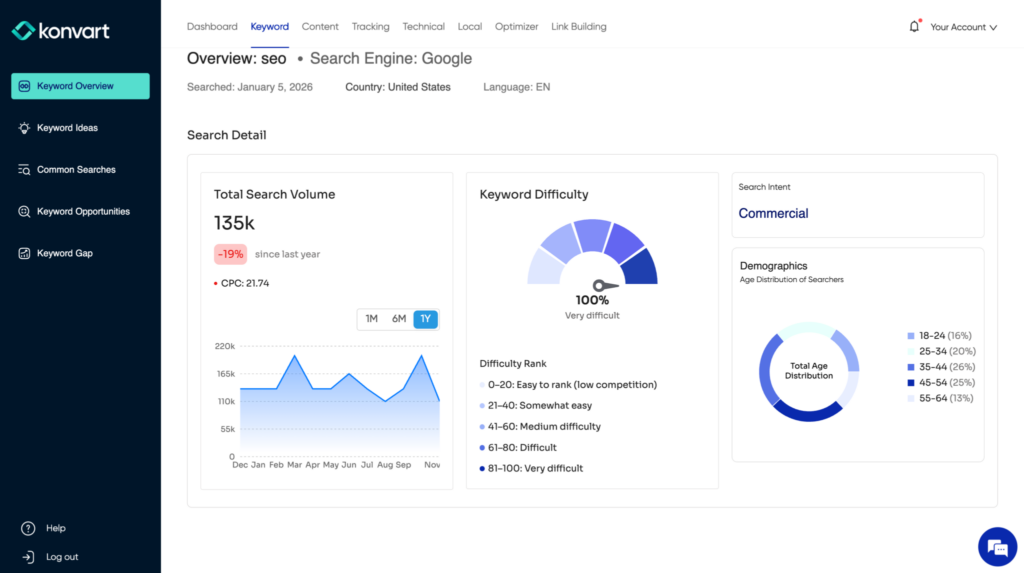
Konvart will provide insight into the search volume, difficulty, intent, demographics, related keywords, and competitors. Each of these has its place in the SEO content writing process.
- Search Volume: The search volume validates interest in the topic. If you are the content writer and not the SEO specialist, this bit should not bother you as much because the SEO specialist has likely already checked. Nevertheless, seeing the search volume against that of the related terms should tell you if you have chosen the right keyword.
- Keyword Difficulty: The keyword difficulty tells you how hard/easy it is to rank for that term based on the strength of the competitors who have ranked for that term. This takes into consideration the page strength, domain strength, and traffic of those competitors. In SEO content writing, the only purpose of this is to compare against the related keywords to see if there’s a better one to focus on.
- Search Intent: When it comes to SEO content writing, search intent is probably one of the most important things. The reason for that is that it tells you the “what”. That is, what searchers are looking for when they enter that keyword in Google search or ChatGPT. There are four popular types, and I have explained how to optimize your content for them below.
- Demographics: The demographics is a breakdown of the age group of searchers. This is important when writing for SEO. You should ensure that your content aligns with what that demographic reads, in terms of tone and cultural significance.
- Competitors: Review your competitors before writing. Konvart provides a list of competitors in order at which they are ranking on the SERP. Check at least the top three and take inspiration from them for:
- Headings covered
- How well they covered those headings
- Use of keywords
- Title construction
- What they didn’t cover that you probably should.
- Related keywords: The related keywords provide more terms that you should cover in your content, for example, in headings. Note that some of those terms are better for other pages, rather than headings in your current content; in cases like this, then you plan to write those and then internal link the old to the new and vice versa when you write them.
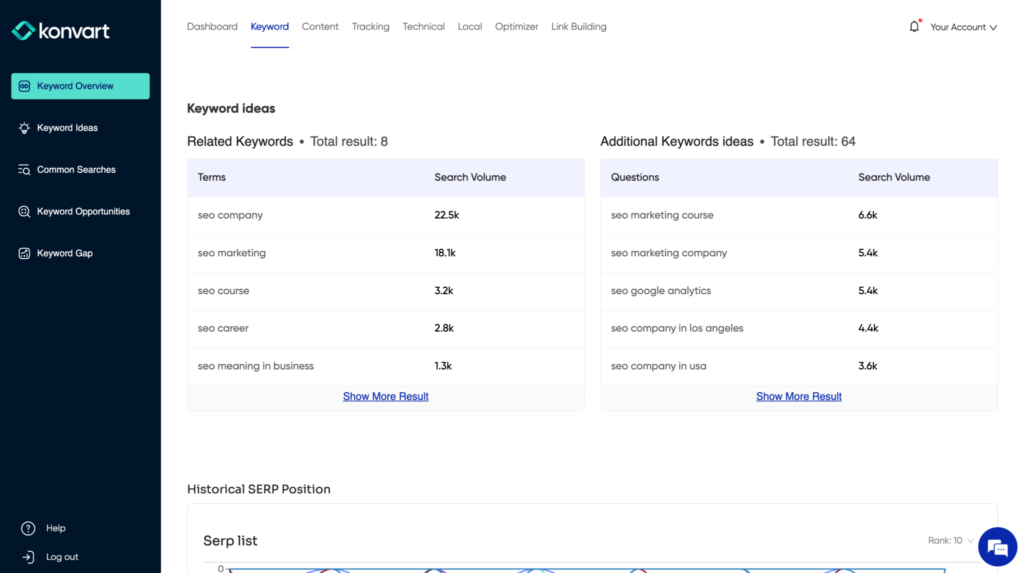
This is the starting point for SEO-friendly content.
The keywords you find need to be used right. However, there’s no one-fits-all number or percentage for keyword usage. It’s subject to each topic.
Your keywords must be strategically incorporated into your content, including the title, headers, and body text. But assuming that they should be mentioned all the time or verbatim would be a mistake. That used to work in the early days of SEO, but not anymore. I have explained how to handle this in the content writing section below.
Search Intent for SEO Content Writing
Earlier, I mentioned explaining search intent.
Search intent refers to the reason behind a user’s query on search engines.
Typically, search intent falls into four main categories:
- Informational Intent: Users seek to learn or gather information. Example queries include “how to tie a tie” or “what is SEO.”
- Navigational Intent: Users search for a specific website or page. For instance, someone might type “Facebook login” or “Amazon customer service.”
- Transactional Intent: Here, the intent is to purchase. Searches like “buy Nikon camera” or “discount on yoga mats” are common examples.
- Commercial Investigation: Users are considering a purchase and want to compare products or read reviews. Examples include “best SEO tools” or “iPhone vs. Android reviews.”
One easy way to understand search intent is to look at the SERPs—what type of pages are ranking on the first page? Are they blogs/articles? Product pages? What page type Google sees as relevant should be what you create content for unless you are sure that is the wrong intent, aka Google isn’t satisfying the user’s query with that page type.
Also, analyse keyword phrases – Look at the language used in the search query. Words like “buy,” “price,” and “how to” can give clues about the type of content the searcher expects. You can also use keyword research tools. As you can see in the above screenshot, Konvart provides search intent data.
Once you’ve identified the search intent, you must tailor your content accordingly. See the content writing section below on how to write content that matches search intent.
Step 2: Find Contextually Relevant Terms
To understand the topic, Google looks at the relevance of the entire content.
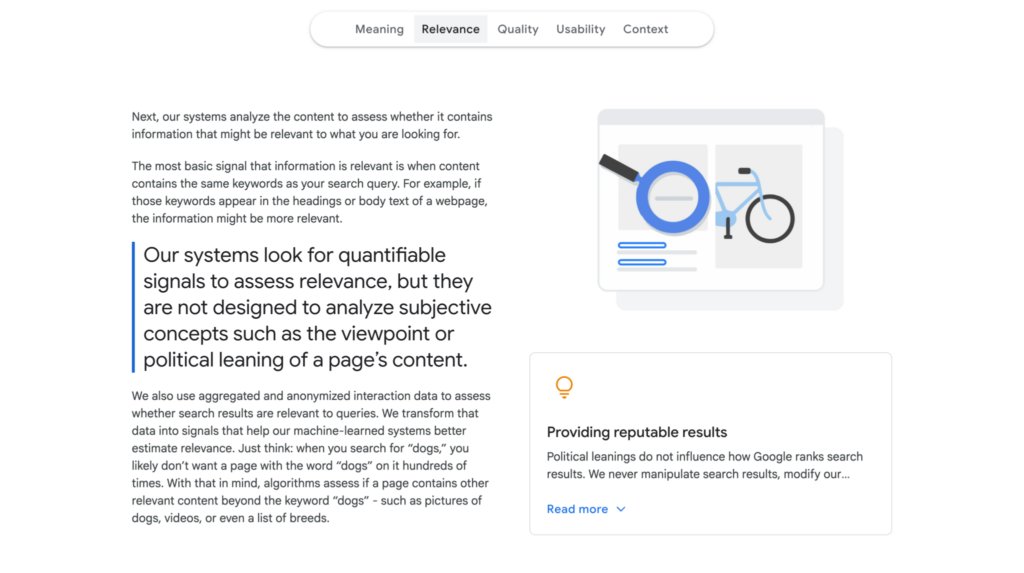
As seen in the screenshot above, Google has mentioned on its website (as well as other comments from representatives) that it looks at the content beyond the keyword to get the full picture. For example, if someone is searching for a “wedding dress”, a page that has texts on “wedding”, “bride”, “ceremony”, “veil”, and “reception” would be of more relevance over one that just says “dress” 20 times over and alone. The other terms gives Google context.
Over time, SEOs have called these terms different things, including “LSIs”, “NLPs”, “TD-IDF terms”, etc. Regardless of what you call it, more often than not, if you write for users, you would incorporate some of them naturally. However, some of them can easily be missed. So, here’s what you need to do to ensure you don’t miss them.
- Write your content structure only after looking at competitors’. What your competitors have written is a good starting point for inspiration on the headings to use and what to cover under them. If you cover each heading in full, you’d likely use some contextually relevant terms naturally.
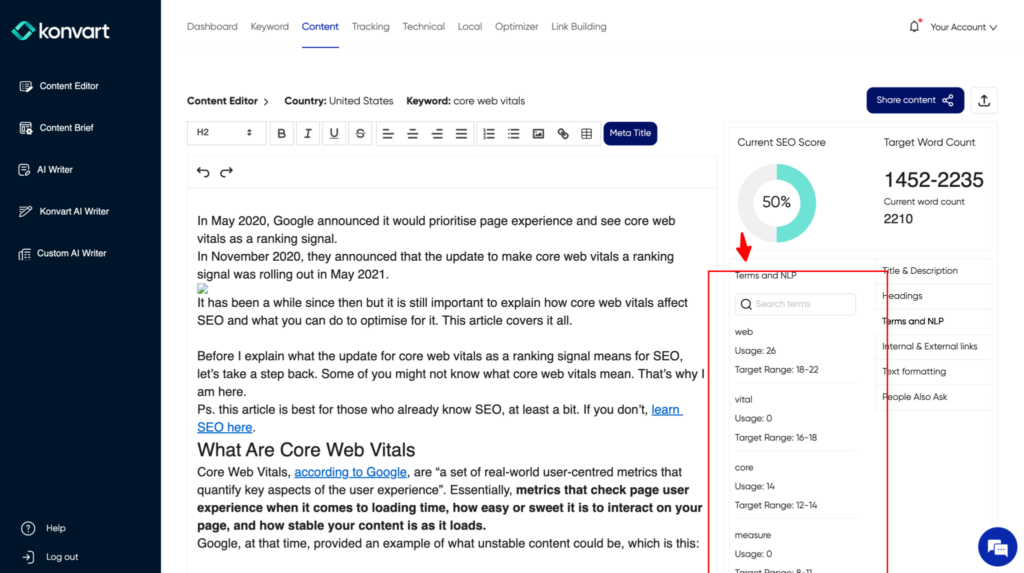
- Write your content, then confirm using an SEO content editor. Rather than force yourself to write with the terms in mind, write first, then confirm and optimize. Konvart’s Content Editor provides these terms and phrases as seen in the screenshot below. Having checked with the content editor, you can then review your content to find sections in which you could include any of those terms.
Step 3: Do Content Research
Your content will not be SEO-friendly if you do not cover every relevant aspect. To ensure this is not the case, you need to do some content/topic research. Here’s the nitty-gritty:
- Browse at least three competitors
- Take note of their headings and what they cover under each
- Start writing your headings based off what they have covered
- Look at the SERP, particularly the People Also Ask questions. Alternatively, use Konvart’s Common Searches and phrases tool.
- Take note of the questions listed there
- Compare those questions against your headings. Use them to re-write your headings to make them better
- If there are questions that you haven’t covered with a heading, turn that question into a heading
- Look at the related keywords you found from the keyword research process.
- Turn relevant related keywords into headings. It’s relevant if it should be a sub-topic within your topic rather than a standalone page. However, in some cases, you can still include it as a sub-topic with a very short section, even if it’s a standalone page as well.
- Review your list of headings now against your target keyword/topic. Is there anything else that users might want to know that is not answered?
- If you are unsure and cannot think of any, check forums, Google autocomplete, and Google related searches.
- If still unsure, ask AI about what might be missing in your structure. This is one good use of ChatGPT, Claude, and Gemini in the SEO content writing process.
Does that all seem like a lot? Use Konvart’s Content Brief or Content Editor tools instead.
Use the Content Editor if you are the writer. Use the Content Brief if you are not the writer, but you create the brief/instructions/guide for the writer. You can see a snippet of the content editor above, and the content brief below.
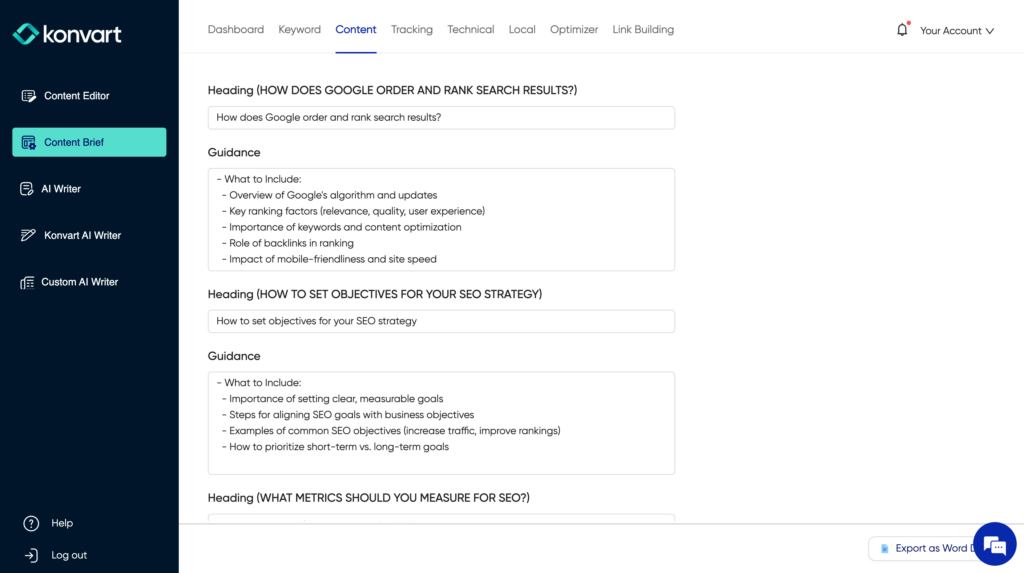
These tools review the SERP, keyword, intent, searchers, and competitors before suggesting headings and what to include under each.
Step 4: Create Your Content Structure
At this point, you should have headings to use and what to include in them, but it’s probably still messy. The purpose of this step is to make it flow well and make sense.
A well-structured article facilitates both readability and SEO effectiveness.
Use headings and subheadings (H1, H2, H3) to organise content logically. This helps readers navigate the article easily and allows search engines to better understand and rank the content.
Each section should flow naturally into the next, with clear transitions and focused discussion points.
Also, place the most important bits at the top of the posts – the higher, the better.
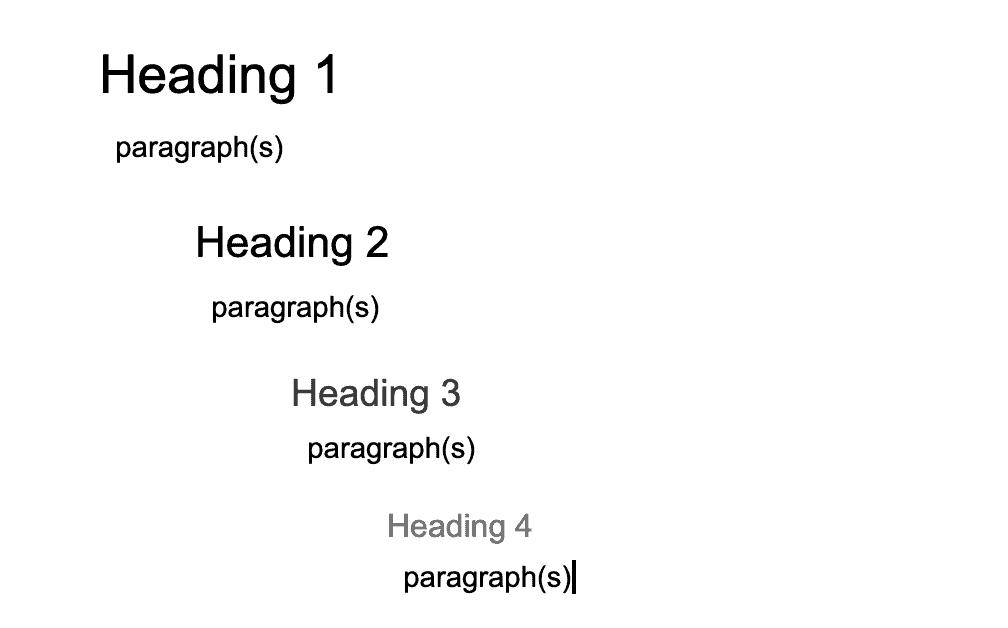
As a rule of thumb, your heading one should be your topic, your heading twos should be main sub-headings, your heading threes should be sub-headings of your heading twos, and your heading four sub-headings of heading three.
Not every heading two needs a heading three and not every heading three needs a heading four. Only create more nested sub-headings only if they are needed to break the topic and provide ease of readability.
Some experts suggest having a heading/sub-heading at most every three hundred words.
I don’t think there should be a rigid rule for this. However, if you are not breaking the content with other formatting styles (e.g., tables, charts, images, etc.), your content will not pass the user and Google’s test for readability and engagement.
Furthermore, if you realize it will take a lot to cover one heading, it’s best to break that heading further into sub-headings so it is easier to follow for the reader. This will also help you focus your writing so you don’t go out of point in each sub-heading.
Step 5: Write Your Content
Now time to start writing.
Content Writing Point 1 – The Depth of the Body
Firstly, cover all heading/subheadings in-depth except for headings that you plan on covering on a different topic.
The depth of each heading affects the quality and value of your content, and content quality is crucial.
Content that provides value to readers tends to perform better in search results. Address the topics you have pulled together and answer all their questions.
Also, consider including statistics and data, as these can enhance credibility and engagement. For instance, integrating statistics like “companies that blog have 55% more website visitors” can stress the importance of consistent, quality blogging.
Content Writing Point 2 – Meta Descriptions and Title Tags
Meta descriptions and title tags play a significant role in SEO.
The meta description is a brief snippet of text that appears under your page title in search engine results and serves as an advertisement for your content. Its primary goal? To entice readers to click through to your website.
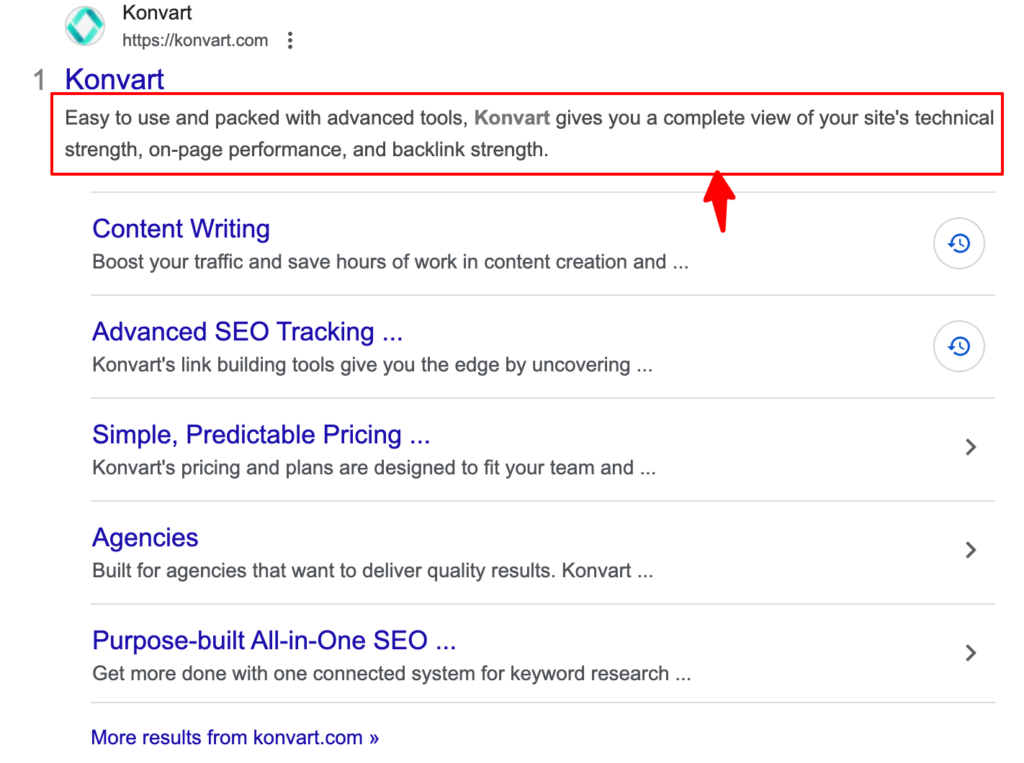
A well-crafted meta description provides a brief summary of the article’s content, encouraging clicks without misleading potential visitors. Although not as relevant to ranking as the title, it can improve clickthrough rates, which in turn can impact ranking.
A compelling title tag should accurately reflect the content’s subject matter while enticing users to click through from search results.
However, note that Google tends to rewrite the title to match the search query of the user. One way to keep it consistent is to use the same text as your H1, or at least one with at least 80% similarity as your H1. I have provided a few tips below.
How to Write Catchy Titles
Firstly, understand your audience. Knowing who you are writing for is the first step in creating an effective title. Titles should resonate with the interests, needs, and search behaviors of your target demographic. For instance, if your audience is primarily DIY enthusiasts, a title like “10 Quick Fixes for Your Home That Even Beginners Can Do” might perform well.
You could also use numbers and lists. Data shows that headlines with numbers typically generate 73% more social shares and engagement. Numbers imply a promise of succinct, easy-to-digest content. For example, “5 Innovative SEO Strategies for now” is likely to be more appealing than “Innovative SEO Strategies.”
Also, I cannot emphasise this enough: incorporate your target keyword. However, ensure the title remains engaging and makes sense; don’t just stuff it with keywords.
Just to add, one thing that works to make a title catchy is emotional triggers. Titles that evoke curiosity, excitement, or concern can lead to higher click-through rates. Use power words like “Secrets,” “Instant,” “Discover,” or “Mistakes” to trigger an emotional response. A title like “Avoid These 10 Common SEO Mistakes” can provoke anxiety about making errors, prompting readers to explore your advice. However, even with adding this, keep it short and sweet; search engines typically display the first 50-62 characters of a title tag, so keeping your titles concise ensures they don’t get cut off in search results.
A good practice would be to test different titles – A/B testing – to see what works best for your audience but you need to set that up with Google ads or social media ads and not SEO.
How to Write Good Meta Descriptions
Keep your meta descriptions between 150-160 characters. Exceeding this limit may result in the text being cut off in search results, potentially losing vital information that could engage users.
Use active voice and action-oriented language to encourage readers to take a specific step. Phrases like “Learn more,” “Get started,” or “Discover why” invite engagement and guide users towards interacting with your content.
Highlight what users will gain by reading your article. If you’re discussing solutions, mention the problem-solving aspect of your content.
Ensure each page’s meta description is unique. Duplicate meta descriptions across multiple pages can dilute user interest and cause confusion about the content’s uniqueness.
Have in mind that Google often presents a different description to the searcher instead of what you have written (to match the user’s search terms). You can use a text that exists on your page if you want your description to be consistent, but this is not foolproof.
Content Writing Point 3 – Use Visualisation
Use images only when they serve a specific purpose, such as illustrating a point without words or breaking up the text. It’s crucial to exercise restraint and not overuse images in place of text, as this can negatively impact your ranking.
Another powerful tool to keep viewers on the page is videos. Videos can significantly extend a user’s stay on a page, which is beneficial for search engine optimisation. Use them to explain concepts visually or, importantly, to provide a more in-depth understanding of issues.
Other options for visualisation are tables, bar, and charts.
It’s also a good idea to look at competitors’ use of these things to determine what to include. That and the results in the SERP. For example, if Google added video results to the SERP, it’s a good idea to upload a Youtube video and add that video to your page.
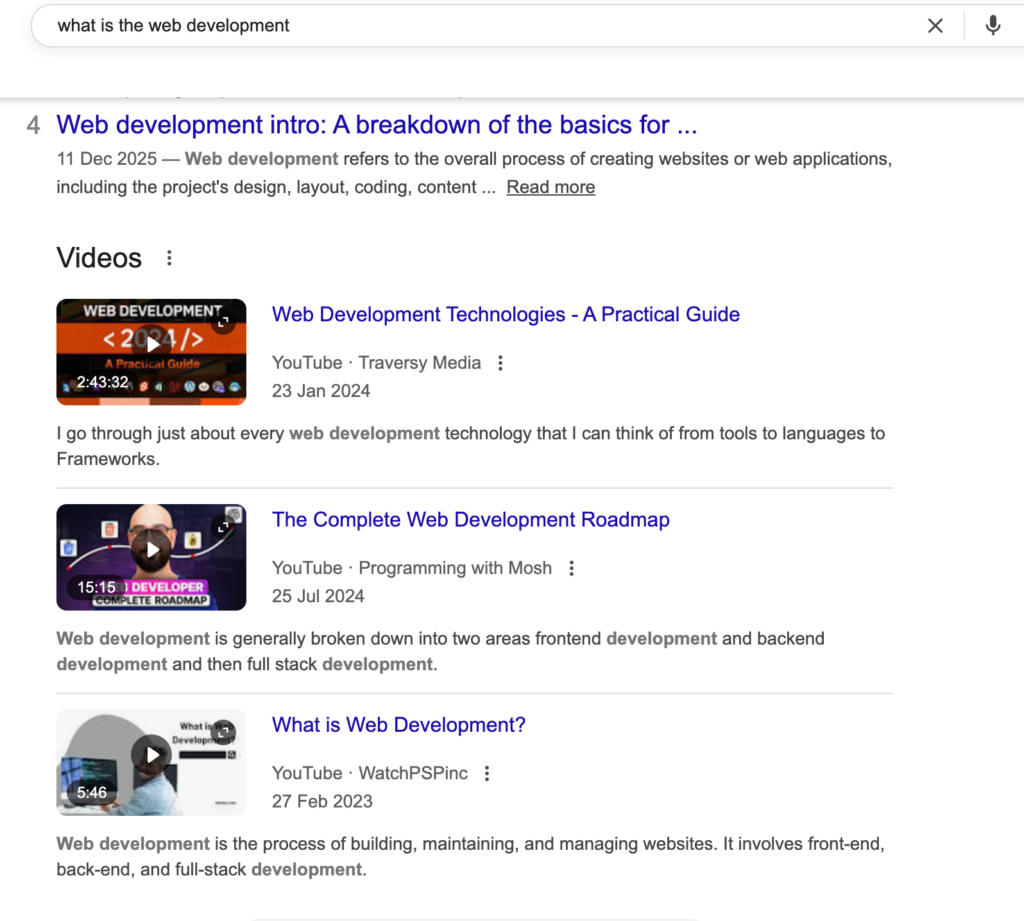
Konvart’s Content Editor also provides suggestions for the use of tables, bullets, bold, italics, and numbered sections based on your competitors’ use of those formats.
Visualization and Load Time
Visual content is a good thing but can be a bad thing if it makes your website slow to load.
So, when using video, it’s a good idea to host it on a third-party like YouTube and defer loading of YouTube’s files if the video is not the first thing on your page. If you use third-party providers like WordPress or Shopify, there are various plugins that can help with this.
When When using images, consider the following:
- Choose the Right Format: JPEGs are ideal for photographs with lots of colors, and PNGs are better for images that require transparency or have fewer colors. However, when it comes to SEO, WebP is advised due to Core Web Vitals. WebP offers high-quality results with smaller file sizes and is supported by many modern browsers.
- Compress Images: Large image files can slow down your website, negatively impacting user experience and SEO rankings. Tools like Adobe Photoshop, TinyPNG, or Imagify allow you to compress images without losing significant quality.
- Responsive Images: Use responsive design techniques to Ensure your images look good on all devices. HTML5 allows for the
srcsetattribute, enabling the browser to select different images based on the screen size of the device. This means faster loading times and a better user experience. - Descriptive Filenames and Alt Text: Rename your image files with relevant, descriptive keywords that reflect the content of the image and include these keywords in the alt text. This helps search engines understand and rank your content better and improves accessibility for users with visual impairments.
If you have a developer or SEO specialist on your team, they can easily handle the format and responsiveness of the image, as well as image compression.
Content Writing Point 4 – Go Straight to the Point – Eliminate Fluff
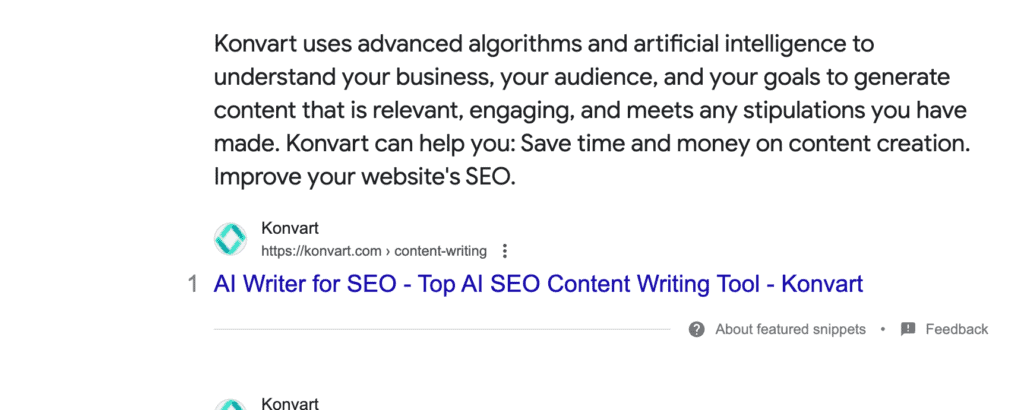
Humans hate fluff – Google, too. You can see that from featured snippets in search results.
Even AI Overview tends to go straight to the point as well.
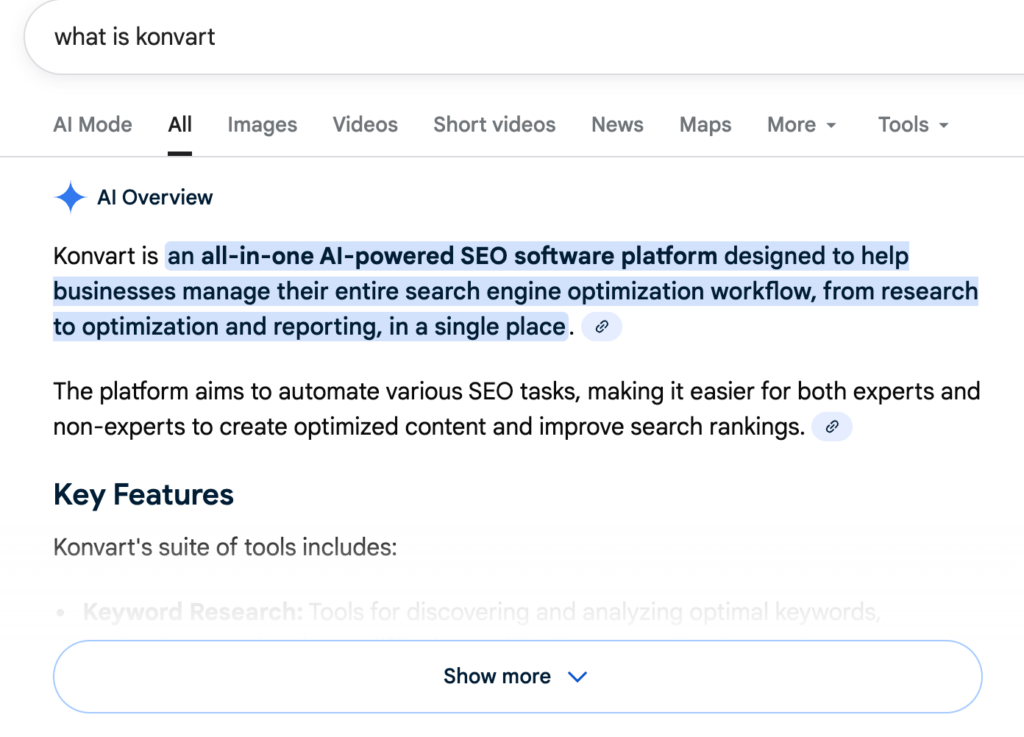
So, go straight to the point, answer questions immediately, and do not repeat things unnecessarily.
Content Writing Point 5 – Cover your search intent
I explained search intent above. When writing, ensure you cover the search intent. Here’s how to do so for each type:
- Informational Intent: Provide comprehensive and authoritative answers. Clear headings, bullet points, and images to enhance readability and engagement.
- Navigational Intent: Ensure your branding is clear, and information like contact details or specific product pages are easily accessible.
- Transactional Intent: Include strong calls-to-action (CTAs), user reviews, and ensure that purchase processes are streamlined.
- Commercial Investigation: Offer detailed comparisons, pros and cons, user testimonials, and expert opinions to aid in decision-making.
Content Writing Point 6 – Check Written Content Against Konvart’s Content Editor
Whether you have used Konvart’s Content Editor at this point or not, it’s a crucial step as it would help ensure your SEO content is search-friendly.
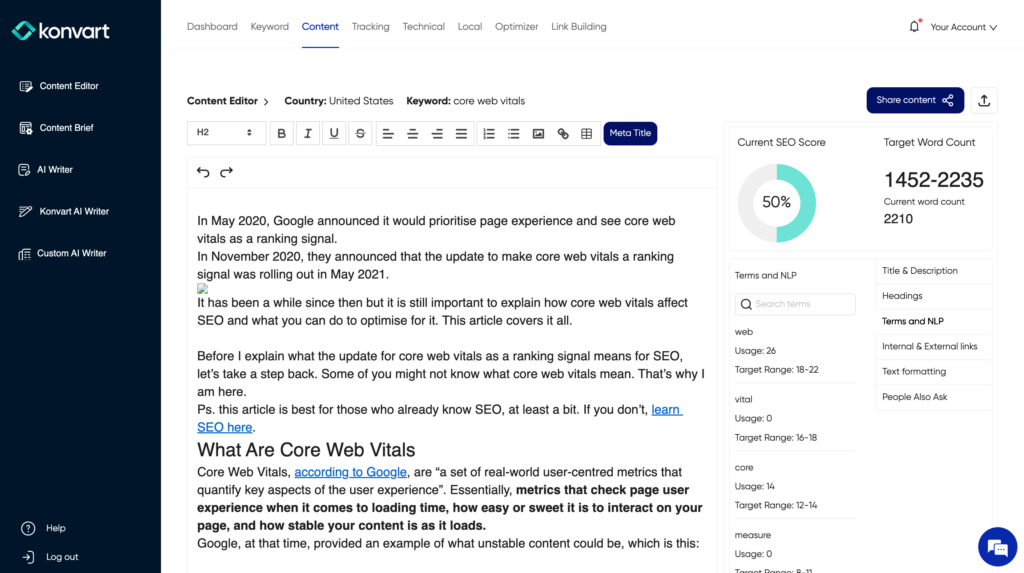
Enter your written content in the editor, Konvart will analyse it against what is needed for your keyword and score it.
If it scores below 85, it means you still have work to do. In this case, look through each tab at the right to find the reason for your low score and suggestions to fix it.
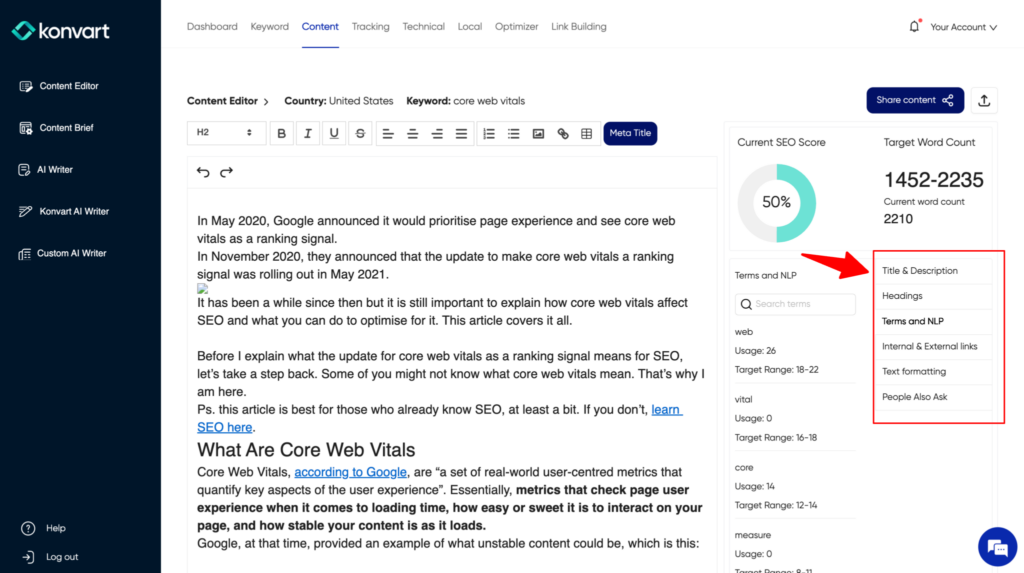
Content Writing Point 7 – Add Internal and External Links
Now that you have completed your writing, go through and add links to other pages on your website where relevant.
Internal links improve your engagement rate and dwell time, and tell Google that users love your website. External links provide citations of the facts and numbers you mention.
When adding links to your content, choose ones that enhance the reader’s understanding and provide additional value. This means linking to reputable sources that are directly related to the points you’re discussing. Also, ensure the following:
- Use natural linking: They should feel natural within the text and lead to sources that expand on the topic at hand or provide supporting data. For instance, if you’re discussing the impact of mobile optimisation on SEO, linking to a recent study on mobile browsing trends can offer readers deeper insights. Don’t force the link in.
- Quality Over Quantity: While it’s tempting to pack your posts with as many links as possible, this can overwhelm your readers and dilute the strength of your content. Focus on inserting truly beneficial links. A good rule of thumb is to ask yourself if the link adds significant value or new information. If it doesn’t, it probably shouldn’t be there.
- Keep it updated: prioritise sources that are up-to-date since outdated information can mislead readers and hurt your credibility.
- Use the right anchor text: The anchor text – the clickable text in a hyperlink – should reflect the linked page’s content while also being informative and natural within the context of your article. Use descriptive words that give readers a clear idea of what they’ll find after clicking through.
Checklist For Your First SEO-optimised Content
Before publishing your content, you must ensure that the following has been checked and effectively placed in your content.
- Analyse the topic by examining competing websites and the SERP.
- List the keywords you want to focus on and know the length you want to shoot for.
- Compile a list of headings to cover and what should be covered under each.
- Include a meta title.
- Include a meta description.
- In your writing, employ paragraphs frequently under (H1, H2, and H3)
- Write naturally, then check that you have incorporated the keyword(s) into all content hotspots, including the title, body, and subheadings.
- Utilise multimedia, such as pictures and videos
What Does SEO Friendliness Mean?
SEO friendliness in the context of content writing means writing content that search engines can understand and index correctly – basically writing your content well enough that Google loves it.
To create SEO-friendly content, use the points discussed above. In addition to those, also have the following in mind:
- Readability and Accessibility: SEO-friendly content must be easy to read and accessible. This means using clear language, short sentences, and paragraphs alongside subheadings to break up text. These elements help search engines better understand the structure and key points of your content, making it more likely to match with relevant queries.
- Mobile Optimisation: With over 50% of global website traffic coming from mobile devices, optimising your content for mobile is non-negotiable. SEO-friendly content must render well on various devices and screen sizes to ensure a good user experience, which is a significant factor in Google’s ranking algorithms.
- Engagement Metrics: Search engines also consider user engagement metrics like bounce rates, time on page, and click-through rates to evaluate content quality. Engaging content that keeps readers interested and encourages them to explore further is often seen as more valuable, thereby boosting its SEO potential.
Key Steps to Start Executing an SEO-Friendly Content Strategy Today
To kick-start your SEO-friendly content strategy effectively, create a clear, actionable plan that aligns with your goals and audience needs.
Here are some key steps to ensure you’re on the right track:
- Define Your Objectives: Before you pen down your first word, decide what you aim to achieve with your content. Are you looking to increase traffic, boost sales, or improve engagement? Setting these goals early on will guide your content creation process.
- Research Keywords Thoroughly: Find relevant keywords that match your audience’s search intent. Don’t just focus on high-volume terms; include long-tail keywords that could drive more targeted traffic.
- Analyse Your Audience: Understanding who your readers are is crucial. What are their pain points? What type of content do they prefer? This knowledge will not only help tailor your content but also assist in structuring it in a way that resonates with them.
Having done the above, your next step should be to craft compelling headlines and then go into writing and optimising the content (see tips above).
Publish and Then Update Your Content Regularly
Updating your content can significantly impact user engagement and SEO performance.
HubSpot found that updating older blog posts with new content and images can increase organic traffic by as much as 106%.
The reason is straightforward: updated content is more likely to meet current search demands and user expectations, which can lead to higher click-through rates and lower bounce rates.
Search engines, like Google, also prioritise websites that consistently update their content, considering them more relevant and useful to users. Regular updates signal that your website is active, helping to boost your rankings.
What to Update
- Review for Accuracy and Relevance: Regularly check your existing content to ensure all facts, figures, and references are current. Industries change, and what was accurate two years ago might need to be updated.
- Incorporate Recent Keywords: Keyword trends change. Use tools like Google Trends or Konvart to identify emerging keywords in your niche and integrate them into your existing posts to remain relevant and competitive.
- Enhance Readability: Break up large blocks of text with bullet points or numbered lists to improve readability and user engagement. Subheadings and bold text can help guide readers through the article and make key information stand out.
- Add Multimedia Elements: Enrich your articles with new images, videos, or infographics to provide added value and improve engagement rates. Visuals are particularly effective in retaining reader attention and can lead to longer dwell times, positively influencing SEO rankings.
- Promote Updated Content: Don’t just update; promote your refreshed content through social media channels, email newsletters, or other marketing platforms. This approach helps drive traffic back to your site and alerts users that new, valuable information is available.
Best Practices for Content Updates
- Schedule Regular Reviews: Set a timeline for reviewing content, whether monthly, quarterly, or annually, depending on the subject matter.
- Track Performance Changes: Use analytics tools to track how updates affect your site’s performance. Look at metrics like page views, bounce rate, and conversion rate before and after updates.
- Engage with User Feedback: Pay attention to comments or questions on your posts. They can provide insights into what additional information readers might need or want.
SEO Writing Tools
- Brief generation/research tools: Konvart brief generator, Konvart Content Editor
- Content writing tools: Google Docs, Konvart AI Writer, Konvart Custom AI Writer
- Keyword research tools: Konvart keyword research tools
- Publishing tools: Konvart remote WordPress publisher
- Image creation tool: Midjourney, Dalle from OpenAI, Gemini
Start Creating Great SEO Content
Now you know how to write SEO-friendly content and the tools to use. As you ensure that your content is the best, also note that great content alone is not enough to rank well in the SERP – you need to have all the other SEO bits set up, including a good number of high quality backlinks and a good user experience,
Also, make it easy for readers to share your content on social media. Social signals don’t directly impact SEO rankings but can help increase visibility and traffic. Also, a leak of Google API showed that Chrome data may be used in ranking pages which means clicks to your site from other platforms may help.
Lastly, analyse your performance. Use tools like Google Analytics to track how well your content performs. Look at metrics like page views, average time on page, and bounce rate to gauge what works and what doesn’t.
And remember, you need the right tools in your arsenal. You can see how Konvart helps SEO teams and agencies. For content writing and optimisation tools that work, sign up for Konvart.