SEO automation is the use of software to carry out recurring SEO tasks, such as tracking rankings, crawling a site, gathering keyword data, fixing page elements, or drafting content, with little or no manual work.
It can be as simple as a weekly rank report or as hands-on as an AI agent that plans changes and makes them on your site.
That range is why the real question isn’t whether to automate, but which tasks to hand over.
Get that wrong in one direction, and you’re still pasting numbers into a spreadsheet every Monday.
Get it wrong in the other, and an unreviewed script rewrites your title tags across the whole site, or a batch of thin AI pages goes live under your brand.
So, this guide gives you a simple way to decide.
Some work should run on its own, some should wait for your approval, and some should stay yours.
You’ll see which is which, what Google actually says about automation, and how to set it up with guardrails.
TL;DR
Decide task by task what to hand over. There are three tiers:
- Automate fully: monitoring, data gathering, reporting, and filling empty fields.
- Automate with approval: content, live-page changes, outreach, and strategy proposals. The software prepares the work, and you sign off.
- Keep human: positioning, original insight, relationships, and publishing-volume decisions.
Google doesn’t penalize automation as such. But it penalizes publishing at scale mainly to manipulate rankings.
What is SEO Automation (and What Isn’t it)?
SEO automation is the use of software to carry out recurring SEO tasks, such as tracking rankings, crawling a site, gathering keyword data, fixing page elements, or drafting content, with little or no manual work.
It ranges from simple scheduled rules to AI agents that plan and act on your site.
It’s easier to understand by what it doesn’t cover.
1. It isn’t programmatic SEO: Programmatic SEO generates many pages from a template and a dataset, like one page per city or per product.
But automation is about how you run the work, and it applies just as well to a 40-page site as to a 40,000-page one.
The two overlap only when automation is used to mass-produce pages, and that’s the risk I cover in the Google section below.
2. It isn’t just SEO software: A keyword database or backlink index gives you information, and you still have to act on it.
Automation starts when the tool also does something with that information: schedules the crawl, flags the drop, drafts the fix, or sends the report.
3. It isn’t “publish AI content at scale”: Using AI to draft is one task you can automate. Pushing out hundreds of unreviewed pages is a different thing, and it’s the pattern that gets sites in trouble.
We go deeper on where that line sits in our look at whether AI-generated content is actually good for SEO.
How Do You Decide What to Automate?
Most advice on this question comes down to a single rule: automate the repetitive stuff and keep the creative stuff human.
It sounds right, but it breaks down quickly.
Is writing a meta description repetitive or creative? What about a link outreach email, or a content refresh?
You could argue either way, and the argument doesn’t tell you what to do on Monday morning.
The more useful question isn’t “can software do this task?” Almost any SEO task can be done by software now.
The better question is “what happens if it does this wrong, and would I notice?”
A wrong rank report is caught the next time you open it. A wrong title tag can sit on a high-traffic page for weeks, costing you clicks, before anyone spots the drop.
That’s the thinking behind what we’ll call the approval ladder.
Instead of a yes-or-no on automation, each task gets one of three levels of freedom: run on its own, prepare the work and wait for your approval, or stay with you.
Where a task lands depends on how easy it is to check, how easy it is to undo, how far a mistake spreads, and who gets to see it.
Ask four questions about any task, then let the riskiest answer decide how much freedom the software gets.
- Can you check it? Is there an objective way to tell whether the output is right, like a broken link, a missing field, or a number that matches a report? Or does “right” depend on judgment?
- Can you undo it? If it’s wrong, can you roll it back quickly, or is the damage permanent (an email you can’t unsend, a page that’s already been indexed)?
- How far does a mistake spread? Does it touch one page or the whole site?
- Who sees it? Is it internal, or does it face customers, search engines, or someone outside your company?
Most tasks give mixed answers. Because a task can be easy to check but public-facing, or reversible but site-wide.
That’s why the rule is that the riskiest answer sets the tier.
The three tiers
| Tier | When it applies | Examples | Control |
| 1. Automate fully | Easy to check, easy to undo, low exposure | Rank tracking, crawl alerts, report assembly, pulling keyword gap data, filling empty alt text | Spot-check on a schedule |
| 2. Automate with approval | The software can do the work, but a mistake would be public or hard to spot | Rewriting existing titles and meta descriptions, content drafts and refreshes, schema, outreach pitches, strategy proposals | You review and approve before anything goes live |
| 3. Keep human | No answer key, or the cost of being wrong is high | Positioning, original experience and insight, relationship follow-up, decisions about publishing volume | You do it, with software as input |
Three tasks, tested
- Weekly rank report: You can check it against the source, there’s nothing to undo, and it’s internal. Tier 1.
- Rewriting a title tag on a high-traffic page: You can undo it, but the effect on rankings and click-through takes weeks to show, and the change is public. Tier 2.
- Pitching a journalist. You can’t check whether it’s “right” in advance, you can’t unsend it, and it affects a relationship. The draft is Tier 2. The follow-up conversation is Tier 3.
How tasks move between tiers
Tiers aren’t permanent. Pick a threshold you’re comfortable with, such as 20 approvals in a row with no edits, and promote that task type from Tier 2 to Tier 1.
Demote it the first time it produces a bad result.
Tier 3 doesn’t graduate. Those tasks stay yours however good the software gets.
Which SEO tasks can you automate fully?
Tier 1 tasks have three things in common. They mostly read and report instead of changing anything.
You can check the output against a source, and a mistake is cheap to fix.
Software does these faster than you can and never skips a week. Your only job is to spot-check now and then, for example by picking five outputs a month and comparing them with the source.
Here are some examples:
1. Rank tracking and drop alerts
Rank tracking is the classic case. A rank tracker checks your target keywords on a schedule and tells you when something moves.
It changes nothing on your site, so the worst outcome is noise.
Check that the keyword list matches the pages and markets you care about, and that your alerts have a sensible threshold.
A drop of more than 3 positions that holds for two weeks is worth a look. A one-day wobble usually isn’t.
2. Site health monitoring
Scheduled crawls catch broken links, redirect chains, accidental noindex tags, and missing metadata before visitors or Google do.
Running a technical audit every week is far more useful than the one you remember to run once a quarter.
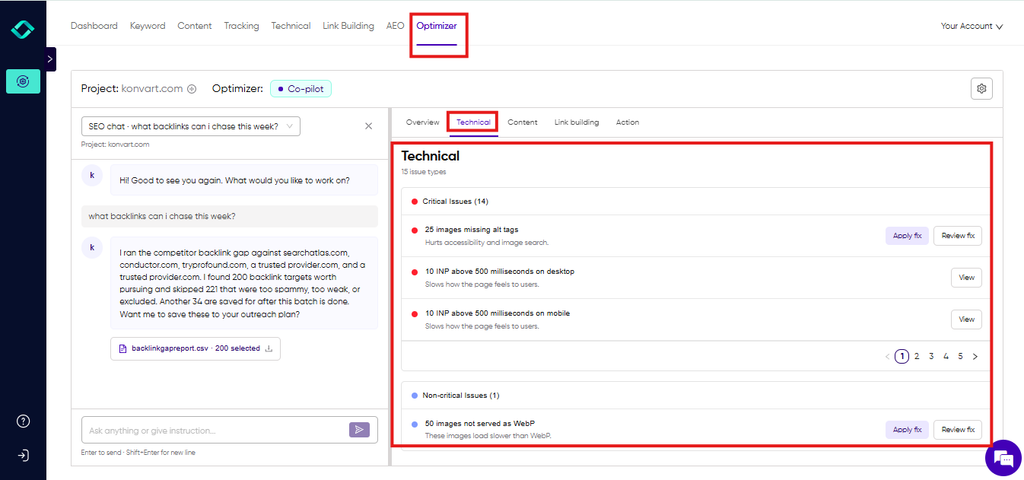
Keep the line clear here. Finding problems is Tier 1, but fixing them mostly isn’t. Most fixes belong in the next tier, apart from the empty-field cases below.
3. Research data
Pulling the raw material for decisions is safe to automate, because nothing gets published or sent.
That includes the keywords your competitors rank for that you don’t, the queries you already get impressions for in Search Console, and the sites that link to your competitors but not to you.
You can build a competitor keyword gap in a spreadsheet, or use a gap tool like Konvart’s, which also turns your Search Console queries into keyword opportunities.
Tracking what competitors publish and where they rank fits here too, and competitor monitoring can flag new pages and ranking changes as they happen.
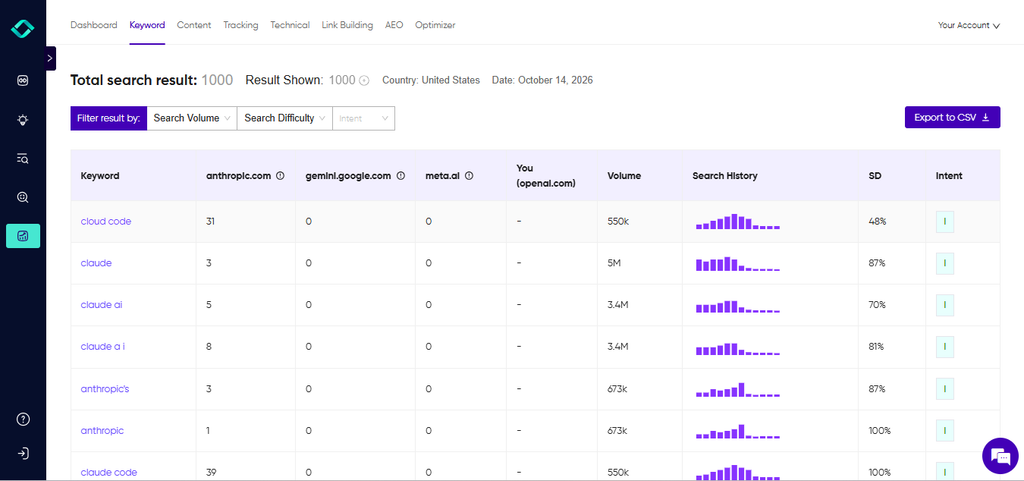
Check that your competitor set is still the right one, because competitors change. Deciding which gaps are worth chasing is a judgment call, and that belongs in the next tier.
4. Report assembly
Collecting numbers into a weekly or monthly report is tedious, easy to get wrong by hand, and easy to automate.
SEO PDF reports can pull rankings, traffic, and site health together on a schedule.
Automate the numbers, but write the “so what” paragraph yourself because a report with no interpretation just moves the work onto whoever reads it.
Agencies feel this most, since the same report repeats for every client, and we cover that setup on our page for agency teams.
5. Filling empty fields
Missing alt text, uncompressed images, and blank meta descriptions are the safest fixes, because there’s nothing to lose.
If a field is empty, almost any reasonable value is an improvement.
Generated alt text can also be generic or wrong, so spot-check a sample before and after a batch run, and keep a record of what changed so you can reverse it.
Handing these five over frees your time for the next tier, where the software prepares the work, and you decide.
Which SEO Tasks Should You Automate With Approval?
Tier 2 is where most of the time savings are, and where most of the risk sits.
A software can do the work, but a mistake would be public, slow to show up, or hard to spot. So the software prepares the work, and you decide what goes live.
The point of this tier is a fast review. If approving a batch takes as long as doing it yourself, the setup is wrong.
We’ll cover what a good review looks like at the end of this section. But for now, here are a few examples of tasks you can automate with approval
1. Rewriting titles, meta descriptions, and H1s
These are quick to generate and easy to roll back, but they affect clicks and rankings on pages that already work.
Changing a title that’s earning traffic can cost you more than it gains, and the effect takes weeks to appear.
Let the software propose rewrites, ideally from the queries each page already ranks for. Then approve them in small batches, starting with pages that sit on page two and have little to lose.
2. Content refreshes and new drafts
A draft is the clearest Tier 2 task. An SEO software like Konvart can build a content brief from search and competitor data, draft the page, and score it against what’s ranking.
You add what it can’t: your own experience, examples, and opinions.
In Konvart, you can review drafts in the content editor with a few questions in mind.
Does it say anything the top results don’t? Are the facts and product claims right? Does it sound like you? Anything that fails goes back for a rewrite.
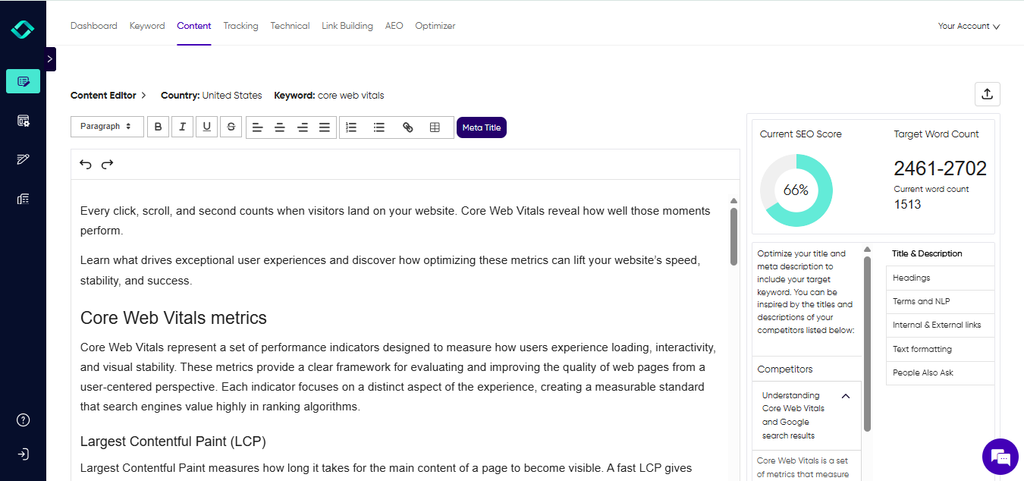
For refreshes of existing pages, the same rule applies. Check that the update fixes the actual gap, such as missing sections or outdated figures, instead of adding length.
3. Technical fixes on a live site
Some technical fixes are mechanical, and some are not. Changing a schema type, an H1, or a redirect affects how a live page works, and a plugin or theme can clash with it.
That’s why approval matters here.
In Konvart Optimizer’s co-pilot mode, for example, technical fixes are prepared first and wait for you to click Apply.
Before you approve, look at exactly what will change, on which URLs, and whether anything on the page (a builder, an SEO plugin) already controls that element.
Schema is a good example. A technical gap analysis shows which structured data types your top-ranking competitors use that you don’t, so you know what to add.
But a wrong or misleading schema block can cause problems of its own, so review the generated code before it goes live.
4. Link outreach
Finding link targets is research, which is Tier 1. Writing and sending pitches is where it changes, because you can’t unsend an email and it reflects on your brand.
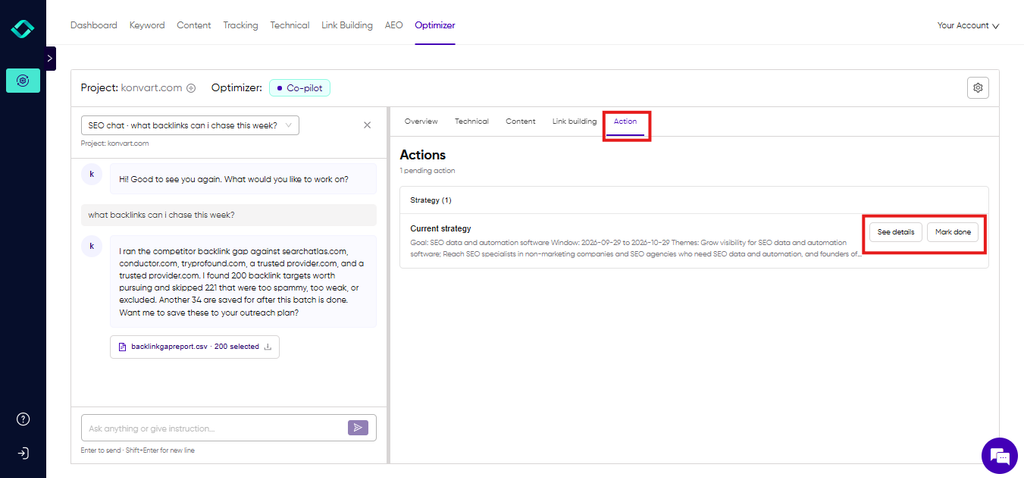
A good workflow runs a backlink gap analysis against your competitors and filters out the spammy or low-traffic sites.
Then it finds contact details and drafts a pitch for each prospect, and you approve the pitches before they send.
Konvart’s outreach support and Digital PR tools handle the contact-finding and drafting steps this way.
Read each draft for accuracy and relevance. A pitch that could be sent to anyone is a pitch that gets ignored.
5. Strategy and content calendars
“Never automate strategy” is common advice, but it’s too blunt. Software is good at the groundwork: clustering keywords, spotting gaps, and proposing what to publish and in what order.
It’s poor at knowing your business priorities.
So let it propose, and keep the decision. A plan that sits as a proposal until you accept it gives you the speed without handing over the direction.
What a good approval looks like
Reviewing automated work should take minutes. For each item, ask:
- What exactly will change, and where?
- Is the reason behind it based on data I can see?
- Could it clash with something already on the page?
- Would I be comfortable if a customer or a competitor read it?
- Is it worth the risk on this page right now?
Approve what passes, edit what’s close, and reject what’s wrong.
Which SEO Tasks Should Stay Human?
Tier 3 is the work where there’s no answer key, or where being wrong costs too much.
Software can feed these tasks with data, drafts, and options, but it shouldn’t make the call. But that isn’t a limit of today’s tools. It’s about who is accountable for the result.
Here are a few SEO tasks that should stay human:
1. Positioning and what to rank for
Any tool can tell you which keywords have volume and which ones your competitors rank for. But they can’t tell you which customers you want, which ones you can serve well, or which ones will turn into revenue.
That depends on your pricing, your capacity, and where the business is going.
Use the data to build the shortlist, then choose from it yourself. Because two keywords with the same volume can be worth very different amounts to you.
2. Original experience, data, and opinions
This is the part of your content that nobody else can copy, and it’s what makes a page worth citing.
For example, a case study from your own work, a number from your own account, or a position you’ll defend all count, and none of them can be generated from other people’s pages.
It’s also what AI answers lean on less and less in generic topics.
As summaries get better at the basics, the content left to win clicks and citations is the kind that carries real evidence.
The practical rule is to let software draft the structure and the obvious parts, then add your experience before anything is published.
If a section could sit unchanged on a competitor’s blog, it isn’t finished.
3. Relationships and closing link prospects
Automation can find a prospect, locate the contact, and draft the first pitch, but when someone replies, the work changes.
They may ask a question, push back, suggest a different angle, or offer something better than a link.
Those conversations decide whether a link happens and whether you get a second one.
So, you have to handle replies, negotiation, and follow-up yourself. The same goes for journalists, partners, and anyone you’d want to hear from again.
4. How much to publish
An automation or content tool can produce far more pages than you can sensibly review. Deciding how many to publish, and how fast, is a human call, because volume is where the real risk starts.
A useful guardrail is to cap what goes live each week at what you can actually review and improve.
If your approvals are turning into rubber stamps, you’re publishing too much. The next section covers why Google cares about this.
5. Accuracy on high-stakes topics
If a wrong answer could hurt someone, a person should check it.
That includes health, legal, and financial topics, as well as any claim about safety or results.
A software can write fluent text that is simply wrong, and it doesn’t flag its own errors.
So, have a qualified person review these pages before publishing, and keep the author’s name and credentials visible.
6. Accountability
You can hand off the work, but not the responsibility. Someone on your team should own the results, review the weekly summary, and decide when to pause or change course.
Without an owner, automation drifts. It keeps running whether or not it’s still doing the right thing.
Now, let’s address a very important question that can affect your site or project.
Does Google Penalize SEO Automation?
No, Google doesn’t penalize you for using automation. Its spam policies target publishing many pages mainly to manipulate rankings, however those pages are produced.
Automation becomes risky when it scales low-value output, creates links nobody chose to give, or scrapes Google’s own results.
The fact that software did the work isn’t the problem.
What the policy actually says
Google calls the pattern scaled content abuse. It means generating many pages mainly to manipulate rankings instead of helping people, typically large amounts of unoriginal content that adds little value.
The key phrase is “no matter how it’s created.” One of Google’s own examples is using generative AI tools to produce many pages without adding value for users.
That wording cuts both ways. A team of humans mass-producing thin pages is covered by the same policy, and an AI draft that you’ve edited and improved isn’t automatically a violation.
Google’s wider position is that it wants helpful content, whoever or whatever wrote it.
You can read the details in Google’s spam policies, its March 2024 announcement of the scaled content policy, and its guidance on using generative AI.
The policy doesn’t set a page-count threshold. There’s no safe number of automated pages, so judge each page by whether it’s useful, not by how many you publish.
Sites that break the policies can rank lower or drop out of results entirely, and they may receive a manual action in Search Console.
Where automation crosses the line
Three patterns come up most often, and each has a lower-risk version.
| Task | Lower-risk pattern | Higher-risk pattern |
| Content | Drafts are reviewed and improved with your own experience, and publishing is capped at what you can review | Hundreds of unreviewed pages generated from a keyword list |
| Links | Automation finds prospects and drafts pitches, a person approves them, and the link is earned | Automated programs or services creating links to your site |
| Rank tracking | Search Console data for your own site, or a tool that handles data collection for you | Your own scripts querying Google’s results pages |
A few details behind the table:
- Bulk pages: Beyond scaled content abuse, Google also has a doorway abuse policy. It covers pages created to rank for similar queries that lead to intermediate pages less useful than the destination. City or keyword variants of the same page are the classic example.
- Link creation: Google’s link spam policy lists using automated programs or services to create links to your site. Automating the research and the first draft of a pitch is fine. Automating the links themselves is not. If a person at the other end decides to link, you’re doing outreach. If a program places the link, you’re doing link spam.
- Scraping Google: Google says automated queries to its results without express permission, such as scraping for rank checks, violate its spam policies and terms of service. If you build your own automation, use Search Console for your own site’s data, and check how any tool you rely on collects its data.
A short checklist to stay on the right side
- Can you name the reader need each page serves, beyond “the keyword exists”?
- Did a person add something the software couldn’t, such as experience, data, or a correction?
- Is weekly publishing capped at what you can actually review?
- Have facts, figures, and product claims been checked?
- Are links earned through outreach a person approves, with nothing created automatically?
- Do you have a record of what the software changed and when?
That last item matters most when something goes wrong. If rankings drop after a batch of changes, check whether the drop lines up with something you approved, or with a confirmed update on the Google Search Status Dashboard.
How do You Automate SEO (Step by Step)?
You can follow this process with any tool, or with none. The steps are the same whether you end up using a plugin, a workflow builder, or a full platform.
The point is to decide what to automate before you pick a software, so the tool serves your list and not the other way around.
Step 1: List the recurring tasks and what each one costs
For one or two weeks, write down every SEO task you repeat. For each one, note how long it takes, how often it happens, who does it, and which tools are involved.
Pay special attention to handoffs.
Every time you export a file, paste data into a spreadsheet, send a brief to a writer, or file a ticket for a developer, there’s a step where work stops and waits for a person.
Those handoffs are usually where automation saves the most time, because the work itself is often quick and the waiting isn’t.
Sort the list by total hours per month. The top five items are your candidates.
Step 2: Sort each task with the ladder
Run each candidate through the four questions from earlier: can you check it, can you undo it, how far does a mistake spread, and who sees it. Then label it Tier 1, 2, or 3.
Start with the Tier 1 tasks that eat the most hours. They’re the safest wins, and they build your confidence in the setup before you hand over anything that touches your live site.
Leave Tier 3 tasks off the list entirely. They stay with you.
Step 3: Pick an approach that fits your list
Most automation falls into four approaches. Pick the lightest one that covers the tasks you listed.
| Approach | Good for | Limits | Setup effort |
| Built-in scheduling and CMS or SEO plugins | Scheduled reports, alerts, auto-compressing images, filling empty fields | Narrow, and each tool only covers its own area | Low |
| Workflow builders (Make, Zapier, n8n) | Moving data between tools, such as Search Console to a sheet to a Slack alert | You design and maintain the logic, and they know nothing about SEO on their own | Medium |
| General AI assistants (ChatGPT, Claude) | Drafting, analyzing data you paste in, brainstorming | They don’t know your site or your data unless you supply it each time, and they don’t change anything themselves | Low to start, high to rely on |
| SEO platforms with AI agents | Turning research into a queue of work, then applying approved changes to your site | Cost, the setup to connect your site, and CMS support varies | Medium |
Most teams end up combining two. A plugin might handle the empty fields, and a platform might handle research, drafts, and fixes.
If you want to compare specific tools, our roundup of the best automated SEO software is the place to start.
Step 4: Set guardrails before you switch anything on
Decide the rules first. They’re much harder to add after something goes wrong.
- Permissions: what the software may touch, and what it may only propose.
- Approval: which Tier 2 tasks need your sign-off before going live.
- Block lists: pages, sections, or domains it must never edit, link to, or pitch.
- A starting scope: a low-risk section such as a blog category or a handful of pages, not the whole site.
- A change log: a record of what was changed, where, and when, so you can trace and reverse it.
- A stop rule: a signal that pauses everything, such as a sustained ranking drop on pages the software changed.
Step 5: Run it in observation mode first
For the first two to four weeks, let the software propose and don’t let it apply anything on its own.
Review every output. Note what you approved as is, what you edited, and what you rejected, and roughly how long each review took.
This gives you real numbers on quality and time saved. It also shows you quickly which tasks the software handles well on your site and which it doesn’t.
Step 6: Review, promote, and expand
At the end of the trial period, look at the log. Tasks with a clean approval record can move up a tier, using the promotion rule from earlier.
Tasks that needed heavy edits stay where they are, or move back.
Then widen the scope a little, to another section or another task type, and repeat the cycle.
Treat this as a monthly habit. Your site, your competitors, and the tools all keep changing, and the right settings change with them.
Next, here’s what these steps look like in practice with one tool.
How Does Konvart’s Optimizer Put This Into Practice?
Doing this by hand means exporting data, briefing writers, editing the CMS, and chasing outreach across several tools. But Optimizer was built to solve this.
Optimizer is Konvart’s SEO automation tool for one website.
It handles the research, drafts and prepares the fixes, and applies what you’ve approved. Here’s how the setup maps to the three tiers.
1. Connect your site: Link WordPress, Shopify, Webflow, or Wix. If your platform isn’t supported, you can paste changes yourself. Connecting Search Console and Analytics is optional.
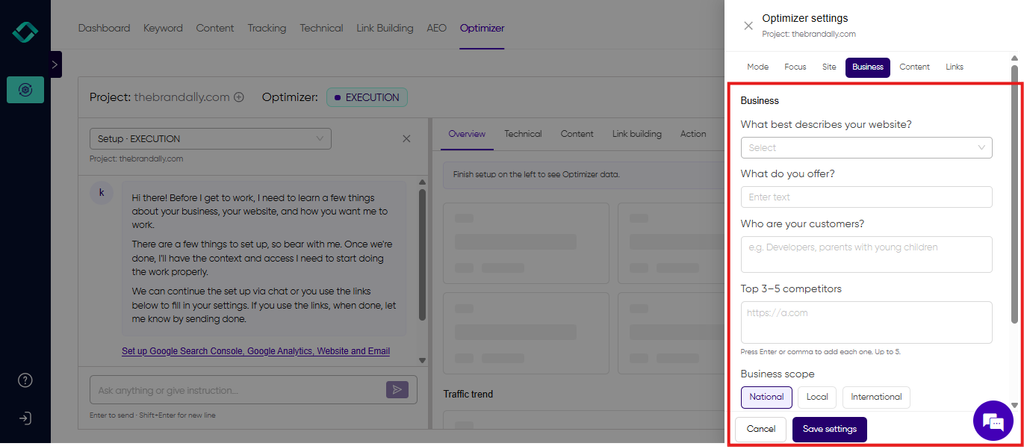
2. Describe the business and set the controls. Tell Optimizer your competitors and location, then choose co-pilot or auto-pilot and which areas it covers: content, technical SEO, link building, and AI visibility.
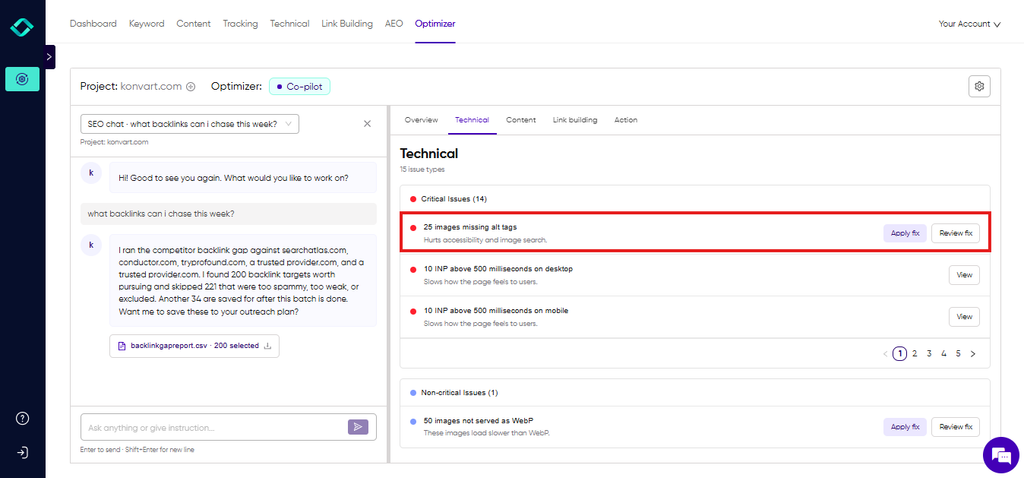
3. Review the Actions tab: In co-pilot mode, technical fixes are prepared and wait for you to click Apply.
You can edit suggested alt text, titles, and H1s first. Fixes it can’t apply safely come with step-by-step instructions.
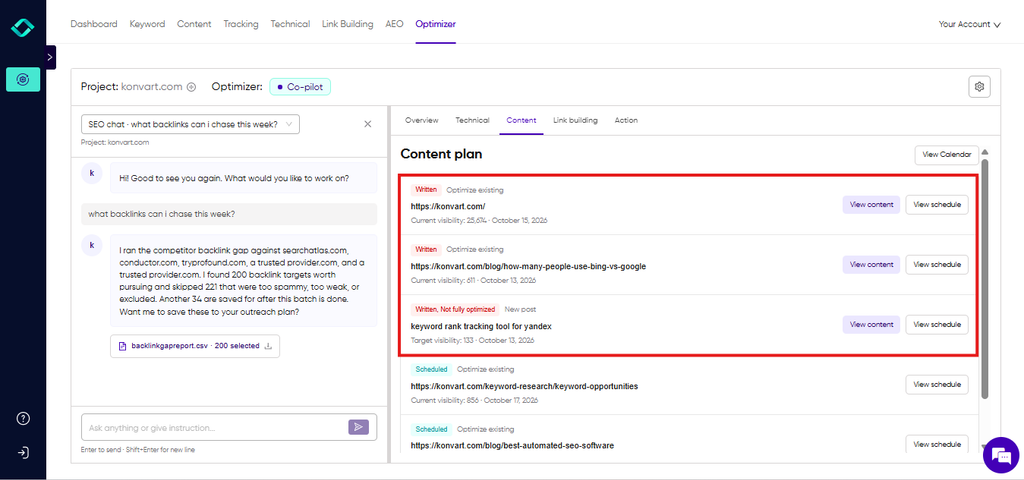
4. Approve content and outreach: Drafts and pitches wait in the content and link building queues. You choose whether new pages save as drafts or publish, and whether pitches send automatically.
5. Read the monthly report: It lists what Optimizer did, what changed in your numbers, and what’s queued next.
Monitoring and data pulls run on their own (Tier 1).
Fixes, drafts, and pitches wait for you (Tier 2).
Adding your experience to the content and handling replies from link prospects stays with you (Tier 3).
You can pause background work at any time, and you can block specific sites from outreach.
Optimizer is part of Konvart’s plans, and every plan includes a 7-day free trial with no credit card, so you can try it on your own site first.
Set up Optimizer on your site in co-pilot mode (7-day free trial, no card).
How do You Know if Your Automation is Working?
Automation makes it easy to feel productive. A dashboard says 400 tasks were completed this month, the reports arrive on time, and the queue is always moving.
But none of that tells you whether the site is better off. So, measuring automation is harder than measuring manual work for a few reasons.
Changes happen in bulk, so it’s hard to tell which one moved a number.
They happen quickly, so problems can spread before anyone notices. And search results take weeks to respond, so the evidence arrives well after the work.
Without a deliberate way to check, it’s easy to credit automation for gains that came from somewhere else, or blame it for drops it didn’t cause.
The fix is to decide what you’ll measure before you start, and to measure outcomes, not activity.
Here are four measures that give you a clear answer.
1. Time saved, net of review
Go back to the task inventory from step 1 and compare.
Add up the hours the work used to take, then subtract the hours it takes now, including the time you spend reviewing and fixing output.
That final number is what you’ve actually gained.
If review takes nearly as long as doing the work yourself, something is off. Either the task sits in the wrong tier, the setup needs tightening, or the tool isn’t good enough at that job yet.
2. Quality of the output
For each task type, track how many outputs you approved unchanged, how many you edited, and how many you rejected.
These three numbers tell you whether a task is ready to move up the ladder or back down.
A high rejection rate on one task type is useful information. It points to a specific setting or prompt to fix, not a reason to drop automation altogether.
3. Effect on search performance
This is the hardest to read cleanly, so be careful with it.
Don’t judge a change by the site-wide trend. Instead, compare the pages that were changed with a similar group of pages that weren’t, over the same period.
In Search Console, look at clicks, impressions, click-through rate, and average position for both groups. Google’s guide to using Search Console and Analytics data for SEO shows how to pull these.
Some things to keep in mind:
- Give changes several weeks before judging them. Title and content updates take time to show up.
- Seasonality and Google updates can move your numbers for reasons unrelated to your changes.
- One before-and-after data point proves little. Look for a pattern across several pages.
4. Errors and side effects
Automation can fix one thing and break another, so look for the damage as well as the gains.
Check these on a schedule:
| What you see | What it may mean | What to check |
| CTR falls after title rewrites | New titles are less compelling than the old ones | Compare old and new titles on the affected pages and roll back the worst ones |
| Two of your pages swap places for the same query | New or refreshed content is competing with existing pages | Search Console queries by page, then merge or differentiate |
| Impressions fall on a batch of new pages | Pages are thin, repetitive, or not being indexed | Index status and whether the pages add anything beyond what’s already on your site |
| Broken links, redirect chains, or missing elements after a batch | A fix clashed with a theme, plugin, or builder | The change log, then roll back the batch |
If something does go wrong, the change log from your guardrails is the fastest way to find the cause.
Match the date of the drop against the changes you approved.
A 30-day review you can copy
Once a month, answer these six questions:
- How many hours did automation save, net of review?
- What was the approval, edit, and rejection rate for each task type?
- Did the changed pages outperform the unchanged ones?
- Did any change cause a problem, and how quickly did we catch it?
- Which task should move up a tier, and which should move down?
- What are we adding or removing next month?
Put someone’s name on this review. As the Tier 3 section said, automation without an owner keeps running whether or not it’s still doing the right thing.
What are The Most Common SEO Automation Mistakes?
The thing about automation going wrong is that it rarely looks like a disaster.
Nobody logs in on Monday to find their site gone. It’s sneakier than that.
A few titles just get slightly worse, or a pile of pages appears that nobody approved. A month later, traffic is down, and you’re scrolling through a change log trying to work out which of the 300 things the software did is to blame.
The good news is that these mistakes are predictable, and cheap to avoid if you catch them early.
Here are the six that do the most damage, and what to do instead.
1. Automating before you have a strategy
Automation tools can speed up whatever direction you’re already heading. If you haven’t decided who you’re competing with, which topics matter to your business, and who your customer is, automation will efficiently produce work that doesn’t help.
You end up with a full content calendar and nothing that brings in the right people.
Decide the targets first, then let the software propose how to reach them. If you’re starting from scratch, a clear view of your real competitors is the best first step.
2. Publishing unedited drafts at volume
A draft that’s 80% right still reads as generic, and a hundred of them publish a lot of generic content under your name.
It’s also the pattern Google’s scaled content policy targets, as covered earlier.
Cap what goes live each week at what you can actually review. Then add something only you have before anything publishes:
- An example from your own work or a client’s
- A number from your own account or a test you ran
- A position you’ll defend, not a summary of what everyone else says
- A correction wherever the draft got something wrong
3. Letting changes go live without approval
Live-site changes spread fast. A rule that rewrites title tags or a schema block can touch hundreds of pages in minutes, and the effect on rankings shows up weeks later, when you’ve forgotten what changed.
Put Tier 2 tasks behind an approval step, start with a small section of the site, and keep a change log.
If a task has earned its way up the ladder, promote it deliberately instead of switching everything on at once.
4. Ignoring what already controls the page
Many sites already have a theme, a page builder, or an SEO plugin managing titles, meta descriptions, or schema. Automation that writes to the same field can overwrite those settings, or add duplicate markup that conflicts with what’s there.
Before you approve a fix, check:
- What currently controls that element (theme, builder, or plugin)
- Whether the change will overwrite it or sit alongside it
- How the page looks live, not just in the preview
Test on one page first. A good tool will flag when a plugin or builder shouldn’t be overwritten, and give you instructions to apply the change yourself when it can’t make it safely.
5. Counting activity instead of results
Tasks completed, pages published, and fixes applied are easy to count and easy to report.
But they say nothing about whether clicks, rankings, or customers went up, and teams that report activity can run for months without noticing that nothing improved.
Use the four measures from the previous section: net time saved, output quality, changed pages versus unchanged ones, and side effects.
Review them monthly and decide what to adjust.
6. Having no owner
Automation runs on its own, and that’s exactly the risk.
Without someone responsible, a setting that made sense in October keeps running in March, after your site, your competitors, and Google have all changed.
Name one person who reads the weekly summary, runs the monthly review, and decides when to pause.
For a small team or a founder, that can be 30 minutes a week. What matters is that someone is accountable.
Avoid these six, and you’re in good shape for what’s next
Get these basics right, and your automation will be safe, measurable, and worth the time.
But there’s another place your site now has to perform: the AI answers that increasingly sit between your page and the searcher.
That changes which tasks are worth automating, and a few new ones appear. Let’s look at that next.
What Does SEO Automation Look Like for AI Search?
Search doesn’t end at the ten blue links anymore. For many questions, people now get a written answer from Google’s AI features, ChatGPT, or another assistant.
Your page is either cited in that answer, your brand is mentioned, or you’re missing from it entirely.
The same principles apply here, but some of the tasks are new.
What’s worth automating for AI search
| Task | Tier | Why |
| Tracking which prompts mention or cite you and your competitors | 1 | Read-only, and repeated checks beat one-off ones |
| Finding citation gaps: prompts where competitors appear and you don’t, and the sources behind them | 1 | Research only, nothing goes live |
| Spotting missing definitions, tables, FAQs, and structured data on key pages | 1 | You’re finding gaps, not changing pages |
| Drafting answer-first intros, comparison tables, FAQs, and schema | 2 | Public-facing, so review accuracy before it goes live |
| Pitching sites that are already cited for your topic | 2 | Outreach needs your approval |
| Choosing which questions to own, stating facts about your brand, publishing original data | 3 | Judgment, accuracy, and experience only you have |
Three things to know
1. One check tells you very little: AI answers can differ from one run to the next and from one assistant to another.
A single “are we mentioned?” check is a snapshot at best. The task worth automating is repeated sampling of a fixed set of prompts, using real buyer questions such as “best SEO tool for a small agency,” so you can see trends.
Our AI visibility tracking is built for this.
For the full background on how it works, see our guide on Answer Engine Optimization (AEO).
2. Being cited depends on two things: One is how clearly your own pages answer the question.
A direct answer up top, clean structure, tables, and sourced facts.
The other is what’s said about you elsewhere, such as reviews, directories, and articles.
Automation can find gaps in both. But the second needs people and relationships, so it lands in Tier 2 or 3.
3. Don’t automate manipulation: This is the trap. Google’s spam policy now defines spam to include attempts to manipulate generative AI responses in Search, not only attempts to manipulate rankings.
Mass-producing posts that plant your brand name, buying or faking reviews, and hiding text meant for AI systems all fall on the wrong side.
So, use automation to improve what you say and to find where you’ve earned a mention. Don’t use it to manufacture one.
How to measure it
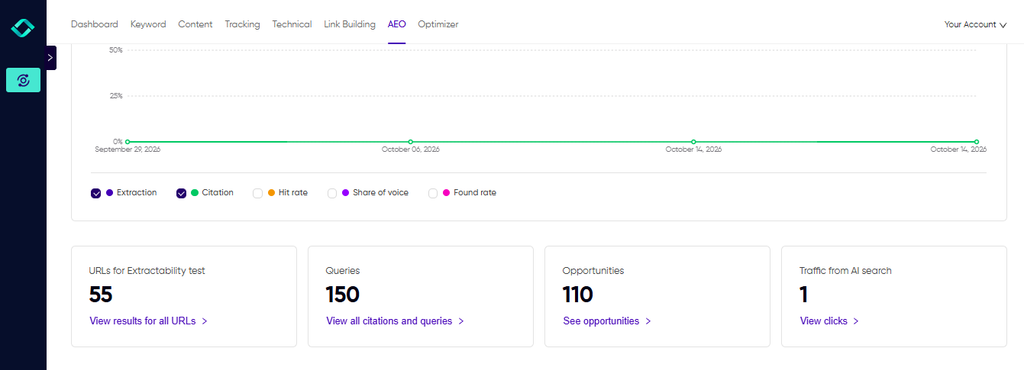
Track a fixed prompt set over time, and watch your share of mentions and citations against your competitors.
Keep AI referral traffic separate from other sources in your analytics so you can see what it’s worth. Google has also added generative AI reporting to Search Console, and it’s worth checking for your own site.
For a much clearer and easier measurement of your citations, mentions, and brand share of voice, use Konvart’s AEO tool
Where to Start
SEO automation works when you decide, task by task, how much freedom the software gets.
Let it run on its own where the work is easy to check and easy to undo.
Have it prepare the work and wait for you where a mistake would be public.
Keep the judgment, the original insight, and the relationships for yourself.
And you don’t need to redesign your whole workflow to try this. This week, list your five most time-consuming recurring SEO tasks, sort them with the four questions, and hand over one Tier 1 task.
Run it in observation mode, review what comes back, and see how many hours it gives you back.
If you’d rather start with software that already works this way, you can try our Optimizer tool on your own site.
Optimizer in co-pilot mode researches, drafts, and prepares fixes, then waits for you to approve what goes live.
Every plan includes a 7-day free trial, and no credit card is needed.
Try Optimizer in co-pilot mode.
Frequently Asked Questions
Q: Can SEO be fully automated?
A: No, and you wouldn’t want it to be. Monitoring, data gathering, reporting, and routine fixes can run on their own. Content, live-site changes, and outreach work best with your approval. Positioning, original insight, and relationships stay with you. Software handles the repetitive work well, but someone still has to decide what the site should be about.
Q: Is SEO automation safe for my rankings?
A: It’s safe when the risk matches the control. Tasks that are easy to check and undo, like monitoring and reports, carry little risk. Changes to live pages should wait for your approval, start on a small section, and be logged. The dangers are publishing unreviewed pages at volume and skipping the review that catches mistakes before they spread.
Q: Will Google penalize AI-generated or automated content?
A: Not for using AI or automation itself. Google’s spam policy targets many pages made mainly to manipulate rankings, however they’re created. Its examples include generating many pages with AI without adding value. Google gives no safe page count, so judge each page by whether it genuinely helps a reader.
Q: What’s the difference between SEO automation and programmatic SEO?
A: Automation is how you run the work: scheduled tasks, drafts, fixes, and reports. Programmatic SEO is a publishing method that generates many pages from a template and a dataset, such as one page per city. They overlap only when automation mass-produces pages, which is where scaled content abuse becomes a risk.
Q: Is SEO automation worth it for a small business or founder?
A: Often, yes, if the setup is simple. Founders often have little time for rank checks, crawls, or reports, which are the easiest tasks to hand over. Start with those, keep approval on anything that changes your site, and measure the hours saved.
Q: Can ChatGPT automate SEO?
A: It can help with drafting, analysis, and brainstorming, but it doesn’t know your site or data unless you supply them each time, and out of the box it can’t change your site. Automation needs tools connected to your data and site, with approval controls.
Q: How much does SEO automation cost?
A: It depends on the approach. Search Console and many plugins are free or low-cost, but they don’t help you much. Tools like Konvart’s Optimizer understand your brand and have access to your search data to make more informed decisions. Every Konvart plan includes a 7-day free trial with no card, and Optimizer sits in the Teams plan. See pricing for current details.