SERP analysis is crucial for optimizing content to improve search engine rankings. Without SERP analysis, you cannot possibly understand what Google sees as relevant to ranking for a particular keyword.
Through SERP analysis, marketers can gain insights into current ranking factors, user query intent, and the competition. These insights can inform the direction of content creation and link building.
In this article, I’ll explain what SERP analysis is and how to do it.
What is SERP Analysis?
Search Engine Results Page (SERP) analysis involves understanding what is happening on the SERP for a keyword or set of keywords, as well as the strength of competitors. Its purpose is to make the right decisions when optimizing pages or articles.
It basically involves examining the results returned by search engines in response to specific queries, so as to see:
- What URLs are ranking
- The number of backlinks they have
- The strength of those backlinks
- Patterns in the meta title
- How the content is written (direction, headings, key areas covered)
- The search intent (knowing whether a user is looking for information, making a purchase, or seeking specific services, so you can meet those needs with your content)
- The other keywords that the same URL is ranking for (to check the content areas covered and any possible gaps you had not yet considered)
- The rich results (e.g., featured snippets, knowledge panels, or AI overview). The presence of any of them can help you tailor content to that format to improve click-through rates.
Benefits of SERP Analysis
SERP analysis can help you rank higher in the SERPs. That said, breaking it down a bit more, these are the benefits of SERP analysis:
- Improved keyword targeting
- Competitive insights
- Content gap provision
- SERP feature opportunities
- User intent clarification
- Backlink opportunities
1. Improved Keyword Targeting
SERP analysis helps identify which keywords are driving traffic to your competitors’ sites. As you analyse the top results, you can discern patterns in keyword usage that may be applicable to your own content strategy. This insight helps you refine your keyword selection process, targeting terms with a better chance of ranking.
It’s not always about low competition and high search volumes. Depending on the industry, this might be difficult to achieve. Instead, follow this guide from our keyword analysis post on how to choose the right keywords.
2. Gain Competitive Insights
SERP analysis reveals what your competitors are doing right that you should copy. For example, their headings, backlinks, and schema.
It also reveals their weaknesses. For instance, if a competitor ranks high but has a slow page speed or is missing a key area in their content, this is an area you can capitalize on to outperform them.
Understanding these aspects can guide your SEO efforts more effectively, allowing you to allocate resources to areas that offer the most competitive advantage.
3. Content Gap Revelation
More than the gaps in your competitors’ content, you can also check the SERP for gaps. One area is in the People Also Ask section. You can have a look at the question there for ideas on what to cover in your content. Addressing these gaps can attract more traffic and improve user engagement on your site.
4. SERP Feature Opportunities
Features like featured snippets, local packs, or knowledge panels can significantly boost visibility. Analyzing search results pages provides insights into which types of content are more likely to win these coveted spots. For example, lists and step-by-step guides often appear in featured snippets for how-to queries. Tailoring content to fit these formats can increase the likelihood of occupying these positions.
Also, certain schema types might result in rich results in the SERP, for example, product schema resulting in reviews and price in the SERP. If you find any competitors with such rich results and the search intent is navigational or commercial, then it is a good idea to add that schema to your page.
5. User Intent Clarification
Different keywords signify different user intents – see this post on search intent. SERP analysis helps determine the predominant intent behind keywords by examining the nature of the content that ranks well.
6. Backlink Opportunities
When doing SERP analysis, one key step is checking the strength of your competitors’ backlinks.
Observing which websites link back to top-ranking pages gives you the backlink gap, so you know how many backlinks and the type of sites to obtain links from. It also gives you a starting point for link building, as you can reach out to sites in the gap first to obtain links.
How to Conduct Effective SERP Analysis
Step 1: Identify Focus Keywords
Before any SERP analysis, you need to have already defined the keywords for which you want to analyse the SERP. These keywords are found during the keyword research and analysis process. Read that article to cover this step.
Step 2: Analyze Search Intent
Aligning your content with the correct user intent increases the likelihood of ranking higher in SERPs. Once you have your keywords, analyze their intent.
Are users looking for information, trying to make a purchase, or seeking a particular website?
The answer to that question can be discerned by examining the types of results that appear (e.g., blog posts, product pages, tutorials). For instance, transactional intents will favor product pages (so you’ll see pages with prices, add to cart, product schema, etc.), while informational intents will usually have content that is heavily text-based, e.g., FAQ pages and blog posts.
Note the content types you find in the top 10 results, as well as any schema they have.
Step 3: Evaluate the Content of Top-Ranking Pages
Study the pages that currently rank highly for your chosen keywords.
Firstly, check how keywords are used in titles, descriptions, and throughout the content. For titles and descriptions, it’s easy.
Do a skim read of the content, then add those pages to Konvart’s content brief or Content Editor tools to get a full breakdown of keyword usage, which is provided within the Terms and NLP section of both tools.
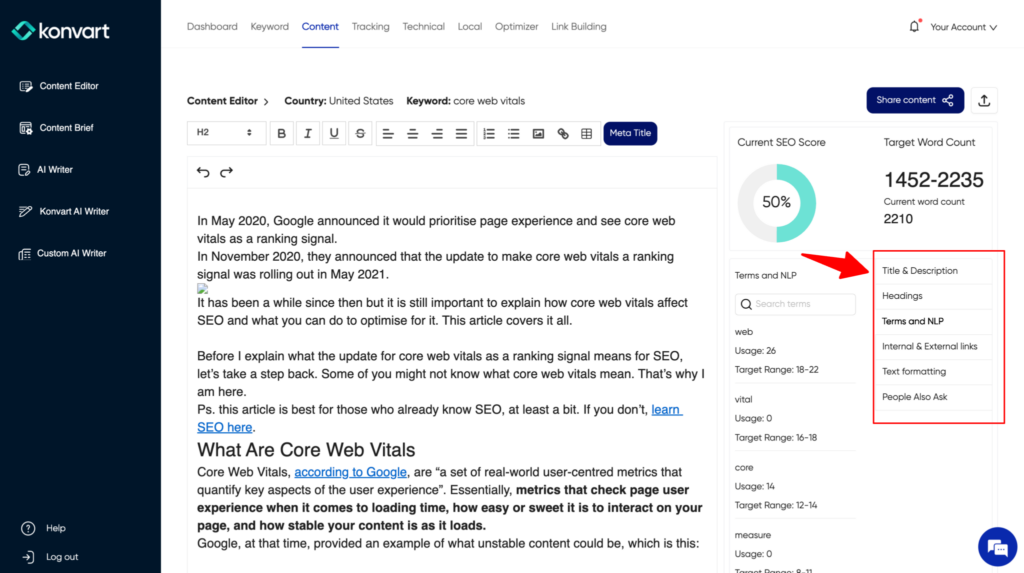
In addition to the keywords, have a look at their content structure and use of images or videos. Note the headings covered and the type of images/videos as inspiration for your own content.
Step 4: Check the Backlinks of Top Ranking Pages
This is more like a side-step, rather than a core part of SERP analysis. Here, you should check the number of backlinks and the strength of the referring domains and pages. You can use Konvart’s Backlink Overview tool for this. If you want a comparative analysis of their backlinks versus yours, then the Backlink Gap tool is more appropriate.
You don’t always have to match the number of backlinks, but what you find with competitors gives you an idea of what you might need to achieve. For example, if competitors have an average of 50 backlinks, then that number should be your target. Depending on your content and other factors, you might not need exactly 50 backlinks, but that can be a target.
Also, note that the number of backlinks is not enough; what is more important is the strength of your backlinks. If competitors have 50 spam backlinks, 2 great backlinks to your content might be sufficient to outrank them. So, review the backlinks as well, and ensure that when you build yours, you approach good sites.
Step 5: Identify SERP Features

A SERP feature is any search result on Google’s Search Engine Results Page (SERP) that is not a traditional organic result. These features aim to provide users with quick answers and information directly on the SERP without needing to click through to a website.
Understanding and optimizing for SERP features is crucial for boosting visibility and driving traffic to your website. Here are the most common types of SERP features and how they function:
- AI Overview: AI overviews are increasingly being shown for most search terms. Optimizing for AI Overviews is mostly about your content structure and how well you answer things (without fluff).
- Rich Snippets: These enhanced search results provide additional data about a content piece, such as ratings, reviews, or product information, making them more attractive to users.
- Knowledge Panels: Appearing on the right side of search results, these panels show detailed information about people, places, or things from Google’s knowledge graph.
- Featured Snippets: Also known as “position zero,” these are concise answers extracted from a webpage that are displayed at the top of search results. They often include steps for a process or quick answers to question-based queries.
- Image Pack: A horizontal row of images that appear for some queries where visual content is relevant. These images can lead users directly to the linked websites when clicked.
- Local Pack: A map feature that shows businesses relevant to local-based searches. This includes important details like reviews, addresses, and business operating hours.
- Top Stories: A section dedicated to recent news articles related to the user’s search query. It’s particularly prevalent in searches concerning current events or trending topics.
- Video Results: These are results where videos are deemed more pertinent by Google for providing the information users are searching for. If you see a video result, it’s in your best interest to create a video, publish it publicly on YouTube, and embed it on your page
- Site Links: Appearing under some website listings, site links provide direct access to specific parts of a site, helping users navigate to desired sections.
- People Also Ask (PAA): This feature shows related questions asked by users around your query. Each question can expand into an answer sourced from a webpage with a link. Monitoring PAA can provide insights into related topics and user intent.
- Shopping Results: For commercial queries, Google often shows a carousel or grid of product listings with images, prices, and sometimes ratings. These are crucial for e-commerce sites looking to attract buyers.
- Scholarly Articles: For academic or scientific queries, Google might display links to relevant research papers or academic documents. This is particularly useful for educational institutions or publishers targeting academic audiences.
Optimizing for each type of featured snippet requires a different angle. For instance, for video results, you need to publish a video on YouTube, but for a featured snippet, you need to write a direct answer to that search term/question on your page. For some, like rich snippets, you need to add schema to your page, and for local pack, you need an optimized Google Business Profile.
Step 6: Check for Other Opportunities
When conducting a SERP analysis, it is imperative to explore additional opportunities that may not be immediately apparent. This means identifying gaps within the search results that your content can fill.
Firstly, in addition to getting the Terms and NLP as explained in Step 3, you should also find alternative keywords and additional headings. Sections like Google’s “People also ask” and “Related searches” provide insights into other queries users are interested in. With these, you can discover new keyword opportunities that might not be as saturated.
Also, these areas, especially the PAAs, can reveal content gaps. You can compare competitors’ content to the PAA results to find a few they haven’t covered.
Also, compare competitors against each other for gaps. E.g., Competitor A might have covered one additional area that Competitor B didn’t, and Competitor B might have done the same – this gives you two content gaps for your content, so you can make yours the best for that topic.
Another aspect is doing things no one has done. For example, if most of the top results are text-based and you notice a lack of video content, this could be an opportunity to produce unique content, such as explainer videos or tutorials. This is more relevant to informational searches, though.
Local SERP Analysis
In addition to regular SERP analysis, you might also need to do local SERP analysis. This is only relevant if you are trying to rank for commercial terms specific to your business location, e.g., “personal injury lawyer near me” or “personal injury lawyer in Manchester.”
The steps for regular SERP analysis still apply, but you also need to analyze Google Business Profile listings. Here, you are looking for:
- The number of reviews of the top 3-5 competitors
- The aggregate of their reviews
- The completion of their profiles (images, description, opening hours, links, etc.)
- How they use keywords in their titles (yes, Google is against using keywords in the business name for the listing, but watching what your competitors have done here is also important)
More often than not, obtaining more reviews with a good aggregate score can help you outrank your competitors in the local map. If they have more reviews or a better aggregate rating, you should look into integrating the review collection process into your after-sales experience, working with the service/product delivery team to emphasize the importance of a good customer experience. Konvart’s Local Search Optimizer can help here as well.
Using Your SERP Analysis in Your SEO and Content Strategy
In addition to the research and analysis, you also need to integrate the results into your SEO strategy. I have explained how to do some of it above, e.g., the review collection, backlinks, and use of schema. I will explain a bit more below.
- Use the identified keywords: first, write naturally, then check for your use of the keywords you found. Also, review your content against the Terms and NLP suggested by Konvart. Use your primary keywords in your title, H1, and content. Also, use related keywords and other relevant terms.
- Create the right content format: Earlier, we looked at the type of content based on the search intent. Ensure you follow that – if you need to create long-form content and competitors have around 8k words, that should be your target. The only time you shouldn’t follow competitors is where it doesn’t make sense, e.g., their 8k words of content are mostly fluff.
- Use the right on-page SEO elements: Use competitors’ headings as inspiration to write yours, take additional headings from the PAAs, and any other area you think competitors have missed. Ensure that all headings used as inspiration also match your brand style.
- Use the technical gap: I already mentioned schema ideas and briefly mentioned the page speed. Identify other technical gaps using the Konvart Technical Gap tool, and incorporate them into your page. Also, if your competitors have better speed or core web vitals, it’s a good idea to match or exceed theirs.
- Get the backlinks: Reach out to the referring domains in your backlink gap and find other opportunities to exceed competitors’ backlink strength.
- Add any interactive elements that they missed: Simple tools like calculators and quizzes are being used to increase engagement and rankings. These are not relevant for every keyword, but when they are, use them. You can easily create one using generative AI.
5 Best Tools for SERP Analysis
Here are five of the best tools that can help you gain deep insights into search engine results pages, enabling you to optimize your content and improve your rankings:
- Google Search: All SERP analysis starts from Google Search results, and it’s free. Sure, you wouldn’t get backlink and keyword data, but if you want to do this without spending anything, then Google Search is your best bet.
- Konvart: If you want to save time and have a tool that handles all parts of SERP analysis for you, Konvart is the right tool. Konvart provides SERP analysis through the following tools:
- Content Editor: for Terms & NLP, headings, title use, and text formatting based on competitor and SERP usage
- Technical Gap: for insights into the difference between you and competitors when it comes to core web vitals, page speed, meta title and H1, and schema.
- Backlink Gap: see the backlinks competitors have that you don’t.
- Backlink Overview: get details on all backlinks for a particular domain or URL.
- Local SEO: find out what’s missing with your Google Business Profile based on a comparison against competitors
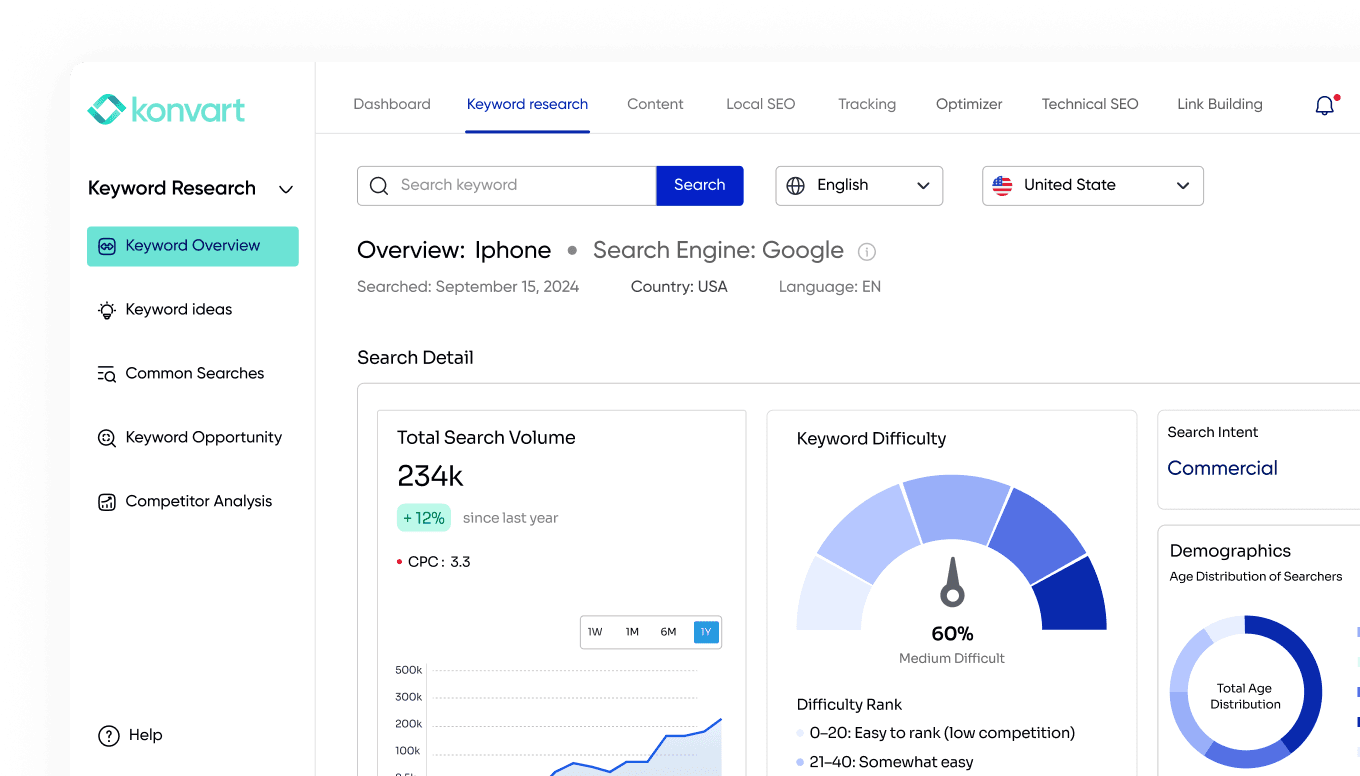
- Keyword Overview: see the entire details of any keyword, including search intent, demographics, historical search rankings, current search ranking, backlink data of each ranking competitor, and related keywords.
- Ahrefs: Ahrefs offers comprehensive SERP analysis features. Its Site Explorer lets you see the top organic keywords a site ranks for, the exact SERP position, and the estimated traffic each keyword drives. Ahrefs also provides visibility into the SERP features that are appearing for your keywords.
- SEMrush: The Keyword Overview tool provides detailed insights into SERPs. You can analyze the top 100 Google results for any keyword, see various SERP Features that are triggered by your query, and understand the competitive landscape.
- Moz Pro: Moz Pro’s Keyword Explorer not only gives information on keyword rankings but also provides SERP analysis that includes a list of pages currently ranking for those keywords, along with their Page Authority and Domain Authority. This tool helps in understanding how difficult it might be to rank for a specific keyword.
Monitoring Changes and Trends
Search engines frequently update their algorithms, which can impact how pages are ranked. Regularly updating your SERP analysis will help you stay ahead of these changes and adjust your SEO strategy accordingly.
The best way to do this is to track your rankings. For example, if you use Konvart’s Rank Tracker to track your rankings, you can see if there’s any new SERP feature for your keyword and if you are ranking in that SERP feature. If you are not, you can update your page to rank for that term.
In addition, look at engagement metrics such as bounce rate and average time on page for your top-performing pages. These indicators can give clues about content quality and user satisfaction. High engagement rates often correlate with higher rankings. For pages with high engagement rates, look at your content style – what did you do differently than the low-engagement pages? Copy that, moving forward.
Lastly, keep an eye on how direct competitors are performing in SERPs. Regularly check whether they introduce new content or optimize existing pages, as these changes might influence their rankings. Konvart’s Competitor Surveillance tool can help you do that. With that tool, if a change made on their page results in higher/lower rankings, you would be able to see it easily.
Ready to enhance your SEO strategy with comprehensive insights? Let Konvart help you. Sign up for free today and explore our tools.