With the high conversion rates on Google search and AI tools like ChatGPT, SEO is far from dead. Yes, AIO is mostly content and PR in SEO, so it’s all the same.
Therefore, you must analyze keywords properly if you want to increase your online visibility and traffic.
Keyword analysis starts where keyword research ends, so I’ll define keyword analysis, then explain some basics about keyword research before going into how to do keyword analysis. So, this is going to be a long post – strap in.
What is Keyword Analysis?
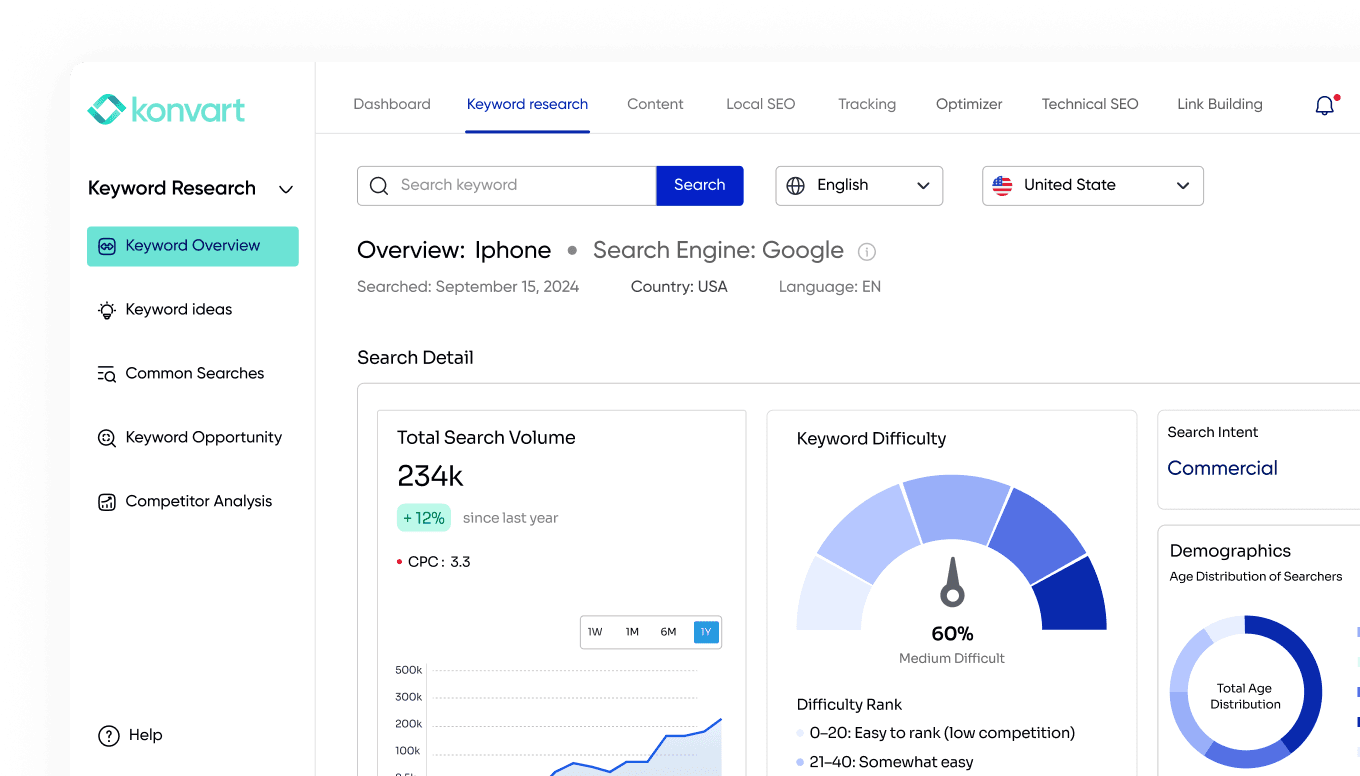
Keyword analysis involves evaluating keyword data, including search volumes, difficulty scores, demographics of searchers, and intent, in order to choose which to target and if targeting those keywords is realistic for your site.
What is the Difference Between Keyword Research and Keyword Analysis?
The difference between keyword research and keyword analysis is that keyword research is more concerned with finding the keywords. In contrast, keyword analysis is more about making a choice of your list of found keywords based on the data. In a way, both processes are intertwined and are needed for good SEO.
How Does Keyword Research Work
Remember the purpose of keyword research is to find terms/keywords to target. I have explained it step by step below.
Step 1: Start with Broad Terms
Begin by listing out broad keywords related to your business or industry. These are typically one or two-word terms that broadly define your products or services. For instance, if you’re in the coffee business, start with terms like “coffee,” “espresso,” or “coffee beans.”
Step 2: Expand with Related Keywords
Related keywords are terms that are closely connected to your main topic – those on your broad terms list right now. These terms help you expand topical coverage, match search intent better, attract different types of searchers, and find opportunities for more pages.
To find them, for to your Konvart dashboard and click on Keyword Ideas, then enter one of your broad terms, select the country you want to target, and the language of the target market.
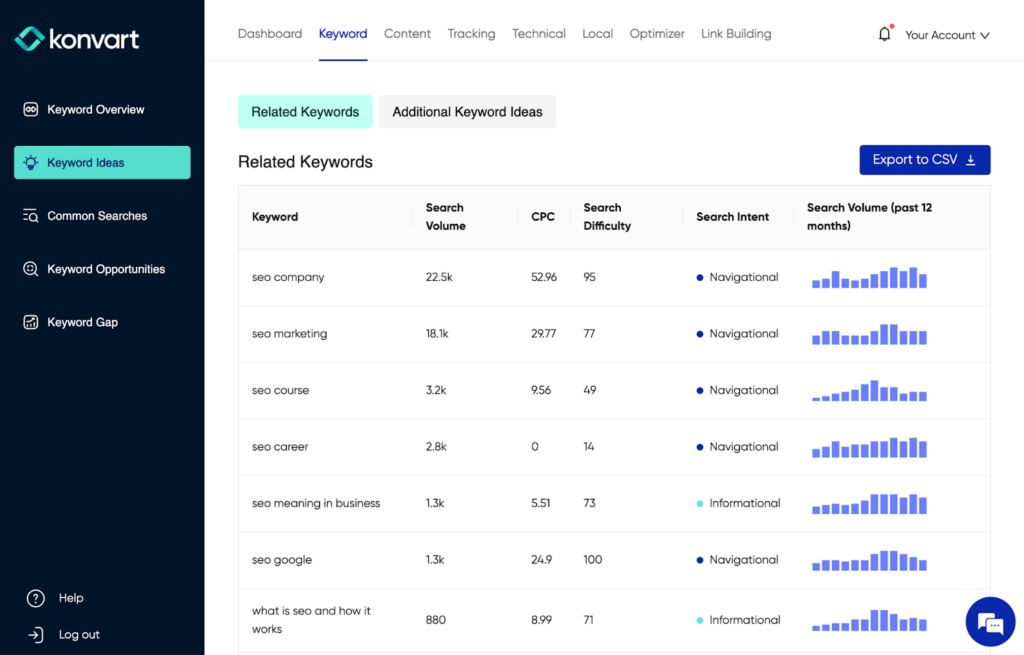
With one term “SEO”, I have now received several ideas under the “Related Keywords” and Additional Keyword Ideas” tabs.
In “Related Keywords”, you find terms that are directly related to the term you entered – these terms are good for topic expansion and sometimes for other new pages. The additional keyword ideas tab expands on the regular related keywords, so you find even more keywords to cover the entire topical map.
If you love to work in spreadsheets, you can download that data to a CSV file while you find more keywords.
Step 3: Get More Long-Tail Keywords
Long-tail keywords are longer phrases that are more specific than broad terms and often less competitive. They are excellent for targeting niche demographics. For example, instead of just “coffee,” you might include “organic fair-trade coffee beans” or “best espresso for home brewing.”
Long-tail keywords represent over 70% of all web searches, and with how people search on AI now, they are more important than ever.
Furthermore, visitors are likely to use them when they’re closer to the point of purchase, and these keywords often have lower competition and higher conversion rates.
In addition to the Keyword Ideas tool, you can find long-tail keywords in Konvart’s Common Searches tool.
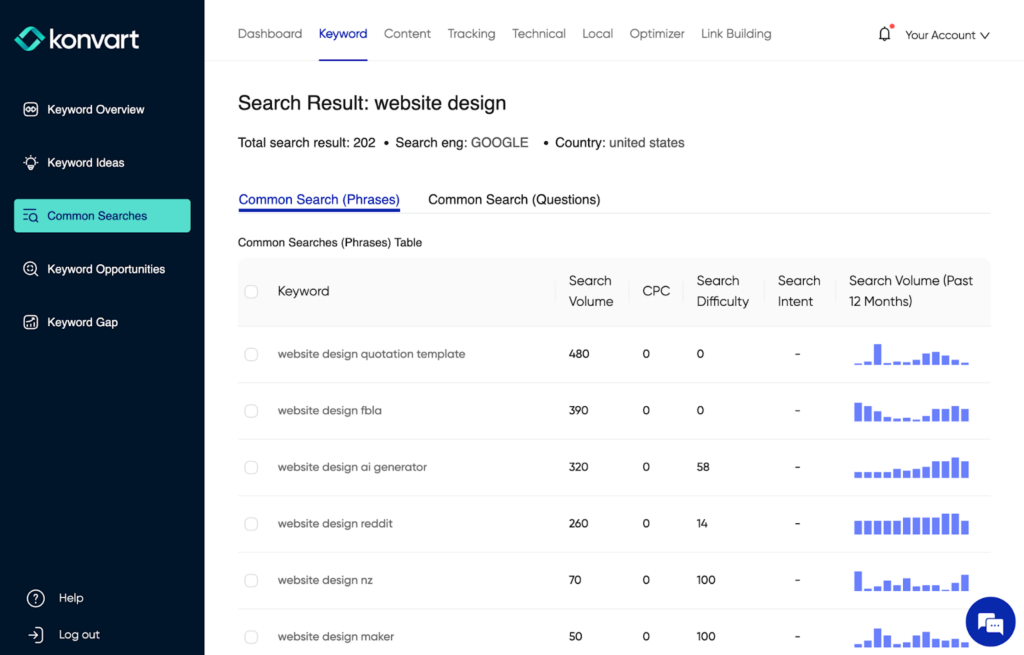
The results here separate Phrases from Questions. Questions include how, what, why, is, etc. and are helpful for getting blog post ideas. For example, “how much does a website designer cost?”
With phrases, you get text that helps you design on more topics in your niche, just from one term. Having done steps 1 and 2 through Konvart, you likely should have about 300 keywords on your list (from one seed phase alone). The more terms you enter, the more keywords you get.
Step 4: Get Keywords from Competitors
Look at the keywords your competitors are targeting. This can give you insights into what is working within your industry and help you spot opportunities you haven’t covered.
In your Konvart dashboard, click on “Keyword Gap”. Then, select your country and language of searchers. Next, enter your domain, and pick the level for analysis (domain/path level, subdomain level, or exact URL level), then do the same for competitors.
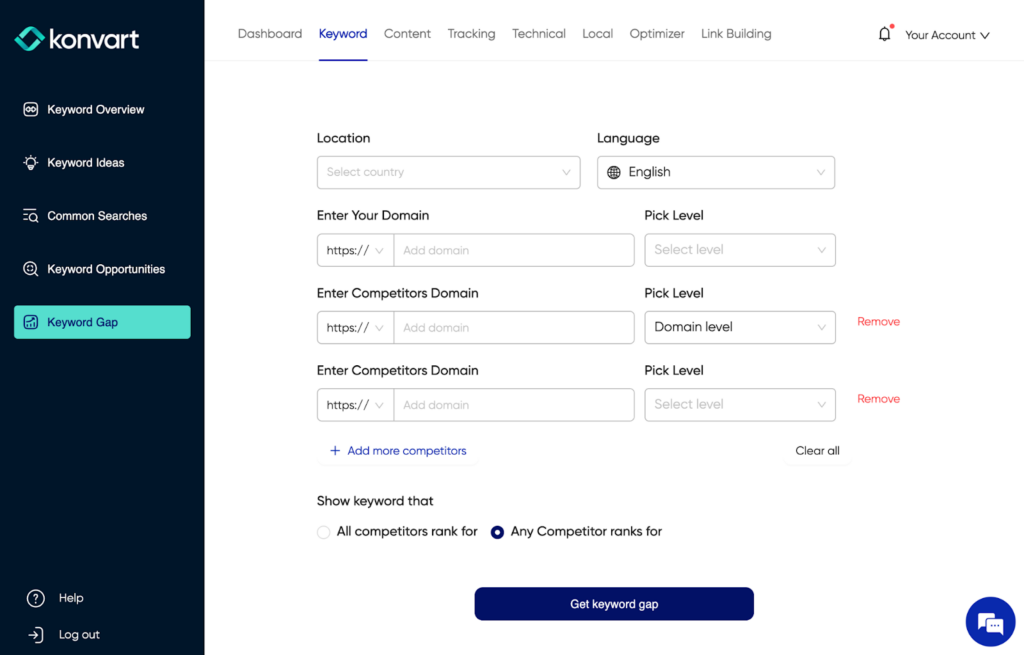
At this point, you need to select if you want keywords that all the competitors you entered rank for (but you don’t) or keywords that any of the entered competitors rank for. With the former, all the competitors must rank for that keyword for you to see it, while with the later, at least one competitor ranks for it even if others do not. Then Konvart will present the results.
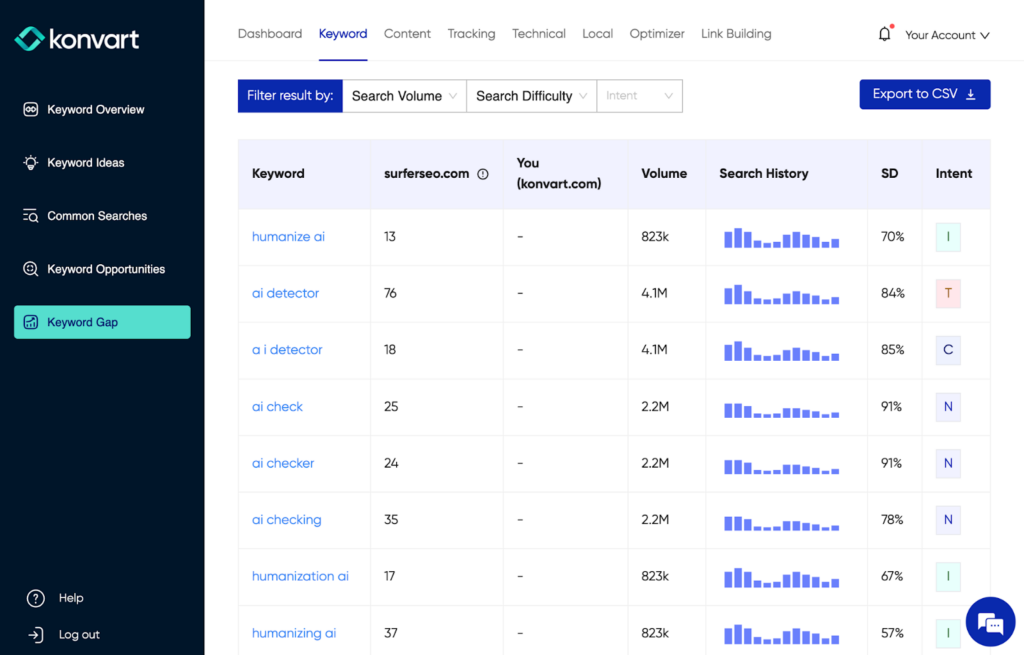
As usual, you can export to a CSV to work on later, especially if there are a lot. You can also filter on Konvart so you see only keywords that match a comfortable difficulty percentage, intent, or search volume.
Now, it’s time for some keyword analysis. To be clear, you don’t always have to wait till the end of step 4 to do your keyword analysis. You could do keyword analysis at the end of each step.
Types of Data Reviewed During Keyword Analysis
The major ones are:
- Search Volume: Search volume indicates how many times a keyword is searched per month, which helps gauge interest levels. The number can start from zero to millions or billions. High search volumes suggest popular keywords, but these often come with high competition. On the other hand, low-competition keywords might be easier to rank for but won’t generate as much traffic.
- Search/Keyword Difficulty: Keyword difficulty is a score from 0% to 100%. It estimates how difficult it would be to rank for that term based on considering the domain and page strength of ranking pages and other SERP insights.
- Search Intent: Keywords can be classified based on the intent behind the searches, which typically fall into four categories: informational, navigational, transactional, and commercial investigation. By analyzing the intent, you can tailor your content to meet the specific needs or interests of searchers. For instance, keywords with transactional intent like “buy eco-friendly packaging” indicate a readiness to purchase, guiding how you might structure content or select keywords that lead directly to sales.
- Demographics: Demographics matter in business. If your target are older people, you would not want to target a keyword that only those in their 20s search for. Also, the demographics could guy the type and tone of content you create so it matches what that demographic likes.
- Historical Search Volume: This is the search volume of the past 12 months. If the searches are declining rapidly, then it might not be the right keyword to target. This would also help you create expectations for traffic seasonality.
How to Do Keyword Analysis in SEO
The keyword analysis process involves several steps that help choose the best keywords. Firstly, you must have done some keyword research or at least be in the process of doing it. Then it’s analysis time. Basically, you’d be reviewing the data.
Step 1: Confirm the Relevance of the Keywords
Do a manual scan of the keywords. For example, if you offer a web design service, and web design courses is on your list, you might want to remove it if you do not offer courses and don’t want to attract people searching for courses.
Step 2: Check the Search Volume, Difficulty, and Intent of Your Lists
During steps one to four of your keyword research process in Konvart, you would have seen the search volume and difficulty. For most of them, you should also have seen the search intent. Look at the numbers.
- If your site is new, it is better to target keywords with low difficulty
- If your site is new, but you have extensive link-building and digital PR capabilities, you can target keywords with high difficulty
- Create a threshold for search volume, e.g., for this quarter, we are to target only keywords with more than 1000 search volume. What is big or small differs by each industry.
- Only pick navigational intent if it’s not a branded search. This rule does not apply if the branded term is your brand
Step 2: View More Insights With Konvart’s Keywords Overview
Having now narrowed your list a little bit, it’s time to check demographics. The demographics will provide you with additional data, including the information you saw in Step 2.
Also, unlike the Keyword Ideas and Keyword Gap tools, you would not see search intent insights for Common Searches. So, having evaluated keywords from the Common Searches tool based on their search volume, difficulty, and relevance, it’s important to also view them in Keyword Overview for intent, demographics, and more data.
Lastly, remember you only got related/extended keyword data previously and not data for your broad/seed terms. Keyword Overview would provide data for those terms here.
Go to Keyword Overview on your Konvart Dashboard and enter your seed phrase, language, and country.
At first glance, you should see the demographics in addition to the other data.
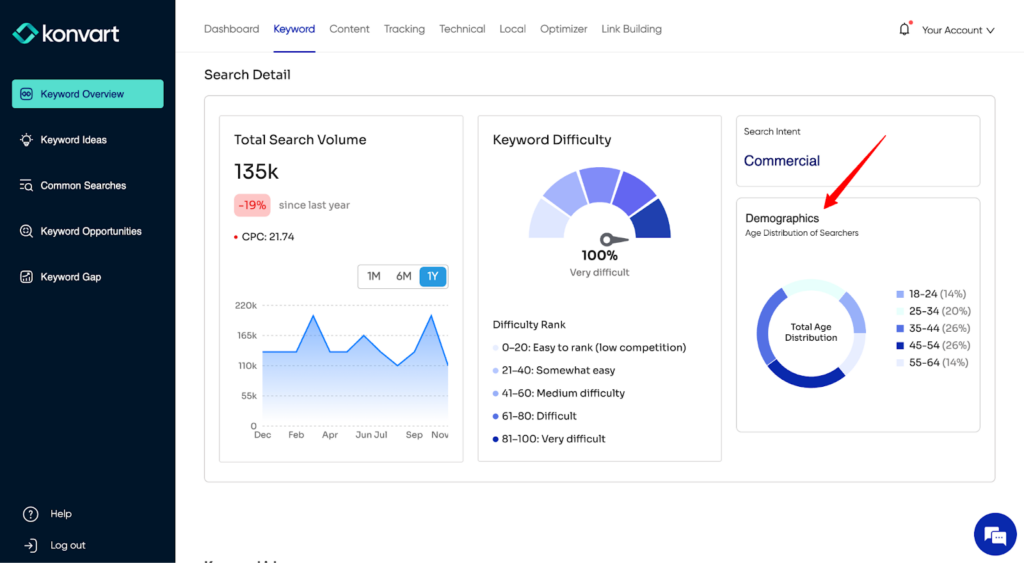
The demographics here is a breakdown of the percentage of searchers according to their age. As earlier mentioned, pay attention here if your website targets a particular age group or you want to tailor your content better.
Further down on this page, you’ll see the historical rankings, which would give you an understanding of the type of websites that have been ranking for that term in the last 12 months. For example, if you are in law and can only see government related pages, it’s probably best to drop that keyword for one for which law firms also rank.
Step 3: Check Out the Competition
Below the historical SERP results in Keyword Overview, is the current/live SERP result. Review what is on it, including the SERP features and your competitors.
If your website is new or you haven’t done much SEO in the past, it is likely going to be difficult to compete against well-established competitors, especially in a competitive space.
Click on at least three competitors in the top 5 and check out their content. Is it something that is relevant to your business? Would you be able to create content that is better than that? If yes to both, keep the keyword but if no, drop it.
Also, look at the SERP features for ideas on type of content or other things you could do. Notice if there are featured snippets, local packs, knowledge graphs, or video carousels. Each feature provides insight into what Google considers most relevant for that query. For example, if you can see local map listings, then optimizing your Google Business Profile is a good idea. This is not exactly a keyword analysis step, but would help with your content planning.
Step 4: Create Keyword Lists
Now that you have all the keywords you can target, organize them into lists.
Consider related groups of terms and topics. For instance, if your main keyword is “organic gardening,” related terms could include “composting techniques,” “best organic fertilizers,” and “seasonal planting guides.”
Organize by topical relationships and page relationships.
Topical relations cover keywords you would use on different pages, e.g. “core web vitals” and “largest contentful paint” might be better covered in depth as separate pages, even if you briefly touch on largest contentful paint within core web vitals.
Page relations cover keywords you would use on the same page, for example, “web design”, “web design agency”, and “cost of web design agency”.
Also, keywords that would compete with each other if they were separate pages should be under page relations. You want to ensure that instead of separate pages, you use each group of keywords that compete with each other on one page.
The purpose of this is to prevent keyword cannibalization and ensure efficiency.
SERP Features and Keyword Analysis
SERP features are special formats through which Google presents information to users. These can include ai overview, featured snippets, local packs, knowledge graphs, and more.
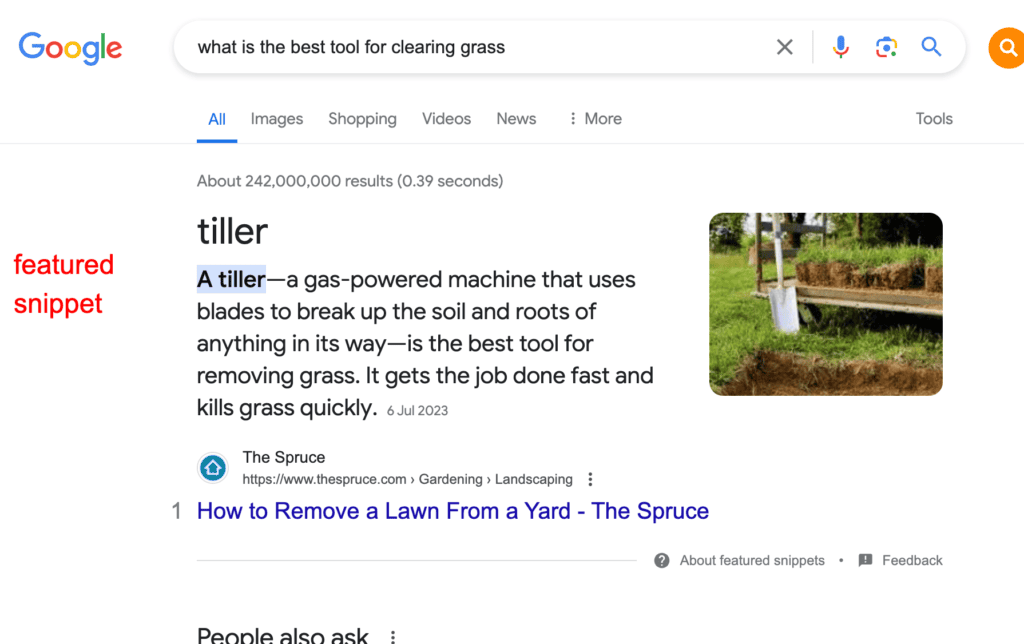
Each feature has a unique influence on user behavior and click-through rates. For example, a keyword triggering a featured snippet might mean that users get their answers directly on the search results page, which could reduce the likelihood of them clicking through to a website.
Statistics show that SERP features can significantly impact traffic. For instance, keywords that trigger a featured snippet can see up to a 30% increase in click-through rates compared to standard search listings.
It’s beneficial to analyze whether and how competitors appear in these SERP features. If competitors frequently appear in featured snippets for relevant keywords, it indicates the effectiveness of their content’s structure and informativeness. In this case, you would need a better answer to the questions in the SERP.
On Konvart, you can view the SERP features that are triggered by your keywords. You can also view them by manually checking through a Google Search.
Put Your Keywords to Work
After conducting a thorough keyword analysis and identifying the most relevant terms, the next step is to integrate these keywords effectively into your content.
Keywords should be incorporated naturally into titles, headers, subheaders, and the body of your content. The title of your page or blog post is particularly critical because it directly influences click-through rates from search results. A compelling title with a well-placed keyword can significantly improve visibility.
Within the body of your article or webpage, it’s important to use keywords contextually. They should fit seamlessly into the text, enhancing the reader’s understanding rather than detracting from it.
That said, overusing keywords can penalize your site. Search engines like Google prefer content that helps users by providing value and relevance. If a page reads unnaturally because of excessive keyword use, it could be flagged as spammy, which would harm its ranking.
Using synonyms and variants of your keywords can help avoid redundancy and enhance readability. There are also contextually relevant keywords that Konvart’s Content Editor or Content Brief can help you find.
Also, pay attention to recurring words or themes in the top results and consider how you might incorporate similar elements into your content. Better yet, read our post on how to create content for SEO.
Can You Use AI for Keyword Research and Analysis?
Not exactly. Although AI like ChatGPT can provide related words to a keyword, they cannot tell you the search volumes or keyword difficulties of those keywords. You need an SEO keyword research tool like Konvart to provide that data. Nevertheless, AI can be relevant for expanding your keyword or topic list, and building content outlines
What Makes the Best Keyword Research and Analysis Tool?
The ideal tool should offer a comprehensive suite of functionalities that cater to both beginners and seasoned SEO professionals.
- Accuracy of Data: A reliable tool pulls its data from clickstream and other search sources and uses sophisticated algorithms to estimate search metrics closely aligned with Google’s own tools. Accurate data helps in making informed decisions about which keywords are worth targeting.
- Depth of Keyword Data: Beyond just search volumes and competition levels, the best tools provide insights into keyword trends, seasonality, low-hanging fruits, and related search queries. This depth allows users to explore various dimensions of keyword performance and discover untapped opportunities.
- User Interface and Ease of Use: The best keyword research tools have intuitive interfaces that simplify the process of searching for and analyzing keywords. Clear tutorials, support resources, and a logical layout are important to help users learn quickly and use the tool effectively.
- Cost-Effectiveness: While the most expensive tool isn’t always the best, it’s important to consider what features you are getting for your investment. Tools that offer tiered pricing plans can accommodate the varying needs of different users, from freelancers to large enterprises, ensuring you pay only for what you truly need.
- Regular Updates and Support: A top-notch tool not only updates its features regularly to adapt to these changes but also provides robust customer support to assist users with any issues they might encounter.
The Best Keyword Research and Analytics Tools at a Glance
| Feature | Konvart | Ahrefs | SEMrush |
|---|---|---|---|
| In-depth keyword ideas | ✅ Yes | ✅ Yes | ✅ Yes |
| Autocomplete & related searches expansion | ✅ Common Searches tool | ❌ Not native | ❌ Not native |
| Competitor keyword gap analysis | ✅ Yes | ✅ Yes | ✅ Yes |
| Keyword metrics | ✅ Yes (volume, difficulty, intent, demographics) | ✅ Yes (volume, difficulty, intent) | ✅ Yes (volume, difficulty, intent) |
| Demographics insights | ✅ Yes (audience insights) | ❌ Not available | ❌ Not available |
| Historical SERP data | ✅ Yes | ✅ Yes | ✅ Yes |
| Search intent | ✅ Yes | ✅ Yes | ✅ Yes |
| Missed keyword opportunities | ✅ Yes | ❌Not available | ❌Not available |
| Integration with all other SEO tasks | ✅ Yes | ❌No | ❌No |
| Cost | $from 29/month | From $129/month | From $199/month |
Here’s a quick overview of the best free keyword research tools:
- Konvart: Konvart provides all you need for keyword analysis and keyword research, including its keyword overview, keyword ideas, common search, keyword gap, and keyword opportunities tools. It provides extensive data in these tools, ensuring that you can find and exhaust all opportunities to grow your website’s visibility. Also, it integrates and can automate other SEO tasks, including link building and content optimization.
- Semrush: Semrush is recognized for its large keyword database and the ability to segment keyword metrics by intent, CPC, and geographic specificity within keyword research and analysis. However, Semrush does not provide keyword opportunities like Konvart and is said to be quite expensive. Nevertheless, it is still one of the top three keyword analysis tools on the market.
- Ahrefs: Ahrefs provides SEO data and is particularly known for its backlink tools rather than its keyword research tools. Nevertheless, it also offers strong keyword insights within its keyword overview tool and provides support for competitor keyword gap analysis. However, like Semrush, it comes at a higher price and does not provide for keyword data based on real-world insights.
Why is Keyword Analysis Important for SEO?
- For Information: Keyword analysis is critical because it informs you which terms are most searched and which ones to target to appear more prominently in search results. A well-optimized website with strategically placed keywords has a better chance of ranking higher. This visibility is key in attracting more clicks; studies show that the first five organic results account for 67.6% of all the clicks on Google.
- Full Competitive Check: through competitor keyword analysis, you gain insights into the terms their competitors are targeting. This knowledge allows you to identify gaps in your keyword strategies and discover new opportunities. For example, if competitors are not ranking well for certain keywords with high search volumes, you can capitalize on this by optimizing these keywords in your own content.
- Saves Resources: Effective keyword analysis ensures that resources are not wasted on low-value or highly competitive keywords that offer little return on investment. By focusing on keywords with reasonable competition and good search volumes, you can allocate their marketing budgets more efficiently, focusing efforts where they are most likely to yield results.
- Aligning Content with User Intent: Keyword research is instrumental in aligning content with what users are actively searching for. By identifying popular and relevant terms within your target market, you can tailor your content to meet the current demands and queries of your audience. This statistic underscores the importance of keyword research in achieving these goals.
- Improving Search Engine Visibility: The strategic use of researched keywords can substantially improve your website’s visibility on search engines.
- Cost-Effective SEO: Focused keyword analysis allows for more efficient use of marketing budgets, ensuring that you attract not just more traffic but higher-quality traffic that is more likely to engage with your brand.
The Best Keyword Analysis and Research Tool
When considering the best keyword analysis or research software, Konvart stands out for its extensive features, in-depth data, intuitive dashboard, and cost-effectiveness. Moreover, Konvart also provides features that extend past your keyword research to help you identify technical gaps and opportunities, building links, and creating high-quality SEO content
Sign up for Konvart today and get the data you need.