AI content can be good for SEO. Google ranks pages on how helpful they are, not on how they were written.
However, AI content hurts rankings when it’s published at scale with little editing, originality, or fact-checking.
And that’s probably why the question keeps coming up.
Sites that leaned heavily on AI have lost most of their traffic overnight, while others use AI every day and keep growing.
Both are true, and the difference between them has little to do with the tool itself. It comes down to how the content is made, how it’s checked, and whether it gives readers something they can’t find on every other page.
In this guide, you’ll see what Google’s policies actually say about AI content, what the data shows about how it ranks, when AI helps and when it hurts, and a step-by-step process for using AI to create content that ranks.
Key takeaways
- Google doesn’t penalize AI content. It penalizes content made mainly to manipulate rankings, regardless of how that content was produced.
- Scaled, low-value AI content is the real risk. Google’s spam policies name generative AI used “to generate many pages without adding value for users” as an example of scaled content abuse.
- AI-assisted beats AI-generated. Using AI to research and draft, then editing, fact-checking, and adding your own experience, is the safest way to use it for SEO.
- Experience is the part AI can’t supply. First-hand examples, original data, and expert insight are what make a page worth ranking over the ones already there.
- The same rules apply in AI search. AI tools like ChatGPT and Perplexity tend to cite pages that answer clearly and add something specific, whether a person or AI wrote them.
Does Google Penalize AI Content?
No. Google doesn’t penalize content for being written with AI. Its focus is on whether a page is helpful, and that position has stayed consistent as AI tools have spread.
What Google does act against is content made mainly to manipulate rankings, and AI happens to make that kind of content much easier to produce.
Three Google sources make the position clear.
1. Google rewards quality “however it is produced”
In February 2023, Google published its guidance on AI-generated content. The core message is that Google focuses on the quality of content, not on how it’s made, and rewards high-quality content “however it is produced.”
The same guidance also says using automation, including AI, to create content mainly to manipulate search rankings goes against Google’s spam policies. But using AI to help create useful content doesn’t.
2. Scaled content abuse targets volume without value
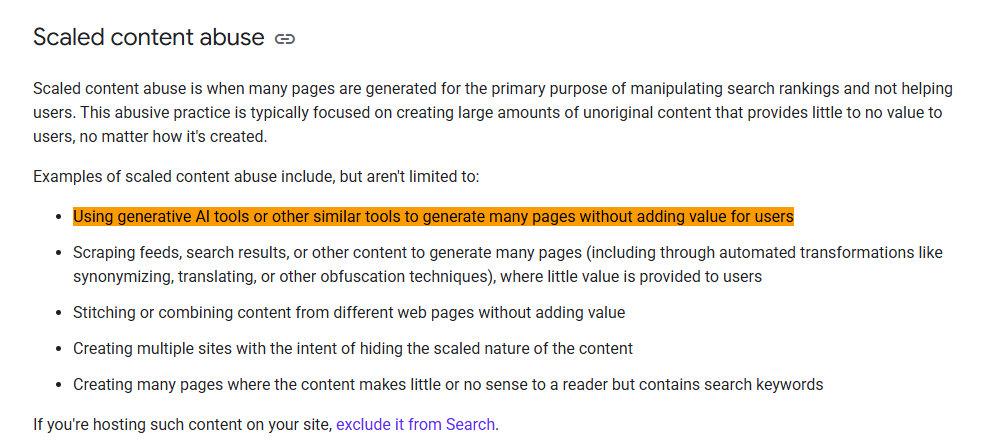
Google’s spam policies include a section on scaled content abuse.
It describes this as generating many pages “for the primary purpose of manipulating search rankings and not helping users,” and notes that this applies “no matter how it’s created.”
One of the examples Google lists is “using generative AI tools or other similar tools to generate many pages without adding value for users.”
The issue isn’t the tool. It’s publishing large numbers of pages that add little for the people who land on them.
3. Quality raters are told to rate low-effort AI pages lowest
Google uses human quality raters to evaluate search results. Their ratings don’t directly change rankings, but they show Google what good results look like.
In January 2025, Google updated its Search Quality Rater Guidelines.
Under the new guidance, a page gets the lowest rating when all or almost all of its main content is copied, paraphrased, or “auto or AI generated” with little to no effort, originality, or added value for visitors.
Read that closely, and the line is clear. A page drafted with AI and then shaped, checked, and improved by a person isn’t the target.
A page published straight from a prompt with nothing added is.
What this looks like in practice
Google’s March 2024 core update shows these policies at work. After the rollout, Google reported 45% less low-quality, unoriginal content in search results.
That figure covers low-quality content in general, not only AI content.
But a large share of what was removed was the kind of mass-produced, low-value content that AI makes easy to create.
To put it simply: Google doesn’t penalize AI. It penalizes content that adds no value, and AI makes that content easier to produce.
That’s the policy side. The next question is what actually happens in search results.
Can AI Content Rank? What the Data Shows
Yes. Google’s ranking systems don’t check whether a page was written by AI. They assess whether it’s the most helpful result for the search.
So AI content ranks the same way any content does: by answering the query better than the pages already there.
That’s also where the real difference lies. AI can speed up the research, structure, and first draft.
What gets a page to the top is everything a person adds afterwards: accuracy, a clear angle, and an answer built around what searchers actually need
What AI-assisted content can do
Take a look at this
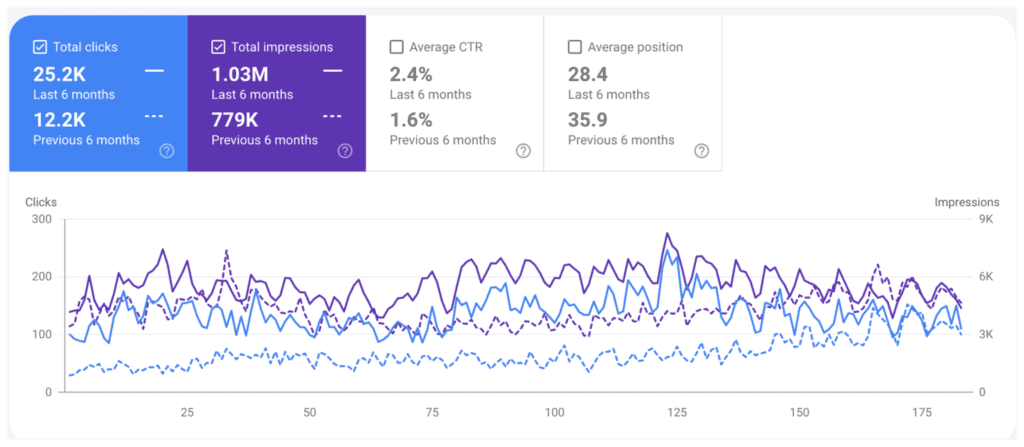
The screenshot is from a site that used Konvart AI writer within a six-month period.
You can see the huge growth in clicks (about 100%). We have also seen improvements for several other sites that use Konvart.
The process behind results like this is simple. Use AI to do the heavy lifting on research and drafting, then put human time into what AI can’t do on its own.
That’s the approach this guide covers step by step, and it’s how SEO-focused AI writing tools are designed to be used.
What separates AI content that ranks from AI content that gets hit
The sites that lose traffic are mostly the ones publishing far more content than anyone could review.
After Google’s March 2024 update, an analysis of 49,345 tracked websites found that 837 had been removed from Google’s index entirely, losing more than 20.7 million visits a month between them.
Many were content-only sites with mass-produced pages built around heavy advertising.
One widely reported case shows how fast this can turn. A software startup published 1,800 AI-generated articles in a matter of hours, built by copying a competitor’s content. Traffic climbed quickly, then fell below where it started within a few months.
The difference between these sites and the ones that grow with AI isn’t the tool. It’s the process.
AI content ranks when it’s researched, checked, and improved by someone who knows the topic.
It loses traffic when you use it to publish more pages than anyone could review.
That difference has a name: AI-generated versus AI-assisted content.
AI-Generated vs AI-Assisted Content
“AI content” covers very different ways of working.
A page typed out by a prompt and published a minute later counts as AI content. So does a page where a writer used AI for research and a first draft, then spent two hours editing it.
Google treats these very differently, so it helps to separate them.
AI-generated content
AI-generated content is published largely as the AI wrote it. Someone enters a prompt, gets a draft, and posts it with little or no editing.
It’s fast, but it has clear limits.
The AI can only draw on what’s already been published, so the result tends to repeat what’s already ranking.
It may include facts that are out of date or simply wrong. And it can’t include first-hand experience, because the model doesn’t have any.
AI-assisted content
AI-assisted content uses AI as part of the process, not as the whole process.
AI might help research the topic, suggest a structure, or write a first draft. A person then shapes the angle, checks every claim, adds real examples and expertise, and edits the piece so it sounds like the brand.
This is how most professional content teams now use AI.
It saves hours on research and drafting, and it keeps people in charge of the parts that decide whether a page ranks: accuracy, originality, and usefulness.
Giving the AI your brand voice and real context from the start also means less rewriting later.
AI-automated content at scale
The third type is where most of the risk sits.
AI-automated content means generating large numbers of pages automatically, often from a template or a list of keywords, with little review of each page.
Think hundreds of near-identical location pages, or thousands of articles published in a week.
Although not all automation is a problem. Product descriptions built from accurate data or pages generated from a real database can be useful.
It becomes scaled content abuse when the pages exist mainly to rank and add little for the people who read them.
How they compare
| AI-generated | AI-assisted | AI-automated at scale | |
| What it means | Published largely as the AI wrote it | AI helps research and draft; a person shapes, checks, and adds to it | Many pages generated automatically with little review |
| Human involvement | Low | High | Very low |
| Originality | Repeats what already ranks | Adds experience, data, and a clear angle | Often near-duplicate pages |
| Accuracy | Unchecked | Fact-checked | Rarely checked page by page |
| SEO risk | High | Low | Highest |
| Best for | Internal notes and rough ideas | Blog posts, guides, landing pages | Only data-backed pages that add real value |
To put it simply, AI-assisted content is the safe and effective way to use AI for SEO.
The other two are where problems start, and the next section covers what those problems look like.
When AI Content Hurts SEO
AI content doesn’t hurt SEO on its own. It hurts SEO when it’s used in ways that produce weak pages.
Most of the problems come from treating AI as a writer you can publish straight from, instead of a tool that still needs direction, checking, and input from someone who knows the topic.
The good news is that each problem has a clear fix, and none of them means giving up the time AI saves you.
Here are the 5 most common problems with writing with AI, and how to fix each one.
1. It repeats what already ranks
AI models learn from content that’s already been published. Ask one to write about a topic, and you’ll usually get a smooth summary of what the top results already say.
That’s a problem, because Google has little reason to rank a page that adds nothing new.
SEOs call this missing “information gain.”
If your page says the same thing as the ten pages above it, there’s no reason for it to rank above them.
The fix: before you draft, decide what your page will add that the others don’t. That could be your own data, a worked example, a clearer process, or a view on a question the top pages skip.
2. It gets facts wrong
AI tools can state wrong information with total confidence. They invent statistics, quote studies that don’t exist, and present outdated information as current.
On one page, that damages trust. But if it happens consistently across the site, it damages your reputation.
The risk is highest on topics that affect people’s health, money, or safety.
Google calls these “Your Money or Your Life” (YMYL) topics and holds them to a higher standard.
The fix: check every number, claim, and source against the original.If you can’t find where a statistic came from, remove it.
For YMYL topics, have someone with real expertise review the page before it’s published.
3. It misses search intent
AI writes to the prompt it’s given, not to what the searcher actually wants. Ask it for an article on “best running shoes”, and you might get a history of running shoes, when searchers want a comparison they can buy from.
A page can be well written and still fail if it answers the wrong question, or answers it in the wrong format.
The fix: look at the search results before you write. Note what type of pages rank (guides, lists, comparisons, product pages), what questions they answer, and how they’re structured.
Then build your outline around that, and give it to the AI as part of your prompt.
4. It has no first-hand experience
Google’s guidance on helpful, reliable content puts weight on experience, expertise, authoritativeness, and trust, known as E-E-A-T.
The first “E”, experience, is the one AI can’t supply. It has never used a product, run a campaign, or solved the problem your reader has.
Google’s quality rater guidelines also ask raters to judge the main content on four factors: effort, originality, talent or skill, and accuracy.
A raw AI draft usually falls short on the first two.
The fix: add what only you have. Share results from your own work, screenshots from tools you’ve used, lessons from clients, or quotes from experts on your team.
Even one real example per section can make a page stand out from generic AI content.
5. It’s published faster than anyone can review it
AI makes it possible to publish dozens of articles a day. That speed is exactly what gets sites into trouble.
Every page that goes out without a proper review is a page that might be inaccurate, repetitive, or thin.
And a sudden jump from a few posts a month to dozens a day, especially on a new site, looks a lot like the scaled content Google’s spam policies target.
The fix: publish at the pace you can review. A smaller number of strong pages will do more for your rankings than a large number of weak ones.
Before each page goes live, run it through a simple quality checklist:
- Does it match intent
- Are the facts checked
- Does it add something new
- Would you be happy to put your name on it?
All five problems come back to the same thing: AI was left to do the whole job.
But knowing where AI helps and where it needs a person makes it much easier to use well, and the next section breaks that down by situation.
When AI Content Helps vs Hurts
Whether AI content helps or hurts depends less on the tool and more on the job you give it.
Some tasks play to AI’s strengths: they’re repetitive, follow a clear structure, or start from information you already have.
Others depend on judgment, accuracy, or experience that AI can’t supply, and those are where it causes problems.
The table below breaks down common content tasks, how risky AI is for each, and what to do to use it safely.
| Situation | Risk | What to do |
| Drafting a blog post you’ll edit | Low | Use AI for research, an outline, and a first draft. Then add your angle, examples, and experience, and fact-check before publishing. |
| Meta titles and descriptions | Low | Let AI suggest several options, then pick and adjust one. Check that each includes the keyword and matches what the page delivers. |
| Updating old content | Low | Use AI to spot gaps, outdated sections, and missing subtopics. Check new facts and keep what already works on the page. |
| Translating pages | Medium | AI handles the first pass well. Have a native speaker review it for meaning, tone, and local terms before it goes live. |
| Product descriptions at scale | Medium | Safe when each description is built from accurate product data and adds real detail. Risky when hundreds sound almost the same. |
| Location pages | High | Only publish a page if it has something specific to that place: local details, reviews, team, or services. Avoid swapping the city name into one template. |
| YMYL topics (health, finance, legal) | High | Use AI for structure and research only. Every claim needs checking, and an expert should review the page before it’s published. |
| News and opinion | High | AI can’t report on what just happened or hold a real view. Use it to tidy your own writing, not to produce the piece. |
Here’s a simple rule: the more a task depends on facts, experience, or a point of view, the more a person needs to be involved.
The lowest-risk tasks are also where AI saves the most time. Refreshing pages that already rank is a good example.
The page has already proven it can rank, so a careful AI-assisted update to fill gaps and fix outdated sections often brings faster results than starting from scratch.
Knowing which tasks suit AI is the first step. The next is a process that keeps AI working for you on every page, from the first search to the final edit.
How to Use AI to Create Content That Ranks
The process below takes the 5 problems from earlier and builds a fix for each one into how the content is made.
It works whether you use a general AI chatbot or a dedicated SEO writing tool like Konvart AI writer.
And it doesn’t take much longer than publishing a raw AI draft, because the time you’d spend rewriting a weak draft goes into setting it up properly instead.
Step 1: Research the search results first
Before you open any AI tool, search your keyword and study the top results. You’re looking for three things
- What type of pages rank
- What questions they all answer
- What they leave out
For example, an HR software company targeting ‘how to write a job description’ would find the top results are mostly templates with short guides.
Most cover responsibilities and requirements, but few explain how to write one that attracts more qualified applicants, which is a gap worth filling.
If you’re not sure which keywords to target in the first place, looking at what your competitors already rank for is a good place to start.
Step 2: Decide your angle
This is the step most AI content skips, and it’s the one that matters most.
Write down, in one sentence, what your page will offer that the top results don’t.
A personal finance app writing about ‘how to build an emergency fund’ might choose: ‘A savings plan by income level, using real numbers from our users’ savings goals.’
It answers the same question as the other pages, but adds data and a structure none of them has.
Step 3: Give the AI real context
A short prompt gets a generic draft. But the more context you give, the less rewriting you’ll do later.
Include:
- The keyword and the search intent
- Your angle from Step 2
- The outline, built from your research in Step 1
- Your audience and brand voice
- Facts, data, or examples the AI should use
For example, instead of ‘Write an article about planning a trip to Japan,’ try: ‘Write a 7-day Japan itinerary for first-time visitors on a mid-range budget. Organize it day by day, with travel times between stops. Use a warm, practical tone. Follow this outline: [outline]. Include these hotel recommendations from our travel team: [list].
The more context you give, the better the output you’ll get from the tool.
Step 4: Let the AI draft from your outline
Now let the AI write. Work section by section rather than asking for the whole article at once.
It’s easier to keep each part focused, and easier to spot when a section drifts off topic or starts repeating itself.
Treat what comes back as a first draft, not a finished article.
Step 5: Fact-check everything
Go through the draft line by line. Check every statistic, claim, date, and product detail against the original source.
Remove anything you can’t verify.
If a skincare brand’s draft says retinol shouldn’t be used with certain ingredients, that claim needs checking against reliable sources and approval from a dermatologist.
Advice that affects people’s health can’t skip this step.
Step 6: Add what only you have
This is where the page becomes yours. Add the things AI can’t produce:
- Results and examples from your own work
- Screenshots, photos, or original data
- Quotes or tips from experts on your team
- Opinions based on real experience
A home renovation company might add before-and-after photos from real jobs, a cost breakdown from a recent kitchen remodel, and the mistake its contractors see homeowners make most often.
Step 7: Optimize, publish, and track
Before publishing, check the basics: the keyword in the title, a clear heading structure, internal links, alt text on images, and a meta description that matches the page.
A checklist of SEO writing best practices makes this quick.
Then track how the page ranks over the following weeks.
If it stalls, look at what the pages above it cover that yours doesn’t, and update it. The same AI-assisted process works just as well for updates.
Follow these steps, and AI does what it’s best at: speed and structure, while you supply what makes a page worth ranking.
And as more searches end in an AI answer instead of a list of links, that same quality decides whether AI tools cite your page too.
Does AI Content Get Cited in AI Search?
Yes, if it’s useful enough to cite.
AI tools like ChatGPT, Perplexity, Gemini, and Google’s AI Overviews don’t check whether a page was written by AI before citing it. They look for pages that answer a question clearly, are easy to pull information from, and add something specific that other sources don’t.
That puts generic AI content at a disadvantage.
If your page says the same thing as dozens of others, an AI tool has no particular reason to cite yours.
It can find that information anywhere. But a page with original data, a clear expert answer, or a specific example gives it a reason to name you as the source.
Here’s what makes a page more likely to be cited:
- A direct answer near the top: AI tools often lift the first clear answer they find. Answer the question in the first sentence or two, then explain.
- Clear structure: Descriptive headings, short paragraphs, lists, and tables make it easy for AI tools to extract the right part of your page.
- Specific facts: Numbers, dates, prices, and named steps are more likely to be quoted than vague statements.
- Something original: Your own data, a tested process, or first-hand experience is what sets your page apart from the rest.
For example, a payroll software company writing about “how to calculate overtime pay” will struggle to get cited with a page that repeats the standard formula.
Add a worked example for three common pay structures and a table of overtime rules by state, and it becomes the page an AI tool would want to reference.
This is also why the AI-assisted process matters beyond Google.
The same steps that help a page rank (a clear angle, checked facts, and real experience) are what get it cited in AI answers.
The best way to know whether it’s working is to measure it.
Tracking which AI tools cite your pages, and the traffic they send you, shows which content is earning visibility in AI search and which needs work.
The Faster Way: Konvart’s AI Writer
The process above works, but steps 1 to 4 take time.
Before you write a word, you’re studying the search results, working out which topics the top pages cover, and building an outline and prompt from scratch.
General AI chatbots can’t help much here, because they write without seeing what’s actually ranking for your keyword.
Konvart’s AI Writer does that groundwork for you:
1. Enter your keyword. The AI Writer analyzes the pages ranking for it, so the draft starts from what Google already rewards.
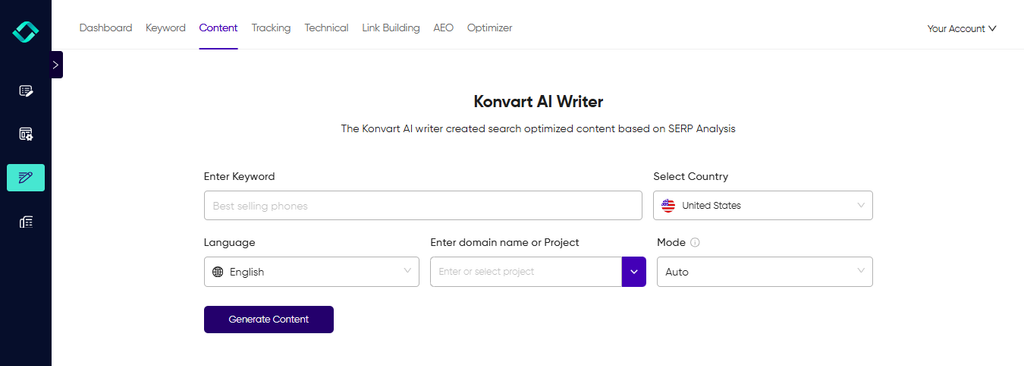
2. Get a structure built from the search results. It suggests the headings to use and the terms and topics to cover, so your page meets search intent from the first draft.
3. Write in your brand’s voice. With our Custom AI, drafts follow your tone and style, so they need less rewriting.
4. Check before you publish. The Content Editor scores the draft against the top-ranking pages and shows what’s missing, so you can fix gaps before the page goes live.
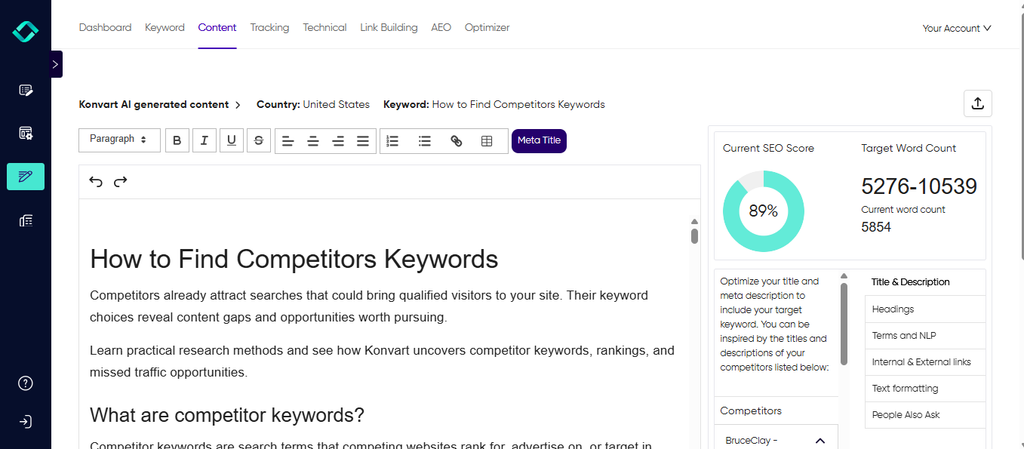
What you get is a strong first draft, built around what ranks and written to sound like you.
Then you can spend your time checking the facts and adding the experience only you have.
Try it on your next article. Start a 7-day free trial, no card required.
Final thoughts: AI Content is Good for SEO When People Stay in Charge
AI content is good for SEO when it’s used to help people create better pages, not to replace them.
Google doesn’t rank or penalize content based on who wrote it. It judges them based on how best they answer the search.
And AI can get you to a strong draft faster, but what decides whether that draft ranks is the work that comes after it.
The simplest way to think about it:
- Use AI for research, outlines, first drafts, meta descriptions, and refreshing pages that already rank.
- Keep people on the angle, fact-checking, expert review, and the experience and examples that make a page worth reading.
If you get the balance right, AI becomes one of the most useful tools in your SEO process. But it becomes a risk when you publish faster than you can review.
If you want AI drafts built around what already ranks, so you spend your time on the parts that make a page stand out, Konvart’s AI Writer is built for that.
It analyzes the top-ranking pages for your keyword, drafts in your brand’s voice, and checks the result against the competition, so every page starts in a strong position.
Create a free Konvart account. There’s no time limit, and you can explore the platform at your own pace.
Frequently Asked Questions
Does Google penalize AI-generated content?
No. Google doesn’t penalize content for being written with AI. It rewards helpful content, regardless of how it’s produced. What Google does act against is content made mainly to manipulate rankings, such as large numbers of AI pages published with little value for readers, which its spam policies call scaled content abuse.
Can Google detect AI content?
Google hasn’t said it uses AI detection to rank pages, and it doesn’t need to. Its systems assess whether a page is helpful, original, and accurate. A weak AI page usually shows itself through those qualities, such as repeated information, errors, or no real expertise, not through a detector.
Do AI content detectors affect SEO?
No. Third-party AI detectors aren’t part of how Google ranks pages, and their results are often inconsistent. A high “AI score” on a detector doesn’t mean your page will rank lower. Focus on what Google measures instead: whether the page is useful, accurate, and better than what already ranks.
Should I disclose that content was written with AI?
It’s not required for SEO, but it can build trust in some cases. Google suggests telling readers how content was made where they’d reasonably expect to know, for example on reviews or news. For most blog posts edited by a person, a clear author byline matters more than an AI label.
How much AI content is too much?
There’s no set limit. The amount of AI you use matters less than how much value each page adds. A site can use AI on every page and grow, as long as every page is reviewed, checked, and improved by a person. Problems start when you publish more pages than you can properly review.
Is AI content safe for YMYL topics?
Only with expert review. For “Your Money or Your Life” topics, such as health, finance, legal, and safety, accuracy matters more than anywhere else. Use AI for research and structure if it helps, but have someone with real expertise check every claim before the page is published.
Can AI-written content appear in AI Overviews or ChatGPT answers?
Yes. AI tools cite pages based on how clearly they answer a question and what they add, not on who wrote them. AI-assisted pages with direct answers, clear structure, and original information can be cited just like any other page. Tracking your AI citations shows which pages are getting picked up.