Imagine a buyer asks ChatGPT for “the best payroll software for a 20-person team,” and five names come back.
If yours isn’t one of them, you lost that buyer before they reached Google, and nothing in your analytics will tell you it happened.
That’s the gap AI visibility tools fill.
They run the prompts your buyers ask across ChatGPT, Gemini, Perplexity, Google AI Overviews and AI Mode. Then they record whether you’re mentioned, how you’re described, and which sources the answer pulled from.
The better ones go a step further and show you what to change so the next answer includes you.
If you’re new to the concept, start with how LLM visibility works.
We compared 12 tools on five things:
- which engines they cover
- how many prompts you get
- how often those prompts run
- whether they show citation sources
- what you can do with the data once you have it
TL;DR
- AI visibility tools track whether your brand shows up and gets cited in AI answers for the prompts your buyers ask.
- Engine coverage on entry plans is often partial. Some tools make you pick three engines. Others charge extra for Gemini or AI Mode.
- Credit-based tools (AthenaHQ, Rankscale) give you unlimited prompts but charge for every run, so costs grow with how often you track.
- Tracking tells you the problem, not the fix. So, tools like Konvart that also audit how easy your pages are for AI to quote, and suggest changes, save you a second tool.
- Konvart is the pick for teams that want AI visibility, rank tracking, site audits and on-page fixes in one platform, from $30 a month.
The 12 tools at a glance:
- Konvart
- Profound
- Peec AI
- Otterly.AI
- Semrush AI Visibility
- Ahrefs Brand Radar
- SE Visible
- Scrunch
- AthenaHQ
- Nightwatch
- Rankscale
- Mangools
The table below shows the differences side by side. After that, we’ll walk through each tool, starting with what to look for before you pay for any of them.
AI Visibility Tools Compared at a Glance
Pricing in this category are hard to compare. One vendor sells prompts, another sells credits, and a third sells “answers.”
To make them comparable, the table below shows each tool’s entry plan on the same terms: how many prompts you get, which engines they run on, how often they run, and what the tool helps you do once you see a gap.
| Tool | Best for | From | Prompts on entry plan | What it helps you fix |
| Konvart | Teams that want tracking and fixes in one SEO platform | $30/mo | Unlimited (credit-based) | Extractability audits, citation opportunities, on-page fixes pushed to your CMS |
| Profound | Enterprise brands | Free trial, then custom | 50 (trial) | AI agents for research and content |
| Peec AI | Picking exactly which engines to track | $80/mo billed annually | 50 | Source insights |
| Otterly.AI | Lowest-cost monitoring | $29/mo | 15 | Weekly recommendations, query fan-out |
| Semrush AI Visibility | Existing Semrush users | $99/mo billed annually | 25 | AI readiness site audit |
| Ahrefs Brand Radar | Benchmarking against a large prompt database | $50/mo | 83 a day | Tracking only |
| SE Visible | Simple daily tracking for small teams | $89/mo | 75 | Tracking and source insights |
| Scrunch | Brands that want AI-focused site audits | $250/mo | 125 | 5 site audits a month |
| AthenaHQ | Trying a free tier first | Free / $295/mo | Unlimited (credit-based) | Content optimization agent, on-page and off-page actions |
| Nightwatch | Daily rank tracking plus AI tracking | €99/mo | 50 | SEO agent, site audit, content studio |
| Rankscale | Widest engine coverage | $17/mo (yearly) | Unlimited (credit-based) | Page-level AI visibility audits |
| Mangools | Most prompts per dollar | $30.50/mo [confirm billing] | 500 | Tracking only (SEO tools sold separately within the bundle) |
Plans change often, so check the current price before you buy.
The pattern is clear once the plans sit side by side. Monitoring is cheap and widely available. But help acting on the data is where the tools differ.
If you only want to know whether ChatGPT mentions you, almost any tool here will tell you. If you want to know why it doesn’t, and change that, the last column matters more than the price.
Next, we’ll cover what to look for before you pay for any of these, and then go through each tool in detail.
What to Look for in an AI Visibility Tool
Most AI visibility tools look alike on a demo. You get a dashboard, a mention-rate chart, and a list of competitors who show up more often than you.
The differences only show once you’ve used one for a month: whether the prompts reflect what your buyers ask, whether the numbers hold steady from week to week, and whether the tool helps you do anything about what it found.
These seven criteria separate the tools in this list. They’re in the order we’d weigh them.
1. Engines that match where your buyers search
Start with where your audience asks questions, not with how many engines a tool lists.
A B2B software company whose buyers do their research in ChatGPT gets little from 17 engines if the one that matters is tracked shallowly.
A local dental clinic may care more about Google AI Overviews and AI Mode than anything else, because that’s where “dentist open Saturday near me” gets answered.
SO, check what the entry plan covers, not the top tier.
Several tools in this list advertise 9 or more engines but include only 3 or 4 at the lowest price, and charge extra for Gemini or AI Mode.
2. A pricing model you can predict
AI visibility tools charge in one of three ways:
- Per prompt: a fixed number of prompts that run on a schedule (Otterly, Peec AI, Semrush, Nightwatch, Mangools). This is the easiest to budget for and the hardest to grow, because adding prompts usually means moving up a plan.
- Per credit: unlimited prompts, but every run spends credits (Konvart, AthenaHQ, Rankscale). You can track exactly the prompts you need and run them as often as you like, so cost follows usage rather than plan tiers.
- Per answer or check: you pay for each AI response collected (Ahrefs Brand Radar’s custom prompts, Scrunch’s response caps). This works out much like credits, with less flexibility in how you spend them.
There’s no best model, only the one that fits how you’ll use the tool.
If you track 20 core prompts weekly, a credit model costs less than a 100-prompt plan you’ll never fill.
If you need 400 prompts checked daily for a client report, a fixed prompt plan is simpler.
3. Frequency and repeat checks
AI answers aren’t stable. Ask ChatGPT the same question twice, and you can get a different list of brands each time.
A tool that checks a prompt once a week and reports “mentioned” or “not mentioned” is giving you a coin flip.
Look for one of two things: daily runs, which smooth out the noise over a week, or several checks per prompt per run.
Either way, judge trends over weeks, not individual readings.
4. Citation sources, not just mentions
A mention tells you that you appeared. A citation tells you why. The most useful view in any of these tools is the list of URLs the AI pulled from when it answered, because that’s the list you can act on.
When a skincare brand finds that ChatGPT’s answers on “best vitamin C serum for sensitive skin” keep citing two comparison blogs and one dermatologist’s site, it has a target list.
It can pitch those publishers, earn a place in those comparisons, or publish a page that answers the question better.
In our analysis of ChatGPT answers, product and comparison pages earned a growing share of citations, which is why source tracking matters more than a raw mention count.
5. Prompt research
Your prompt list decides everything downstream.
Good tools help you find prompts with query fan-out (the related sub-questions an AI asks itself before answering), prompt volume estimates, or suggestions based on your keywords and competitors.
Without this, you track the prompts you think buyers ask, which is rarely the same as the prompts they do ask.
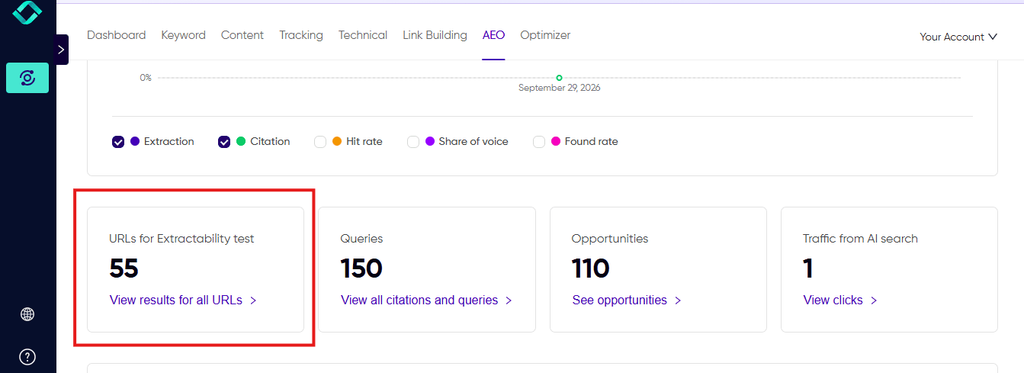
6. A page-level audit of how easy you are to quote
Some pages are hard for AI to use even when they rank well: key facts buried in long paragraphs, answers hidden behind tabs or JavaScript, no clear definitions, missing schema, etc.
An extractability audit checks your pages for these problems and flags the ones holding you back.
Semrush, Scrunch and Rankscale include some form of AI-focused page audit. In Konvart, the AEO extractability audit runs alongside the AI visibility audit, so you know how easy it is for LLMs to fetch each page.
7. What happens after the dashboard
This is where the title’s “fix” comes in, and where the tools in this list differ most.
Ask any vendor one question: once I see that a competitor gets cited and I don’t, what does your tool do next?
The answers fall into three tiers:
- Report only: You get the data and work out the fix yourself.
- Recommend: The tool suggests content changes, pages to update, or sources to pitch.
- Act: The tool drafts the change and, with your permission, applies it.
Konvart’s Optimizer writes on-page changes directly to WordPress, Shopify, Webflow or Wix, and Outreach Support covers the off-page side by finding contacts and sending pitches to the sites AI already cites.
A team with a dedicated content and PR staff may be fine with report-only. But a two-person marketing team usually isn’t, because the gap between seeing a problem and fixing it is where the work stalls.
Questions to ask on any demo or trial:
- Which engines are included on the plan I’d actually buy?
- How many times is each prompt checked per run?
- Can I see the exact URLs cited in each answer?
- How do you help me find prompts I’m not tracking yet?
- What does the tool do once it finds a gap?
With these criteria in mind, here’s how each of the 12 tools measures up, starting with the ones that cover the full cycle from tracking to fixing.
The 12 Best AI Visibility Tools
Each entry below covers what the tool does well, what the entry plan includes, and where it falls short.
We’ve also marked how far each one goes past the dashboard:
- Track: it shows whether and where AI engines mention you.
- Recommend: it tells you what to change.
- Act: it helps you make the change.
✓ means it does that, — means partly, and ✗ means it doesn’t.
1. Konvart: AI visibility plus SEO fixes in one platform
Track ✓ · Recommend ✓ · Act ✓
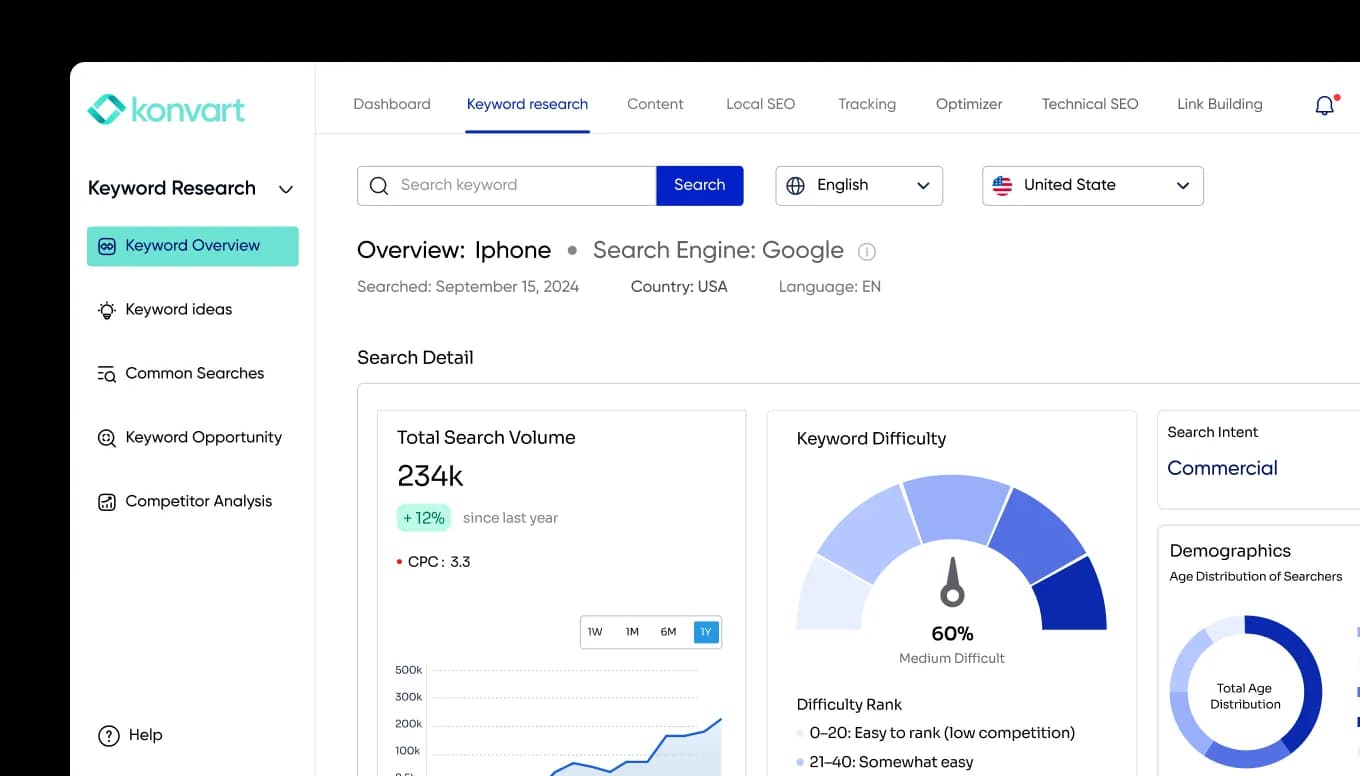
Konvart is an all-in-one SEO and AEO platform, so AI visibility sits next to rank tracking, site audits, content and link building rather than in a separate tool.
It’s built ChatGPT-first: you track as many prompts as you need, pay for runs with credits, and see which sources ChatGPT pulled from for each answer.
You can see which of your pages it cites, which competitor pages it cites instead, and why.
What sets it apart from the rest of this list is what happens after the report.
The same platform that finds a gap can draft the fix, apply it to your site with your permission, and track whether it worked.
What’s covered:
- Prompt tracking with no prompt cap: Prompts run on credits, so you pay for what you track rather than for a plan tier.
- Citation and source tracking: See every URL AI used for an answer and how often each domain appears.
- Query fan-out: See the sub-questions ChatGPT asks itself before answering, which often point to prompts you aren’t tracking yet.
- Extractability audit: Flags pages that are hard for AI to quote, such as buried answers, missing definitions, weak structure and missing schema.
- AI traffic reporting: Visits from AI channels, so you can tie visibility to actual sessions.
- Opportunities: A prioritized list of prompts and sources where you’re close to being cited.
- On-page fixes: The Optimizer picks up to 20 core pages, tracks them through Google Search Console for 3 to 6 months, and writes changes directly to WordPress, Shopify, Webflow or Wix. It works within the permissions you set, and it decides whether a page needs new content or more links. Pages rotate out as they hit their targets.
- Off-page fixes: Konvart’s Outreach Support finds contacts at the sites AI already cites, writes pitches, sends them from your connected mailbox, follows up on replies, and tracks the links you earn.
- SEO in the same account: Weekly Google rank tracking, a Local Map Tracker, site audits with 100+ checks, and technical gap analysis against up to 3 competitors.
Pricing: Individual is $30/mo and includes 1 AI visibility site, 250 credits, 200 tracked keywords and 12,000 audit URLs.
Team is $45 per user per month (minimum 2 users) and includes 5 AI visibility sites, 400 keywords and MCP/API access.
Extra credits cost $10 for 50, and annual billing saves 11%.
There’s a 7-day free trial with no card required, and a free account with 10 credits.
Choose Konvart if you want a platform that tracks your AI visibility, explains the gaps, and does the work to close them.
This matters most for a small team with no spare hands for content updates and outreach.
2. Profound: enterprise AI visibility with a free trial
Track ✓ · Recommend ✓ · Act —
Profound is built for large brands running AI search as its own program, with several teams, regions and languages to cover.
It now presents itself as an “AI Marketer,” a workspace where agents research, write and report using a knowledge base about your brand.
Its monitoring is broad on Enterprise: up to 9 engines, including ChatGPT, Perplexity, Gemini, Claude, Google AI Overviews, AI Mode and DeepSeek, plus ChatGPT Shopping tracking for retailers.
Key features:
- Daily prompt tracking across up to 9 answer engines
- An AI Marketer with reusable agents for research, content and reporting
- A Context Manager that grounds agent output in your brand’s own information
- ChatGPT Shopping visibility on Enterprise
Pricing: There’s no public paid plan. The free trial runs 50 prompts daily for 7 days on ChatGPT, Gemini and Google AI Overviews, in 1 language and 1 region.
Enterprise is priced on request.
Things to consider: Without a self-serve plan, small teams can’t move from the trial to a paid plan without a sales call.
The agents draft content, but publishing it and earning links stays with your team.
Choose Profound if you’re an enterprise brand with a budget for a dedicated AI search platform and need multi-region coverage, compliance and engine breadth more than a low entry price.
3. Peec AI: pick exactly which engines you track
Track ✓ · Recommend — · Act ✗
Peec AI is a focused tracker for teams who know which engines matter to them. Rather than bundling a fixed set, the Starter plan lets you choose 3 models from ChatGPT, AI Mode, AI Overviews, Copilot, Gemini and Naver.
Naver makes Peec one of the few options for brands selling into South Korea.
Every plan includes unlimited users and competitors, which helps agencies and larger marketing teams.
Key features:
- Choose 3 engines on Starter, with up to 13 models on Enterprise (including Claude and Perplexity)
- Daily tracking with up to 4,500 AI answers a month on Starter
- Unlimited users and competitors on every plan
- Source insights showing which domains drive answers
- A Looker Studio connector on Advanced
Pricing: Starter is $80/mo billed annually (about $95 monthly) for 50 prompts, 1 project and 1 country.
Pro is $205/mo billed annually for 150 prompts, and Advanced is $420/mo billed annually for 350 prompts. Enterprise is custom.
Things to consider: Peec tells you where you stand but leaves the fixing to you. The single country on Starter also limits brands tracking several markets.
Choose Peec AI if you want precise control over which engines you track, or you have a large team that needs access without per-seat fees.
4. OtterlyAI: the low-cost way to start monitoring
Track ✓ · Recommend — · Act ✗
Otterly is one of the easiest ways to find out whether AI engines mention you without committing much budget.
The Lite plan covers ChatGPT, Google AI Overviews, Perplexity and Copilot out of the box.
It includes citation source tracking and sentiment, so even the cheapest plan shows which sites shape the answers.
A built-in query fan-out tool helps you find related prompts worth adding.
Key features:
- Daily tracking on ChatGPT, AI Overviews, Perplexity and Copilot
- Add-ons for Claude, Gemini and AI Mode (AI Mode from $9/mo)
- Citation source tracking and sentiment on every plan
- A query fan-out tool for prompt research
- 3 recommendations a week on Lite
Pricing: Lite is $29/mo for 15 prompts, Standard is $189/mo for 100, and Premium $489/mo for 400.
Enterprise is custom from 1,000 prompts. Annual billing saves 15%, and an extra 100 prompts cost $99. Every plan has a free trial.
Things to consider: 15 prompts is enough to test the idea, but not to cover a real buyer journey.
The jump to the next plan is steep ($29 to $189), and engines beyond the core four cost extra.
Choose Otterly.AI if you want to check your AI visibility on a small budget before committing, or you only need to watch a short list of high-value prompts.
5. Semrush AI Visibility: for teams already on Semrush
Track ✓ · Recommend — · Act ✗
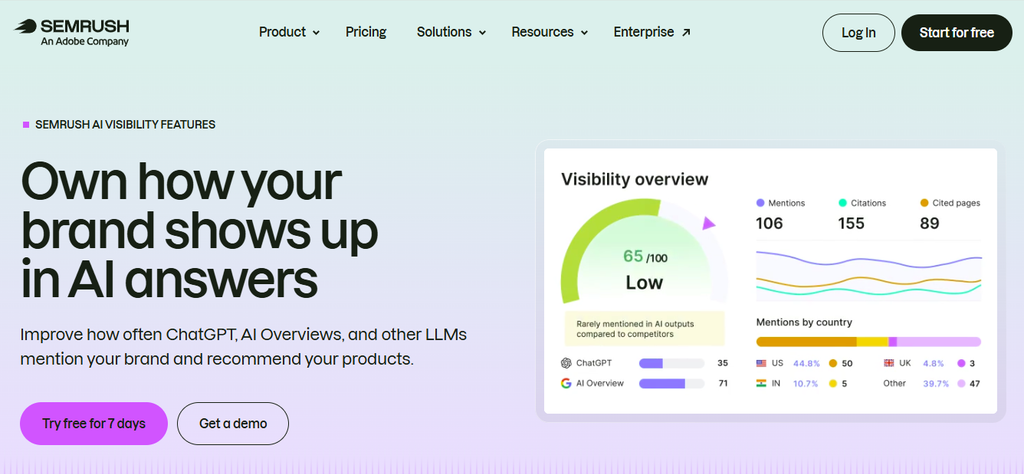
Semrush’s AI Visibility toolkit brings AI tracking into a platform many SEO teams already pay for.
You can buy it as a standalone toolkit, but its real advantage is context.
If your keyword research, audits and competitor data already live in Semrush, AI visibility sits beside them.
It tracks ChatGPT, Google’s AI results, Gemini and Perplexity, and includes an AI readiness audit that checks whether your site is easy for AI crawlers to read.
Key features:
- Daily tracking of custom prompts across ChatGPT, Google AI, Gemini and Perplexity
- Share of voice and sentiment against competitors
- Prompt research to find questions worth tracking
- An AI readiness site audit for crawlability and structure
Pricing: Base is $99/mo per domain, billed annually, for 25 custom prompts with daily updates.
Things to consider: 25 prompts per domain is one of the lowest allowances here at this price.
The audit flags problems, but you’ll handle content changes and outreach yourself.
Choose Semrush AI Visibility if your team already works in Semrush every day and wants AI data in the same place, even if it means a smaller prompt list.
6. Ahrefs Brand Radar: benchmark against millions of real prompts
Track ✓ · Recommend ✗ · Act ✗
Brand Radar works differently from most tools in this list.
Besides tracking your own prompts, it lets you look up your brand in a database of 531 million prompts.
That shows how often AI mentions you across topics you never thought to track.
This suits market research: sizing your share of AI conversation against competitors, or spotting categories where a rival dominates.
You can buy it on its own, without a full Ahrefs subscription.
Key features:
- Custom prompt tracking across all major platforms, including Claude
- An AI Visibility Index built on a 531-million-prompt database
- Competitor share of voice across topics
- YouTube, TikTok and Reddit mention tracking for existing Ahrefs customers
Pricing:
- Custom prompts: from $50/mo, with 2,500 checks a month (about 83 a day) and $0.02 for each extra check.
- AI Visibility Index: $199/mo per platform for AI Overviews or AI Mode, or $699/mo for all models.
Things to consider: On custom prompts, each check counts against your allowance.
Running prompts across several engines daily uses up 2,500 checks quickly, so budget for overages.
Brand Radar is built for measurement, so turning findings into page or link changes happens elsewhere.
Choose Ahrefs Brand Radar if you need a broad, data-heavy view of how AI talks about your brand and competitors.
It suits market or competitive analysis more than day-to-day optimization.
7. SE Visible: simple daily tracking for small teams
Track ✓ · Recommend — · Act ✗
SE Visible, from the team behind SE Ranking, is a tracker for businesses that want to know if they’re showing up.
Its 75 prompts on the entry plan, run daily across five engines, give more room than most tools at a similar price.
Google’s AI Overviews and AI Mode are both included, which helps local and ecommerce brands whose buyers search on Google.
Key features:
- Daily tracking across ChatGPT, AI Overviews, AI Mode, Gemini and Copilot
- 75 prompts on the entry plan
- Competitor comparison and source views
- A 10-day free trial
Pricing: Basic is $89/mo, or $71/mo billed yearly, for 75 prompts.
Things to consider: SE Visible tracks well but doesn’t go far into why you’re missing or how to fix it. Perplexity and Claude aren’t on the entry plan.
Choose SE Visible if you’re a small team that wants dependable daily tracking on Google’s AI results and ChatGPT, with a generous prompt allowance and nothing complicated to learn.
8. Scrunch: AI-focused site audits alongside tracking
Track ✓ · Recommend ✓ · Act —
Scrunch puts as much weight on your site as on the answers.
Alongside prompt tracking, the Core plan includes monthly site audits that check how AI crawlers read your pages, so a drop in visibility can be traced to a technical cause rather than guessed at.
Its 125 prompts and 5,000 responses a month on the entry plan make it one of the roomier mid-priced options.
Key features:
- Prompt tracking across ChatGPT, Perplexity, Google AI Overviews and Copilot, with up to 9 engines on Enterprise
- 5 AI-focused site audits a month on Core
- Limited query fan-out for prompt discovery
- 5 users and 5 competitors on the entry plan
- A 7-day free trial
Pricing: Core is $250/mo for 125 prompts and 5,000 responses a month. Enterprise is custom.
Things to consider: At $250/mo, the entry price is high for a small business.
The audits show what to fix, but the changes and outreach are still yours to do. Gemini and AI Mode aren’t on Core.
Choose Scrunch if you suspect technical issues are holding back your AI visibility and want tracking and site diagnosis in the same tool.
9. AthenaHQ: a free plan with a content optimization agent
Track ✓ · Recommend ✓ · Act —
AthenaHQ lets you start without paying anything. The free Essential plan comes with $25 in credit and covers 5 engines.
It includes prompt and response analysis, source and competitor insights, and content recommendations.
The paid Starter plan covers 11 engines, including Claude and Grok, and adds a content optimization agent that suggests on-page and off-page actions and improves its suggestions as it learns what works for your site.
Key features:
- A free plan with $25 credit, unlimited users and the Athena AI agent
- Visibility across 11 models on Starter, including ChatGPT, Perplexity, AI Overviews, AI Mode, Gemini, Claude, Copilot and Grok
- Unlimited topics, prompts and competitors, paid for with credits
- A content optimization agent with on-page and off-page actions
- Shopify, Webflow, GA4 and Google Search Console integrations
Pricing: Essential is free. Starter is $295/mo, or 17% less billed annually, for 3,600 credits a month with a 1-month rollover. API access and extra credits are paid add-ons.
Enterprise is custom.
Things to consider: The jump from free to $295/mo has nothing in between, which is a big step for a small business.
Starter covers one country and one language. The advanced version of the content agent is Enterprise-only.
Choose AthenaHQ if you want to test AI visibility tracking, then move to a plan that suggests content fixes across a wide range of engines.
10. Nightwatch: daily rank tracking with AI tracking built in
Track ✓ · Recommend ✓ · Act —
Nightwatch started as a rank tracker and still leads with it, with 500 keywords tracked daily on the entry plan across Google, YouTube, Bing and more.
AI visibility is part of the same plan rather than an add-on.
You get 50 prompts across 5 AI platforms, plus sentiment and citation analysis showing which sources each answer cites.
Every plan includes the full toolkit (site audit, content studio, prompt research, an SEO agent and an SEO MCP) and unlimited seats.
Key features:
- 500 keywords tracked daily plus 50 AI prompts on Starter
- 1,500 AI answers a month across 5 AI platforms
- Sentiment, citation analysis and source mapping
- An SEO agent, site audit (1,000 pages) and content studio on every plan
- Unlimited seats with no per-seat fees
- A 14-day free trial, no card required
Pricing: Starter is €99/mo for 500 keywords and 50 prompts.
Professional is €199/mo for 2,500 keywords and 150 prompts, with Looker Studio, white-label reports and API access.
Agency is €499/mo for 7,500 keywords and 500 prompts. Yearly billing saves 20%.
Things to consider: Nightwatch’s pricing is built around keyword volume, so you pay for rank tracking capacity whether you need it or not.
Choose Nightwatch if daily Google rankings are still your main report and you want AI visibility in the same dashboard.
11. Rankscale: the widest engine coverage
Track ✓ · Recommend — · Act ✗
Rankscale covers more AI engines than any other tool here.
It tracks 17+ engines on every plan, including newer ones like Meta’s Muse Spark, in every region.
Prompts are unlimited, and runs use credits, and you choose how often each prompt runs, from hourly to monthly.
That flexibility lets you check high-value prompts daily and the long tail monthly without paying for one schedule across the board.
Pro adds local results, AI visit tracking and an MCP connection.
Key features:
- 17+ AI engines and all regions on every plan
- Unlimited search terms, with execution paid for in credits
- Scheduling from hourly to monthly per prompt
- Citation analysis, competitor benchmarking and query fan-out
- Page-level AI visibility audits (50 a month on Pro)
- Local results and AI visit tracking from Pro up
Pricing:
- Essentials: $17/mo, billed yearly only, for 120 credits (about 480 answers).
- Pro: $99/mo for 1,200 credits (about 4,800 answers), with a free trial.
- Pro+: $229/mo, adding REST API access.
- Growth: $385/mo, adding white-label options.
- Enterprise: $780/mo for 12,000 credits.
- Yearly billing saves 15%, and unused credits roll over (up to 2x or 3x, depending on plan).
Things to consider: Essentials leaves out sentiment, local results and AI visits, so most teams will need Pro. Credit costs grow quickly if you run many prompts across many engines often.
Choose Rankscale if you need to monitor a long list of AI engines or markets and want fine control over how often each prompt runs.
12. Mangools: the most prompts per dollar
Track ✓ · Recommend ✗ · Act ✗
Mangools is a beginner-friendly SEO suite that now bundles AI Search Watcher PRO into every plan.
You get 500 prompts on the cheapest plan, and each prompt is checked twice per run to smooth out the randomness in AI answers across ChatGPT, Google, Claude and 5 more engines.
Keyword research, SERP analysis, backlinks and rank tracking come in the same bundle.
Key features:
- 500 prompts monitored with unlimited monitors on every plan
- 2 checks per prompt per run
- 8 AI engines, including ChatGPT, Google and Claude
- Keyword research, SERP analysis, backlinks and rank tracking included
- API and MCP access on every plan
Pricing: Basic is $30.50/mo and includes 200 tracked keywords updated weekly.
Premium is $40.50/mo, with 700 keywords and 3 extra seats.
Agency is $70.50/mo, with 1,500 keywords updated daily and 5 extra seats.
Annual billing saves about 35%. A free account is available.
Things to consider: Mangools shows you where you appear but offers no recommendations, audits for AI readiness, or help with fixes.
Basic has no extra seats and updates rankings weekly.
Choose Mangools if you’re a solo marketer or freelancer who wants to monitor a large prompt list cheaply and is happy to work out the fixes yourself.
That’s every tool reviewed.
The pattern from the table holds up close: most tools are strong at tracking, a few recommend fixes, and very few help you carry them out.
How to Get the Most From an AI Visibility Tool
Buying the tool is the easy part. Most teams set up a few prompts, check the dashboard for a couple of weeks, and then stop looking, because a mention rate on its own doesn’t tell anyone what to do on Monday morning.
The trouble is that AI visibility doesn’t behave like a Google ranking.
A ranking moves slowly and responds to changes you can trace. An AI answer can include you one day and leave you out the next.
It can cite a competitor because of an article you didn’t know existed. It can describe your product using a page you haven’t updated in two years.
So, if you watch only the score, you’ll see it move without knowing why, which makes it hard to justify the time or the budget for long.
To see your citations grow, treat the tool as the start of a process, not the end of one.
Decide what to track based on what buyers ask, give the data time to settle before acting on it, and spend more time on the sources behind each answer.
Then they close the loop: fix the page, earn the mention, and check whether it changed the answer.
Whichever tool you pick, these seven habits turn its data into changes that show up in AI answers.
1. Build your prompt list from real buyer questions
Your results are only as good as the prompts you track, and brainstormed prompts tend to be too short and too generic.
Real buyers ask long, specific questions with their constraints built in.
Pull prompts from places where customers already tell you what they want:
- Sales call notes and demo requests
- Support tickets and live chat transcripts
- Your site’s internal search
- Long queries in your Google Search Console report
- Questions in Reddit threads and review sites in your niche
A payroll provider will learn far more from “payroll software that handles contractors in multiple states” than from “best payroll software.”
This means you should group your prompts by stage (research, comparison, ready to buy) so you can see where in the journey you drop out of the answer.
2. Set a baseline before you change anything
AI answers vary from run to run. The same prompt can mention you on Tuesday and leave you out on Wednesday, with nothing changed on your end.
That’s why a single reading tells you very little.
Run your prompt list for 2 to 4 weeks before making changes. That gives you a baseline: your typical mention rate, the competitors who usually appear, and the sources the AI keeps returning to.
Without it, you can’t tell whether a later jump came from your work or from chance.
3. Study the sources, not just the score
The mention rate tells you whether you’re winning. The cited sources tell you why you’re not.
For each prompt where a competitor appears and you don’t, open the list of URLs the AI used.
A short list of the same sites usually shows up again and again: a couple of comparison articles, an industry directory, a review platform, a forum thread.
A meal kit brand might find that ChatGPT’s answers on “healthy meal kits for busy families” lean on two parenting blogs and one nutrition site, none of which mention it.
That’s a far more useful finding than “visibility: 18%.”
4. Fix the pages that should be cited
Next, check whether your own site gives the AI something worth quoting.
Pages often rank well and still get skipped because the answer is buried halfway down, split across tabs, or never stated plainly.
Look at the page that should win each prompt and ask:
- Does it answer the question in the first few lines?
- Does it use clear definitions, specific numbers and simple comparisons?
- Can the key facts be read without clicking, scrolling through a carousel or loading JavaScript?
- Is schema in place where it fits (product, FAQ, local business, article)?
A boutique hotel missing from “family-friendly hotels near the Louvre” may simply have no page that says how far it is from the Louvre and what it offers families.
To learn what makes a page easy to quote, see our guide to improving your LLM visibility.
In Konvart, the extractability audit flags these issues page by page, and the Optimizer can apply the fixes to your CMS within the permissions you set.
5. Earn a place in the sources AI already trusts
Some gaps can’t be closed on your own site. If ChatGPT builds its answer from three comparison articles and you’re in none of them, the quickest win is often to get into those articles rather than publish a fourth.
Reach out to the publishers that keep appearing in your citation reports.
Offer an updated data point, a product for review, or an expert quote for their next refresh.
For a B2B software company, getting added to one well-cited “best tools” roundup can do more for visibility than months of new blog posts.
Our Outreach Support handles this end to end: it finds the right contact, writes the pitch, sends it from your mailbox and tracks the reply.
6. Connect visibility to traffic
A mention is only worth something if it brings visitors or shapes a decision.
So, track referral traffic from ChatGPT, Perplexity, Claude and Gemini in your analytics, and note which pages it lands on.
This also helps you prioritize.
A prompt you win that sends no traffic may not deserve more effort. But one that sends a handful of visitors who convert at twice your site average deserves your next round of fixes.
7. Review monthly and rotate your prompts
AI engines change which sources they cite as new content appears, so last quarter’s citation list goes out of date.
Once a month:
- Retire prompts you’ve won consistently for 6 or more weeks.
- Add new prompts from your latest sales and support questions.
- Re-check the sources behind your most valuable prompts.
- Compare your mention rate against your baseline, not against last week.
Followed consistently, these habits change what the tool is for. Instead of telling you how visible you were last week, it tells you what to work on this month and whether last month’s work paid off.
Choosing the Right AI Visibility Tool for Your Team
Every tool in this list will tell you whether AI engines mention your brand. What separates them is what happens next: whether the tool leaves you with a report, or helps you change the answer.
So, before you choose, be honest about the follow-up work.
Finding out that a competitor is cited in 7 out of 10 buyer prompts is only the first step. Someone then has to work out which sources the AI is relying on, rewrite the pages that should be quoted, reach out to the sites that shape the answer, and check whether any of it worked.
If you have a content team and a PR team with time to spare, a tracking-only tool may be enough.
But most teams don’t, and that follow-through is where AI visibility work usually stalls.
That’s the gap Konvart was built to close.
Konvart is an all-in-one SEO and AEO platform that tracks your brand in ChatGPT answers, shows which sources shape those answers, and fixes the pages and links holding you back.
It does three jobs that usually take separate tools:
- It finds the gap: Citation tracking, query fan-out and opportunity reports show where you’re missing and why.
- It fixes your pages: The extractability audit flags pages that are hard for AI to quote, and the Optimizer applies fixes to your CMS within the permissions you set.
- It earns your place in the sources: Outreach Support pitches the sites AI already cites, follows up on replies and tracks the links you earn.
Rank tracking, site audits and reporting sit in the same account, so a gap you spot on Monday can be fixed, published and measured without switching tools.
Start your 7-day free trial, no card required.
You’ll see which buyer prompts you’re already winning, which competitors are cited instead of you, and which pages are one fix away from being quoted.
Frequently Asked Questions
What is an AI visibility tool?
An AI visibility tool tracks whether your brand appears in answers from AI engines such as ChatGPT, Gemini, Perplexity and Google AI Overviews. It runs a set of prompts on a schedule, records which brands are mentioned and which sources are cited, and shows how your visibility compares with your competitors’ over time.
What’s the difference between AI visibility and rank tracking?
Rank tracking measures where your pages appear in search results for a keyword. AI visibility tracking measures whether an AI engine mentions or cites your brand when it answers a prompt. A page can rank in Google’s top 10 and still be left out of the AI answer to the same question, which is why it’s worth tracking both.
How often should I check my AI visibility?
Weekly is enough for most prompts. Check your highest-value buyer prompts daily, and judge results on trends over several weeks rather than single readings, because AI answers vary from one run to the next.
Can an AI visibility tool improve my citations?
Most AI visibility tools only measure. Some suggest changes, but updating pages and earning mentions on cited sites is usually left to you. Konvart goes further: its Optimizer applies on-page fixes to your site, and Outreach Support pitches the sources AI already cites, both within the permissions you set.
Which AI engines should I track?
Track the engines your buyers use. For most brands, that’s ChatGPT first, since it handles the largest share of AI conversations, followed by Google’s AI Overviews and AI Mode for search-led buyers. Add Perplexity, Gemini or Claude if your audience relies on them.
Is there a free AI visibility tool?
A few AI visibility tools offer free plans or trials, but free tiers usually cover too few prompts for ongoing tracking. Konvart offers a 7-day free trial with no card required, so you can see which buyer prompts you’re winning and which competitors are cited instead of you.
How long does it take to improve AI visibility?
Expect early changes within 4 to 8 weeks of updating pages and earning mentions on cited sources, though it varies by engine and topic. Set a baseline first, so you can tell real progress from the normal swings in AI answers.