You know people are searching for what you sell. You’ve seen competitors show up on Google, some of them newer and smaller than you. Your website is live, maybe you’ve even paid someone to do SEO for you, and yet the phone isn’t ringing any more often than it did last year.
So you start reading about SEO, and the advice multiplies.
Write blog posts, build backlinks, fix your site speed, add schema, post on Google Business Profile.
Each guide hands you another checklist with 30 or 40 tasks, and none of them tell you which ones matter for a business your size, or where to start on a Tuesday evening when you have an hour to spare.
That’s where most small business owners get stuck. Usually not from doing nothing, but from doing the right things in the wrong order.
Take a café owner who blogs every Sunday for six months. Her traffic creeps up, but her catering bookings, the work that actually pays the bills, don’t move.
People are reading about coffee. They aren’t booking her for their office lunch.
The fix is a clearer picture of what SEO is for.
And for a small business, SEO isn’t about getting as much traffic as possible. It’s about showing up when someone is ready to buy, call or book, and giving them every reason to choose you when they land on your site.
A plumber doesn’t need 10,000 visitors a month. They need the 40 people nearby searching “emergency plumber” this week to find them first.
This guide gives you that plan, in order. It’s built for a busy owner with 2 to 3 hours a week for the first few months, and about an hour a week after that.
You’ll learn:
- What to do first, in your first week and first month, and what can safely wait.
- Which pages bring in customers, and why they come before the blog.
- How to adjust the plan for a local service, an online shop or a professional services firm.
- How to tell if it’s working, in calls, bookings and orders, not just rankings.
If you’d rather build the core SEO skills first, our guide to doing SEO yourself covers the basics step by step. This article is the plan that puts those skills to work.
What SEO for Small Business Really Means
Strip away the jargon, and SEO for a small business comes down to three things:
- People searching for what you sell can find you
- When they find you, they trust you
- Once they trust you, it’s easy for them to call, book or buy
Rankings, keywords, links and site speed all matter, but only because they serve one of those three.
That’s a useful test whenever someone recommends an SEO task: which of the three does it help, and how directly?
If the answer is “none of them, really,” it can probably wait.
The ways customers search for a business like yours
Not every search is worth the same to you. Most of the searches that matter to a small business fall into one of four types, and knowing which is which tells you what to work on first.
- Ready to buy: “Emergency plumber near me.” “Birthday cakes Leeds.” “Accountant for freelancers.” These people already know what they want and are choosing who to get it from. They’re the closest to becoming customers, so your service or product pages should be built to win these searches.
- Researching a problem: “Why is my boiler losing pressure?” “How far ahead should I book a wedding photographer?” These people aren’t ready to buy yet, but they will be soon. Answering their questions is how you get remembered when they are ready, and it’s where a blog earns its place.
- Looking for you by name: Someone heard about you from a friend, saw your van or read a review, and searches your business name. You should always own these results: your website, your Google Business Profile, your reviews and your social profiles.
- Asking an AI tool: More customers now ask ChatGPT, Google’s AI Overviews or other AI tools things like “What’s a good family dentist in Bristol?” These tools pull from websites, reviews and directories, so the work you do for search also helps you show up here.
Most small businesses get their first customers from the first and third types. That’s why the plan below starts with your foundations and your money pages, and saves the blog for later.
Small business SEO vs local SEO
You’ll often see these two terms used as if they mean the same thing. They overlap, but they’re not quite the same.
Local SEO is about showing up in searches tied to a place: the map results, “near me” searches and searches that include a town or city.
It matters most to businesses that serve customers in a specific area, like trades, clinics, salons, restaurants and shops.
Small business SEO is broader. It covers everything a small business does to get found in search, whether its customers are around the corner or around the world.
An online candle shop shipping nationwide still needs SEO, even though it has no map listing to optimize.
Most small businesses need a bit of both.
A local accountant wants to appear in “accountant near me” searches, and it also wants to answer questions like “what expenses can sole traders claim?” for people who will later need an accountant.
The plan in this guide covers both, and the “adjust for your business type” section shows how to weight them for your business.
Before You Start: What This Plan Assumes
Most SEO advice is written for one of two people: a marketing team with a budget and a full-time specialist, or a complete beginner who’s been told to “just start a blog.”
If you run a small business, you’re probably neither.
You know your customers better than any agency ever will, but your time is split between serving them, managing staff, chasing invoices and a dozen other jobs. SEO has to fit around all of that.
So this plan is built for a real small business, not a marketing department.
It assumes you’re doing most of the work yourself, or with one helper, and that every hour you spend on SEO has to earn its place.
It doesn’t assume any technical skills, a big budget or a developer on call.
So, before you dive in, it’s worth being clear on three things: how much time the plan needs, which tools you’ll use and what kind of timeline to expect.
Getting these straight now saves the most common frustration owners run into, which is giving up in month two because nothing seemed to happen, when the results were just around the corner.
1. Your time
Plan for 2 to 3 hours a week for the first three months. That’s enough to get the foundations right and fix the pages that bring in customers. After that, most of the heavy lifting is done, and about an hour a week keeps things moving.
If that’s more time than you have, don’t skip steps. Slow the plan down.
Doing week 1 over two weeks is fine. Jumping straight to month 3 because it sounds more exciting is how owners end up with 24 blog posts and no new bookings.
2. Your tools
You don’t need an expensive stack to start. Three of the four essentials are free:
- Google Search Console (free): shows which searches your site appears for, how often people click, and whether Google can see your pages.
- Google Analytics 4 (free): shows what visitors do on your site, including the calls, form fills, bookings and orders that prove SEO is working.
- Google Business Profile (free): your listing on Google Maps and in local results. Essential if you serve customers in a specific area.
- One SEO tool: for keyword ideas, site audits and rank tracking. You can start without one, but it saves hours once you’re past week 1, especially for spotting technical problems and searches you’re close to winning.
3. Your timeline
SEO isn’t instant. Most small businesses see early movement within three to six months, such as pages climbing and the first enquiries from search, with steadier results building over six to twelve months.
Our guide on how long SEO takes to work explains what affects that timeline and what to expect month by month.
The good news is that small businesses often move faster than big ones.
Local searches are less competitive, the right fixes to a handful of pages can make a visible difference, and you don’t need anyone’s sign-off to make changes.
Three rules for the whole plan
- Do it in order: Each stage makes the next one work better. Content on a site Google can’t properly read, or links to pages that don’t convert, is effort wasted.
- Change one thing at a time where you can: If you rewrite every page in the same week, you won’t know what made the difference.
- Keep a simple change log: A note with the date and what you changed is enough. When enquiries go up (or down), you’ll know why.
The plan at a glance
| Stage | Focus | Time per week | What “done” looks like |
| Week 1 | Foundations: tracking, Google Business Profile, making sure Google can see your site | 3 to 4 hours (one-off) | Calls, forms and orders tracked in GA4; Business Profile complete; no indexing problems on key pages |
| Month 1 | The pages that make you money | 2 to 3 hours | Every main service or product has its own page, with a clear offer, proof and an obvious next step |
| Months 2 to 3 | Getting found for more searches | 2 to 3 hours | Pages close to page one improved; a handful of posts answering customer questions; reviews coming in steadily |
| Month 3 onward | Trust from beyond your site | 1 to 2 hours | A few relevant local or industry links; consistent business details everywhere; a plan for AI answers |
| Ongoing | A light weekly routine | About 1 hour | Monthly scorecard reviewed; one small improvement made each week |
Here’s how each stage works.
Week 1: Lay the Foundations
The first week is the least exciting part of the plan, and the most important. Nothing you do here will bring in a customer instantly. But everything you do later depends on it.
Think of it like opening a new shop. Before you worry about window displays, you need the lights on, the door unlocked and a till that records sales.
Week 1 does the same for your online presence: it makes sure Google can find and understand your site, that local customers can find you on the map, and that you can see which visits turn into real customers.
Set aside 3 to 4 hours this week. Most of it is a one-off setup you won’t have to repeat.
1. Connect Search Console and GA4, and track what counts as a customer
Time: about 1 to 1.5 hours
If you skip one step in this whole plan, don’t let it be this one. Without tracking, you’ll never know whether SEO is working, and you’ll be guessing about what to do next.
Start with Google Search Console. Add your website, verify that you own it (your website platform usually has a simple way to do this), and submit your sitemap.
Within a few days, you’ll start seeing which searches your site appears for and how many people click.
Then set up Google Analytics 4, and connect it to Search Console so the two share data. The most important part of GA4 for a small business is key events: the actions on your site that mean someone has become, or is about to become, a customer.
Depending on your business, that might be:
- A tap on your phone number on mobile. For an electrician or a locksmith, this is often the most important action of all.
- A contact or quote form submitted.
- A booking made through your booking tool, like a hair salon appointment or a consultation slot.
- An order or purchase completed, for online shops.
- A click to get directions, for businesses with a physical location.
Mark these as key events in GA4. From then on, you can see how many of them came from organic search.
That’s the number this whole plan is designed to grow.
2. Claim and complete your Google Business Profile
Time: about 1 hour (skip this if you only sell online with no local customers)
For any business that serves customers in a specific area, your Google Business Profile is as important as your website, sometimes more so.
It’s what appears on Google Maps and in the local results at the top of many searches, and it’s often the first thing a customer sees before deciding whether to call.
If you haven’t claimed your profile yet, do that first.
Then fill in every section you can:
- Primary category: choose the one that best describes your main service. This affects which searches you appear for more than almost anything else on the profile.
- Services or products: list each one, with a short description.
- Hours, phone number and website: make sure they match exactly what’s on your website.
- Service area or address: a mobile dog groomer who visits customers’ homes, for example, should set a service area and hide the home address.
- Photos: your work, your team, your premises and your van. Real photos build trust far more than stock images.
- Reviews: set up a simple way to ask happy customers for a review, like a short link sent by text after each job. Reviews influence both your visibility and whether people choose you.
3. Make sure Google can see your site
Time: about 1 hour, more if problems turn up
None of your SEO work matters if Google can’t find, read or show your pages. Most small business sites built on popular platforms are fine, but problems are common enough that you should check, especially on older sites or ones that have been redesigned.
Check these five things:
- Indexing: in Search Console, look at the Pages report. Your homepage, service pages and product pages should all be indexed. If key pages are missing, find out why before doing anything else.
- Sitemap: your site should have a sitemap, and it should be submitted in Search Console.
- Mobile: open your site on your phone. Can you read everything, tap the buttons easily and call you in one tap? Most of your customers will visit on mobile.
- Speed: if pages take more than a few seconds to load on your phone, that costs you customers as well as rankings. Large, uncompressed images are the most common cause.
- HTTPS: your site address should start with “https” and show a padlock in the browser.
A site audit tool can run most of these checks for you in one go and flag what to fix first.
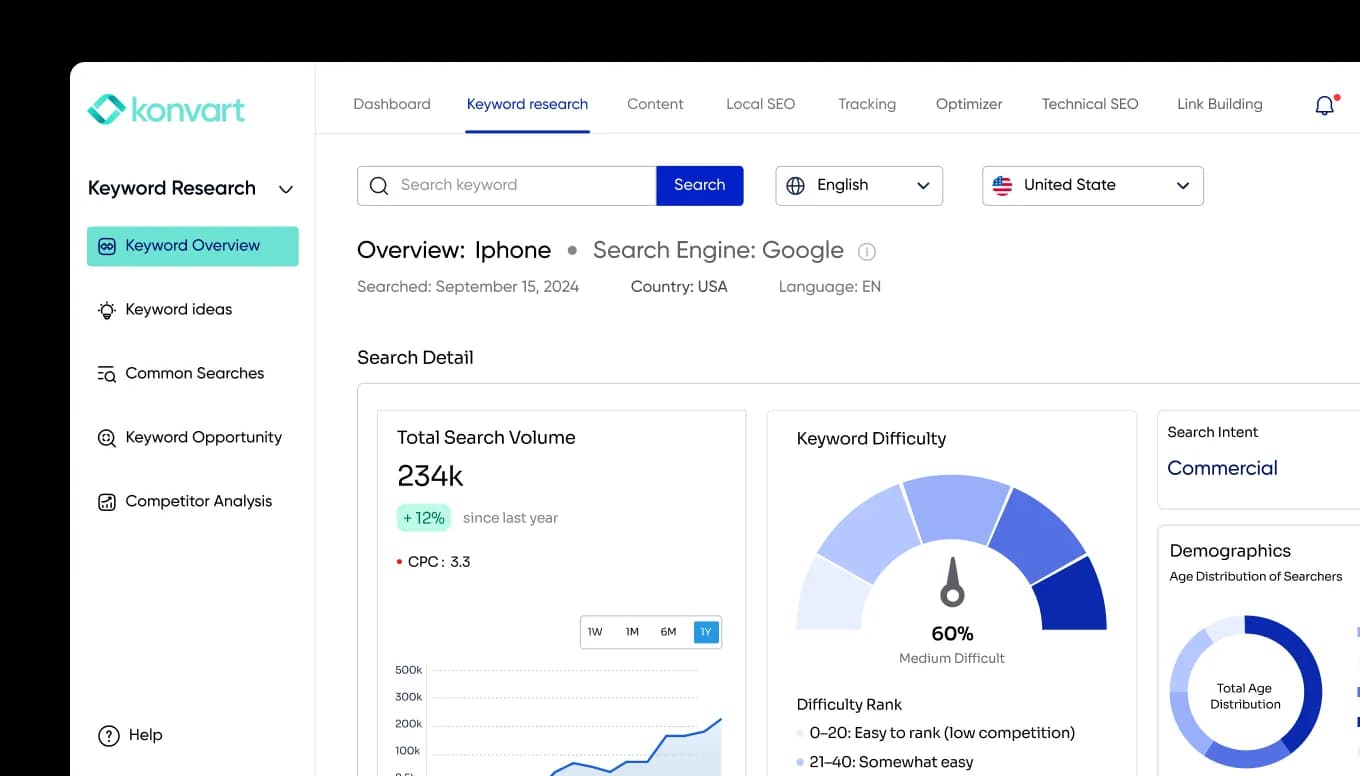
Konvart, for example, checks your whole site against more than 100 issues every week, and it checks whether your sitemap is submitted in Search Console and submits it for you if it isn’t.
You’ll still request indexing for individual pages in Search Console itself, but you won’t have to hunt for problems page by page.
If you want more detail on any of these checks, our guide to doing SEO yourself walks through each one.
What “done” looks like at the end of week 1
- Search Console and GA4 are connected, and your key customer actions are tracked as key events.
- Your Google Business Profile is complete, with photos, services and a way to collect reviews.
- Your main pages are indexed, your sitemap is submitted, and your site works well on mobile.
With the foundations in place, it’s time to work on the pages that bring in your customers.
Month 1: Fix the Pages That Make You Money
With the foundations in place, it’s time for the part of SEO that most small businesses skip: improving the pages customers actually land on before they buy.
Most owners jump from setup straight to blogging. It feels productive, and it’s the advice they hear most.
But think about what happens when someone searches “kitchen fitters in Leicester” or “buy indoor plants online.” Google doesn’t show them a blog post about kitchen trends or the history of houseplants.
It shows them service pages, product pages and local listings. If those pages are thin, vague or missing, the blog can’t make up for it.
Your money pages are where searches turn into customers. They usually need fewer changes than you’d expect, and they pay off faster than anything else in this plan.
Spend 2 to 3 hours a week on this for the month. A simple way to split it:
- Week 2: list your money pages and spot what’s missing.
- Week 3: rework your two or three most important pages.
- Week 4: work through the rest.
- Week 5: tidy up titles, descriptions and links between pages.
1. Find your money pages
Start by listing the pages on your site that a ready-to-buy customer should land on. For most small businesses, that’s:
- Your homepage
- A page for each main service or product line
- Location pages, if you serve several distinct areas
- Your contact or booking page
Then compare that list with what you actually sell.
Most owners find gaps here: a service they offer that has no page, or three different services crammed onto one.
2. Give each service its own page, matched to how people search
This is the single biggest win for most small business websites.
Picture a dental practice with one “Our Services” page that lists check-ups, implants, Invisalign, teeth whitening and emergency appointments in a few lines each.
Someone searching “dental implants Bristol” lands on that page, if Google shows it at all, and has to hunt for the one paragraph that’s relevant.
Compare that with a dedicated implants page that explains the treatment, the price range, how many appointments it takes, before-and-after photos and patient reviews. Google has a much clearer page to show, and the patient has far more reason to book.
For each main service or product line, create a page that:
- Uses the words your customers search for: “Boiler repair,” not “heating solutions.” Check the searches showing up in Search Console, and listen to how customers describe the problem on the phone.
- Has a clear title and description: The page title (what shows in Google) should say what the service is and, if you’re local, where. For example: “Boiler Repair in Leicester | Same-Day Callouts | Smith Heating.” The meta description should give someone a reason to click.
- Answers the questions people ask before buying: What’s included, how long it takes, roughly what it costs, and what happens next.
If writing doesn’t come naturally, a content editor can show you which topics and terms the pages already ranking for that search include, so you know what yours is missing.
3. Each page type has a different job
Not every money page should look the same. A product page and a service page have different jobs, and treating them the same way is a common reason pages don’t perform.
| Page type | Its job | What it needs most |
| Homepage | Tell visitors in seconds what you do, for whom and where | A clear headline, your main services, proof (reviews, logos, years in business) and a single next step |
| Service page | Win searches for one service and turn them into enquiries | What’s included, price guidance, process, FAQs, reviews and a call to action |
| Product or category page | Help shoppers choose and buy | Clear photos, specific descriptions, prices, delivery details and reviews |
| Location page | Show you serve a specific area | Genuinely local details: areas covered, local jobs or projects, directions and local reviews |
| Contact or booking page | Make getting in touch effortless | Phone number, form, hours, map and what happens after someone gets in touch |
One warning about location pages: a cleaning company that serves three towns shouldn’t publish three copies of the same page with only the town name swapped.
Google sees through that, and customers do too. Each location page needs something genuinely specific to that area.
4. Make every page easy to say yes to
Ranking gets people to your page. What’s on the page decides whether they contact you or go back to Google and click on a competitor.
Before moving on, check each money page for:
- A clear offer above the fold: what you do and who it’s for, in one or two sentences.
- Price guidance, even if it’s a range or a “from” price. Pages that hide prices completely often lose people who just wanted a rough idea.
- Proof: reviews, ratings, photos of real work, accreditations or the number of customers served.
- One obvious next step: call, book, get a quote or buy. Not five different buttons competing for attention.
- A phone number customers can tap on mobile, if calls matter to your business.
Finally, link your pages together.
Your homepage should link to each service page, related services should link to each other, and every page should make the contact page easy to reach.
Where an SEO tool can do the heavy lifting
Working through every money page by hand takes time. It’s one of the main reasons owners stall in month 1.
This is where an SEO tool that does the work, not just reports on it, earns its keep.
Konvart’s Optimizer picks up to 20 of your most important pages and tracks them in Search Console for three to six months, rotating them out as they hit their targets.
It treats each page by its type, so a product page is improved like a product page and a service page like a service page. It also decides whether a page needs better content or more links to rank.
On WordPress, Shopify, Webflow and Wix sites, it applies the changes directly, within the permissions you set.
You might let it update new pages automatically, for example, while changes to your homepage wait for your approval.
What “done” looks like at the end of month 1
- Every main service or product line has its own page, written in the words customers search for.
- Each money page has a clear title, a useful description, price guidance, proof and one obvious next step.
- Your homepage, service, product, location and contact pages link to each other in a way that makes sense.
Your site is now in good shape to win the searches that matter most. Next, you’ll start getting found for more of them.
Months 2 to 3: Get Found for More Searches
By now, your foundations are in place and your money pages are in much better shape. Some of them may already be climbing in Search Console.
This is the stage where SEO starts to feel less like setup and more like growth.
Over the next two months, you’ll widen the net in three ways: by pushing pages that are close to page one over the line, by answering the questions customers ask before they buy, and, if you serve a local area, by making your business easier to find on the map.
Keep to 2 to 3 hours a week. A simple rhythm that works for most owners:
- First week of each month: check Search Console for near-wins and improve one or two pages.
- Every week or two: write one helpful post answering a customer question.
- Every week: ask for reviews and keep your business details consistent.
1. Start with the searches you almost win
Before you create anything new, look at what’s already close. Search Console shows every search your pages appear for, along with their average position.
Searches where you sit around positions 8 to 20 are your quickest wins.
Google already sees your page as relevant, and a few improvements can be enough to move it onto page one, or from the bottom of page one into the top few results, where most of the clicks happen.
To find them, open the Performance report in Search Console, switch on “Average position,” and sort by position.
Look for searches that:
- Sit between positions 8 and 20
- Get a reasonable number of impressions, meaning people are searching for them
- Match something you sell, or a question your customers ask
Then improve the page that’s ranking. Often it just needs to answer the search more completely.
Take a removals company sitting at position 11 for “house removals Reading.” Adding a clear price guide, a section on how a move is planned, answers to the questions customers ask on the phone, and a few reviews from local moves could be enough to push it onto page one.
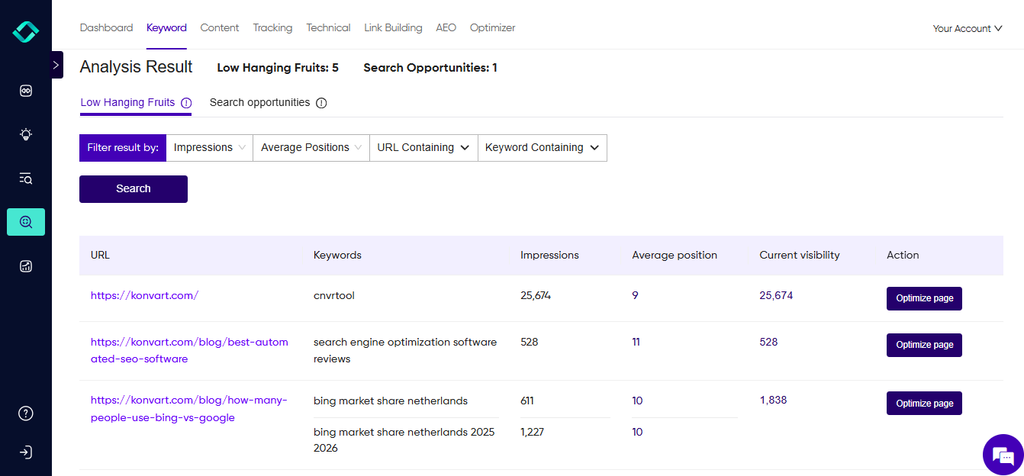
Keyword Opportunities in Konvart does this digging for you. It pulls the searches from your own Search Console data where you’re close to page one, so you can go straight to the pages worth improving instead of scrolling through spreadsheets.
2. Now start the blog, aimed at customer questions
This is the point where a blog starts to earn its place. Your money pages are ready to convert, so the people a good post attracts have somewhere useful to go next.
The trick is to write for customers, not for search engines or other businesses in your industry. The best topics are usually the questions you already answer every week:
- A landscaper: “How much does a new patio cost?” or “When’s the best time to lay turf?”
- An optician: “How often should children have an eye test?”
- An online tea shop: “What’s the difference between green and white tea?”
Start by writing down the 10 questions customers ask most often before they buy, by phone, by email or in person. Each one is a post.
Keep each post focused on answering that one question well, and end it with a natural link to the relevant money page.
The landscaper’s patio cost post, for example, should point readers to the patio installation page with a line like “Want an exact price for your garden? Get a free quote.”
You don’t need to publish often. One genuinely useful post every week or two beats daily posts nobody reads.
If you’d like help getting first drafts down faster, an AI writer built from what already ranks can give you a structured draft to edit and add your own experience to.
3. Build your local presence
Skip this step if you sell only online with no local customers.
For local businesses, ranking on the map is often worth more than ranking in the regular results.
The map pack, the three business listings shown with a map, sits near the top of most local searches, and it’s where many customers choose who to call. Three things move you up:
- Steady reviews: A steady stream of new reviews does more than a burst of twenty in one week. Keep asking after every job, and reply to every review, good or bad. A short, polite reply to a negative review often reassures future customers more than another five stars would.
- Consistent business details everywhere: Your business name, address and phone number should match exactly across your website, Google Business Profile and directories. Small differences like “Ltd” in one place and not another, or an old phone number, can confuse Google and customers alike.
- Listings on the directories that matter for your industry: Industry bodies, trade associations, local business directories and well-known review sites. A handful of relevant ones beats a hundred random directories.
Keep your Google Business Profile active too. Add new photos regularly, keep your services and hours up to date, and post occasional updates about offers or recent work.
Then track how you’re doing across your whole area, not just from your own location. Map rankings change from street to street, so a search from your shop might show you in first place while a customer two miles away doesn’t see you at all.
A local rank tracker like Konvart’s Local Map Tracker shows where you appear in the map pack and local results across a 5, 10 or 20 km radius, so you can see which parts of your area you’re winning and where you need more work.
What “done” looks like at the end of month 3
- You’ve improved the pages closest to page one, and some of them have moved up.
- You’ve published a handful of posts answering real customer questions, each linking to a money page.
- If you’re local: reviews are coming in steadily, your business details match everywhere, and you know where you rank across your area.
At this point, your site is doing most of what it can on its own. The next stage is about what other websites say about you.
Month 3 and Beyond: Build Trust Beyond Your Own Site
Up to now, almost everything in this plan has happened on your own website and Google Business Profile. That’s the part you control completely, and it’s why it comes first.
But Google doesn’t only judge your business by what you say about yourself. It also looks at what the rest of the web says about you.
When a local news site writes about you, your industry association lists you as a member, or a supplier recommends you on their website, that’s a signal you’re a real, trusted business. The same goes for AI tools like ChatGPT, which lean heavily on what other sites say when they recommend a business.
This stage is slower and steadier than the ones before it. Expect to spend 1 to 2 hours a week here, and think in quarters, not weeks.
A few good mentions from the right sites will do more for a small business than a hundred from the wrong ones.
1. Earn links from local and industry sites
Backlinks, links from other websites to yours, are still one of the clearest signals Google uses to decide who to trust.
For a small business, the best ones usually come from relationships you already have, not from cold pitching strangers.
Start with the easiest wins:
- Suppliers and manufacturers: Many brands have a “find a stockist” or “find an installer” page. A flooring fitter certified by a flooring brand should be listed on that brand’s installer finder.
- Industry bodies and associations: If you’re a member, make sure your listing includes a link to your website.
- Local organisations: Sponsoring a youth football team, supporting a local charity event or joining the chamber of commerce often comes with a link from their website.
- Local press and blogs: A new service, a milestone or a community project can be a story for local news sites and “what’s on” blogs. A craft brewery opening a taproom is exactly the kind of thing a local food blog wants to cover.
- Businesses you work with: A wedding venue and its recommended suppliers often link to each other, and those links make sense for customers too.
Once you’ve worked through the obvious ones, look at where your competitors get their links. Sites that link to two or three businesses like yours, but not to you, are often happy to add you too. Our guide to finding the sites linking to your competitors shows how to build that list.
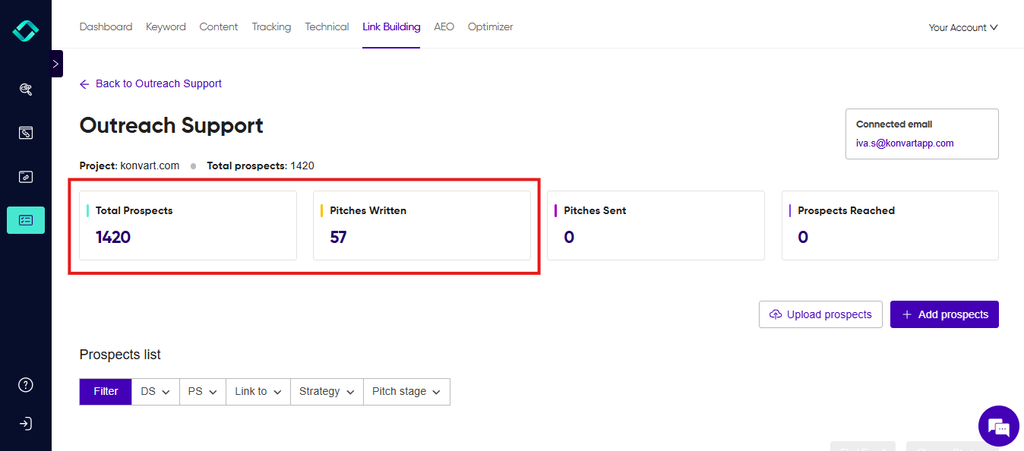
Reaching out takes time, and it’s the step owners most often put off. Konvart’s Outreach Support can find the right contact at each site, draft a pitch and send it from your own mailbox, so you only need to review drafts and reply when someone responds.
Whatever you do, skip anything that offers links in bulk for a small fee. Cheap link packages are one of the fastest ways to waste money, and at worst, they can hold your rankings back.
2. Show up in AI answers
More customers now ask AI tools for recommendations instead of searching. Someone might ask ChatGPT for “a good MOT garage in Nottingham” or “an accountant who specialises in restaurants,” and get a short list of named businesses, with no page of ten blue links to scroll through.
You can’t control those answers directly, but you can make your business easier for AI tools to find, understand and trust:
- Keep your details consistent everywhere: AI tools piece together what they know about you from many sources. Matching names, addresses, phone numbers and service descriptions across your website, Business Profile and directories make that picture clearer.
- Earn reviews on the sites that matter: Ratings and review content often shape whether a business is recommended, and how it’s described.
- Answer questions clearly on your own pages: A service page that says plainly what you do, where you do it, who it’s for and roughly what it costs is easier for an AI tool to use than one full of vague marketing copy.
- Get mentioned on the sites AI tools rely on: For most local and niche searches, AI tools draw on a fairly small set of directories, review sites, local publications and industry blogs. Being listed and mentioned there matters.
The hard part is knowing which sites those are for your business. Konvart’s AI visibility tracking shows whether AI tools mention you for the questions your customers ask, which sources they cite in their answers, and the related questions they search behind the scenes.
That tells you exactly which sites to get your business listed or mentioned on.
3. The 1-hour weekly routine
Once the first three months are done, SEO becomes a habit rather than a project. About an hour a week is enough to keep things moving for most small businesses:
| How often | What to do | Time |
| Weekly | Check GA4 for calls, forms, bookings and orders from organic search | 10 minutes |
| Weekly | Ask recent customers for reviews, and reply to new ones | 15 minutes |
| Weekly | Make one improvement: update a money page, add photos, or write or refresh a post | 30 minutes |
| Monthly | Review your scorecard, check Search Console for new near-wins, and check map rankings | 1 hour |
| Monthly | Reach out to 3 to 5 sites for links or mentions | 1 hour |
| Quarterly | Check competitors’ new links, update prices and photos, and review which pages bring in customers | 2 hours |
The weekly improvement is the part that compounds. A bookkeeping firm that adds one useful section to a service page, or answers one new customer question every week, ends the year with 50 small upgrades its competitors didn’t make.
What “done” looks like from month 3 onward
There’s no finish line here, but by the end of your first six months you should have:
- A handful of relevant links from suppliers, associations, local organisations or the press.
- Consistent business details across your website, Business Profile and key directories.
- A clear picture of how AI tools describe your business, and where you need to be mentioned.
- A weekly routine you can keep up without it taking over your week.
That’s the full plan.
Next, let’s look at how to adjust it for your type of business, because a plumber, an online shop and an accountant won’t weigh each stage the same way.
Adjust The Plan For Your Type of Business
The plan works for almost any small business, but not every stage matters equally to every business. A pest control company lives and dies by the map results. An online shop has no map listing at all. An accountant’s clients often spend weeks researching before they get in touch.
Use the stages in the same order, but shift where you spend most of your time. Here’s a quick view, followed by the detail for each type.
| Business type | Spend more time on | Spend less time on |
| Local service (trades, clinics, salons) | Google Business Profile, reviews, service and location pages | Blog posts aimed at a national audience |
| Online shop | Product and category pages, technical health, product details | Google Business Profile and local directories |
| Professional services (accountants, lawyers, consultants) | Expertise content, case studies, trust signals | Chasing broad, high-volume keywords |
| Multi-location business | One strong page per location, a Business Profile for each site | Copying the same page across locations |
Local service businesses
For a plumber, a pest control company, a dentist or a hair salon, most new customers come from searches with local intent, and many of them choose from the map results without visiting a website at all.
Your Google Business Profile does a lot of the selling.
- Front-load week 1 and the local steps in months 2 to 3: A complete Business Profile, a steady flow of reviews and consistent business details will often bring in calls before your website changes do.
- Build service pages around urgent searches: A pest control company should have separate pages for wasps, mice and bed bugs, each with response times, prices and a tap-to-call button.
- Keep the blog local and practical. “What to do if you find a wasp nest” helps someone nearby right now. A general post about insect biology doesn’t.
Online shops
An independent shop selling handmade leather goods online has no map listing to optimise, but it has dozens or hundreds of product pages, and that brings different priorities.
- Category pages often matter more than individual products: People search “leather wallets for men” far more often than a specific product name, so your category pages need real descriptions and helpful filters, not just a grid of photos.
- Make every product page specific: Unique descriptions (not the manufacturer’s copy), sizes, materials, care instructions, delivery times and reviews. These are what help a page rank and what convince someone to buy.
- Watch your technical health closely: Larger sites run into more problems: duplicate pages from filters, out-of-stock products, slow image-heavy pages. Product schema, the code that shows price and star ratings in search results, is worth adding too. A technical gap analysis can show where your schema, speed and page setup fall behind competing shops.
Professional services and B2B
For an accountant, a financial planner, an immigration lawyer or an IT support company, customers rarely buy on the first visit. They research, compare and look for reasons to trust you before they get in touch.
- Give expertise content a bigger role: Clear, accurate answers to the questions clients ask (“Do I need to register for VAT as a freelancer?”) build trust over time and bring in people who will need your help later.
- Show proof on every money page: Case studies, client results, qualifications, memberships and named team members with their experience matter more here than almost anywhere else.
- Target specific searches, not broad ones: “Accountant for restaurants” or “immigration lawyer for skilled worker visas” is easier to win, and brings better-fit clients, than “accountant” on its own.
Multi-location businesses
A small chain of three veterinary practices, or a gym with sites in neighbouring towns, needs to win local searches in each area without creating near-identical pages.
- Give each location its own Business Profile, with its own photos, hours, phone number and reviews.
- Create one genuinely useful page per location: Include the team at that site, parking and directions, services specific to that location and reviews from local customers. Avoid copying one page and swapping the town name.
- Track each area separately: A site that ranks well in one town can be invisible in the next, so check your map rankings location by location, not as one overall average.
Whatever type of business you run, the next question is the same: is any of this actually bringing in customers?
How to Tell if SEO is Bringing in Customers
This is the part of SEO most small businesses never set up properly, and it’s why so many give up too early or keep paying for work that isn’t helping.
If you can’t see whether SEO is bringing in customers, every decision is a guess.
You already did the hard part in week 1 when you set up key events in GA4. Now it’s about checking the right numbers, ignoring the irrelevant ones, and looking at them often enough to spot trends without obsessing over every dip.
What to track
Focus on the numbers closest to money. In rough order of importance:
- Customer actions from organic search:In GA4, open the Traffic acquisition report, look at the Organic Search channel and check your key events: calls, form fills, bookings and orders. This is the number the whole plan is designed to grow.
- Clicks to your money pages: In Search Console, filter the Performance report to your homepage, service, product and location pages. Rising clicks here usually come before rising enquiries.
- Google Business Profile actions: Your profile’s performance view shows calls, direction requests and website clicks. For local businesses, this is often where most of the action happens.
- Visits from AI tools: In GA4, visits from ChatGPT, Perplexity and similar tools appear as referral traffic. The numbers are usually small for now, but they’re worth watching.
- What customers tell you: Add “How did you hear about us?” to your contact form, booking form or phone script. Some customers will find you on Google, then call from memory a week later, and analytics won’t always connect the two.
What not to worry about
Some numbers look important but cause more stress than insight:
- Daily ranking changes: Positions move up and down from day to day. Look at weekly or monthly trends instead.
- Total traffic on its own: A blog post that brings in 2,000 visitors from another country may do nothing for a local business. A service page with 80 visits a month that turns 10 of them into bookings is worth far more.
- Authority scores: Domain scores from SEO tools are useful for comparing websites, but they don’t measure customers. Don’t let one become your main goal.
- One quiet week: Holidays, weather, school breaks and seasons all affect demand. Judge progress over at least three months.
A simple monthly scorecard
Once a month, fill in a short scorecard. It takes about 15 minutes, and after three months it tells you clearly whether the plan is working.
Here’s what one might look like for a small electrical contractor:
| Metric | Where to find it | Last month | This month | Note |
| Calls and quote requests from organic search | GA4 (key events, Organic Search) | 14 | 19 | New EV charger page live mid-month |
| Clicks to service pages | Search Console | 310 | 365 | “EV charger installation” climbing |
| Business Profile calls | Google Business Profile | 22 | 27 | 6 new reviews |
| Business Profile direction requests | Google Business Profile | 9 | 8 | Steady |
| Visits from AI tools | GA4 (Referral) | 3 | 6 | Mostly ChatGPT |
| Customers who said “Google” | Contact form and phone notes | 11 | 15 | Up from 8 three months ago |
Keep the scorecard next to your change log from the start of the plan.
When a number moves, you can usually see what caused it. In this case, the new EV charger page went live in the same month that calls jumped.
How to read the results
- Look for trends over three months, not changes month to month: One good month can be luck. Three in a row is a pattern.
- Compare with the same month last year: if your business is seasonal. A garden landscaper’s March will always beat its January.
- Expect leading signs first: Impressions and clicks usually rise before enquiries do. If clicks are climbing but enquiries aren’t, the problem is likely on the page itself, such as an unclear offer, hidden prices or a hard-to-find phone number, not in your rankings.
If you’d rather not build this by hand each month, Konvart’s SEO reports pull rankings, traffic, AI citations, technical health and conversions into one report, emailed to you weekly or monthly.
You can add notes explaining what changed, much like the change log, and they don’t use any credits.
A 90-day Plan in Practice
Plans are easier to follow when you can see one in action. Here’s how the first 90 days might look for a family-run bakery that sells bread and pastries in its shop, takes online orders for local delivery, and makes custom cakes for birthdays, weddings and office events.
Before starting, its website had one “Cakes” page listing everything, a Google Business Profile with old photos and 31 reviews, and a blog nobody had updated in a year.
Custom cake enquiries, the most profitable part of the business, came almost entirely from word of mouth.
The numbers below are typical of what a small local business can expect from the first three months.
| Weeks | What they did | What changed |
| 1 | Connected Search Console and GA4; tracked cake enquiry forms, calls and online orders; refreshed the Business Profile | For the first time, they could see which enquiries came from search |
| 2 to 5 | Split the “Cakes” page into wedding, birthday and corporate cake pages; rewrote the homepage; fixed the order page on mobile | New pages indexed within two weeks; mobile orders became easier to complete |
| 6 to 9 | Improved pages close to page one; started asking every cake customer for a review; published two posts answering customer questions | Birthday cakes page moved from position 14 to 6 in its town |
| 10 to 13 | Got listed by two local wedding venues as a recommended supplier; featured on a local wedding blog | Wedding cakes page moved from position 24 to 9 |
Weeks 1 to 5: Foundations and money pages
The bakery spent its first week on setup. Once enquiry forms and online orders were tracked as key events in GA4, the owners could see the baseline: about four custom cake enquiries a month from organic search, and around ten calls a month from their Business Profile.
The biggest change came in weeks 2 to 5. The single “Cakes” page became three separate pages:
- Wedding cakes: tiers and flavours, price guidance per serving, how far ahead to book, photos of real wedding cakes and a tasting appointment form.
- Birthday cakes: popular designs, a “from” price, order lead times, delivery areas and a quick order form.
- Corporate cakes: branded cakes and tray bakes for office events, with prices per head and an invoice option for businesses.
Their online shop runs on Shopify, so they connected it to Konvart and set the Optimizer’s permissions so it could work on the three new pages automatically, while any changes to the homepage waited for their approval.
It rewrote the page titles and descriptions around the searches each page should win, such as “wedding cakes [town]” and “birthday cake delivery [town],” and flagged that the wedding page needed more proof.
That prompted the owners to add photos and reviews from past weddings.
They also fixed a problem they hadn’t noticed: on mobile, the order button sat below a long block of text, and several customers had given up halfway through ordering.
Weeks 6 to 9: Reaching more searches
By week 6, Search Console showed the birthday cakes page sitting at position 14 for “birthday cakes” plus their town.
Adding an FAQ about allergies and lead times, more photos and a clearer delivery section helped move it to position 6 within a few weeks.
They started asking every custom cake customer for a review with a short link sent by text the day after collection, and added 23 new reviews in two months.
They also published two posts answering questions they heard every week:
- “How far in advance should you order a wedding cake?”, linking to the wedding cakes page.
- “How much cake do you need per guest?”, linking to both the wedding and corporate pages.
Weeks 10 to 13: Trust from other sites
In the final month, the bakery reached out to the wedding venues it already delivered to. Two of them added the bakery to their recommended suppliers pages, with a link.
A local wedding blog featured one of its cakes in a “real weddings” post after the couple tagged the bakery on social media.
Those links, alongside the new page and reviews, helped the wedding cakes page climb from position 24 to 9 for “wedding cakes” in its town.
Where they were at day 90
- Custom cake enquiries from organic search: up from about 4 a month to 11.
- Business Profile calls: up from about 10 a month to 18.
- Online orders from organic search: up slightly, helped most by the mobile fix.
- Reviews: 54, up from 31.
Ninety days is still early in SEO terms. The wedding page has only just reached page one, and wedding cakes are often booked months ahead, so the full effect of that change won’t show up in revenue for a while.
But the direction is clear, and it came from doing the right things in the right order, not from doing more.
What this example shows
- Money pages did the most work: Splitting one vague page into three specific ones brought in more enquiries than anything else.
- Small fixes can matter as much as rankings: The mobile order button had been quietly losing sales.
- Reviews and local relationships compound: The venue listings came from relationships the bakery already had. It just hadn’t asked.
- Tracking made every decision easier: Because enquiries were tracked from week 1, the owners knew which changes were working and where to spend their time next.
Small Business SEO Mistakes to Avoid
Most small businesses that give up on SEO don’t fail because they did nothing. They fail because they spent their limited time on the wrong things, or undid good work by accident.
These are the mistakes that come up again and again, and what to do instead.
1. Starting with the blog
It’s the most common piece of SEO advice, and for most small businesses, the wrong place to start.
Like the café owner from the start of this guide, you can publish posts every week for months and see traffic rise while enquiries stay flat, because the pages that turn visitors into customers were never fixed.
Instead, get your foundations and money pages right first.
Start the blog in months 2 to 3, aimed at questions customers ask before they buy, and link every post to a relevant money page.
2. Chasing broad keywords you can’t win
A personal trainer trying to rank for “fitness” or “weight loss” is up against national brands, health publishers and apps with huge budgets.
Even if they somehow got there, most of those searchers would never become clients.
So, target specific searches that match what you sell and where you sell it, like “personal trainer for over 50s in Brighton” or “postnatal fitness classes Brighton.”
They’re easier to win, and the people searching are much closer to booking.
3. Putting every service on one page
One “Services” page listing everything you do is easy to build and hard to rank. Google can’t tell which service the page is really about, and a customer looking for one specific service has to hunt for it.
Give each main service or product line its own page, with its own details, prices, proof and call to action.
4. Stuffing location pages with town names
A carpet cleaner that serves eight towns might be tempted to create eight copies of the same page, swapping the town name each time, or to list every nearby village at the bottom of the homepage. Both look spammy to Google and unhelpful to customers.
Create location pages only where you can say something genuinely specific about each area, such as jobs you’ve done there, local reviews, response times or coverage details.
Where you can’t, a clear “areas we cover” section on your service pages is enough.
5. Buying cheap links or “guaranteed rankings”
Offers of hundreds of backlinks for a small fee, or first-page rankings guaranteed within 30 days, are everywhere. A car detailing business that buys a cheap link package usually gets links from spammy sites no customer will ever see.
At best, they do nothing. At worst, they hold your rankings back.
Instead, earn links from real relationships, such as suppliers, associations, local organizations and the press.
And be wary of anyone who guarantees rankings. Nobody controls Google’s results.
6. Ignoring reviews
Reviews influence where you appear in local results and whether people choose you once they see you.
A pizza takeaway with 12 reviews from three years ago will lose customers to one down the road with 300 recent reviews, even if its pizza is better.
So, make asking for reviews part of every job or order, with a short link sent by text or email. Reply to every review, including the negative ones, politely and briefly.
7. Changing everything at once
When nothing seems to be working, it’s tempting to rewrite every page, change your site design and switch platforms in the same month.
A small clothing boutique that does all three can’t tell which change helped, or which one caused a drop.
Make changes in stages, note what you changed and when in a simple change log, and give each change a few weeks before judging it.
That’s how you learn what actually works for your business.
A quick check before you start any SEO task
If you’re unsure whether something is worth your time, run it through the three questions from the start of this guide:
- Does it help customers find you?
- Does it help them trust you once they do?
- Does it make it easier for them to call, book or buy?
If the answer to all three is “not really,” it can wait.
Do it Yourself, Hire Help or Automate?
By now, you know what the plan involves. The last question is who does the work.
For most small businesses, there are three realistic options, and plenty of owners end up mixing them.
None of them is right for everyone. The best choice depends on how much time you have, how much you want to spend, and how much of the work you’d like to stay hands-on with.
| Option | Typical cost | Your time each week | Best for |
| Do it yourself | Free to low cost: Google’s free tools, plus an optional SEO tool | 2 to 3 hours at first, then about 1 hour | Owners who have the time and enjoy learning how things work |
| Hire a freelancer or agency | A monthly retainer or project fee, depending on scope | 30 to 60 minutes for updates, approvals and answering questions | Businesses in competitive markets, or owners who’d rather not do SEO at all |
| Automate with approval | A monthly subscription to an SEO platform that does part of the work | About 1 hour, mostly reviewing and approving changes | Owners who want progress without doing every task by hand |
Doing it yourself
This guide is written so you can follow it on your own, and many small businesses do. You know your customers, services and local area better than anyone, which is a real advantage when writing pages and answering questions.
- What works well: the lowest cost, full control and a deep understanding of your own results.
- What to watch: it’s easy to stall once the business gets busy. The plan only works if the weekly hour actually happens.
Our guide to doing SEO yourself covers the core skills step by step if you go this route.
Hiring a freelancer or agency
A good freelancer or agency brings experience you’d otherwise build up over years, and saves you the time.
That’s especially valuable in competitive markets, like law firms in big cities or ecommerce in crowded niches, or if you’d simply rather spend your time running the business.
- What works well: expertise, accountability and someone who does the work for you.
- What to watch: costs vary widely, so agree in writing on what’s included and how results will be reported. Ask for progress measured in enquiries and sales, not just rankings, and be wary of anyone who guarantees first-page results.
If you’re not sure what’s reasonable to pay, our SEO cost calculator can give you a ballpark based on your goals and competition.
Automating with approval
The third option sits in between. Instead of doing every task yourself or paying someone else to, you use an SEO platform that handles much of the routine work, such as fixing pages, improving titles and descriptions, finding near-wins and preparing outreach, while you approve what goes live.
- What works well: steady progress for a fraction of the time, with you still in control.
- What to watch: automation handles routine work well, but your knowledge of the business still matters. Pricing, offers, customer stories and final approvals should stay with you.
Not every SEO task should be automated, though. Our guide on what to automate in SEO, and what to keep human shows how to decide.
Konvart is an all-in-one SEO platform that sets itself up from your domain, finds the pages closest to bringing in customers, and uses its Optimizer to improve up to 20 core pages by page type, within the permissions you set.
You enter your website, and Konvart fills in the setup from it: your services, competitors, target market and site type.
You review it rather than starting from scratch, then choose what the Optimizer can change on its own and what needs your approval.
The Individual plan is $30 a month, with Optimizer usage added as top-ups. The Team plan, from $45 per user a month with a minimum of two users, includes an Optimizer allowance.
Both come with a 7-day free trial, no card needed. See the pricing page for the full breakdown.
How to decide
If you’re still unsure, these four questions usually settle it:
- Will you reliably find 2 to 3 hours a week for the next three months? If yes, doing it yourself is realistic. If not, look at the other two options.
- How competitive is your market? A local bakery in a small town can make huge progress alone. A personal injury law firm in a major city usually needs more firepower.
- Do you want to understand the work, or just see the results? Owners who like being hands-on tend to prefer doing it themselves or automating with approval. Owners who’d rather never think about SEO tend to prefer an agency.
- What’s a new customer worth to you? If one extra job a month covers the cost of help, outside help or a tool usually pays for itself quickly.
Many small businesses combine options as they grow: doing it themselves in the first few months, then automating the routine work, or bringing in an agency for one big push such as a site redesign or a move into a new area.
The Right Pages, in The Right Order
Think back to the café owner who wrote 24 blog posts and still waited for the catering calls. She didn’t need to work harder. She needed to start in a different place: track what counts as a customer, fix the pages people land on when they’re ready to book, and only then widen the net.
That’s what SEO for a small business really comes down to. Not doing everything, but doing the right things in order:
- Week 1: make sure Google can see you, customers can find you on the map, and you can see which visits turn into customers.
- Month 1: give every service and product a page that’s easy to find and easy to say yes to.
- Months 2 to 3: win the searches you’re close to, answer the questions customers ask, and build your local presence.
- Month 3 onward: earn trust from other sites and AI tools, and keep a light weekly routine going.
Measure it in calls, bookings and orders, give it a few months, and the results build on each other.
Every page you improve and every review and link you earn keeps working long after you’ve moved on to the next task.
If you’d like help with the heavy lifting, Konvart sets itself up from your website, shows you which pages are closest to bringing in customers, and improves them within the permissions you set, so the plan keeps moving even in the weeks you’re busy running the business.
See which of your pages could bring in more customers (7-day free trial)