The SERP is changing fast and has been for the last few years. Automating SEO is now important more than ever in order to achieve more with the same time.
SEO automation software streamlines routine tasks such as keyword research, link building, and content optimization, allowing SEO professionals to focus on more strategic elements of their campaigns.
This article explores various SEO automation tools and provides a comparative analysis to help you understand their unique features and benefits.
What Tasks Can You Do with SEO Automation Tools?
1. Keyword Research and Analysis
Although most of keyword research is still manual, parts of it can be automated, especially parts that connect to your site’s data.
However, most tools do not offer this feature.
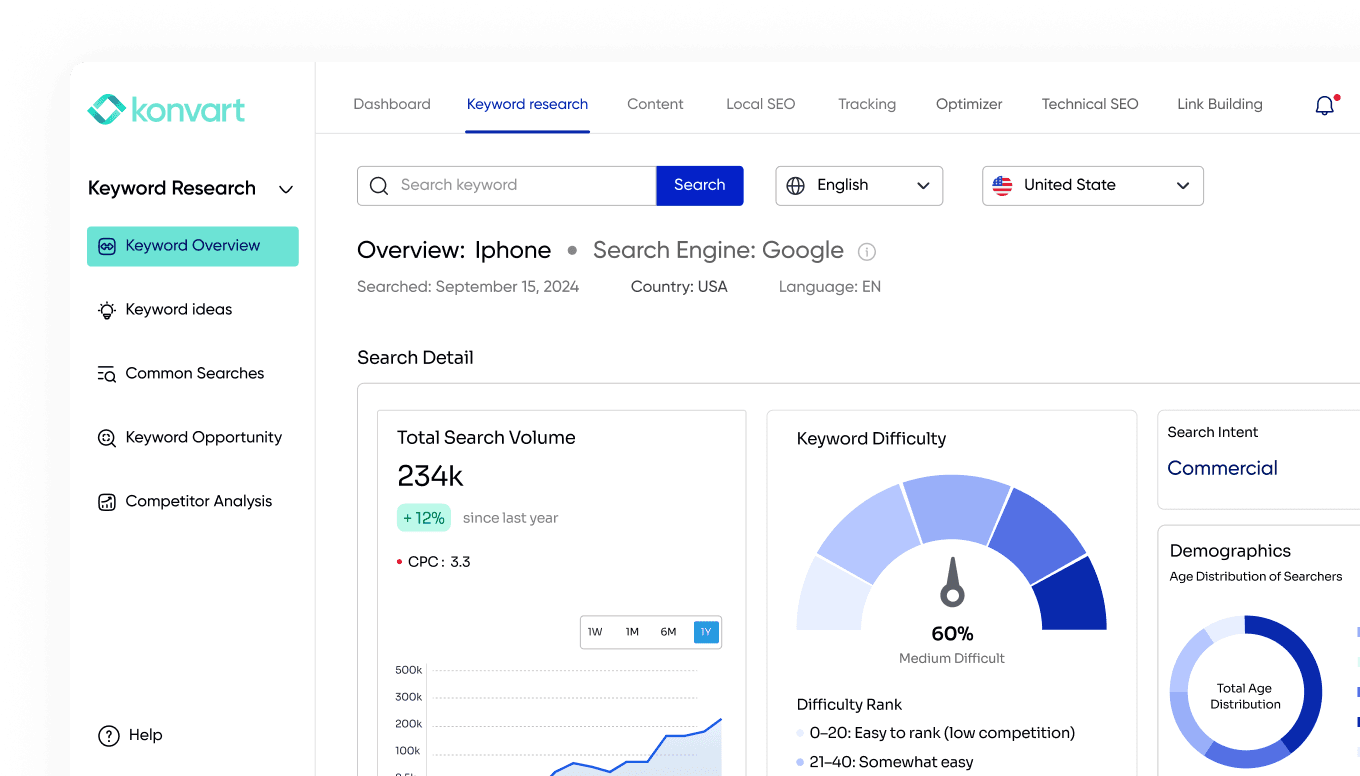
For example, you could get monthly updates on keyword opportunities based on your site’s SERP data so you know what keywords to optimize or create new pages for. Konvart provides this with the Keyword Opportunities tool.
This allows SEO specialists to target their efforts better and improve their content’s visibility in search engine results pages (SERPs).
2. SEO Content Creation & Optimization
The creation of SEO-optimized content can also be automated. Konvart and similar platforms offer features that suggest headings, titles, and paragraphs optimized for your search terms.
You can also set up content to be written and published so your site is never out of fresh content.
This assists in maintaining the best SEO practices while drafting articles, blogs, or web content. You can view all Konvart’s content features here.
3. SEO Audits
Regular SEO audits are vital for maintaining the health of a website. This is one part that most SEO automation software provide.
Automation software can conduct thorough audits that assess a site’s structure, performance, and compliance with SEO best practices. These tools can detect issues like broken links, slow-loading pages, and poorly optimized metadata, which are crucial for maintaining optimal website performance.
Konvart excels here as well with weekly SEO audits.

4. Link Building
Most SEOs will agree with me that link building is a time and labour-intensive task. It’s probably the least enjoyed task for some. However, it is a critical component of any SEO strategy, so it must be done.
SEO automation tools help by identifying potential link-building opportunities, creating pitches that win backlinks, collating contact details, monitoring existing backlinks for health and relevance, and even suggesting the removal of toxic links that could harm your site’s ranking.
Konvart also provides support with link building, including its outreach support tool.
5. Rank Tracking
Like technical site audits, rank tracking is supported by most SEO tools. Automation tools track changes in keyword rankings across different search engines and geographical locations, offering detailed reports that help refine SEO tactics.
6. Competitor Analysis
SEO doesn’t occur in a vacuum. Keeping an eye on competitors’ SEO strategies is vital, and automation tools can assist in this area by tracking competitors’ changes and benchmarking your site against theirs.
This analysis helps identify not just where your site might be falling short, but also opportunities for improvement and differentiation in your SEO strategy.
For example, you could get a notification when competitors publish new content, which could give you ideas of content to write, or you could monitor their rankings alongside yours so you know when they overtake you in the SERP.
7. Reporting and Analytics
Generating detailed reports on SEO performance is another area ripe for automation. You already know you can track your rankings and organic traffic, but what about reports?
Whether you are in-house or agency-based, most SEO managers must create reports for higher-ups or clients to demonstrate impact and ROI.
Konvart automates that with monthly editable PDF reports that show organic traffic data for the month, including growth/decline in traffic, rankings for key keywords, conversions (sales, lead generation, etc.), and snippets of some work done (e.g., content created and links built). This should save you hours of work.
These reports are crucial for demonstrating ROI to stakeholders and guiding future SEO initiatives.
Best SEO Automation Tools
There are several tools in the market, but most of them only provide automation for one or two areas. I have highlighted some of the best below, in order of overall value.
- Konvart:Konvart is the best SEO automation software in the market and the only one that provides automation features for almost all aspects of SEO that can happen on or off your site, including:
- Content optimization
- Keyword research
- Link building (outreach support)
- Site audits
- Reporting (PDF reports)
- rank tracking
- competitor monitoring
- local SEO
- 360 search optimization
- SEMrush: SEMrush is one of the oldest SEO tools, but its automation features don’t cover everything. Nevertheless, it has some good ones including:
- Link health review
- Site audit
- Rank tracking
- Search Atlas: If you are worried about editing your content and auditing your site, Search Atlas could help. It provides a WordPress plugin that could add internal links and edit your title among other things.
| Automation Feature | Konvart | Semrush | Search Atlas |
|---|---|---|---|
| Keyword Research | ✓ | x | x |
| Content Creation & Optimization | ✓ | ✓ | ✓ |
| SEO Audits | ✓ | ✓ | ✓ |
| Rank Tracking | ✓ | ✓ | x |
| Competitor analysis | ✓ | x | x |
| Reporting | ✓ | ✓ | ✓ |
| Link building | ✓ | ✓ | ✓ |
| Local SEO | ✓ | x | x |
| Cost | from $29/month | from $199/month | from $99/month |
How to Choose the Right SEO Automation Tools
When selecting the appropriate SEO automation tools, several factors must be considered to ensure they align perfectly with your business needs and objectives.
Functionality and Features
Start by assessing the functionality you require from an SEO automation tool. Do you need it for keyword research, link building, content optimization, or perhaps all of the above? Different tools offer varying levels of functionality. For instance, some might excel in providing comprehensive keyword data but lack in technical SEO audits.
Ease of Use
The best tools are those that are easy to use, or at least provide extensive guidance and support.
Opt for solutions that offer a clean, intuitive interface and provide reliable customer support and training resources to help your team make the most of the software.
Scalability
Your chosen SEO automation tool should be able to handle increased data processing demands and more extensive SEO campaigns without compromising performance. Scalability ensures that you won’t need to switch tools frequently as your business expands, saving you time and resources in the long run.
Cost Efficiency
For most businesses, cost versus output is always in the conversation.
While it might be tempting to choose less expensive options, they may not always deliver the best value if critical features are missing or limited.
Consider what you are willing to spend, the time saving you would get with the tool, possible results, and your long-term plans.
Automated SEO Tools vs. Managed Organic SEO Services
This isn’t a concern for agency users but in-house. When it comes to considering if to outsource SEO (managed SEO services) versus using automated tools, it should be subject to cost and in-house capabilities.
Automated SEO tools cannot replace humans. You’d still need an SEO expert to review what has been automated, and in cases like a technical site audit, interpret it.
So, while automated SEO tools provide efficiency and scalability, you must ensure you have at least one SEO expert on your team to get the most out of them.
If you don’t want to hire an SEO specialist or don’t want to bother about dealing with SEO in-house, then managed SEO services are the way to go. These services are typically provided by experienced SEO professionals or agencies who tailor strategies to a client’s needs.
Data shows that approximately 73% of small enterprises focus on in-house management of SEO but also use some form of automation tool to enhance their efficiency.
Where Do SEO Automation Tools Fail?
SEO automation tools have limitations, and understanding where they fall short can help SEO professionals manage their expectations and supplement these tools with human oversight.
Limited Understanding of Context and Nuance
One of the primary shortcomings of SEO automation tools lies in their inability to grasp human language’s context and subtlety fully.
Advancements in AI and machine learning have improved their capability to interpret content but these tools can still miss the nuances that can make a difference in how content resonates with users. For instance, automated tools may suggest technically relevant keywords but fail to capture the tone that the target audience might expect. This can lead to content that ranks well but does not engage or convert visitors effectively.
Over-reliance on Quantitative Data
Every SEO person can attest to the factt hat data is a cornerstone of effective SEO strategies.
SEO automation tools are built based off a complete reliance on quantitative data.
So, they’d excel at providing results or suggestions based on numerical data like search volumes, rankings, and traffic figures; however, only a few effectively measure qualitative factors such as user satisfaction. Without incorporating these softer metrics into SEO strategies, businesses might optimize for search engines at the expense of actual user engagement and conversion.
That is why I suggested ensuring you still have at least one SEO specialist on your team to add the human element when using SEO automation tools.
Ethical Considerations and Spam Risks
Automated SEO software can sometimes border on practices that are either unethical or perceived negatively by search engines. For example, some automation tools, especially those that add internal links, often link to the wrong pages or link in a spammy way.
You must test each tool, especially if it’s connected to your website and can make changes without your approval. Test on a small usecase first before giving it access to do everything. Otherwise, you might risk penalties from search engines, which could severely impact online visibility and credibility.
What Are the Benefits of Using SEO Automation Tools?
Using SEO automation tools offers several distinct advantages that can significantly enhance the effectiveness and efficiency of SEO strategies. Here are the key benefits:
- Time Savings: One of the most significant benefits of employing SEO automation tools is the substantial amount of time they save.
- Accuracy and Consistency: Automation tools minimize human errors by providing consistent results in tasks like reporting and data analysis.
- Scalability: As businesses grow, managing SEO efforts manually becomes increasingly impractical. With automation tools, you can scale your SEO activities efficiently without having to increase costs.
- Competitive Analysis: Monitoring competitors manually can never provide accurate results, and you need to know what they are doing. In this regard, a tool that monitors competitors and lets you know immediately when important actions are taken is beneficial.
- Improved ROI: If you can achieve more in the same time as you currently spend on SEO tasks, you would get a better return on investment, whether that is faster growth in traffic, ranking improvement, or customer acquisition.
What Type of SEO Automation can I set up for Free?
There are a few.
Traffic Alerts
Traffic alerts function by monitoring your website analytics and sending notifications based on predefined criteria, such as a percentage drop or increase in visitors. For instance, if your site typically receives 1,000 daily visitors, you could set an alert for a 20% decrease or increase. This would trigger an automatic notification if the visitor count falls below 800 or rises above 1,200.
To implement these alerts, you can utilize various tools and platforms that integrate with your analytics software. Google Analytics, for example, offers custom alerts which can be configured directly within the platform. Users can specify the exact conditions under which they wish to be notified, tailoring the system to focus on specific pages, demographics, or time frames.
Once an alert is triggered, the next step involves analysis to understand the cause of the traffic change. This could be due to external factors like changes in search engine algorithms, seasonal fluctuations in user interest, or internal issues such as server downtime or broken links.
Automating Internal Linking for Better PageRank Flow
Some WordPress plugins automate internal linking.
Most of the free internal linking tools are plugins. One example is the Internal Linking Juicer for WordPress.This can be great if your site is not large in the sense that your site architecture stays tight, and overall crawlability is easier.
If you manage a large website with thousands of articles, this could be a great idea as automation ensures that new and old content is effectively interlinked and navigable, improving user engagement by providing them with more relevant content and making it easier for search engines to index more pages. However, auto-linkers need to be monitored, which might be a task for large sites.
In general, you must audit them regularly to identify incorrectly linked or underlinked pages, ensuring a balanced distribution of PageRank across your site.
Optimizing for Fast-Loading Images
Optimizing images for faster loading is a key component of SEO automation that can significantly enhance site speed and user experience, directly impacting search engine rankings. This process involves:
- Compression Techniques: To reduce the file size of an image. If you are using WordPress, there are several tools for this, including Imagify and Shortpixel. These optimize images as you upload them to your website.
- Appropriate Image Formats: JPEG is ideal for photographs with subtle color gradients, while PNG is better for images requiring transparency or clear lines. For icons and logos, SVG format provides scalability without loss in quality. However, WebP, which offers superior compression and quality characteristics compared to JPEG and PNG, is better for SEO. Converting to WebP is also found in several image optimization WordPress plugins.
- Other Features: There’s also lazy loading and image caching, which are important SEO features that free software can handle.
Social Listening
Social Listening involves monitoring digital conversations around specific topics, keywords, brands, or industries to gather insights into audience interests and prevailing trends, which can inform content strategy and keyword optimization.
Social listening tools scan various social media platforms and websites to collect data on how often certain terms are mentioned and the context in which they’re used. For SEO automation, this data is invaluable. It helps in identifying emerging trends or sudden changes in consumer behavior that could influence search patterns. For instance, if there is a sudden spike in discussions about “remote work software,” businesses can quickly produce relevant content to capture this traffic.
Another application is reputation management. By continuously monitoring brand mentions, professionals can swiftly address negative feedback or misinformation, thereby maintaining the brand’s integrity online.
Google Trends and Google Alerts are free tools that you can leverage here.
More than listening, you must consider how to integrate your insights from social listening into SEO. This could involve syncing it with other tasks, such as content creation and link building. Insights derived from social listening can guide automated content generation tools to produce targeted articles that meet the current interests of users.
Similarly, understanding popular topics within industry conversations can lead to more strategic decisions about where to build backlinks. For example, if there are a lot of news articles in your industry, you could reach out to the journalists to provide expert opinions or create original research or stats in response to the news.
Need More SEO Automation Features?
SEO (or GEO/AIO) automation is the present and future.
I have provided three of the best SEO automation tools in order of how much they can automate, performance, and reliability.
For SEO professionals, embracing these innovations is key to staying competitive. Explore how Konvart can transform your SEO by signing up today.