Picture this. A competitor’s page is thinner than yours. The design is dated, the advice is generic, and it still sits at position 3 while yours is stuck on page two.
When that happens, part of the answer is usually off the page: other websites have chosen to link to theirs, and you can’t see them.
That’s why people search for “how to find backlinks”. It isn’t to admire a number, but to answer one question.
Which sites link to my competitor, and could they link to me?
This guide shows you how to find backlinks for a website, whether you’re up against a landscaping company in Denver, a fintech in Berlin, or an online pet store.
You’ll see how to pull up a competitor’s links, what each method misses, how to spot the sites that link to them and not to you, and how to check your own backlinks along the way.
Key Takeaways
- To see a competitor’s backlinks, run their domain through a backlink checker and read the referring domains, linking pages and anchor text.
- To find the links they have and you don’t, compare your domain against 2-3 competitors using backlink gap analysis.
- Sites that link to more than one competitor but not to you are your strongest prospects.
- Check your own backlinks the same way, so you know what you already have before you chase more.
What Exactly is a Backlink?
A backlink is a link from one website to a page on another website.
If a local food blog links to a bakery’s website, that’s a backlink to the bakery. Simple enough.
But the trouble starts when you open your first backlink report.
One tool says “3,400 backlinks.” Another says “212 referring domains.” A third talks about “inbound links” and “linking pages.”
Are those three different things? Mostly no.
They’re the same thing under different names, and a few of them really are different. Spend 2 minutes on this key, and every report in the rest of this guide will make sense.
If you want the full story on why links matter for rankings, we cover it in our guide to what backlinks are.
| Term | What it means | Also called |
| Backlink | A link from another site to a page on yours (or a competitor’s) | Inbound link, incoming link, external link |
| Referring domain | One unique website that links to you, no matter how many times | Linking site, source domain |
| Linking page | The exact page that holds the link | Referring page, source page |
| Anchor text | The clickable words of the link | Link text |
| Target page | The page that receives the link | Linked page, target URL |
| Follow / nofollow | Whether the link is set to pass authority, or asks search engines not to count it | Link attributes |
Of all these, one pair trips people up the most: backlinks versus referring domains.
Say that food blog links to the bakery from 40 different posts. That’s 40 backlinks, but only 1 referring domain.
Now say a competitor shows 3,400 backlinks and 212 referring domains. The 3,400 sounds scary until you see it’s coming from 212 sites, and some of those sites are probably sending dozens of links each.
The referring domain count is the better read on how many different websites vouch for someone, so it’s the number to compare when you size up a competitor.
That’s all the vocabulary you need. Now for the fun part: opening up a competitor’s backlink profile and seeing exactly who’s been linking to them.
How Do You Find Your Competitors’ Backlinks?
You can find a competitor’s backlinks in about 15 minutes, and you don’t need to be an expert to read what comes back.
The method is the same for a bakery, a B2B software company or a law firm. Pick the right competitors, pull up the sites that link to them, then look for patterns in the results.
But pulling a list is easy. Knowing what it’s telling you is the skill.
If you do it well, your competitor backlink analysis should show you which sites are willing to link to businesses like yours, which content earns those links, and where your own link profile is falling short.
Here’s the process in four steps:
- Pick the competitors who actually compete with you in search
- Pull up their backlinks
- Read the profile
- Write down the patterns
Let’s start with who to look at.
Step 1: Pick the competitors who actually compete with you
Your business competitor and your search competitor aren’t always the same company.
A landscaper in Denver might think of a national franchise as the rival, but the sites outranking them for “lawn care Denver” are two local companies and a home-services directory.
Those are the backlink profiles worth studying, because they’re the ones Google is choosing over you right now.
Not sure who they are? Check who shows up on page one for your 3-5 main keywords. Then pick 3, because you’ll need that number for the comparison in the next section.
Step 2: Pull up their backlinks
To see who links to a competitor, you enter their domain into a backlink analysis tool, and it returns the sites linking to them. You have a few options:
- Free options: Some free link-lookup tools can show links to a site you don’t own. They’re a fair first look, but expect a sample, not the full picture.
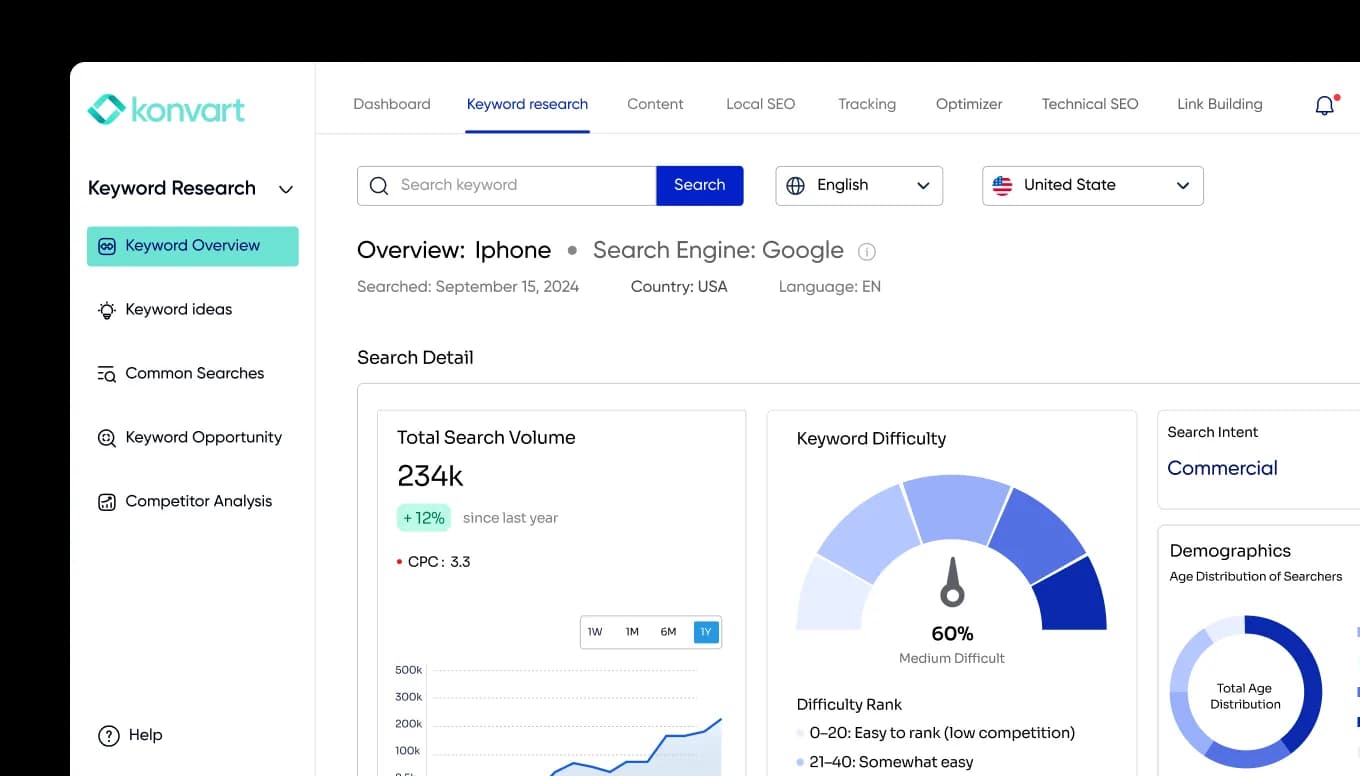
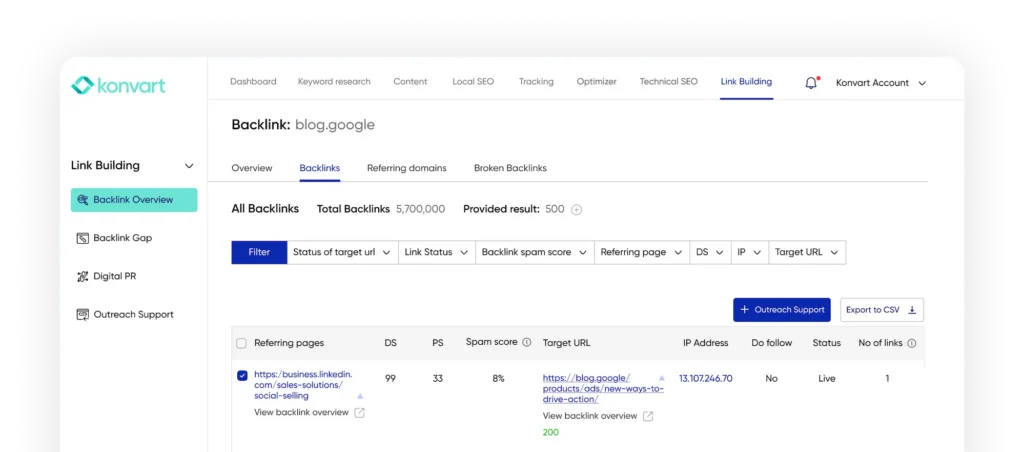
- A full backlink index: Paid tools crawl much more of the web, so you see more links, plus quality metrics. Konvart’s backlink checker does this for any domain, subdomain or page, and shows referring domains, anchor text, follow/nofollow status and new and lost links.
Whichever you use, check the whole domain, not just the homepage. That way you see links to every page on their site.
Step 3: Read the profile like a detective
A list of 2,000 links is not necessarily useful until you know what to look for. These six things tell you the story:
| Look at | What it tells you | Example |
| Referring domains | How many different sites vouch for them | 150 sites is a different game from 15 |
| Most-linked pages | The content that earns links | A Berlin fintech’s free salary calculator pulling links while the product pages get none |
| Linking site types | Where their links come from | A pet store whose links mostly come from blogger review roundups |
| Anchor text | How others describe them | Mostly brand name is normal; heavy exact-match keywords can look forced |
| Follow vs nofollow | Whether the links likely pass authority | A profile that’s mostly nofollow forum posts is weaker than it looks |
| New and lost links | Whether their backlink profile is growing or shrinking | A burst of new links last month means a campaign you can learn from |
The examples are illustrations, but the point is to use every row as a decision.
A competitor whose links come from review roundups tells you to pitch bloggers. One whose calculator earns the links tells you to build something worth linking to.
Step 4: Write down the patterns
Don’t try to remember it all. For each competitor, note their top 5 linking domains, their top 3 most-linked pages, and the type of site that links most.
10 minutes of notes now saves you redoing the research later.
And you might end up with a long list of sites that link to one competitor. Most of them won’t help you. Some are irrelevant, and some already link to you. But the sites worth your time are the ones that link to your competitors and not to you.
Finding those is next.
How Do You Find the Links Your Competitors Have That You Don’t?
Compare your backlink profile against 2-3 competitors and keep only the websites that link to them but not to you.
That list is your backlink gap, and it’s the most useful thing a competitor backlink report can give you.
Think about what you’ve just collected. In the last section, you built a pile of sites that link to your competitors.
Some of those sites already link to you. Some are irrelevant, and some are so weak they aren’t worth the effort.
The gap strips all of that away and leaves the sites that have already linked to businesses like yours and haven’t linked to you yet.
That matters because of how link requests work. A site that has linked to your space before has shown it’s willing to link in your space, so you’re not cold-pitching a stranger. You’re asking someone who’s already made that choice at least once, so the odds are better than a random prospect.
It’s also the fastest way to turn competitor research into a to-do list you can act on this week.
The manual method
You can do this with nothing but spreadsheets:
- Export the referring domains for you and each of your 3 competitors.
- Put them in one sheet, one column per site.
- Mark every domain that appears for a competitor and is missing from your column.
- Count how many competitors each missing domain links to.
Say you run a florist in Leeds, and a local wedding blog links to 3 competing florists but not to you. That blog is a far better prospect than a directory that links to just 1 of them, because 3 out of 3 suggests it’s a natural place for florists to be listed.
How to decide which gaps are worth chasing
Not every missing link deserves an email. Rank your gap list on these:
| Check | Why it matters | Strong signal |
| Links to several competitors | It’s a pattern, not a fluke | 2 or 3 of your 3 competitors |
| Relevance | Links from related sites carry more meaning | A B2B accounting tool getting listed on a small-business finance blog |
| Link type | A follow link is more likely to pass authority | Follow, placed in the body of an article |
| Strength of the linking page | Stronger pages usually mean more value | A page with its own links and traffic, not a dead directory entry |
| Spam signals | Some links aren’t worth having | Skip sites that exist only to sell links |
Work top-down. 20 well-chosen prospects beat 200 you never get round to.
But the caveat with the manual method is the time.
With 3 competitors and a few thousand domains each, you’ll spend more hours cleaning and matching rows than thinking about who to approach.
That cleaning-and-matching part is what a tool should take off your plate.
How to do it in Konvart
Everything above, the exports, the sheet, the matching and the quality checks, comes down to one question: who links to my competitors and not to me?
Konvart’s Backlink Gap Analysis is built to answer exactly that, so you don’t have to build the spreadsheet yourself.
Before you start, have two things ready.
Your own domain and the 3 competitors you picked in Step 1 of the last section.
If you skipped that step, go back, because the quality of the gap depends on comparing yourself with the right sites.
Here’s how it runs.
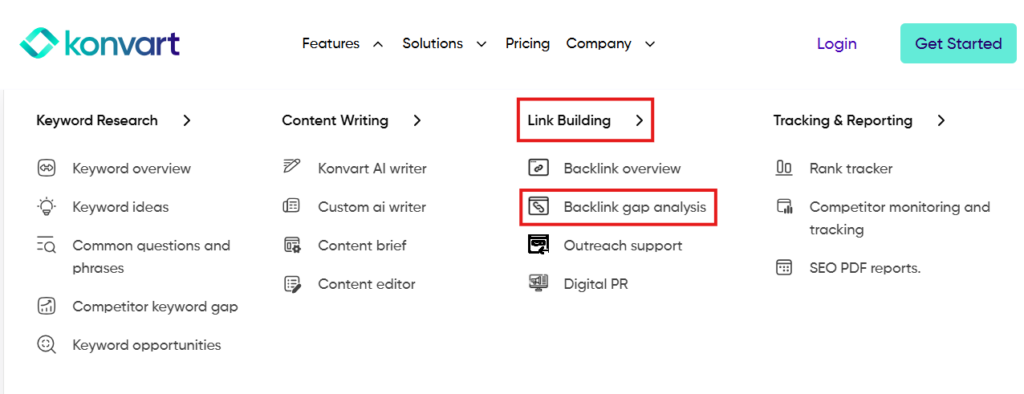
1. Open Backlink Gap Analysis: It sits under Link Building in Konvart.
This is the screen where you set up the comparison, so you won’t need to export anything first.
2. Enter your domain and up to 3 competitors: Your domain goes in as the site you’re improving, and the competitors are the ones you chose earlier.
You can enter a whole domain or a single URL, which is useful if you want to compare one page against theirs.
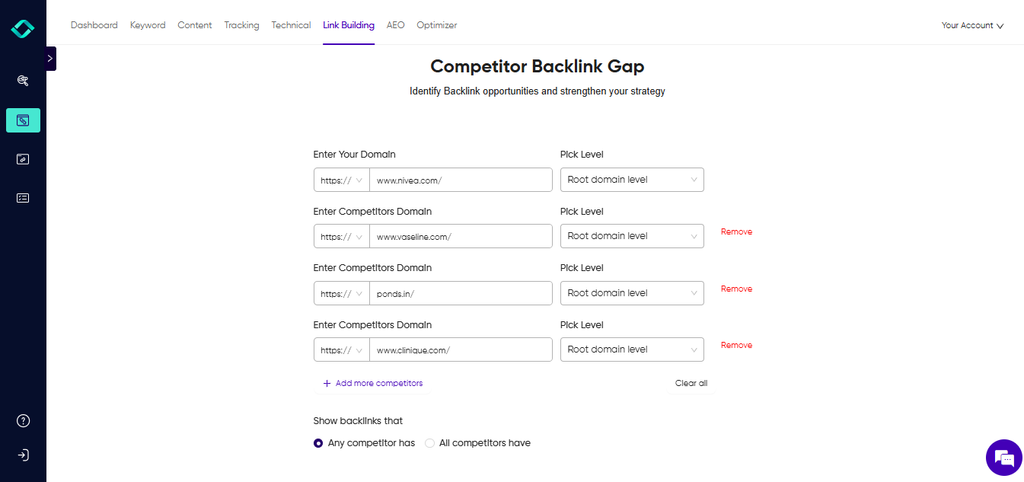
3. Run the comparison: Konvart returns the domains that link to your competitors, so the list you’d normally build by hand arrives already matched.
4. Read each row before you act on it: For every gap, you’ll see the referring page, the anchor text, whether the link is follow or nofollow, and the page strength of the linking page.
Use the same checks as the table above: how strong the page is, whether the link is follow, and whether the site fits your niche.
Konvart also shows spam scores and relevance indicators, which help you drop the sites you don’t want.
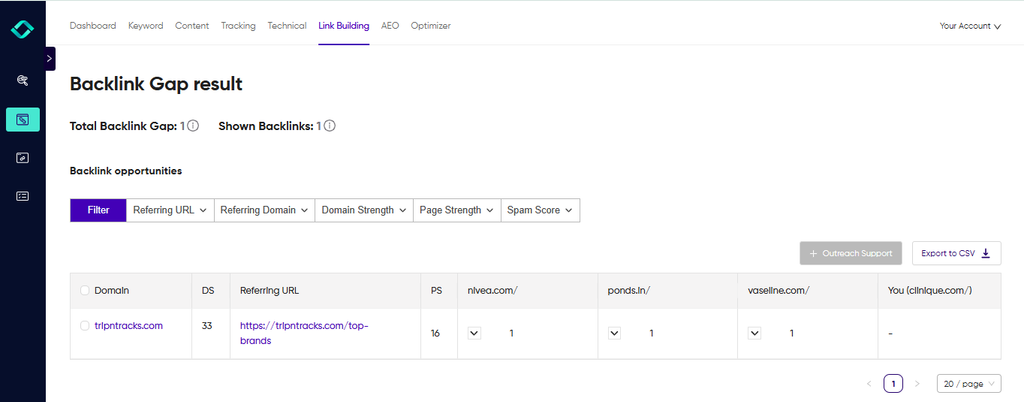
5. Save the best prospects: Instead of copying rows into a sheet, you can push the ones worth pursuing straight into your outreach list, so the research and the next step live in one place.
What you get is a ready list of the sites worth approaching, with the context to decide how.
You skip the exports, the sheet and the matching, and you start the week with a target list instead of a data-cleaning task.
And once the list exists, the work doesn’t stop there.
The prospects you save feed into Konvart’s Outreach Support, which can find a contact email for each site and help you draft the pitch, so you’re not hunting through contact pages.
If some of the sites on your list turn out to be news or media sites, our Digital PR tool is worth a look too.
It surfaces journalist requests that match your niche, so you can earn some of those links by answering a question instead of asking for a favor.
You still handle the replies and the follow-ups, but the finding and the drafting get a lot shorter.
Try it on your own site: find your competitors’ backlinks you don’t have, free for 7 days, no card needed.
That way, you now know who links to your competitors and who doesn’t link to you.
One more thing to check before you send a single pitch is what’s already pointing at your own site.
How Do You Find Your Own Backlinks?
Check your own backlinks the same way you checked your competitors’.
Pull up the sites that link to you, then read the profile for patterns. The difference is that you can also use free tools that only work on sites you own.
You’ll want this done before you send a single pitch because if a site already links to you, emailing them for a link is awkward at best.
If you’ve lost links you used to have, those are the easiest wins you’ll find. And once you know your own numbers, you can put them next to the competitor notes from the last two sections and see where you really stand.
It takes four steps:
- Check the free sources: They cost nothing and take 10 minutes.
- Fill in the gaps with a full backlink analysis: Free tools only show part of the picture.
- Read your profile: Same lens you used on your competitors, plus a few checks that only matter for your own site.
- Put your numbers next to theirs: That’s how you find out whether you’re behind, level or ahead.
Step 1: Check the free sources
Two free tools show you the links they’ve found to your site:
- Google Search Console: Open the Links report and look at the external links section. It lists your top linking sites, your most-linked pages and the anchor text used, and you can export it. It’s the most direct view of what Google has seen.
- Bing Webmaster Tools: Its Backlinks report lists referring domains, linking pages and anchors for your site, with a download option. Bing’s own help pages describe the data as a sample, not a complete list.
Both come with limits though. They show a sample; they cap how much you can see, and neither tells you much about link quality.
Think of them as a quick first read.
One tip: the two tools often show different links. Export both, put the referring domains in a single column and remove the duplicates.
A yoga studio that sees 40 linking sites in one and 55 in the other may really have 70 once the lists are combined.
Step 2: Fill in the gaps with a full backlink analysis
To see more than a sample, run your own domain through the same backlink analysis tool you used on your competitors.
With Konvart’s Backlink Overview tool, you enter your domain and get the referring domains, linking pages, anchor text and follow or nofollow status, plus links you’ve gained and lost recently.
Using one tool for yourself and your competitors is the best approach.
Different tools crawl different parts of the web, so comparing your numbers from one tool with a competitor’s from another gives you a false picture. The same tool for both keeps the comparison fair.
Step 3: Read your profile
Use the six checks from the competitor section: referring domains, most-linked pages, linking site types, anchor text, follow versus nofollow, and new and lost links.
For your own site, three more are worth a look:
| Check | What you’re looking for | Example |
| Lost links | Links you used to have that disappeared. Some can be won back. | A furniture maker whose best link broke when a magazine redesigned its site |
| Your most-linked pages | Whether the pages that earn links are the pages that earn money | A cybersecurity startup whose blog gets the links while its core feature page gets none |
| Risky links | Links from spammy sites that you may want to deal with | A sudden batch of links from sites in unrelated languages |
The first check is often the quickest win. A lost link usually means a page moved, a site was redesigned, or an article was updated, and a short email can fix it.
Step 4: Put your numbers next to theirs
Look at the notes you made on your competitors. How many referring domains do they have, and how many do you have? Which of their pages earn links, and which of yours do? Where do their links come from that yours don’t?
You don’t need a perfect comparison. You just need to know which of three situations you’re in: far behind, close, or ahead. And each one calls for a different plan.
If you’re far behind, the backlink gap list is your priority. If you’re close, a few of the right links could tip it. If you’re ahead, protecting what you have matters more than chasing more.
That brings us to the part that actually moves the numbers.
You’ve found your links, your competitors’ links and the gap between them. What you do next decides whether any of it was worth the effort.
What Should You Do Once You’ve Found the Backlinks?
Use them. A backlink report that sits in a spreadsheet does nothing for your rankings, so turn what you found into four actions, in this order:
- Win back the links you lost
- Deal with risky ones
- Pitch the sites on your gap list
- Earn links from journalists
It’s tempting to jump straight to the exciting part, which is the new links. Don’t.
The first two actions are usually quicker and cheaper, because you’re protecting links you already earned.
Think of it like a leaky bucket. There’s no point pouring more water in until you’ve checked the holes.
Here’s how each one works.
1. Win back lost and broken links
A lost link is one that used to point to you and doesn’t anymore. A broken link is one that still exists but points to a page of yours that no longer works.
Both are usually accidents. A magazine redesigned its site, an old article was updated, or you moved a page and forgot the redirect.
The fix depends on the cause:
- Your page moved or was deleted: Redirect the old address to the closest live page, and the link starts working again without you emailing anyone.
- The other site changed: Check the linking page. If the link was removed, send a short, friendly note asking if they’d restore it, and point to the page you want them to link to.
Say you run a bakery supply shop in Manchester, and a food magazine’s “best suppliers” roundup stops linking to you after a redesign. One polite email with the current URL can bring it back.
That’s far less work than earning a new link of the same quality. You can flag lost links in Konvart’s Backlink Overview, so you can see them without comparing old exports.
2. Review the risky links
Every site collects a few odd links over time. Look for clusters: dozens of links from unrelated sites, foreign-language pages that have nothing to do with your business, or anchor text stuffed with exact-match keywords you never asked for.
Don’t panic over one or two. Google’s own guidance says most sites don’t need to disavow links, so keep that tool for clear spam patterns, not for every low-quality link.
The point of the check is to catch a real problem early, such as a spam attack or a bad link-buying arrangement, before it grows.
Spam scores in your backlink tool help you tell the difference between “ugly” and “actually risky.”
3. Pitch the sites on your gap list
This is where your gap list from the last two sections pays off. You have a ranked list of sites that link to your competitors and not to you, so start at the top.
Make each request specific.
“Please link to us” gets ignored. “You listed 3 local plumbers in your guide to winter pipe care, and we’ve published a checklist that covers what the guide misses” gets read.
So, mention the page they already have, name the gap and say what you’re offering.
This is also the slow part, which is why people stall here. For each site, you need a contact, then an email that sounds like a person wrote it, then a follow-up.
Konvart’s Outreach Support takes the prospects you saved from the gap analysis, finds a contact email for each one and helps you draft the pitch.
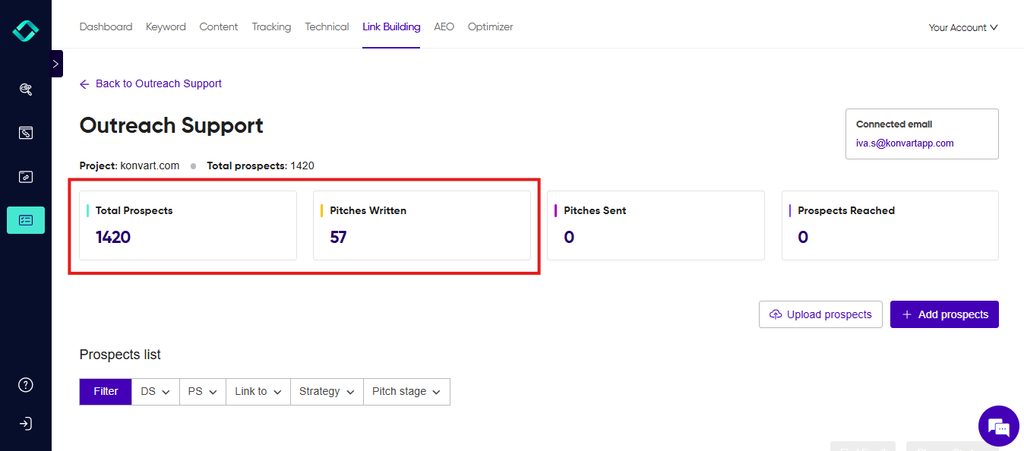
You still review it, send it and handle the replies, because that’s where the relationship happens.
4. Earn links from journalists
Not every link has to come from a cold pitch. Journalists regularly post requests asking for expert comments, data or examples, and the people who answer well get quoted and linked.
It works best for founders and specialists with something real to say, such as a view on a trend in your industry or a number from your own work.
Konvart’s Digital PR shows journalist requests that match your niche and helps you draft an answer.
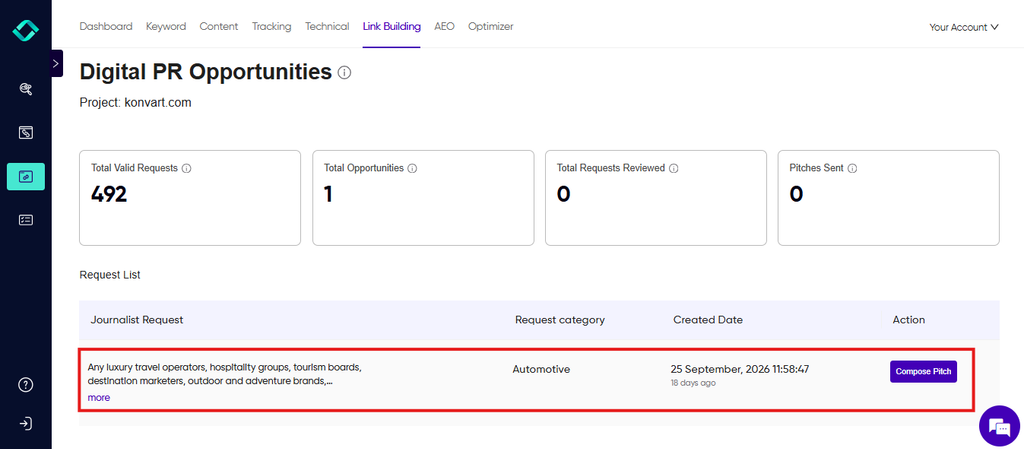
It won’t write your expertise for you, so the best replies still come from you.
But it saves the hours of scanning for requests, and each reply is a chance at a link from a site that’s hard to get through ordinary outreach.
If you only have an hour this week, spend it in this order:
- Fix any broken links to your own pages
- Send 5 pitches from the top of your gap list
- Answer 1 journalist request if one fits
That’s a real week of link work, and none of it needs a big budget.
By now you know how to find backlinks, who links to your competitors and which links you’re missing.
Start With One Competitor
Finding backlinks sounds like a big research project, but it comes down to one habit.
Look at who links to the sites beating you, then work out which of those sites could link to you.
Here’s the summary of everything above:
- Competitors’ backlinks: pick the sites that outrank you in search, run each domain through a backlink analysis tool like Konvart’s, and read the referring domains, most-linked pages and anchor text.
- The gap: compare yourself against 2-3 of them and keep the sites that link to them and not to you. Those are your best prospects.
- Your own links: check what you already have first, so you don’t pitch a site that already links to you, and you spot lost links worth winning back.
But you don’t have to do it all today. Pick one competitor, pull up their top 10 linking sites and see how many already link to you.
That 15-minute check will tell you more than another hour of reading about link building.
When you want to skip the exports and the spreadsheet, see who links to your competitors and not to you, free for 7 days.
Or run Backlink Gap Analysis on your own site, and you’ll have a prospect list before you’ve finished your coffee.
Frequently asked questions
Q: How do I find backlinks to my website for free?
A: Use Google Search Console and Bing Webmaster Tools. In Search Console, open the Links report and check the external links section. In Bing Webmaster Tools, open the Backlinks report. Both show a sample rather than every link, so export both and combine the referring domains for a fuller picture.
Q: Can I see my competitors’ backlinks in Google Search Console?
A: No. Search Console only shows links to sites you’ve verified as your own. To see a competitor’s backlinks, use a backlink analysis tool.
Q: How many backlinks does a website have?
A: It depends on which tool you ask, because no tool sees every link on the web. Different tools crawl different pages, so their counts rarely match. When comparing yourself with a competitor, use the same tool for both sites and compare referring domains, not just raw link counts.
Q: How do I find the backlinks a competitor has that I don’t?
A: Run a backlink gap analysis. Enter your domain and 2-3 competitors, then keep the sites that link to them and not to you. Sites that link to more than one competitor are usually the strongest prospects, because they already link to businesses like yours.
Q: How often should I check my backlinks?
A: Once a month is a sensible frequency for most sites. Check sooner after a site redesign, a page migration or a sudden ranking drop, since those are the moments links most often break or disappear.
Q: Do nofollow backlinks matter?
A: Yes, though usually less than follow links. Google treats nofollow as a hint and not a command, and these links can still send visitors and put your brand in front of new audiences. Prioritize follow links when you pick prospects, but don’t ignore the others.