Backlinks are links from other websites that point to yours. When a blog, news site, or industry publication links to one of your pages, that’s a backlink.
They sound simple, but they’re one of the clearest signals search engines use to decide which pages to trust.
Two pages can cover the same topic equally well, and the one with better backlinks will usually rank higher.
But not all backlinks are equal. Some can lift your rankings, others make no difference, and a few can actually hold you back.
In this guide, you’ll learn:
- what backlinks are
- why they matter
- how to tell a good one from a bad one
- how to check your own
- and where to find your first real link opportunities
And once you understand how they work, a lot of SEO starts to make sense, from why some pages rank with very little content to why others never move despite being well written.
So let’s start with the basics: what a backlink actually is, and what it looks like.
TL;DR: What Are Backlinks?
- Backlinks are links from other websites to yours. They’re also called inbound links
- Search engines treat them as signs of trust. A link from a respected site works like a recommendation, and pages with strong backlinks tend to rank higher
- Quality matters more than quantity. One link from a relevant, trusted site is worth more than dozens from random or spammy ones
- You can check your backlinks for free in Google Search Console’s Links report
- Your best opportunities are often the sites already linking to your competitors. They’ve shown interest in your topic, so they’re more likely to link to you too
What Are Backlinks?
A backlink is a link on another website that points to a page on your site. You’ll also hear them called inbound links or incoming links, because they bring visitors (and search engines) into your site from somewhere else.
The easiest way to think about backlinks is like citations in a research paper. When an author cites a source, they’re telling readers, “This is worth trusting.”
When a website links to your page, it’s doing the same thing. And when lots of reputable sites cite the same page, search engines take notice.
Here’s what that looks like in practice:
- A dermatology blog links to a skincare brand’s guide on how to use niacinamide.
- An HR publication links to an HR software company’s free employee turnover calculator.
- A personal finance site links to a fintech app’s guide to opening a business bank account.
In each case, the linking site is pointing its readers to a resource it finds useful. So, for the site receiving the link, that’s a backlink.
What a Backlink Looks Like
On the page, a backlink is just clickable text. Behind the scenes, it’s a short piece of HTML code with three parts that matter for SEO:
<a href=”https://yourbrand.com/niacinamide-guide” rel=”nofollow”>how to use niacinamide</a>
- The destination URL (href): the page the link points to. This is the page that receives the backlink.
- The anchor text: the clickable words (“how to use niacinamide”). It tells readers and search engines what to expect on the other side.
- The rel attribute (optional): an instruction to search engines about how to treat the link. Here, nofollow tells them not to count it as an endorsement. Most links don’t have this attribute at all, which means they’re treated as normal links.
You’ll see these three parts come up again and again in this guide, because they shape how much a backlink is worth.
Links vs Backlinks: What’s the Difference?
Every backlink is a link, but not every link is a backlink. The difference comes down to where the link starts and where it points:
| Type | Where it points | Example |
| Internal link | From one page on your site to another page on your site | Your blog post linking to your pricing page |
| Outbound link | From your site to a different website | Your skincare guide linking to a dermatology study |
| Backlink | From a different website to your site | A beauty magazine linking to your product page |
The same link can be two things at once, depending on whose side you’re on. If a beauty magazine links to your product page, it’s an outbound link for the magazine and a backlink for you.
Internal and outbound links still matter. Internal links help visitors and search engines move around your site, and outbound links to good sources make your content more useful.
But backlinks are the ones you can’t simply add yourself. Other websites have to choose to link to you, and that’s exactly why search engines value them so much.
Why Backlinks Matter for SEO
Search engines want to show people the most trustworthy, useful pages for every search. And backlinks are one of the main ways they work out which pages those are.
Here’s why they matter.
1. They build authority and trust
A backlink works like a recommendation. When a respected website links to your page, it’s vouching for your content, and search engines treat that as a sign your page deserves attention.
Some of the linking site’s authority also passes to your page through the link.
SEOs call this link equity (you might also hear “link juice”).
A link from a well-known, trusted site passes more of it than a link from a small or unknown one, which is why one great backlink can matter more than many weak ones.
2. They show search engines what your page is about
Links from sites in your industry help search engines understand your topic.
A travel company linked by travel blogs and tourism boards sends a clear signal about its expertise.
The same company linked by a random car parts website sends a much weaker one.
3. They help search engines find your pages
Search engines discover new pages by following links from pages they already know.
If a well-known site links to a new article on your website, search engines are likely to find and crawl it sooner.
That’s especially helpful for newer websites that search engines don’t visit often yet.
4. They bring in visitors directly
Backlinks aren’t only for search engines. People click them.
If a popular food blog links to a local bakery’s recipe page, some readers will follow that link, and a few might become customers.
This is called referral traffic, and it often brings visitors who are already interested in what you offer.
5. Quality matters more than quantity
Ten links from relevant, trusted websites will almost always do more for you than a hundred links from spammy or unrelated ones. In fact, low-quality links can work against you, which we’ll cover later in this guide.
So the goal isn’t to collect as many backlinks as possible. It’s to earn the right ones.
Do Backlinks Matter for AI Search?
More people now ask ChatGPT, Gemini, Perplexity, or Google’s AI Mode for answers and recommendations. So it’s fair to ask whether backlinks still matter when the search result is an AI-written answer.
The short answer: they still matter, but they’re only part of the picture.
Google’s AI features build on regular search
AI Overviews and AI Mode draw on pages from Google’s search index, and Google has said the same SEO best practices apply to them.
Pages that rank well, partly thanks to strong backlinks, are well placed to be used as sources.
Being mentioned matters, not just being linked
AI tools learn which brands are associated with which topics from what’s written about them across the web.
If an accounting software company is regularly mentioned and linked on trusted finance sites, review platforms, and industry publications, AI tools are more likely to bring it up when someone asks for recommendations.
Even mentions without a link can help build that association.
What’s reasonable to expect
Backlinks help, but no one outside these AI companies knows exactly how each tool chooses its sources, and it changes often.
The safest approach is the one that works for search too: earn links and mentions from relevant, trusted sites in your industry.
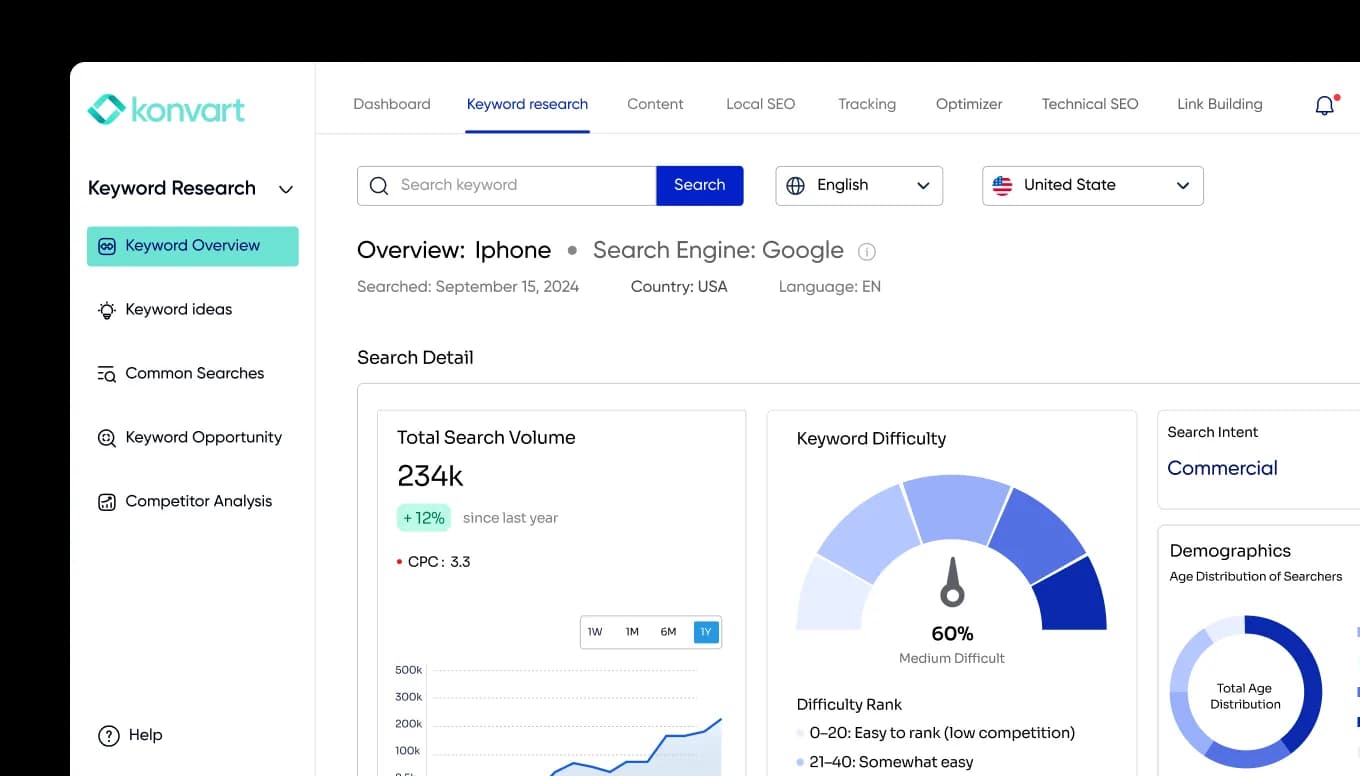
If you want to see how often AI tools mention your brand, Konvart’s AI visibility tracking shows where you appear and how you compare with competitors.
Types of Backlinks
Backlinks can be grouped in two ways
By the attribute in their code, which tells search engines how to treat them, and by where they come from.
Once you start looking at your own backlinks, or your competitors’, you’ll notice they don’t all look the same.
Some sit inside news articles, some come from directory listings, and some are tucked into forum discussions. Some carry special tags in their code, and others don’t.
These differences matter because they affect how much a link is worth.
A link from a trusted publication can help your rankings for years, while a link from a comment section might bring a few visitors and nothing more.
To make sense of it all, that’s why we grouped them in two ways: by the attribute in their code, which tells search engines how to treat them, and by where they come from, which usually tells you how much they’re worth.
1. Backlinks by Link Attribute
Remember the rel attribute from the anatomy of a backlink? It’s a small piece of code, but it changes how search engines read the link.
Website owners use these attributes to be transparent about their links.
If a link is paid for, posted by a user, or simply not something the site wants to vouch for, the attribute tells search engines so.
But most links have no attribute at all, which means they’re treated as normal, editorial links.
Here are the four types you’ll come across:
| Type | What it tells search engines | Typical use |
| Dofollow (no attribute) | A normal link that can pass ranking value | Most links in articles and editorial content |
| rel=”nofollow” | Don’t treat this link as an endorsement | Links a site doesn’t want to vouch for |
| rel=”ugc” | The link comes from user-generated content | Blog comments, forum posts, community answers |
| rel=”sponsored” | The link is paid or sponsored | Ads, sponsorships, affiliate links |
“Dofollow” isn’t an actual attribute. It’s just what SEOs call a regular link without a nofollow, ugc, or sponsored tag.
Google treats nofollow, ugc, and sponsored as hints rather than strict rules, so these links may still carry a little weight.
Even when they don’t help rankings directly, they can bring referral traffic and get your brand in front of new audiences.
A nofollow link from a popular industry forum can still send you interested visitors every week.
2. Backlinks by Source
The attribute tells search engines how to treat a link, but the source tells you far more about its real value.
Two dofollow links can be worth completely different amounts depending on the site they come from and why they were placed there.
Here are the most common sources:
- Editorial links: a site links to you because it genuinely finds your content useful, without being asked. A news article citing a fitness app’s survey data is a good example. These are the most valuable backlinks you can get.
- Guest post links: you write an article for another website, and it includes a link back to your site. Done well, on relevant sites, guest posting builds both links and credibility.
- Resource page links: many sites keep pages listing helpful tools and guides, like a university career center listing resume templates. Getting your resource added to these pages can bring steady, relevant links.
- Directory links: business listings on sites like industry directories or local business platforms. They’re useful for visibility, especially for local businesses, but usually carry less ranking value.
- Forum and community links: links in discussions on forums, Reddit, or Q&A sites. They’re usually marked nofollow or ugc, but helpful answers can still bring interested visitors.
- Digital PR links: links from news sites and media outlets, usually earned by giving journalists expert comments, data, or stories. Because media sites tend to be highly trusted, these links are often among the strongest you can earn.
The common thread is simple: the more natural and relevant the link, the more it’s likely to be worth.
What Makes a High-Quality Backlink
Not every backlink is worth chasing. Before you spend time earning a link, it helps to know what separates a valuable one from a link that does nothing for you.
Here are five things that matter most.
1. Relevance
The best backlinks come from sites related to your topic.
A pet food brand linked by a veterinary blog gets a strong, relevant signal. The same brand linked by a cryptocurrency news site gets a much weaker one, even if that site is popular.
Relevance also applies to the page itself.
A link from an article about dog nutrition is worth more than a link from an unrelated page on the same veterinary site.
2. Authority
Links from well-established, trusted websites carry more weight.
A law firm linked by a national news outlet or a respected legal publication gains far more than one linked by a brand-new blog with no visitors.
SEO tools like Konvart estimate authority with scores based on a site’s own backlinks. These scores aren’t used by Google directly, but they’re a useful way to compare potential link sources quickly.
3. Trust
A site can look authoritative and still be risky. Be cautious of sites that publish anything for a fee, link out to hundreds of unrelated businesses, or exist mainly to sell links.
Because real websites have real audiences, clear ownership, and content written for people, not search engines.
4. Placement
Where the link sits on the page matters. A link inside the main content of an article, surrounded by relevant text, carries more weight than one buried in a footer, sidebar, or list of hundreds of links.
A wedding photographer mentioned and linked in a feature article on “best wedding photographers in Austin” earns far more than a link in a site’s footer.
5. Natural anchor text
The anchor text should describe the linked page naturally. Varied anchors like your brand name, the page title, or a descriptive phrase look natural.
Hundreds of links all using the exact same keyword (“best running shoes,” over and over) look manipulated and can do more harm than good.
The easiest way to find links that tick all five boxes? Look at sites already linking to businesses like yours. We’ll cover how to do that in who links to your competitors [→ jump link to “How to find backlink opportunities through your competitors”].
The easiest way to find links that tick all five boxes is to look at sites already linking to businesses like yours. We’ll get to that shortly.
But first, it’s worth knowing where you stand.
Before you go after new backlinks, check the ones you already have. They’ll show you which of your pages attract links, which sites already trust you, and whether anything in your link profile needs attention.
How to Check Your Backlinks
Before you start building new links, you need to know what you’re working with. Most websites already have some backlinks, even if no one has ever looked at them. They might come from a partner who mentioned you, a directory listing someone created years ago, or a blog that found one of your articles useful.
Checking your backlinks regularly helps you answer a few important questions:
- Which pages attract links naturally? These show you what kind of content other sites find worth linking to, so you can create more of it.
- Who already trusts you? Sites that have linked to you once may be open to linking again.
- Is anything hurting you? Spammy or broken links can drag down your link profile.
Checking your backlinks is easier than most people expect, and you can start for free. Here are the two main ways.
1. Google Search Console (free)
If your website is set up in Google Search Console, you already have access to a basic backlink report.
- Open Search Console and select your website.
- Click Links in the left-hand menu.
- Look at the External links section, which shows three reports:
- Top linked pages: the pages on your site with the most backlinks
- Top linking sites: the websites that link to you most
- Top linking text: the anchor text other sites use when linking to you
Search Console is a great starting point, but it has limits.
It only shows a sample of your backlinks, it doesn’t tell you how strong or risky each linking site is, and it can’t show you anyone else’s backlinks, including your competitors’.
2. SEO tools
SEO tools fill the gaps Search Console leaves. They crawl the web independently, so they can show you much more detail about each link, and they let you check any website, not just your own.
In Konvart, Backlink Overview lets you check any domain, subdomain, or individual page.
Here’s what it shows you:
- Every referring domain and backlink, with the exact page linking to you and the anchor text it uses. You can export the full list.
- Domain Strength and Page Strength scores, so you can see how strong each linking site and page is at a glance.
- Follow and nofollow status for each link.
- New and lost backlinks, so you notice when you earn a link or lose one.
- Live and lost status, including errors, such as links pointing to pages that now return a 404 error. These are often easy wins: fix or redirect the broken page, and you recover the link’s value.
- Spam scores, which flag linking sites that look risky, so you can review them before they become a problem.
- Referring countries and domain extensions, useful if you target specific markets.
- Your most linked-to pages, and your competitors’, so you can see which content earns the most links in your niche.
Say you run an online furniture store. Backlink Overview might show that your buying guides, like “how to choose a sofa for a small living room,” attract most of your links, while your product pages attract almost none.
It might also reveal a dozen links still pointing to a seasonal collection page you deleted last year.
Redirect that old page to a relevant category, create more buying guides, and you’re already improving your link profile without earning a single new link.
Checking your own backlinks tells you where you stand. But the real opportunities usually sit in someone else’s backlink profile: your competitors’.
That’s where we’re heading next.
How to Find Backlink Opportunities Through Your Competitors
One of the hardest parts of link building is knowing who to ask. You could email hundreds of random websites and hope some say yes, but most won’t reply, because they have no reason to care about your business.
But there’s a much better place to start: the websites already linking to your competitors.
These sites have already shown they’re interested in your topic. They’ve written about it, recommended businesses like yours, or listed resources in your space.
That makes them far more likely to link to you too, especially if you can offer something better or newer than what they currently link to.
Say you run a meal kit company. If a nutrition blog links to three of your competitors in a “best meal kits for busy families” roundup, it’s a strong sign the blog could include you as well.
The same goes for recipe sites that link to competitors’ cooking guides, or resource pages listing healthy eating services.
As you look through your competitors’ backlinks, keep an eye out for three types of opportunities:
1. Sites linking to several competitors but not to you: These are your warmest prospects. If a site links to two or three businesses like yours, there’s often room for one more.
2. Roundups and “best of” lists: Articles comparing products or services in your industry are regularly updated, and their authors are often open to adding new options.
3. Your competitors’ most linked-to pages: If a competitor’s free calculator or research report attracts dozens of links, that tells you what kind of content earns links in your niche.
Creating a better version can win some of those links for you.
Now, let’s walk through how you can find your competitors backlinks in Konvart.
How to Find Competitor Backlink Opportunities in Konvart
Doing this manually means exporting each competitor’s backlinks, comparing them with yours in a spreadsheet, removing the sites that already link to you, and checking each remaining site’s quality.
With several competitors, that can take days.
Our Backlink Gap Analysis tool does it in a few minutes:
1. Enter your domain or URL, plus up to three competitors.
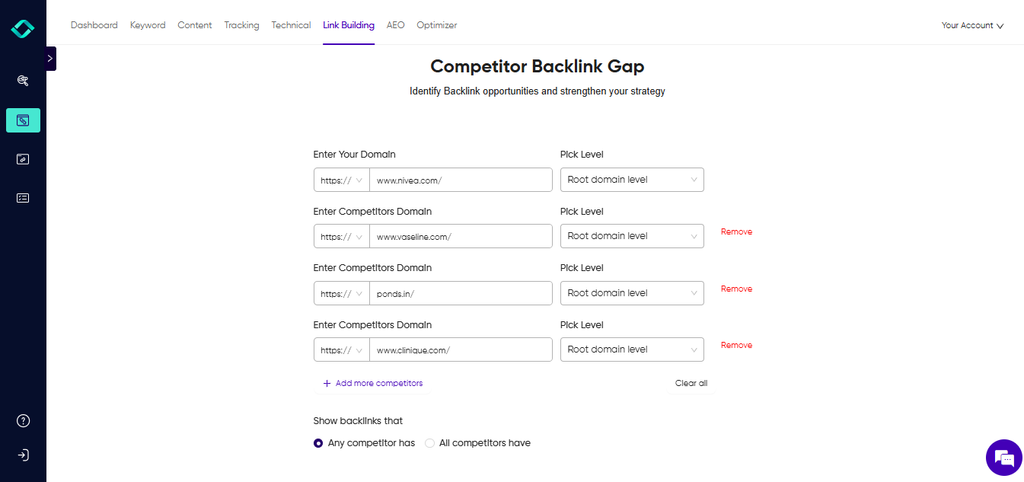
2. See the gap: Konvart shows the sites linking to your competitors but not to you.
3. Review each opportunity: For every linking site, you’ll see the anchor text it uses, the exact page the link sits on, whether the link is follow or nofollow, and the strength of the linking page.
This helps you decide which sites are worth pursuing and how to pitch them.
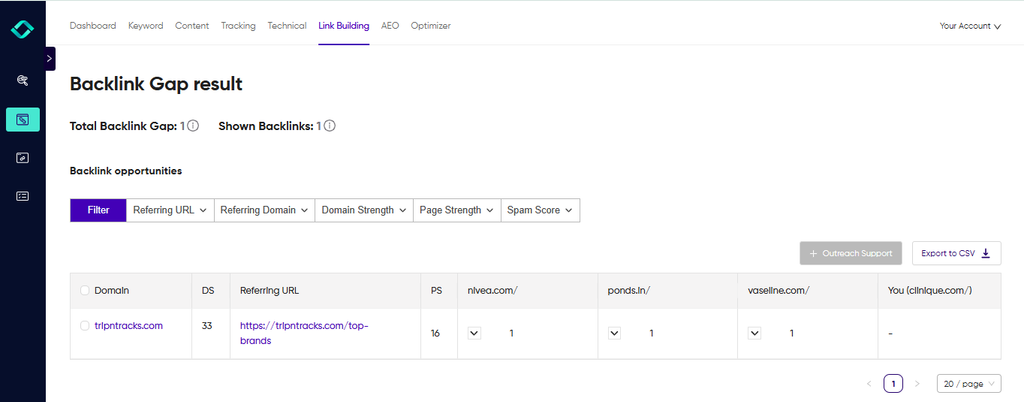
4. Move straight to outreach: Send promising sites to Outreach Support, where Konvart can find the right contact email and help you draft a pitch.
Instead of guessing who might link to you, you end up with a list of real, relevant websites and the context you need to pitch each one.
Want to see who’s linking to your competitors?
Run a backlink gap analysis free for 7 days.
Of course, finding the right sites is only half the job. The next step is giving them a reason to link to you.
How to Earn High-Quality Backlinks
Now that you know what good backlinks look like and where to find opportunities, the next question is how to actually get them.
The most important thing to understand is that the best backlinks are earned, not asked for.
Websites link to pages that make their own content better: a useful statistic, a helpful tool, an expert opinion, or a guide their readers will appreciate.
Every method below works because it gives other sites a genuine reason to link to you.
1. Create content worth linking to
Some content naturally attracts links because other writers need it. That includes:
- Original data and research, like a survey of 500 small business owners about hiring challenges
- Free tools and calculators, like a mortgage affordability calculator from a home loan company
- Templates and checklists, like an onboarding checklist from an HR platform
- In-depth guides that answer a topic more thoroughly than anything else available
A cybersecurity company that publishes yearly data on phishing attacks, for example, gives journalists and bloggers something to cite every time they write about the topic.
2. Reach out to the right sites
Even great content needs a nudge. Reach out to the relevant sites you found in your competitor research, and explain why your page would be useful to their readers.
Keep it short, personal, and specific by mentioning the exact article you’re referring to and what your resource adds.
The hardest part is often finding the right person to contact. But with Konvart, you can use the Outreach Support to find verified contact emails for your prospects and helps you draft personalized pitches, so you can spend your time on the sites most likely to say yes.
3. Write guest posts for relevant sites
Guest posting means writing an article for another website in your industry, usually with a link back to your site.
An architecture firm writing about sustainable design for a home renovation magazine, for example, reaches a new audience and earns a relevant link.
So, focus on sites your customers actually read, and write something genuinely useful.
Because guest posts written only for the link tend to land on low-quality sites that don’t help much.
4. Use digital PR
Journalists regularly look for expert comments, data, and stories for their articles.
If you respond with something useful, they’ll often link to your website when they quote you, and links from news sites are among the most valuable you can earn.
Konvart’s Digital PR tool collects live journalist requests from across the web, lets you filter them by your industry, and helps you write pitches with AI assistance.
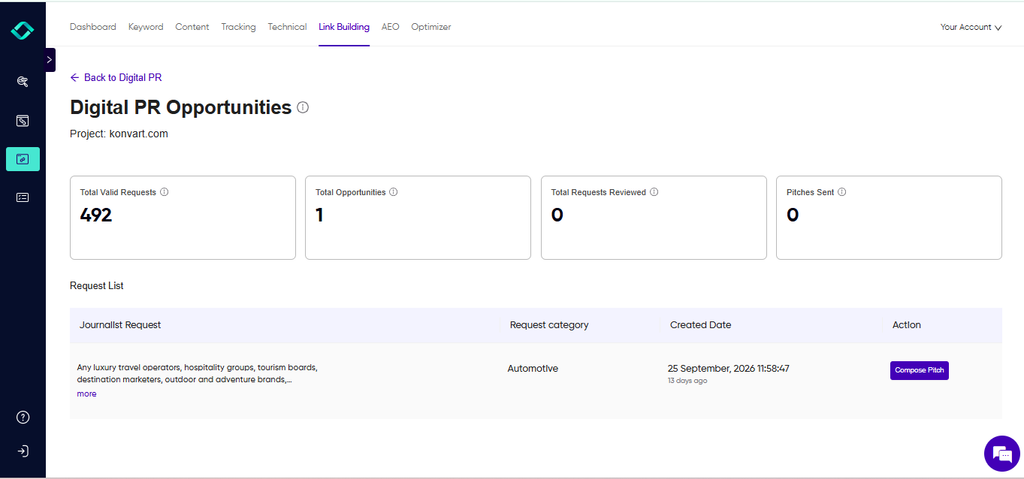
With this, you don’t have to spend too much time looking for backlink opportunities or writing pitches; Konvart does it for you.
5. Fix broken links on other sites
Websites often link to pages that no longer exist. If you find a broken link on a relevant site, and you have a page covering the same topic, let the site owner know and suggest your page as a replacement.
For example, a yoga studio might find a wellness blog linking to a deleted “beginner yoga poses” guide and offer its own.
You’re helping them fix a problem, which makes this one of the friendliest ways to ask for a link.
6. Turn brand mentions into links
Sometimes websites mention your business without linking to it. Search for your brand name, find mentions without a link, and politely ask the author to add one.
They’ve already chosen to talk about you, so it’s often an easy yes.
These mentions also help with AI visibility, since they show AI tools which brands are associated with your topic.
Finally, you don’t need to use every method at once. Pick the one or two that suit your business best and do them consistently.
A software company with strong in-house data might lead with original research and digital PR, while a local business might focus on resource pages, directories, and brand mentions.
Over time, those steady, relevant links add up to a backlink profile that’s hard for competitors to match.
What to Avoid When Building Backlinks
When backlinks start to feel slow to earn, shortcuts become tempting. Some promise hundreds of links in a week for a small fee. Others seem harmless, like swapping links with a friendly website or adding your link to every forum you can find.
The problem is that search engines are very good at spotting links that weren’t earned naturally.
Google’s spam policies describe link spam as links created “primarily for the purpose of manipulating search rankings,” and warn that sites breaking these rules may rank lower or disappear from results entirely.
At best, these links do nothing. At worst, they hold your rankings back.
Here’s what to steer clear of:
1. Buying links that pass ranking value: Paying for a placement isn’t automatically wrong, but the link should use the rel=”sponsored” attribute.
The same goes for gifting products. Google’s policies specifically list sending someone a free product in exchange for a review with a link as an example of link spam.
2. Large-scale link exchanges: Linking to a partner who links back is normal. Agreeing to swap links with dozens of sites purely for SEO is not.
3. Private blog networks (PBNs): These are groups of websites built only to create links. They often look like real blogs at first glance, but they exist for one purpose, and search engines watch for them.
4. Spammy comments and forum posts: Dropping your link into blog comments or forum threads where it adds nothing to the conversation looks like spam to readers and search engines alike.
5. Over-optimized anchor text: If most of your backlinks use the exact same keyword as anchor text, it can look unnatural.
Real links use a mix of brand names, page titles, and descriptive phrases.
6. Mass directory submissions: A few relevant directories, like industry associations or local business listings, are worth it. Submitting your site to hundreds of low-quality directories is not.
A simple test: would you be comfortable explaining exactly how you got a link to someone at Google?
If the honest answer is “not really,” it’s probably not worth the risk.
Even if you never use these tactics, spammy links can still find their way to your site.
Other websites can link to you without your permission, and some low-quality sites copy content and links automatically.
That’s why it’s worth checking your backlink profile from time to time and knowing what to do when something looks wrong.
Keeping Your Backlink Profile Healthy
Your backlink profile isn’t something you set up once and forget. New links appear all the time, some good, some not, and old links disappear as websites change or shut down.
A quick check every month or two helps you catch problems early, before they affect your rankings.
Here are some signs of spammy backlinks
- Links from sites with no connection to your industry, like a plumbing company getting dozens of links from casino or crypto sites
- Sudden spikes in new links you didn’t do anything to earn
- Links from sites that look built for SEO, with thin content, no real audience, and hundreds of outbound links to unrelated businesses
- The same keyword-heavy anchor text appearing across many unfamiliar sites
- Links from foreign-language sites that have nothing to do with your market or topic
In Konvart, Backlink Overview shows a spam score for each linking site, so you can quickly see which links look risky and review them first.
The common advice is that you rarely need to act on spammy links. Unless you’ve bought links or received a penalty, search engines will usually ignore low-quality links on their own.
For many sites, that’s true. But it isn’t guaranteed.
So the practical approach is to keep an eye on your profile and act when spammy links appear alongside an unexplained drop in rankings.
What to do About Harmful Links
1. Check before you act: Make sure the link is genuinely harmful, not just from a small or unfamiliar site. Removing good links by mistake can hurt more than it helps.
2. Ask for removal first. If you can find a contact on the linking site, politely ask them to remove the link. Keep a record of who you contacted and when.
3. Disavow what you can’t remove: For links you’re confident are harmful and can’t get removed, you can submit a list of them through Google’s disavow links tool.
This asks Google to ignore those links when assessing your site. Use it carefully, and only for links you’re sure about.
4. Keep monitoring: Watch your rankings and backlink profile in the weeks after, and keep your disavow file up to date as new spammy links appear.
A healthy backlink profile isn’t about having zero bad links. Almost every website has a few. It’s about making sure the good, relevant links far outweigh the bad ones, and catching problems before they grow.i
Start Building Better Backlinks
Backlinks come down to one simple idea: other websites vouching for yours.
The more relevant and trusted those websites are, the more their recommendation counts, with search engines, with AI tools, and with the people who click through.
And you don’t need hundreds of links to see results. You only need the right ones.
Start by checking the backlinks you already have, fix anything broken or risky, and then look at the websites already linking to your competitors.
Those sites have already shown they care about your topic, which makes them your best place to start.
In Konvart, you can see every site linking to your competitors but not to you, review each one’s strength and relevance, and move straight into outreach, all in one place.
See who links to your competitors but not to you. Free for 7 days
Frequently Asked Questions
Q: Are backlinks still important?
A: Yes. Backlinks are still one of the main ways search engines judge which pages to trust. What has changed is how much quality matters. A handful of links from relevant, respected sites now does far more than a large number of weak ones. Backlinks and brand mentions also help build the kind of reputation AI tools draw on when recommending businesses.
Q: How many backlinks do I need?
A: There’s no fixed number. It depends on how competitive your topic is. A local bakery might rank well with a few links from local news sites and food blogs, while a page competing for “best project management software” may need far more. The best way to estimate is to check the backlinks of the pages already ranking for your target keyword. That gives you a realistic benchmark.
Q: What’s the difference between backlinks and referring domains?
A: Backlinks are the individual links pointing to your site. Referring domains are the unique websites those links come from. If one blog links to you ten times, that’s ten backlinks but only one referring domain. Links from many different websites usually count for more than many links from the same one.
Q: Do nofollow links help SEO?
A: Sometimes, a little. Google treats nofollow links as hints rather than strict rules, so they may carry some value. Even when they don’t help rankings directly, they can still send visitors to your site and get your brand in front of new audiences. A natural backlink profile includes both followed and nofollow links.
Q: Should I buy backlinks?
A: Buying links to boost your rankings goes against Google’s spam policies and puts your site at risk. Paying for exposure, like a sponsored article or an ad, is fine, as long as the link is marked with the rel=”sponsored” attribute. If you want links that help rankings, the reliable path is earning them through useful content, outreach, and digital PR.
Q: How long does it take for backlinks to affect rankings?
A: It usually takes a few weeks to a few months. Search engines first need to find the new link, then reassess your page, and the effect depends on how competitive your keyword is and how strong the link is. That’s why consistent link building over time tends to work better than a short burst of activity.