A keyword gap analysis compares the keywords your site ranks for with your competitors’ to find the searches they get traffic from, and you don’t.
Those gaps show you exactly where you’re losing potential customers, and what to create or improve to win them back.
It’s one of the most practical ways to plan SEO. Your competitors’ rankings are proof that people search for those terms and that sites like yours can rank for them.
So instead of guessing which keywords might work, you start from searches that are already sending visitors to businesses in your space. The only question is how to get some of that traffic for yourself.
And finding the gap is the easy part. The harder part is deciding what to do with it.
A list of 2,000 keywords your competitors rank for isn’t exactly a plan. Some of those keywords need a new page, some need an update to a page you already have, some belong on a product or service page rather than a blog post, and some aren’t worth chasing at all.
So, in this guide, you’ll learn what a keyword gap analysis is, the different types of keyword gaps, and how to run one step by step.
You’ll also learn how to decide what each gap needs, so it turns into traffic instead of a spreadsheet.
There’s a full worked example, plus a look at keyword gaps in AI search.
Key takeaways
- A keyword gap is a search your competitors rank for, and you don’t, or where they outrank you. Their rankings prove there’s demand, and that the keyword is winnable in your niche.
- Not every gap is worth closing. Filter out competitors’ brand names and irrelevant terms, then focus on keywords that match what you sell and what your customers search for.
- Weak keywords are usually your fastest wins. If you already rank on page two, improving an existing page often gets results sooner than writing a new one.
- Every gap needs a decision. Depending on the keyword, it might need a new page, an update, the right type of page, or links to an existing page.
- Konvart’s keyword gap tool finds the gaps, and the Optimizer turns them into the work that closes them: new pages, updates, and links.
What is a Keyword Gap Analysis?
A keyword gap analysis is the process of comparing your site’s keyword rankings with your competitors’ to find the searches where they’re getting traffic, and you aren’t. The “gap” is every keyword where a competitor ranks and you don’t, or where they rank well above you.
It’s sometimes called a competitor keyword gap, a keyword overlap analysis, or a competitive keyword analysis.
Whatever the name, the idea is the same.
Your competitors have already done some of your research for you. Every keyword they rank for is evidence that people search for it, that Google sees it as relevant to businesses like yours, and that a site in your niche can rank for it.
That’s what makes a gap analysis more reliable than starting from a blank keyword list.
Instead of scrambling for keywords that might work, you start from keywords that are already working for someone else.
Types of keyword gaps
Not all gaps are the same, and each type usually calls for a different response. So, sorting your gap into these four groups makes the next steps much clearer.
| Type | What it means | What it usually needs |
| Missing | Competitors rank for it, and you don’t rank at all | A new page, or a section added to a closely related page |
| Weak | You rank for it, but competitors rank higher | An update to your existing page, or links to strengthen it |
| Shared | You and your competitors all rank, in similar positions | Small improvements to pull ahead, such as fresher content or better structure |
| Untapped | Relevant searches where nobody ranks particularly well | A strong new page that can take the top spot early |
Missing keywords get the most attention, but weak keywords are often where the quickest wins are.
If you already rank on page two for a search, Google already sees your page as relevant. A focused update can be enough to push it onto page one, which is usually faster than building a new page from scratch.
Keyword gap vs content gap vs backlink gap
You’ll often hear “keyword gap” alongside two related terms. They’re closely connected, but each one answers a different question.
| Keyword gap | Content gap | Backlink gap | |
| What it compares | The individual keywords you and your competitors rank for | The topics and subtopics your competitors cover | The sites that link to you and your competitors |
| What it shows | Specific searches you’re missing or losing | Whole subjects your audience cares about that you haven’t covered | Sites that link to competitors but not to you |
| What you do with it | Create or improve pages to target those searches | Plan new content or sections to cover the topic fully | Reach out to earn links from those sites |
In practice, the three work best together.
A keyword gap tells you which searches to target. A content gap helps you cover the wider topic well enough to rank. And a backlink gap analysis shows how to build the authority those pages need when content alone isn’t enough.
With the types clear, here’s how to run the analysis itself.
How to do a Keyword Gap Analysis (Step by Step)
A keyword gap analysis follows the same process every time, whether you’re comparing yourself with two competitors or ten.
What changes is how much of the work you do by hand and how much a dedicated tool does for you.
The process has four stages:
- Find the gap by choosing the right competitors and comparing keyword profiles.
- Filter it by removing the noise and sorting what’s left.
- Decide what each keyword needs.
- Act on those decisions and track the results.
Spending too much time on the first stage is fruitless. The later stages are where a list of keywords becomes a plan that actually brings in traffic.
Step 1: Choose your search competitors
The competitors that matter for a keyword gap analysis are the sites that outrank you in search, which aren’t always the businesses you compete with for customers.
A small accounting firm, for example, might think of the firm across town as its main rival.
But for searches like “how to pay quarterly estimated taxes,” the pages outranking it might belong to a tax software company, a personal finance blog, and a national accounting chain.
Those are the sites whose keywords show you where the opportunities are.
Pick three to five competitors that consistently rank for the searches you care about most. For your most important pages, look at page-level competitors too: the specific pages ranking above yours for a keyword, not just the sites behind them.
Our guide to finding your competitors’ keywords covers how to identify them.
Step 2: Compare keyword profiles
Next, compare the keywords your site ranks for with each competitor’s. You’re looking for every keyword where at least one competitor ranks, and you don’t, plus every keyword where they rank well above you.
Doing this by hand means exporting keyword lists for each site and cross-referencing them in a spreadsheet, which takes hours with even three competitors.
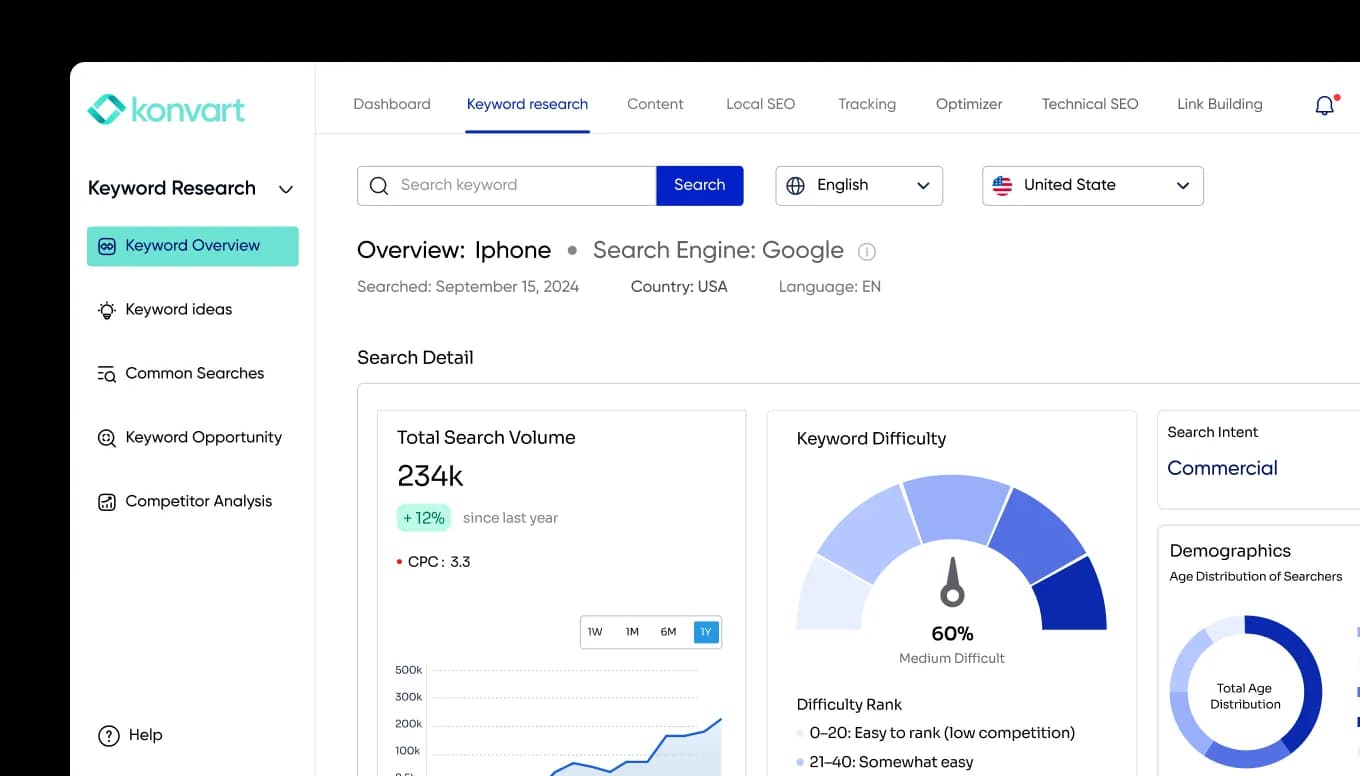
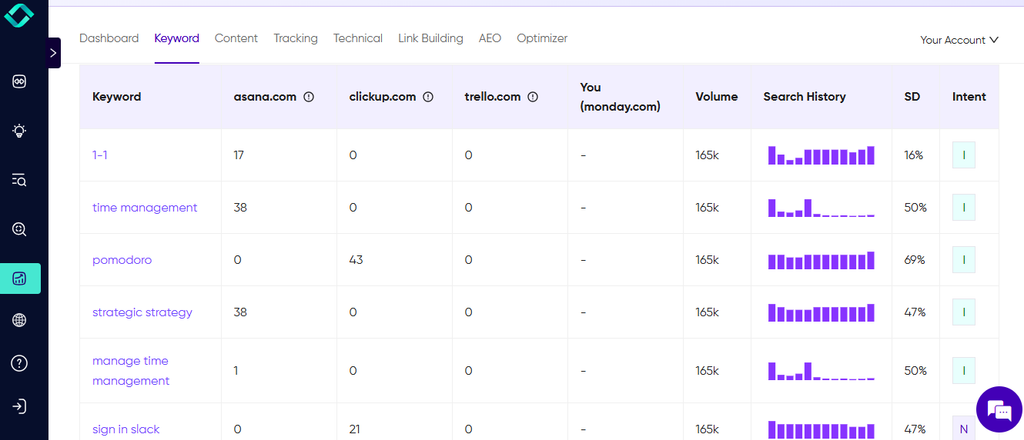
Konvart’s keyword gap tool does the comparison for you.
Enter your site and your competitors, and you’ll see the keywords they rank for that you don’t, with filters for search volume, difficulty, and intent.
Step 3: Clean the list
A raw keyword gap is full of noise. Before you analyze it, remove anything that isn’t a real opportunity:
- Competitors’ brand names: Searches like “[competitor name] login” or “[competitor name] pricing” will show up in their profiles, but you’re never going to rank for them.
- Irrelevant keywords: Competitors often rank for terms outside your business, such as job listings, unrelated blog topics, or products you don’t sell.
- Keywords outside your market: If you only serve customers in the UK, a gap keyword built around US-only terms or locations won’t help you.
This step usually cuts the list down a lot, and what’s left is far more useful.
Step 4: Sort into missing, weak, and shared
Now group the remaining keywords using the types from earlier: missing (you don’t rank), weak (you rank, but lower), and shared (you’re close to competitors).
This is also the point to bring in your own data.
Your Google Search Console account shows every search your site already appears for, including the ones sitting on page two.
Those are weak keywords you might not see in a competitor comparison, and they’re often your quickest wins.
Our Keyword Opportunities tool pulls these out of your Search Console data automatically.
Step 5: Prioritize
You won’t close every gap at once, so rank the keywords by how much they’re worth and how realistic they are to win.
Look at:
- Search volume: how many people search for it each month.
- Keyword difficulty: how hard it is to rank, based on the strength of the pages already there.
- Search intent: what the searcher wants. That could be to learn something, compare options, or buy. A keyword matters more when its intent matches what you offer.
- Business value: whether ranking would bring in potential customers, or just general readers.
- SERP features: the extra elements on the results page, such as AI Overviews, maps, or “People also ask” boxes. They affect how many clicks the top results actually get.
Also pay extra attention to keywords that two or more competitors rank for. If several businesses like yours are all getting traffic from the same search, it’s a strong sign the keyword is valuable in your niche.
For example, a home fitness equipment store might find “best adjustable dumbbells” has lower volume than “home workout ideas.”
But it has clear buying intent and three competitors ranking for it, so it’s the more valuable gap to close first.
Step 6: Decide what each keyword needs
This is the step most keyword gap analyses skip, and it’s the one that decides whether the gap turns into traffic.
For every priority keyword, ask what it actually needs to rank. The answer isn’t always “write a new blog post.”
| Situation | What to do | Example |
| A missing keyword that closely matches a page you already have | Update that page to cover it | Adding a section on “payroll for contractors” to an existing payroll guide |
| A missing keyword on a new topic | Create a new page | A new guide for “how to run payroll for a small business” |
| A keyword with buying intent, such as pricing, a product, or a service | Target it with a product or service page, not a blog post | Putting “payroll software pricing” on the pricing page, not in an article |
| Several close variations of the same search | Cover them all on one page instead of creating several thin ones | “Payroll software for startups,” “payroll for small teams,” and “startup payroll tools” on one page |
| A weak keyword where your page is already strong | Build links to that page rather than adding more content | A detailed guide stuck at position 9 behind pages with more backlinks |
| A keyword that’s off-topic or low value | Skip it | A competitor’s job listings or an unrelated blog topic |
Two things you should already notice here.
First, page type matters.
If the people searching a keyword are ready to buy, they expect a product, service, or pricing page, and a blog post will struggle to rank there no matter how good it is.
Second, not every gap needs more content.
If your page already covers the topic well but sits below competitors with stronger link profiles, writing more won’t fix it.
That’s a backlink problem, and a backlink gap analysis shows where to find the links that page needs.
Step 7: Close the gap
Now act on your decisions. For every page you’re creating or updating, start by studying the pages already ranking for the keyword: what they cover, how they’re structured, and what type of page they are.
Then make yours more useful, clearer, or more complete.
A few habits help here:
- Match the format of what’s ranking. If the top results are step-by-step guides, a short opinion piece is unlikely to compete.
- Answer the question directly, near the top of the page, before you explain it.
- Add what competitors don’t have, such as your own examples, data, or experience.
Konvart’s AI Writer drafts new pages from what’s already ranking, in your brand voice. Then the Content Editor checks drafts and updated pages against the top results before they go live.
Step 8: Track results and repeat
Keyword gaps keep changing. Competitors publish new pages, rankings shift, and new searches appear.
Track the keywords you’re targeting so you can see which pages are climbing and which need more work. Our rank tracking tool shows your progress keyword by keyword.
Then rerun your analysis regularly:
- Monthly if you’re in a competitive market or publishing often
- Quarterly for most other businesses
Between analyses, keep an eye on your competitors.
When a competitor publishes a new page that starts ranking quickly, it’s often a sign of a new gap you can close too.
A Keyword Gap Analysis Example
To see how the steps fit together, here’s an example:
The business: LedgerLoop, a bookkeeping app for freelancers. It wants more sign-ups from searches like “bookkeeping for freelancers” and “how to track business expenses.”
Finding the gap
LedgerLoop’s team searched its main keywords and found the same three sites ranking above it again and again: two rival bookkeeping apps and a popular personal finance blog for freelancers.
Only two were direct business competitors, but all three were competing for the same searches, so all three went into the analysis.
Comparing keyword profiles, the team found 2,860 keywords where at least one competitor ranked, and LedgerLoop didn’t, or where a competitor ranked well above it.
Cleaning and sorting
The team removed:
- Competitors’ brand searches, such as “[competitor] login” and “[competitor] app review”
- Irrelevant topics from the finance blog, like travel budgeting and student loans
- Keywords focused on markets LedgerLoop doesn’t serve
That left 940 relevant keywords.
Adding LedgerLoop’s own Search Console data revealed more weak keywords sitting on page two. It was sorted by type, and the gap looked like this:
| Gap type | Keywords | What it told the team |
| Missing | 610 | Topics LedgerLoop hadn’t covered at all |
| Weak | 240 | Pages that already ranked but needed help to reach page one |
| Shared | 90 | Close contests where small improvements could pull ahead |
Prioritizing
Next, the team scored the keywords on search volume, difficulty, intent, and business value, with extra weight for keywords that two or more competitors ranked for.
That produced a shortlist of 45 priority keywords. Many were close variations of each other, so they grouped them into 14 pieces of work.
Deciding what each gap needed
| Decision | Pages | Example keywords |
| Update an existing page | 4 | “how to track business expenses” was added to an existing expenses guide stuck at position 14 |
| Create a new blog post | 3 | “quarterly taxes for freelancers,” “how to separate business and personal finances” |
| Fix a product or pricing page | 2 | “bookkeeping app for freelancers” and “freelance bookkeeping software pricing” were moved from a blog post to the product and pricing pages |
| Combine variations into one page | 3 | “invoice template for freelancers,” “free freelance invoice,” and “simple invoice template” in one page with downloadable templates |
| Build links instead of content | 2 | A strong “self-employed tax deductions” guide at position 8, behind pages with far more backlinks |
| Skip | Remaining keywords | Low-value or off-topic searches |
Two decisions changed the team’s thinking.
First, they’d been targeting their most commercial keyword, “bookkeeping app for freelancers,” with a blog post.
Searchers wanted to compare and sign up, not read an article, so moving the keyword to the product page made far more sense.
Second, the tax deductions guide was already better than the pages above it. It didn’t need rewriting. It needed links, which sent the team to a backlink gap analysis for that page.
Turning it into a plan
With 14 clear pieces of work, LedgerLoop’s plan for the next quarter looked like this:
- Month 1: Fix the product and pricing pages, then update the four existing pages. These were the fastest wins, because Google already knew the pages.
- Month 2: Publish the three new blog posts and the combined invoice template page, and start link outreach for the two strong pages.
- Month 3: Track progress, refine the pages that were climbing slowly, and rerun the gap analysis to find the next set of opportunities.
The result was a focused plan of 14 pieces of work, each with a clear purpose, built from searches already sending traffic to LedgerLoop’s competitors.
Compare that with a list of 2,860 keywords and no idea where to start.
The same idea now applies to AI search, where the gaps look slightly different.
Find Keyword Gaps in AI Search Too
Keyword gaps used to be only about search rankings. Now there’s a second kind: the questions where AI tools like ChatGPT, Perplexity, and Gemini mention or cite your competitors, but not you.
But AI search works a little differently from Google rankings.
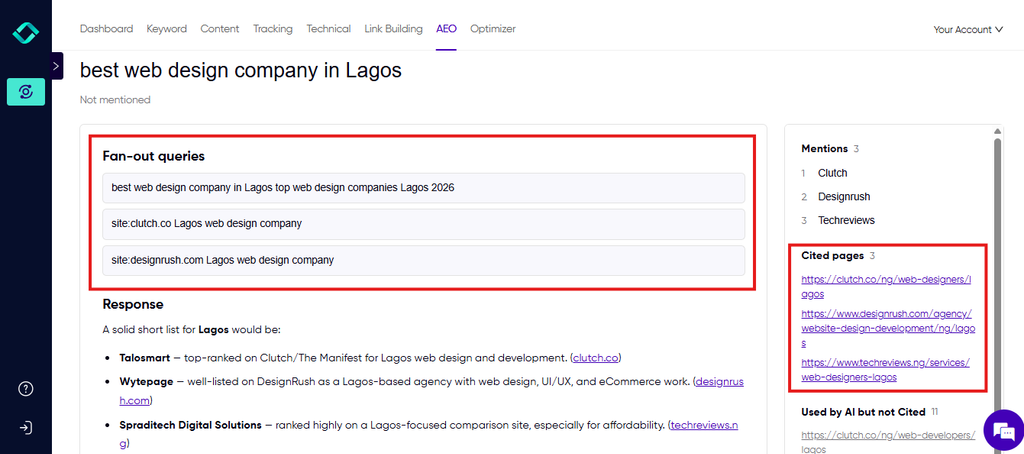
When someone asks an AI tool a question, it often breaks that question into several related searches behind the scenes, known as fan-out queries, and builds its answer from the sources it finds.
A question like “What’s the best bookkeeping app for freelancers?” might also trigger searches about pricing, invoicing features, tax tools, and ease of use.
If your competitors’ content covers those follow-up questions and yours doesn’t, they’re more likely to be cited in the answer.
You can look for AI search gaps using the same thinking as a traditional keyword gap analysis:
- List the questions your customers ask AI tools. These are often longer and more conversational than search keywords, such as “Which bookkeeping app is easiest for a freelance designer?”
- Check which brands and sources the answers cite, and note where competitors appear and you don’t.
- Look at the fan-out queries behind each answer, meaning the related questions the AI tool searched to build its response.
- Close the gap by covering those questions clearly on your pages, or by getting featured on the sources the AI tools trust.
There’s a useful overlap here. Many fan-out queries are the same long-tail keywords that show up in a traditional keyword gap, so covering them well helps you in Google and in AI answers at the same time.
Tracking this by hand means running the same questions through several AI tools again and again.
Konvart’s AI visibility tool shows where AI tools cite your brand, the sources behind each answer, and the fan-out queries that shaped it, so you can see exactly which follow-up questions your content is missing.
For a full guide to tracking and improving your presence in AI answers, see our guide on LLM visibility
Common Keyword Gap Analysis Mistakes
A keyword gap analysis can quickly point you in the right direction, but a few common mistakes can send you chasing keywords that never bring in customers.
Most of them come from moving too fast from the list to the content, without stopping to ask what each keyword really needs.
And the cost isn’t always obvious at first.
You might publish a dozen new pages and see traffic rise, only to find months later that few of those visitors ever became leads or sales.
Knowing these mistakes upfront helps you spend your time on the gaps that actually grow the business. So, here are a few of them:
1. Comparing yourself with the wrong competitors: Your biggest business rivals aren’t always the sites you’re competing with in search.
If they don’t rank for the searches you care about, their keyword profile won’t show you useful gaps.
So, start with the sites that actually outrank you, and use page-level competitors for your most important pages.
2. Leaving competitors’ brand searches in your data: Searches that include a competitor’s name, such as their login page or product reviews, can make up a big share of a raw gap.
They inflate the numbers and hide the real opportunities. Remove them before you start prioritizing.
3. Chasing search volume over intent: A keyword with huge search volume looks like the biggest prize, but if the people searching it aren’t looking for what you offer, ranking for it won’t grow your business.
A smaller keyword with clear buying intent is often worth far more.
4. Putting buying keywords on blog posts: When someone searches for pricing, a product, or a service, they usually expect a product or service page.
Targeting those keywords with a blog post makes it harder to rank, and harder to turn visitors into customers once they arrive.
5. Creating new pages when an update would do: It’s tempting to write a new article for every gap. But if you already have a page on the topic, a new one can end up competing with it, and neither ranks well.
Check whether you can expand an existing page before creating another.
6. Assuming every gap needs more content: Sometimes your page is already as good as, or better than, the ones above it, and competitors simply have stronger backlinks.
Adding more words won’t fix that. Those pages need links.
7. Running it once and moving on: Competitors publish new pages, and rankings shift every month.
A keyword gap analysis from six months ago misses the new opportunities that have opened up since. Make it a regular part of your SEO process.
Avoiding these mistakes comes down to making the right call on each keyword. That’s the hardest part to do quickly by hand, especially once the gap runs into hundreds or thousands of searches.
Here’s what the same process looks like when much of that work is done for you.
From Keyword Gap to Published Page With Konvart
You can do every step in this guide by hand. But when the gap runs into hundreds of keywords, most of the time goes into sorting data, deciding what each keyword needs, and then actually doing the work.
Here’s what the same process looks like in Konvart, using a marketing manager through her first few weeks as an example.
Meet Dana, head of marketing at a small company selling scheduling software to fitness studios.
She has no SEO specialist on the team, and she knows competitors are getting traffic she isn’t.
Day 1: Set up in minutes
Dana enters her domain. Konvart scans her site and brand, then fills in her settings: her brand style, her sitemap, her main competitors, her services, her target market, and the type of site she runs.
She checks the details, adds one competitor it missed, and moves on.
Day 1: See the gap
The keyword gap tool compares her site with her competitors and shows the keywords they rank for that she doesn’t. Keyword Opportunities adds the weak keywords hiding in her Search Console data, such as the pages sitting on page two that only need a push.
Days 2–3: The Optimizer decides what each gap needs
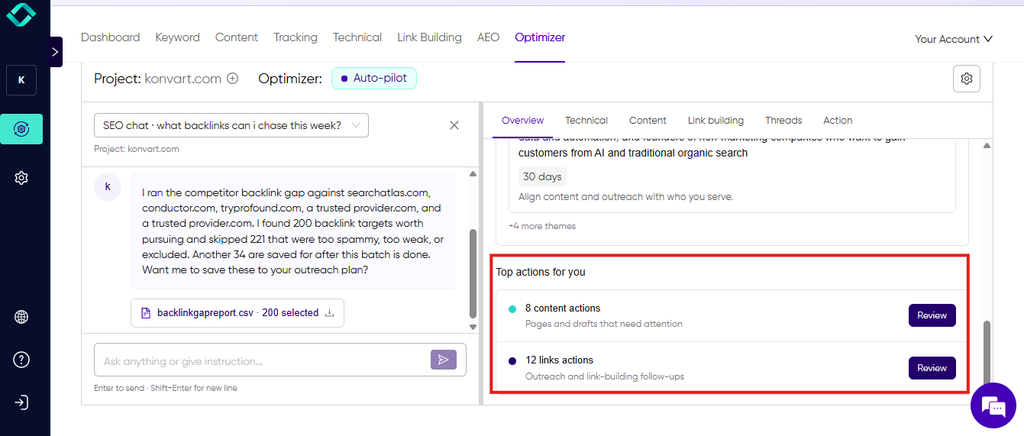
Instead of a spreadsheet of keywords, Dana gets a plan. The Optimizer groups related keywords together and maps each group to the right page: an update to an existing page, or a new one.
It takes the page type into account, too. “Class scheduling software for yoga studios” goes to a product page, not a blog post, and that page is optimized as a product page.
Where one of her pages is already strong but stuck behind competitors with more backlinks, the Optimizer flags it as needing links rather than more content.
It also picks Dana’s most important pages, up to 20 of them, as core pages to focus on over the next few months.
That way, the pages that matter most to the business get steady attention, alongside the quick wins and new content from the keyword gap.
Days 3–5: The work gets done
For new pages, the AI Writer drafts content from what’s already ranking, in Dana’s brand voice. The Content Editor checks each draft against the top results, and a cover image is generated, so the post is ready to go live.
For the pages that need links, Konvart runs outreach from start to finish.
It finds relevant sites and contacts, sends the pitch, watches for replies, and when a site says yes, writes the guest post or link insertion to that site’s guidelines. Every link it earns is tracked.
Dana stays in control throughout.
She’s set permissions that let the Optimizer publish new pages on its own but require her approval before it changes any existing page.
So the new posts go live automatically, and the product page updates wait for her sign-off.
The following weeks: Track and move on
Weekly rank tracking and Search Console show which pages are climbing.
As her core pages reach good positions and bring in more traffic, they’re moved out of the core set to make room for the next priority pages.
A month later, Dana reruns the gap analysis and the cycle starts again, with new gaps and new pages.
The difference for Dana isn’t only speed. A keyword gap that would have sat in a spreadsheet for weeks turned into published pages, updated product pages, and earned links, without her needing to spend more time than necessary on any of them.
See what Konvart would do with your keyword gaps. Enter your domain and start a 7-day free trial, no card required.
Final Thoughts: Turn Your Competitors’ Traffic Into Your Next Wins
Your competitors’ rankings are one of the clearest guides you have in SEO.
They show which searches bring in visitors in your market, which topics Google trusts sites like yours to cover, and where your own site is falling behind. A keyword gap analysis is what turns that information into a focused plan.
The key is to treat the gap as a set of decisions, not a to-do list.
Choose the competitors that actually outrank you, clean out the noise, and sort what’s left into missing, weak, and shared keywords.
Then decide what each one really needs: a new page, an update, the right type of page, or links.
Start with the weak keywords that are already close to page one, and rerun the analysis regularly as the gaps change.
If you want to find your keyword gaps and turn them into published, optimized pages in one place, Konvart is built for that.
It finds the gaps, works out what each one needs, and does the work within the permissions you set, from new content and page updates to the links that help your strongest pages climb.
Create a free Konvart account and find the keywords worth chasing
Frequently Asked Questions
What is a keyword gap?
A keyword gap is a search term that your competitors rank for, and you don’t, or one where they rank well above you. Each gap is a search that’s already sending visitors to businesses in your space, which makes it a strong opportunity to win traffic for your own site.
What is keyword gap analysis in SEO?
Keyword gap analysis is the process of comparing your site’s keyword rankings with your competitors’ to find the searches you’re missing or losing. It helps you decide which pages to create or improve, based on keywords that are already proven to bring in traffic in your niche.
How do I find keyword gaps?
Choose three to five competitors that outrank you in search. Then compare the keywords they rank for with the ones you rank for, and list the keywords where they appear and you don’t, or where they rank higher. A keyword gap tool does this comparison automatically.
What should I do with my keyword gap?
Decide what each keyword needs before you start creating content. Some keywords need an update to an existing page, and others need a new page. Keywords with buying intent belong on a product or service page. If your page is already strong but stuck below competitors, it usually needs links rather than more content. Skip keywords that are off-topic or low value.
How many competitors should I compare?
Three to five competitors is the right number for most businesses. That’s enough to spot patterns, such as keywords that several competitors rank for, without burying the best opportunities in a huge list. Choose the sites that consistently outrank you in search, not just your biggest business rivals.
How often should I do a keyword gap analysis?
Run a keyword gap analysis quarterly for most businesses, and monthly if you’re in a competitive market or publishing often. Competitors publish new pages, and rankings shift all the time, so regular analysis keeps your plan focused on current opportunities.
What’s the difference between a keyword gap and a content gap?
A keyword gap is a specific search your competitors rank for, and you don’t. A content gap is a broader topic or subtopic your audience cares about that you haven’t covered. Keyword gaps tell you which searches to target, and content gaps help you cover the wider subject well enough to rank.
Can I do a keyword gap analysis for free?
You can do a basic version by hand, but it’s slow and limited. Free keyword data usually covers only part of each site’s rankings, and comparing several competitors in a spreadsheet takes hours. A dedicated tool gives you fuller data and does the comparison automatically. You can try Konvart’s keyword gap tool