You know your business needs to show up on Google. Maybe you’ve tried a few things already. Or maybe you’re working out whether SEO is something you can take on yourself before you bring anyone else in.
You can.
Learning how to do SEO yourself mostly comes down to doing a small number of things well, in the right order, and sticking with them.
You don’t need a technical background or hours of free time every day.
And this guide gives you that order.
You’ll learn which pages to focus on first, how to find the searches your customers actually use, and how to optimize product, service and blog pages differently.
You’ll also learn how to earn your first backlinks.
Each step also comes with a realistic time estimate, so you can fit SEO around running your business, not instead of it.
Can You Really Do SEO Yourself?
Yes. Most SEO isn’t advanced technical work. It’s a set of tasks you repeat consistently: help Google find your pages, make each page match what people are searching for, and give other websites reasons to link to you.
It works a bit like a formula.
You can be creative with what you write and how you present your business, but every page needs to tick the same core boxes:
- Google can find it: The page is indexed, so it can appear in search results at all.
- It targets a search people actually make: One main keyword per page, based on how your customers search.
- It gives searchers what they came for: A product page helps people buy, a service page helps them enquire, and a blog post answers their question.
- The basics are in place: A clear title tag, meta description and heading, plus links to related pages on your site.
- It loads quickly and works on mobile.
- Other sites vouch for it: A few relevant backlinks show Google that your page is worth ranking.
Once you know these boxes, you can apply them to any page on your site. The steps below show how to tick each one.
Results usually build over a few months, and they come from small improvements made week after week, not from one big push. I’ve seen most DIY SEO efforts fail because they stop, not because the owner lacked skill.
Before you start, you’ll need a few free tools set up.
What You Need Before You Start
Every SEO plan starts with three questions: can Google find your site, what are people searching to reach it, and do those visitors become customers?
Google’s free tools answer all three.
They’re also where Google shares data about your site that isn’t available anywhere else, which is why most SEO platforms ask you to connect them during setup.
Set these up first. Your data starts building from the day you connect them, so even a week’s head start helps when you begin making changes.
- Google Search Console: This shows which searches your site appears for, how often people click, and whether Google has indexed your pages. Add your site as a Domain property and verify it through your domain provider, so every version of your site is covered. If you can’t edit your DNS settings, use a URL-prefix property and verify it with an HTML tag or your Google Analytics account instead.
- Google Analytics 4 (GA4): This shows what visitors do once they arrive. Set up key events for the actions that matter to your business, such as form submissions, booked calls or purchases. Then you can see which pages bring in customers, not just traffic.
- Google Business Profile (if you serve customers in a specific area): For a dental clinic, a plumber or a local gym, this is often the quickest way to appear in map results.
You’ll also need edit access to your website platform, whether that’s WordPress, Shopify, Webflow, Wix or something else.
Keep a note of every change you make and when, so you can link any movement in rankings back to what caused it.
Finally, block out time in your calendar. Two to four hours a week is enough for most small sites, and a regular slot works better than an occasional full day.
With your tools in place, it’s time to work through the steps.
How to Do SEO Yourself in 8 Steps
You might expect step one to be keyword research or writing blog posts. It isn’t.
The order below is designed so that each step builds on the one before it. There’s no point perfecting a page Google can’t find, and no point building links to a page that doesn’t match what people are searching for.
Work through the steps in order the first time. After that, most of your weekly time goes into steps 2, 4 and 7, with a quick check on everything else once a month.
Step 1: Make sure Google can find your site
Time: about 1 hour, once. Then 10 minutes a month.
Before anything else, check that your pages are actually in Google’s index. If a page isn’t indexed, it can’t rank for anything, however good it is.
This happens more often than most owners realize, especially on newer sites or after a redesign.
Start with a quick check.
Type site:yourdomain.com into Google. You’ll see a rough list of the pages Google has indexed.
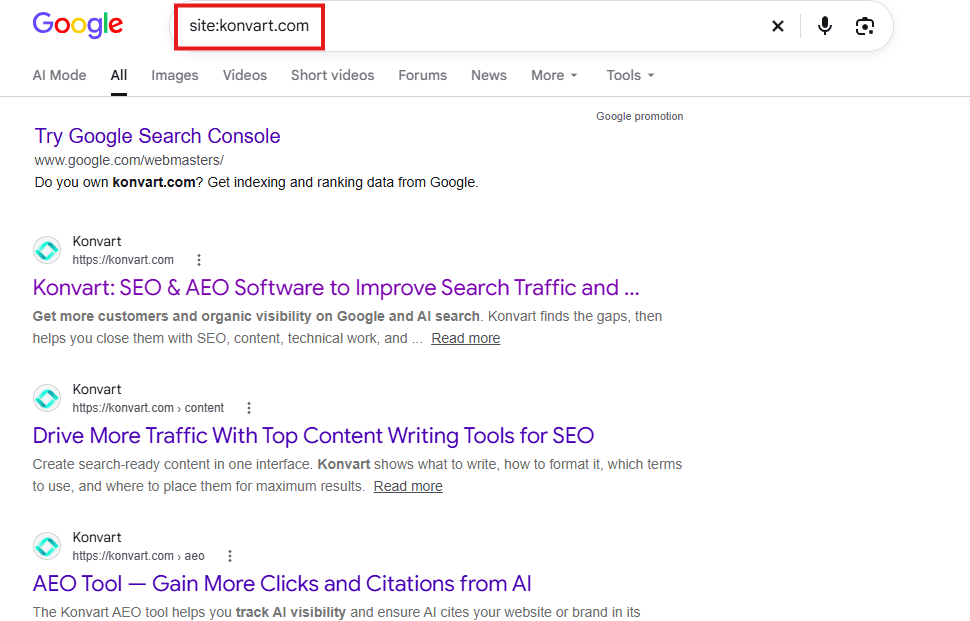
If your main service or product pages are missing, you’ve found your first job.
For the full picture, open the Pages report in Search Console. It splits your URLs into indexed and not indexed, and gives a reason for each page that’s been left out.
These are the reasons worth knowing:
- Discovered or crawled, but currently not indexed: Google knows the page exists but hasn’t added it yet. This is common on new sites. Stronger content and internal links from your other pages usually help.
- Excluded by “noindex” tag: your site is telling Google not to show the page. This is often left over from a development site or a ticked box in your website settings.
- Blocked by robots.txt: Google has been told not to crawl the page.
- Duplicate without a user-selected canonical: Google thinks the page is a copy of another page and has picked a different one to show.
If an important page has been left out, fix the cause, then paste the URL into the URL Inspection tool at the top of Search Console and click Request indexing.
Next, make sure Google has your sitemap. A sitemap is a file that lists the pages on your site, so Google doesn’t have to find them all by following links.
Most platforms create one for you. Shopify and Wix do it automatically, WordPress has one built in, and Webflow can generate one in your site settings.
It usually lives at yourdomain.com/sitemap.xml. Open the Sitemaps report in Search Console, paste in the address and click Submit.
If you want to see more reasons why your website might showing up on Google, and how to fix them, you can read the detailed guide here.
And if you’d rather not deal with the setup, Konvart handles the sitemap side for you.
If your site doesn’t have a sitemap, it creates a basic one. If your platform has a built-in sitemap feature, it turns that on, so new pages are added automatically.
It then checks Search Console and submits the sitemap if it isn’t there yet.
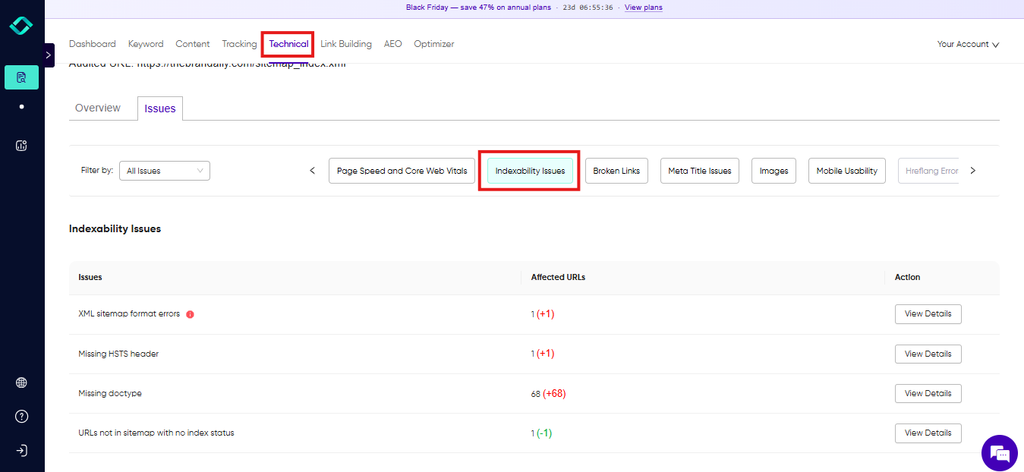
A site audit also flags indexing problems across your whole site, such as pages listed in your sitemap but marked noindex, or pages blocked by robots.txt, so you don’t have to check URLs one at a time.
Once Google can see your pages, the next question is which of them deserve your attention first.
Step 2: Pick the pages that matter most
Time: about 1 hour to choose them. Review the list every 3 months.
Where most DIY SEO goes wrong is that people try to improve everything at once. Every blog post, every old page, every new idea.
A few weeks later, they’ve made small changes to 40 pages and none of them have moved.
A better approach is to choose a short list of core pages, usually 10 to 20, and focus on them until they perform.
These are the pages that bring in customers or come closest to it.
For most businesses, that means:
- Your homepage
- Your main product or service pages, the ones that make you money
- Pricing, location or booking pages, if you have them
- Pages that already get impressions in Search Console but sit just off the first page
That last group is your quickest win.
In Search Console, open Performance, switch to the Pages tab and set the date range to the last 3 months.
Turn on Average position, then sort by impressions.
Pages with plenty of impressions and an average position between about 5 and 20 are already close to the top. A few improvements there usually pay off faster than anything you start from scratch.
Picture an IT support company with 70 pages on its site. Its list might be the homepage, six service pages, two city pages and three blog posts that already get steady impressions.
That’s 12 pages.
Each week, the owner works only on those, and steps 4 to 7 of this guide are applied to that list first.
Treat the list as something that changes. Once a page reaches a strong position and brings in steady traffic, take it off and add the next most important page.
That way, your effort always goes where it’s most needed.
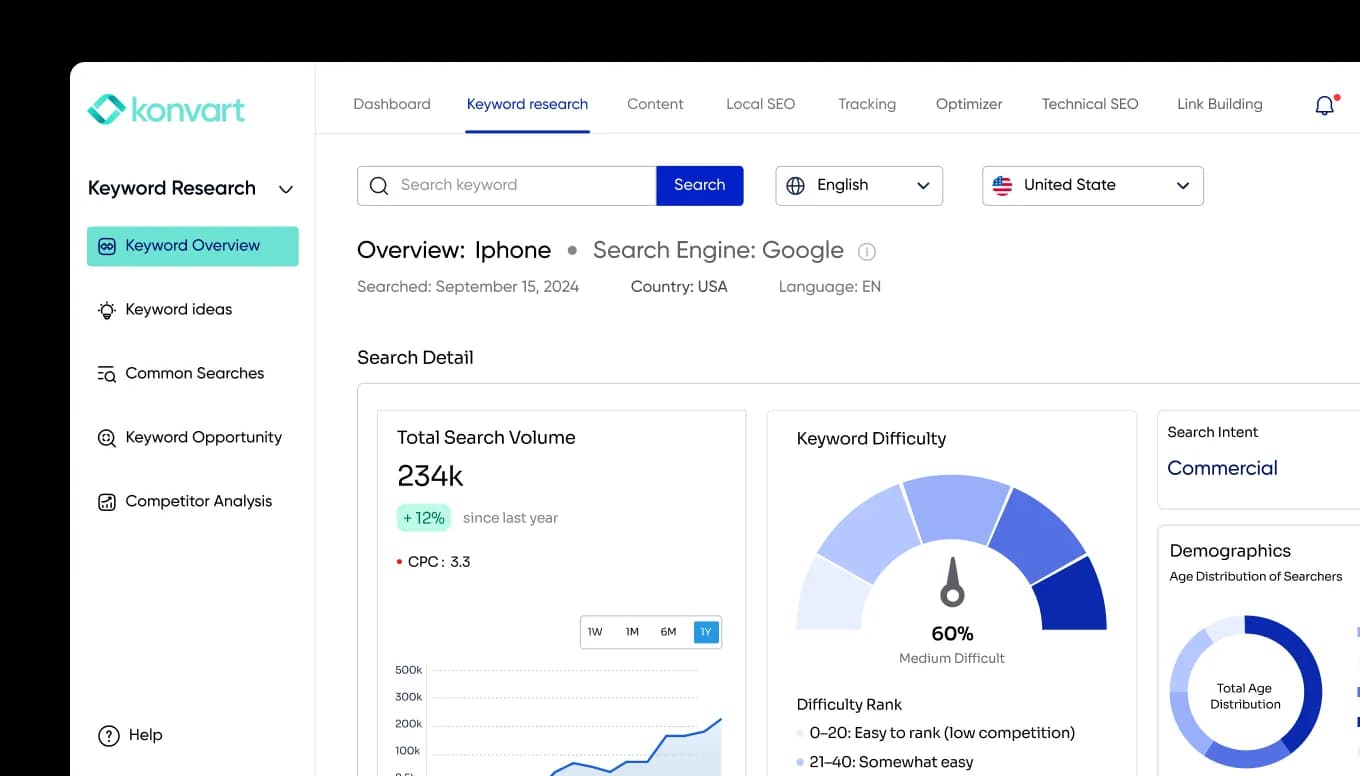
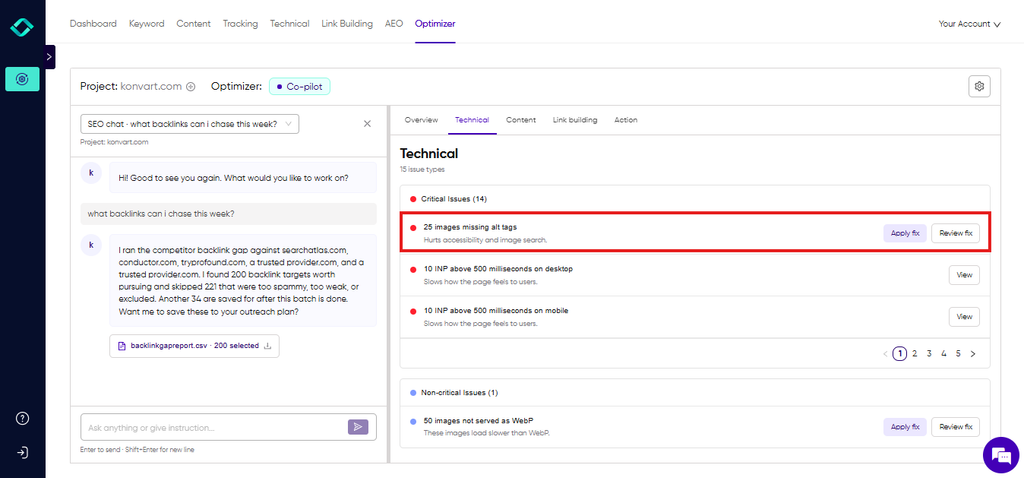
This is also how Konvart’s Optimizer works. It picks up to 20 core pages from your site, tracks their progress through Search Console for 3 to 6 months, and works out what each one needs, whether that’s better content or more backlinks.
When a page hits its target, it moves off the list and the next page takes its place.
You get the same focused approach without having to check the numbers or decide what to do next.
Now that you know which pages to focus on, the next step is finding the searches each of them should rank for.
Step 3: Find the keywords your customers actually use
Time: about 2 hours the first time. Then about 30 minutes for each new page.
A keyword is simply the words someone types into Google. The trick is to use your customers’ words, not yours.
You might call what you sell “bespoke financial advisory services,” but your customers might search for “accountant for small business near me.” If your page uses only your words, it won’t show up for theirs.
Start by checking the intent behind a search, meaning what the person actually wants.
Search intent usually falls into one of four groups:
- Informational: they want to learn something (“how to descale a coffee machine”)
- Commercial: they’re comparing options (“best espresso machine for small cafes”)
- Transactional: they’re ready to buy or book (“buy espresso machine online”)
- Navigational: they’re looking for a specific brand or site
The simplest test is to search your keyword and look at what ranks. If the first page is full of product pages, Google thinks people want to buy, so a blog post will struggle to rank there.
If it’s all guides, a product page will struggle instead.
Next, aim for longer, more specific searches, often called long-tail keywords.
“Dog food” is hard to rank for and too vague to convert. “Grain-free dog food for small breeds” gets fewer searches, but the people making them know exactly what they want, and fewer sites compete for them.
There are three good places to find keywords:
1. Your own Search Console data: In the Performance report, click one of your core pages, then open the Queries tab.
You’ll see the searches that page already appears for. Queries sitting in positions 5 to 20 are your best openings.
Keyword Opportunities in Konvart pulls these for your whole site at once, so you can see your quickest wins without checking pages one by one.
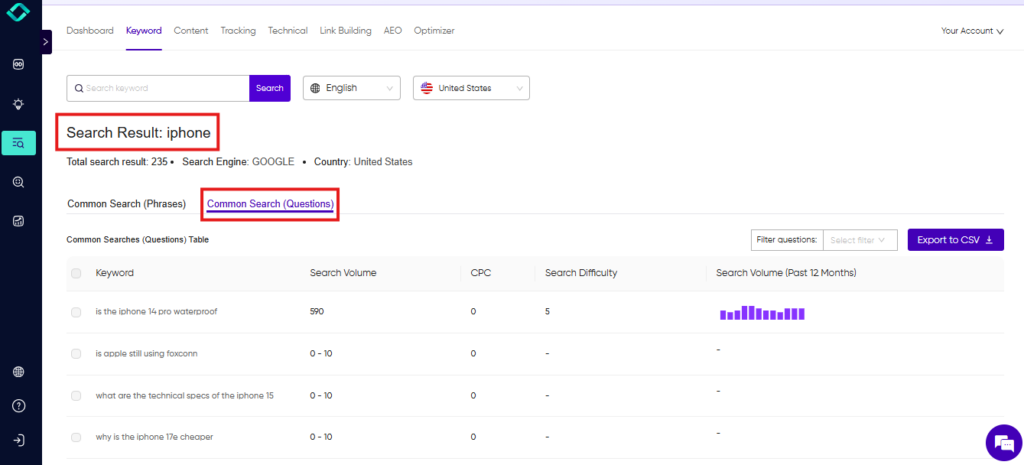
2. Google itself: Type your main topic into Google and look at the autocomplete suggestions, the “People also ask” box and the related searches at the bottom of the page.
In Konvart, common searches collects them in one place, which is handy for FAQ sections and blog ideas.
3. Your competitors: Search for your main products or services and note who ranks above you.
The keywords bringing them traffic are a good sign of what works in your market.
Our guide on how to find your competitors’ keywords walks you through it, and a competitor keyword gap check shows the searches they rank for that you don’t.
Finally, give each core page one main keyword, plus a few close variations.
Here’s how that might look for an online pet store:
| Page | Main keyword | Search intent |
| Homepage | natural pet food online | Transactional |
| Grain-free dog food category | grain-free dog food for small breeds | Transactional |
| Guide | how much should I feed my puppy | Informational |
| Comparison page | wet vs dry cat food | Commercial |
Keep it to one page per main keyword. If two pages target the same search, they end up competing with each other, and often neither ranks well.
With a keyword matched to each page, you’re ready to make the page itself work harder.
Step 4: Optimize each page for its job
Time: about 1 hour per page. Start with your core pages.
This is where many small sites lose out. They treat every page like a blog post: long text, a keyword repeated a few times, job done.
But someone landing on a product page doesn’t want 2,000 words. They want to know if the product is right for them and how to buy it.
So before you change anything, ask what the page is for. Then optimize it for that job:
| Product page | Service page | Blog post | |
| What the searcher wants | To decide whether to buy | To decide whether to get in touch | An answer to their question |
| What to focus on | Clear product name, key details (size, materials, price), good photos, reviews, shipping and returns info | What you do, who it’s for, where you work, proof (case studies, reviews), a clear way to enquire | A direct answer near the top, helpful detail, examples, links to related products or services |
| How long | Short and scannable | Medium. Enough to build trust | As long as the answer needs |
| What to avoid | Copying the manufacturer’s description used on dozens of other sites | Vague claims like “quality service” with nothing to back them up | Pushing a sale before you’ve answered the question |
A skincare brand’s moisturizer page, for example, should tell shoppers about skin type, ingredients and results in a few short sections.
A landscaping company’s “garden design in Leeds” page needs examples of past projects, the areas it covers and a quote form above the fold.
Neither needs a long essay.
Once the content fits the page’s job, check the basics. These are the parts Google reads first:
- Title tag: the blue headline in search results. Put your main keyword near the start and keep it to about 50 to 60 characters, so it doesn’t get cut off.
- Meta description: the short summary under the title. It doesn’t directly affect rankings, but a clear, specific description earns more clicks. Aim for about 150 to 160 characters.
- H1: the main heading on the page. Use one per page, and make it match what the searcher came for.
- URL: short and readable, such as /garden-design-leeds rather than /page?id=4821.
- Subheadings: break the page into clear sections that answer the questions people have.
- Internal links: link to the page from related pages on your site, using descriptive words rather than “click here.” This helps Google understand what the page is about and helps visitors find it.
- Images: give each image a descriptive file name and alt text, which describes it for screen readers and search engines.
If you’d like a second opinion on a page, our Content Editor compares it with the pages already ranking for your keyword and shows what’s missing.
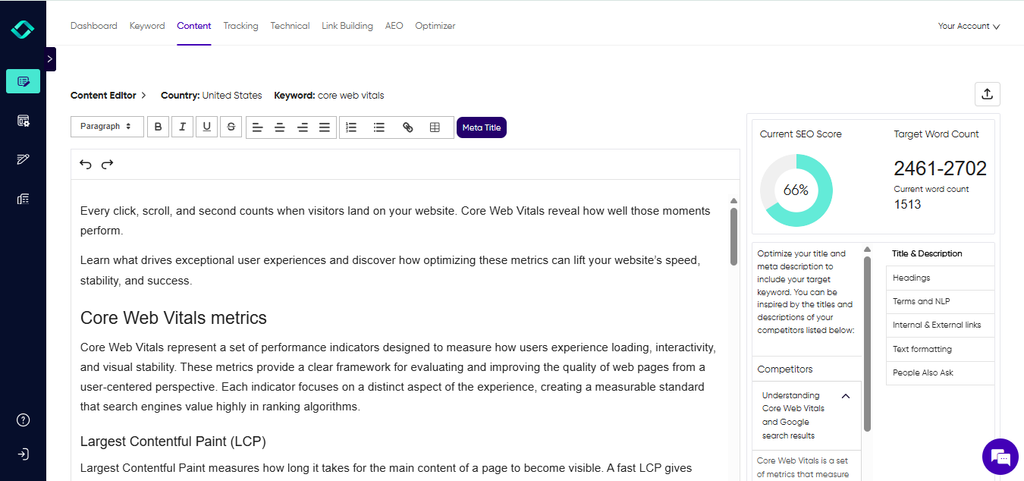
Konvart’s Optimizer goes a step further. It recognizes whether a page is a product page, a service page or a blog post and optimizes it to match.
On WordPress, Shopify, Webflow and Wix, it can update the title, meta description, H1, alt text and schema for you, within the permissions you set.
Even a perfectly optimized page can struggle if the site underneath it has technical problems, so that’s next.
Step 5: Fix the technical basics that actually matter
Time: about 2 hours the first time. Then about 20 minutes a month.
Technical SEO sounds intimidating, but for most small sites it comes down to a handful of checks.
You don’t need a perfect score on every test. You just need a site that loads quickly, works well on a phone and doesn’t send visitors or Google into dead ends.
Think of it as making sure the shop door opens. It won’t win you customers on its own, but it can definitely lose you some.
Here’s what to check:
- Security (HTTPS): Your web address should start with https:// and show a padlock in the browser. Most hosting providers and website builders include this for free. If yours doesn’t, turn it on first.
- Mobile experience: Open your core pages on your phone. Can you read the text without zooming? Are buttons easy to tap? Does anything spill off the side of the screen? Most of your visitors probably see your site this way, and Google mainly looks at the mobile version when deciding rankings.
- Speed: Open the Core Web Vitals report in Search Console. It groups your pages into good, needs improvement and poor, based on how real visitors experience them. You can also run any page through PageSpeed Insights for specific fixes. The most common culprit on small sites is large images. Compressing them, or switching them to a modern format like WebP, often makes the biggest difference.
- Broken links and deleted pages: When you remove or move a page, set up a 301 redirect to the closest relevant page. Otherwise, anyone who clicks an old link, including Google, hits a “page not found” error. Also check for chains of redirects (page A to B to C), and point links straight to the final page.
- Structured data (schema): This is extra code that tells search engines exactly what a page contains, such as a product’s price, a business’s opening hours or a set of FAQs. It can help your listing stand out in results, and it helps AI tools understand your pages. Most website platforms and SEO plugins can add the basics for you.
Picture a restaurant whose menu page loads slowly because of huge photos, and whose old “Christmas menu” page leads to an error. Fixing those two issues takes an afternoon, and both affect the visitors most likely to book a table.
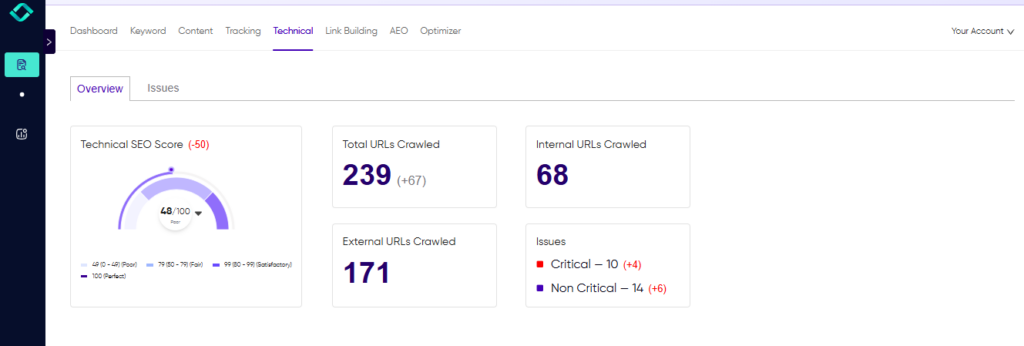
Checking all of this by hand across a whole site takes time. Konvart’s site audit runs automatically every week, checking more than 100 issues, from broken links and redirect chains to Core Web Vitals on mobile and desktop.
On connected sites, Optimizer fixes the common ones itself, such as missing alt text, meta titles and schema.
For anything it can’t change, it gives you step-by-step instructions to apply yourself or pass to your developer.
And if you’re wondering why a competitor’s page outperforms yours, a technical gap analysis compares your page with up to three competitors on speed, schema, titles and more.
With the foundations in place, you can turn to the part that brings in new visitors over time: content.
Step 6: Publish helpful content consistently
Time: about 3 to 5 hours per article.
Your core pages bring in people who are ready to buy. Content brings in people a step earlier, while they’re still researching, comparing or trying to solve a problem.
If your article helps them, you’re the business they remember when they’re ready.
The best topics are usually already in your inbox. Think about the questions customers ask before they buy, the objections that come up on sales calls and the same three emails your team answers every week.
A wedding photographer gets asked “how many hours of coverage do we need?” all the time. A recruitment agency hears “how long does it take to hire a developer?”
Each of those questions is a search someone is making right now.
When you write, a few things make the difference:
- Answer the question early. Give the direct answer in the first paragraph or two, then add the detail.
- Add what only you know. Real examples, photos from your own work, numbers from your own projects and lessons from mistakes you’ve made. This is what sets your page apart from the dozens of others on the same topic, and it’s what Google and AI tools look for when deciding who to trust.
- Link to your core pages: An article about wedding coverage should link to the photographer’s packages page. This is how content passes visitors, and ranking strength, to the pages that make money.
- Update what you already have: Refreshing an older post with current information often lifts it faster than writing a new one.
Consistency matters more than volume here. One genuinely useful article a month, every month, will do more than ten rushed posts in January and nothing after.
AI writing tools can help you get a first draft down faster, and Google cares about whether content is helpful, not how it was written.
Our guide to using AI content without hurting your SEO covers where it helps and where it doesn’t.
With Konvart, Optimizer can take this further. It finds topics from your keyword gaps, adds them to your content calendar, drafts and optimizes each article, and creates a cover image so it’s ready to go live.
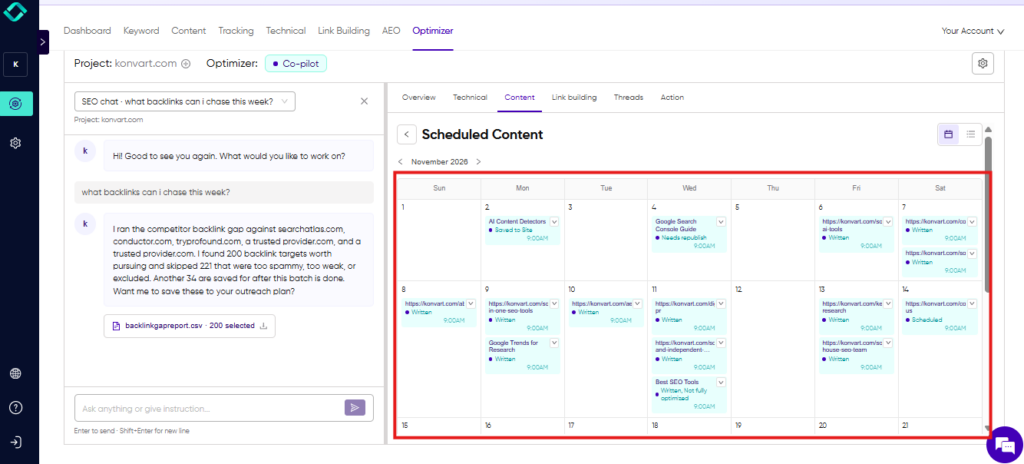
You decide whether it publishes automatically or waits for your approval.
The best use of your time is then the part no tool can do: adding your own experience to a draft that’s already optimized.
Good content earns attention. To turn that attention into rankings, you also need other websites to point to you.
Step 7: Earn a few good backlinks
Time: about 2 hours a week. This is ongoing work.
A backlink is a link from another website to yours. Google treats it a bit like a recommendation: if a relevant, trusted site links to your page, that page is probably worth showing.
If you’re new to the idea, our guide to what backlinks are and why they matter covers the basics.
Quality matters far more than quantity here. One link from a respected site in your industry can do more than a hundred from random directories.
You also don’t need hundreds. For most small businesses, a steady trickle of relevant links to your core pages is enough to move the needle.
These are the methods that work best when you’re doing it yourself:
- Ask the people you already work with: Suppliers, partners, distributors, and happy clients often have websites. A bike shop might ask the brands it stocks to list it on their “where to buy” page. A software company can offer a short case study to an integration partner. These are the easiest links you’ll ever get, because the relationship already exists.
- Join industry associations and local groups: Trade bodies, chambers of commerce, and professional directories often list members with a link. Choose the ones your customers would actually recognize, not every directory that will take you.
- Write guest posts for sites your customers read: Pitch a useful article to a blog or publication in your industry, and include a link back to a relevant page on your site. An architecture firm could write about planning permission for a homeowners’ magazine, for example.
- Answer journalists’ requests: Reporters regularly look for expert comments. Quick, specific answers can earn links from news sites that are hard to get any other way.
- Find the sites that link to your competitors: If a site links to three businesses like yours but not to you, it’s a strong lead. A backlink gap analysis shows you these sites in one list.
When you reach out, keep it short and personal. Explain who you are, why your page is useful to their readers and what you’re offering.
Avoid shortcuts. Cheap link packages, link networks and large-scale link swaps can do more harm than good, and cleaning up after them takes far longer than building links properly.
Also, the hardest part of link building isn’t finding sites. It’s the follow-through: finding the right email address, writing a pitch, remembering to follow up and then writing the guest post once someone says yes.
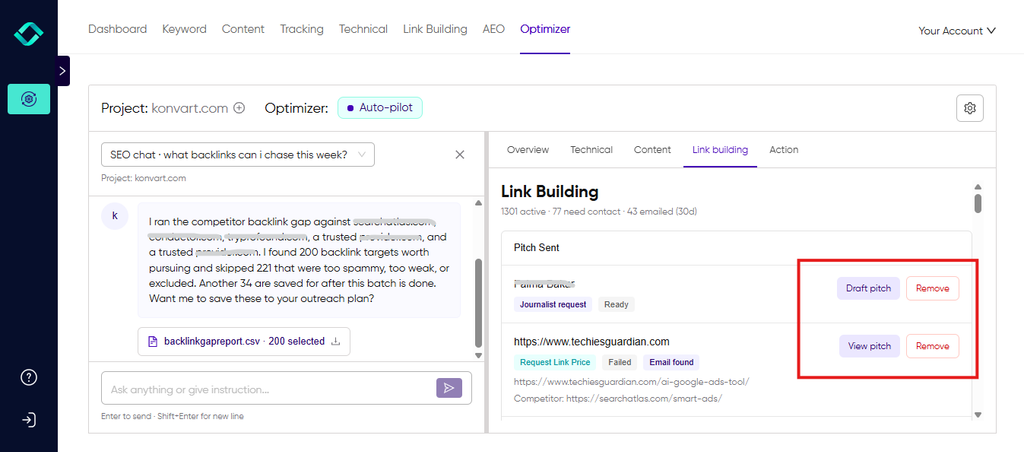
Konvart’s Outreach Support handles that whole process. It finds contact emails, writes personalized pitches and sends them from your own mailbox.
It also watches for replies, writes the guest post or link paragraph to match each site’s guidelines, and tracks the link once it goes live.
All you have to do is review the conversation and agree on the details.
Once your pages are optimized and your links are building, you need a way to see what’s working.
Step 8: Track what’s working
Time: about 30 minutes a month.
SEO without tracking is guesswork. You’ll make changes, wait a few weeks and have no idea whether they helped.
A short monthly check fixes that, and it tells you where to spend your time next.
Focus on two things: whether your core pages are getting more visible, and whether that visibility brings in customers.
In Search Console, open the Performance report and click Date to compare the last 3 months with the previous 3.
Then switch to the Pages tab and look at your core pages. For each one, check four numbers:
- Impressions: how often the page appeared in search results. This usually rises first.
- Average position: where it tends to rank. Lower is better.
- Clicks: how many people visited from Google.
- CTR (click-through rate): the share of people who clicked after seeing it. If impressions are high but CTR is low, rewrite the title tag and meta description.
In GA4, go to Reports, then Engagement, then Landing page. Filter to organic search traffic and look at the key events column.
This shows which pages bring in enquiries, bookings or sales, not just visits.
A furniture store might find that its “solid oak dining tables” page gets half the traffic of its blog but three times the orders.
That’s the page to keep improving.
Then ask yourself three questions each month:
- Which core pages moved up, and what did I change on them?
- Which pages are stuck, and what do they need next: better content, technical fixes or links?
- Has any core page reached its target? If so, swap it for the next page on your list.
Don’t react to daily ups and downs. Rankings shift all the time. Give any change about 4 to 8 weeks before you judge it.
Search Console shows average positions across every search a page appears for. To follow specific keywords, a rank tracker checks where you rank for each one.
If you serve a local area, a yoga studio, for example, a local rank tracker shows how you appear in the map results across your city, not just from one spot.
Konvart also brings the bigger picture into one overview: organic traffic, traffic from AI tools, conversions, rankings and site health. It can generate branded PDF reports every 30 days (or weekly), which is useful if you need to show progress to a co-founder, a board or a client.
Those eight steps cover Google. But more of your customers are now asking AI tools for recommendations too, so it’s worth making sure you show up there as well.
Don’t Forget AI Search
More people now ask ChatGPT, Gemini or Perplexity for recommendations before they ever search on Google. Google also shows AI Overviews, short AI-written answers at the top of many results pages.
If you want to know how those answers are put together, our guide to ranking in AI Overviews explains it.
Instead of a list of links, people get a summary that names a few businesses and cites a few sources. You want to be one of them.
The good news is that you’ve already done most of the work.
AI tools draw heavily on the same pages that rank well in search, so the eight steps above are your foundation.
Optimizing for these answers is often called answer engine optimization, and a few extra habits go a long way:
- Answer questions directly: Use question-style subheadings and put a clear one- or two-sentence answer right underneath. AI tools tend to lift answers that make sense on their own.
- Add FAQ sections and structured data to your core pages, so the key facts are easy to pick out.
- Get mentioned on the sites AI tools trust: AI tools build their picture of your business from reviews, directories, articles and industry lists, not just your own website. The backlink work in step 7 helps here too.
- Keep your details consistent: Describe what you do, who you serve and where you operate the same way everywhere, from your homepage to your Google Business Profile.
To see where you stand, ask the AI tools the questions your customers would ask.
A travel agency might try “best travel agent for family safaris in Kenya.” Note whether you’re mentioned, which competitors are and which sources the answer cites.
You can also check GA4 for visits coming from sites like chatgpt.com.
Checking by hand gets slow once you’re tracking more than a few questions. Konvart’s AI visibility tracking shows which prompts you appear for and how much traffic they drive.
It also shows two things that are hard to see manually:
- Cited sources: the websites AI tools rely on for their answers. These are the places to focus on getting your brand mentioned, through guest posts, reviews or listings.
- Fan-out queries: the related searches an AI tool runs behind the scenes to build its answer, where available. Each one is a question your content can cover, giving you more chances to be picked up.
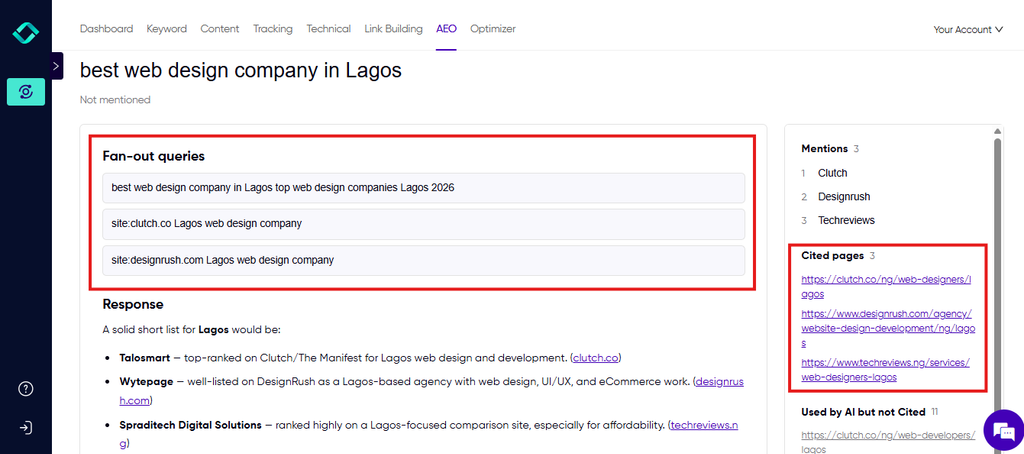
It also flags pages that are hard for AI tools to extract answers from, so you know what to fix first.
By now you’ve seen everything DIY SEO involves. The next is deciding what to do yourself or automate.
What to Do Yourself, What to Automate, and What to Hand Off
You don’t have to choose between doing everything yourself and handing everything over. Most businesses get the best results from a mix.
The trick is knowing which tasks need you, which just need doing, and which need specialist help.
A simple way to sort them:
- Keep the tasks that need your judgment or your knowledge: No one knows your customers, products and results like you do.
- Automate the tasks that are repetitive and follow clear rules: They matter, but they don’t need you personally.
- Hand off the tasks that need deep expertise or would take you weeks to learn: especially when a mistake would be costly.
For automation in particular, it helps to ask a few questions about each task.
Can you check the result easily? Can you undo it? Who sees it if something goes wrong?
Our guide to deciding what SEO to automate and what to keep human walks through this task by task.
Here’s how that looks in practice:
| Do it yourself | Automate | Hand off to an expert |
| Deciding which pages and markets matter most | Tracking rankings, traffic and conversions | Moving your site to a new platform or domain |
| Approving changes to important pages | Weekly site audits and routine technical fixes | Custom development and complex technical problems |
| Adding your own experience, photos and results to content | Keyword research and content planning | Large-scale content production across many markets |
| Building relationships with partners, suppliers and journalists | Optimizing core pages and drafting content | Big digital PR campaigns and brand launches |
| Agreeing link deals when a site says yes | Finding link prospects, sending pitches and following up | A full strategy review when growth stalls and you can’t see why |
Where you draw the line depends on your business. A two-person software startup might do almost everything in the first two columns and only bring in a developer for a site rebuild.
A dental group with eight locations might automate the routine work, keep control of approvals and work with an agency on a wider campaign.
What’s changed recently is the middle column. Work that used to need an SEO specialist’s time every week, like optimizing pages, fixing technical issues and running outreach, can now be done for you while you stay in charge of the decisions.
Where Automation Fits, Without Giving Up Control
The biggest worry most owners have about automating SEO is losing control.
You don’t want software rewriting your homepage at 2 a.m. or sending pitches you’ve never seen. That’s a fair worry, and it’s why the best way to automate is to decide upfront exactly what the tool is allowed to do.
That’s how Konvart’s Optimizer is built.
Konvart is an all-in-one SEO platform whose Optimizer handles the repetitive SEO work, such as optimizing your most important pages, fixing technical issues and running link-building outreach, within the permissions you set.
Getting started takes a couple of minutes. Enter your domain, and Konvart scans your site to fill in the setup for you: your brand style, sitemap, competitors, services, target market and site type.
You check what it found, change anything that’s off, and connect Search Console and Analytics.
Then you set the permissions. You might let it optimize new pages but not existing ones, fix technical issues but wait for your approval before sending any outreach, or draft articles without publishing them.
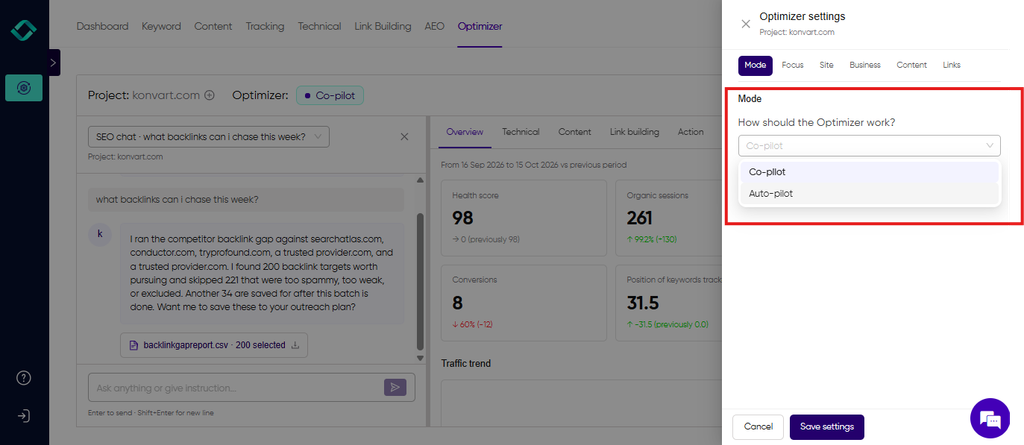
You can widen or narrow these at any time as you get comfortable.
Here’s how the eight steps change:
| Step | Doing it yourself | With Konvart |
| Make sure Google can find your site | Check indexing, find your sitemap, submit it in Search Console | Sitemap turned on or created and submitted for you. Indexing issues flagged in the weekly audit |
| Pick your core pages | Sort Search Console data, choose pages, review every few months | Up to 20 core pages picked, tracked for 3 to 6 months and rotated as they hit targets |
| Find keywords | Search Console, Google suggestions, competitor research | Gaps and quick wins found from your data and your competitors, then added to your calendar |
| Optimize each page | Rewrite titles, descriptions, headings and content by hand | Pages optimized for their type, with changes applied on WordPress, Shopify, Webflow or Wix |
| Fix technical basics | Run checks, fix or brief a developer | Common fixes applied. Step-by-step instructions for the rest |
| Publish content | Research, write, find an image, publish | Drafted, optimized and given a cover image, ready for your experience and approval |
| Earn backlinks | Find sites, find emails, pitch, follow up, write the guest post | Prospects found, pitches sent from your mailbox, replies monitored, guest posts written, links tracked |
| Track results | Check Search Console and GA4 each month | Rankings, traffic, AI visibility and conversions in one overview, plus monthly PDF reports |
Your role shifts from doing the work to steering it. The hours in the table above become a short weekly review.
If you’d like to see how Optimizer compares with other options before deciding, our roundup of the best automation softwares for SEO covers what each tool automates and what it costs.
For Konvart, the plans start at $30 a month, with a 7-day free trial and no card needed.
Whichever route you choose, a few common mistakes can slow down your progress. Here’s what to watch out for.
Common DIY SEO Mistakes to Avoid
Most DIY SEO problems aren’t technical. They don’t come from a missing tag or a slow server. They come from small habits that waste your time.
You do the work, nothing seems to change, and it’s hard to tell why. The good news is that habits are much easier to fix than code. Once you know what to watch for, you’ll spot these mistakes early, before they cost you months of effort.
Here are the ones that slow down owners most often:
1. Trying to fix everything at once: Spreading your time across 50 pages means none of them gets enough attention to move.
Stick to your core pages until they perform, then move on.
2. Using the same approach for every page: A product page, a service page and a blog post do different jobs. If every page on your site reads like an article, your product and service pages will struggle to rank and to convert.
3. Writing for keywords instead of people: Repeating a keyword over and over doesn’t help a page rank. It just makes it harder to read. Use your main keyword in the places that matter, such as the title, the H1 and early in the page, then write naturally.
4. Changing too much at the same time: If you rewrite a page, change its URL and add new links all in one week, you won’t know which change made the difference.
So, make one round of changes, note the date and give it time.
5. Judging results too early, or giving up: SEO builds slowly. Many owners stop after six or eight weeks, often just before their changes start to show.
Give it at least 3 to 6 months of steady work before deciding whether it’s working.
6. Measuring traffic instead of customers: More visitors is nice, but it isn’t the goal. A page that brings in 200 visitors and 10 enquiries is worth more than one that brings in 2,000 and none.
Check your key events in GA4, not just your visitor numbers.
Avoid these, and you’ll be ahead of most sites competing with you.
Start This Week
You don’t need to work through the whole guide before you see progress. SEO rewards steady effort more than big bursts, and the most important step is simply starting.
Here’s what to do this week:
- Connect Search Console and GA4, then check that your most important pages are indexed.
- Choose your core pages: List the 10 to 20 pages that bring in customers or come closest to it.
- Improve one page: Pick the core page closest to the first page of results, make sure it does its job, and tighten its title tag, meta description and H1.
That’s about three hours of work, and it sets up everything that follows.
From there, keep a regular weekly slot, work through your core pages one at a time and give each change time to show results.
If you’d rather spend those hours running your business, Konvart can handle the repetitive work while you stay in control of the decisions.
Enter your domain and see what Konvart would do for your site. You get a 7-day free trial, and no card is needed.