Right now, your competitors are getting traffic from keywords you’ve probably never thought about. And some of those searches come from people who are ready to buy.
The good news? Those keywords aren’t hidden.
They’re sitting in plain sight in your competitors’ rankings. You just need to know where to look.
That’s what competitor keyword research is for. Instead of guessing what your audience searches for, you can see exactly what’s already bringing visitors to sites like yours.
In this guide, you’ll learn how to find your competitors’ keywords in four easy steps, using free methods and SEO tools.
Then we’ll cover how to analyze what you find, so you only go after keywords that are relevant, realistic to rank for, and likely to bring you customers.
TL;DR: How to find your competitors’ keywords
- Identify your true search competitors: search your main keywords and note which sites keep appearing. They’re not always your business competitors.
- Pull the keywords they rank for: check their pages manually, or use an SEO tool to see every keyword they rank for.
- Run a keyword gap analysis: compare your keywords with theirs to find what they rank for that you don’t.
- Check which competitors show up in AI answers: see which brands ChatGPT and Google’s AI Overviews mention for your topics.
Then analyze the list: keep keywords that are relevant to your business, match the right search intent, and are realistic for your site to rank for. Match each one to a page on your site.
What are Competitor Keywords?
Competitor keywords are the search terms your competitors rank for or bid on in search engines. They show you what your audience is actually searching for, and which of those searches are already sending traffic to someone else.
For example, an HR software company might find a competitor ranking for “how to calculate employee turnover rate” or “HR software for small business.”
A skincare brand might spot competitors ranking for “niacinamide serum for oily skin.”
Each of those keywords represents real people looking for answers or products.
But “competitors” can mean more than one thing. When you research keywords, you’ll usually come across three types:
| Type | What it means | Example |
| Direct | Sells the same thing to the same audience | Two HR software platforms for small businesses |
| Indirect | Solves the same problem in a different way | An HR platform and a site selling HR policy templates |
| Search | Ranks for your keywords without selling what you sell | A personal finance blog ranking for “best business bank account” alongside fintech apps |
All three can reveal useful keywords. But search competitors are the ones most people overlook, and they’re often the sites standing between you and page one.
Why it’s Worth Finding Your Competitors’ Keywords
Competitor keyword research gives you something regular keyword research can’t. And that’s proof.
Instead of starting from a blank page, you can see which keywords are already bringing organic traffic to sites like yours.
Here’s what it helps you do:
- Find proven search demand: If several competitors rank for the same keyword, real people are searching for it, and it’s worth their while to compete for it.
- Spot keywords you missed: Even thorough keyword analysis can overlook the specific, problem-focused searches your customers use, like “invoicing software for freelancers” instead of just “invoicing software.”
- Uncover content gaps: Competitors may cover topics and questions your site hasn’t touched yet.
- Find easier wins: Long-tail keywords with lower keyword difficulty give newer or smaller sites a realistic path to page one.
- Invest in content with confidence: Before you spend time and budget on a new page, you can confirm there’s search volume and interest behind the topic.
The value of all these depends on analyzing the right competitors. So that’s where the process starts.
How to find your competitors’ keywords (in 4 steps)
Finding your competitors’ keywords comes down to four steps.
Work out who you’re really competing with, see what they rank for, compare it with your own site, and check who’s winning in AI answers.
Before you start, you’ll need two things:
- A list of your 5-10 most important keywords. These are the main products, services, or topics you want to be known for. Don’t worry about getting it perfect. It’s just a starting point.
- Somewhere to collect what you find. A spreadsheet works for the free methods, and an SEO tool will save you time if you’re analyzing several competitors.
To make each step concrete, we’ll follow a small HR software company comparing itself against larger HR platforms, with examples from skincare and fintech along the way. The process works the same in any niche.
It all starts with choosing the right competitors to study. Pick the wrong ones, and every step after this will point you toward the wrong keywords.
Step 1: Identify your true search competitors
The companies you compete with for customers aren’t always the ones you compete with on Google.
Say you run a small HR software company. Your business competitors are probably other HR platforms.
But when you search “how to calculate employee turnover rate,” you might find HR blogs, career sites, and template websites outranking all of them. Those are your search competitors for that topic, and they can be just as useful to study.
To find your true search competitors:
- List your 5-10 most important keywords. Think of the main products, services, and topics you want to be known for.
- Search each one on Google and note the sites that rank on page one.
- Look for patterns. The domains that keep appearing across several of your keywords are your real search competitors.
- Shortlist 3-5 of them. Choose sites that rank for the topics you want to own, not just the biggest names in your industry.
If Your Site is New
If your website is new and doesn’t rank for much yet, the usual “find sites with overlapping keywords” approach won’t work, because there’s nothing to overlap with.
Start with seed keywords instead.
These are the broad topics you want to rank for, like “HR software for small business” or “employee onboarding checklist.”
Search them, note who dominates the results, and use those sites as your competitors.
The same applies in other industries. A fintech app offering business bank accounts might find personal finance blogs and comparison sites outranking its direct competitors for “best business bank account for LLC.”
SEO tools can speed this up.
For example, Konvart’s Competitor Monitoring shows which sites compete with you in organic search and how your rankings compare over time.
Step 2: Pull the keywords they rank for
Once you have your shortlist, the next step is to see which keywords each competitor ranks for.
You can do this manually for free, or use an SEO tool to see everything at once.
The free way
If you’re just getting started, a few manual checks will give you a good sense of what each competitor is targeting:
- Check their page titles, headings, and meta descriptions. Open a competitor’s key pages and look at the title tag, H1, and meta description (right-click and choose “View page source” to see them). These usually reveal the main keyword a page is targeting.
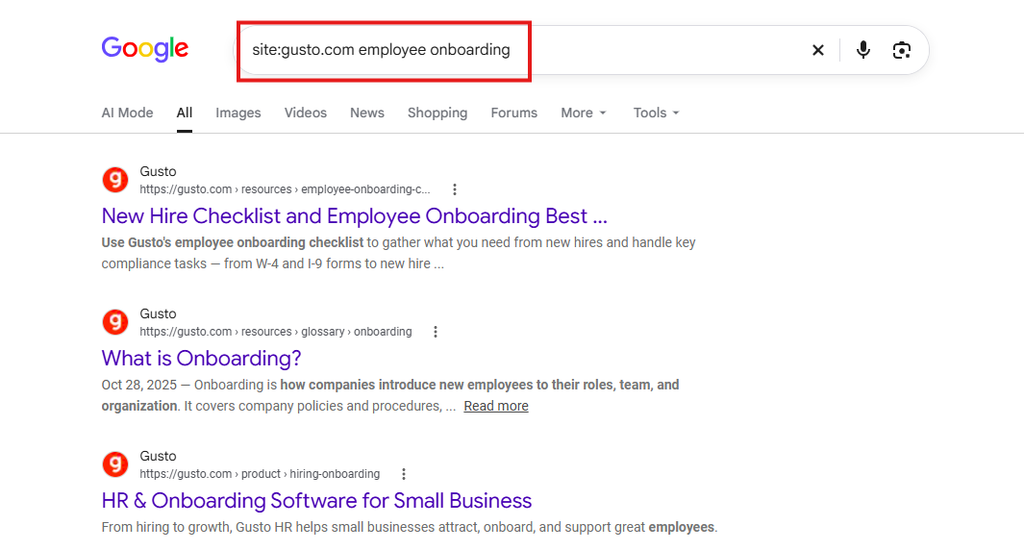
- Use site: searches. Type “site:competitor.com onboarding” into Google to see every page that competitor has about onboarding. It’s a quick way to find out how deeply they cover a topic.
- Look at People Also Ask. Search your main keywords and note the questions in the “People also ask” box. If competitors have pages answering those questions, those are keywords worth noting.
- Browse their blog categories and navigation. How a competitor organizes its site often shows which topics it treats as most important.
An HR software company might find that one competitor has a whole onboarding section, with separate pages for “employee onboarding checklist,” “onboarding email templates,” and “remote onboarding.”
That’s a clear sign the topic drives traffic for them.
The caveat: Manual research works for a quick look, but it doesn’t scale.
It also can’t tell you how much traffic each keyword brings in or where exactly a competitor ranks.
The faster way
SEO tools like Konvart can show you every keyword a competitor ranks for, along with its ranking position, search volume, keyword difficulty, and the page that ranks.
Because looking at one competitor at a time is useful, but it only tells you half the story.
You’ll learn what they rank for, but not how that compares with your own site, which keywords you’re already competing for, or where you’re missing out entirely.
That’s why it’s often faster to skip straight to a side-by-side comparison.
In Konvart, for example, Competitor Keyword Gap pulls your competitors’ keywords and compares them with yours in a single report.
We’ll walk through it in the next step.
Step 3: Run a keyword gap analysis
A keyword gap analysis compares your keywords with your competitors’ keywords in one view.
Instead of reviewing each competitor separately, you see exactly where they’re getting traffic that you’re not.
When you run one, you’ll usually find three groups of keywords:
- Missing keywords: your competitors rank for them, and you don’t rank at all. These are your biggest untapped opportunities.
- Weak keywords: you rank for them, but lower than your competitors. A better page or a few improvements could help you move up.
- Shared keywords: you and your competitors both rank for them. This shows where you’re already competing head-to-head.
For most sites, the missing keywords are the best place to start, especially when more than one competitor ranks for them.
If two or three competitors all rank for the same keyword, that’s strong evidence of real search demand.
How to Run a Keyword Gap Analysis in Konvart
Doing this manually means exporting each competitor’s keywords, combining them in a spreadsheet, removing duplicates, and checking which ones you already rank for.
With several competitors, that can mean thousands of rows.
Here’s how to do it in Konvart instead:
- Enter your domain: Our example HR software company would enter its own website.
- Choose your competitors: Pick one competitor, or several, from your shortlist in Step 1.
- Run the report: Konvart shows the keywords your competitors rank for that you don’t.
- Sort and shortlist: Sort by search volume or keyword difficulty, then save or export the keywords worth a closer look.
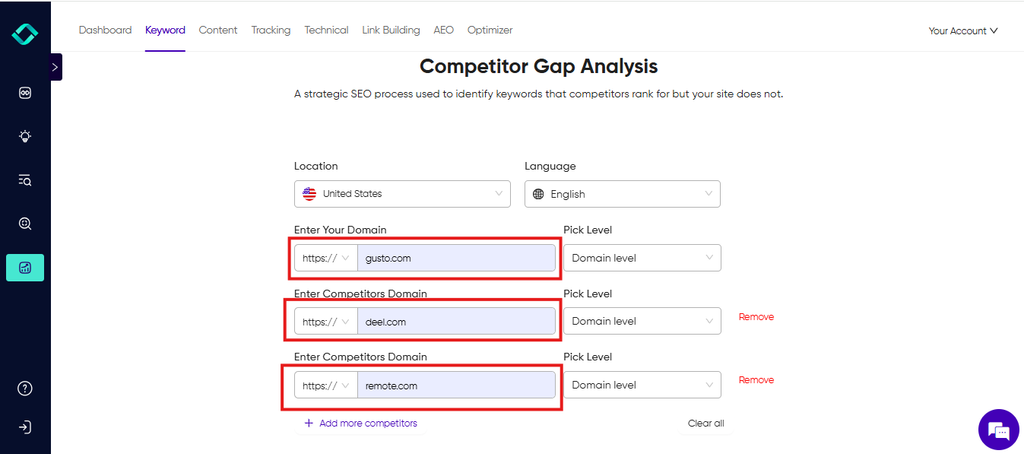
An HR software company might find that all three competitors rank for keywords like “employee onboarding checklist” and “PTO policy template,” while it ranks for neither.
That’s a clear content gap, and a strong signal these topics are worth covering.
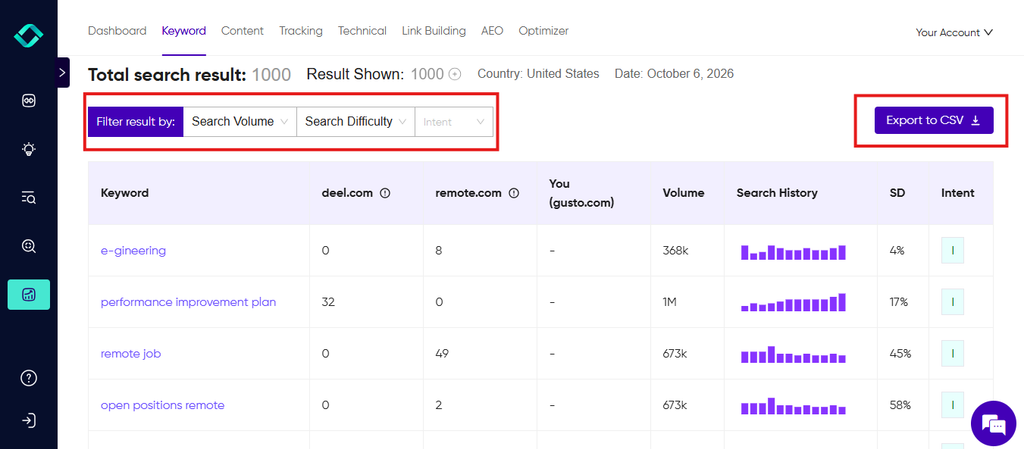
What used to take hours in a spreadsheet takes a few minutes.
If you want to see the gaps for your own site, run a keyword gap free for 7 days.
Step 4: Check which competitors show up in AI answers
Search doesn’t only happen on Google’s results page anymore.
More people now ask ChatGPT, Gemini, Perplexity, or Google’s AI Overviews for recommendations, and those tools often name specific brands.
Ask ChatGPT for the “best invoicing software for freelancers,” and it might recommend four or five fintech tools.
If your competitors are on that list and you’re not, you’re missing out on customers before they ever see a search result.
That’s why it’s worth checking which competitors AI engines mention for your most important topics. Here’s what to look for:
- Which brands get mentioned: Note which competitors appear, how often, and for which questions.
- Which pages get cited: AI answers often link to their sources. These might be competitor blogs, review sites, or community threads.
- Which topics trigger mentions: You may find that a competitor dominates AI answers for one topic but rarely appears for others.
A skincare brand might search “best moisturizer for sensitive skin” and find that Google’s AI Overview cites a dermatology blog and a Reddit thread, not any brand’s website.
Those sources are competitors too, because they shape what AI recommends.
You can check this manually by asking each AI tool your main questions and recording the results.
The catch is that answers change often and can vary from person to person, so a single check won’t tell you much.
Konvart’s AEO tool handles the AI visibility tracking for you, monitoring the prompts that matter to your business and showing how often your brand appears compared with your competitors.
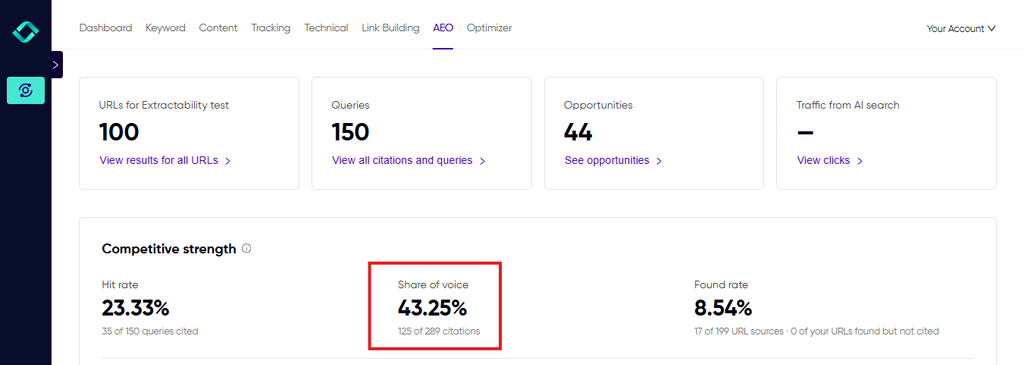
If you want to go further, here’s how to make your brand visible in AI answers.
Now that you know how to check the keywords and topics that are pulling traffic and customers to your competitors’ website, the next step is to know which ones to use and how to pick them
How to Analyze Your Competitors’ Keywords
Finding competitor keywords is the easy part. Most keyword gap reports will hand you hundreds, sometimes thousands, of options.
But the real work is deciding which ones deserve your time.
Here’s how to narrow the list down to the keywords that can actually bring you traffic and customers.
1. Start with relevance
Before you look at a single number, ask: does this keyword match what you sell and who you serve?
A keyword can have huge search volume and still be worthless if the people searching for it would never become customers.
For instance, a fintech company offering business bank accounts might see competitors ranking for “best credit cards for students.”
It’s a popular keyword, but those searchers aren’t business owners, so it doesn’t belong on the list.
Relevance comes first because every other metric is meaningless without it.
2. Match the search intent
Search intent is the reason behind a search. The same topic can have very different intent depending on how it’s phrased:
- Informational: the searcher wants to learn something, like “how to calculate employee turnover rate.”
- Commercial: the searcher is comparing options, like “best HR software for small business” or “Gusto alternatives.”
- Transactional: the searcher is ready to act, like “HR software pricing” or “buy niacinamide serum.”
The easiest way to check intent is to search the keyword and look at what ranks. If the top results are all comparison articles, a product page probably won’t rank there.
If they’re step-by-step guides, a sales page won’t satisfy the searcher.
Commercial and transactional keywords usually bring visitors closer to buying, so they’re often worth prioritizing even when their search volume is lower.
3. Look at search volume in context
Search volume tells you how many people search for a keyword each month. It matters, but it’s easy to overvalue.
A keyword with 100 monthly searches from people ready to buy can bring in more customers than one with 10,000 searches from people who are just browsing.
For example, ” Invoicing software for freelancers” might have a fraction of the volume of “what is an invoice,” but the people searching it are much closer to choosing a product.
So, use volume to compare keywords with similar relevance and intent, not as the main deciding factor.
4. Be realistic about keyword difficulty
Keyword difficulty estimates how hard it will be to rank on page one. If your site is newer or smaller, competing for the most difficult keywords right away usually means months of effort with little to show for it.
Start with keywords where the difficulty is realistic for your site, and plan the harder ones as longer-term goals.
Often, the best way to rank for a difficult keyword later is to first build content around the easier topics related to it.
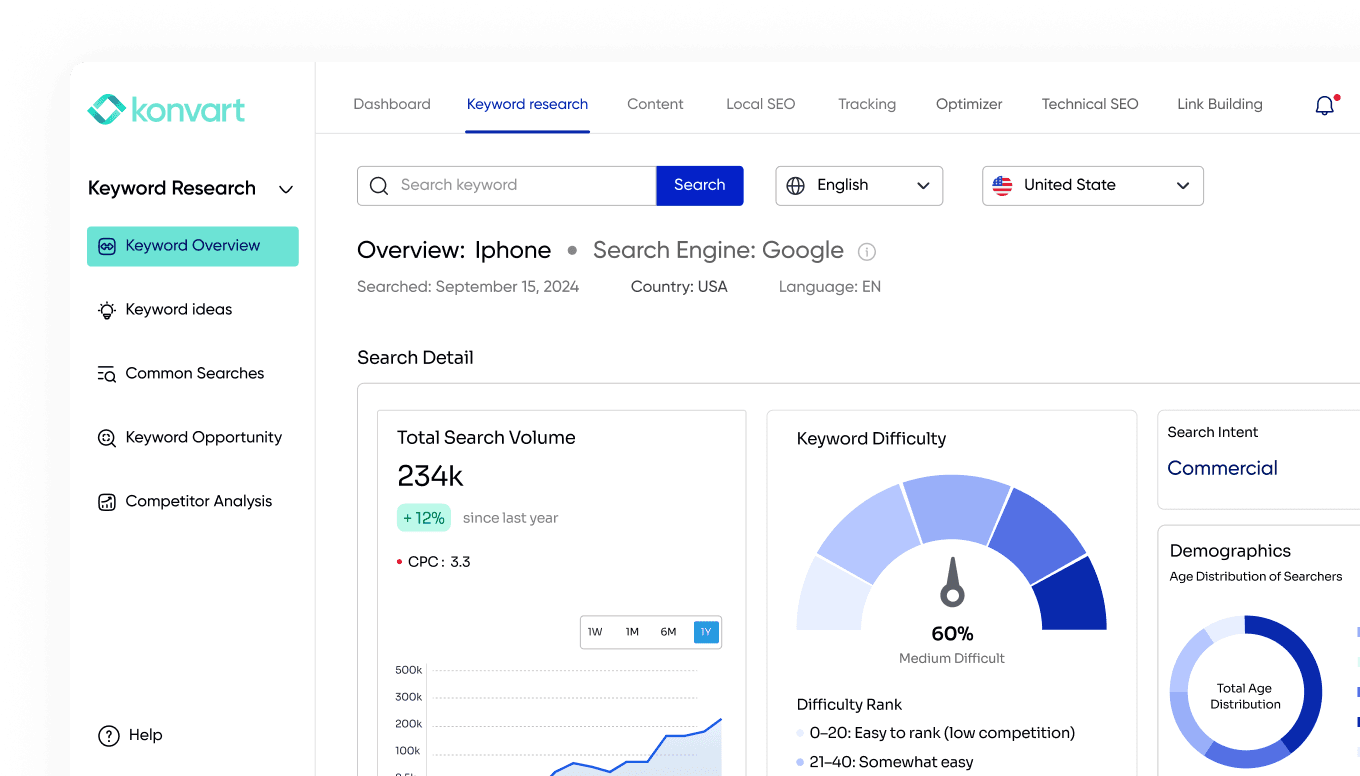
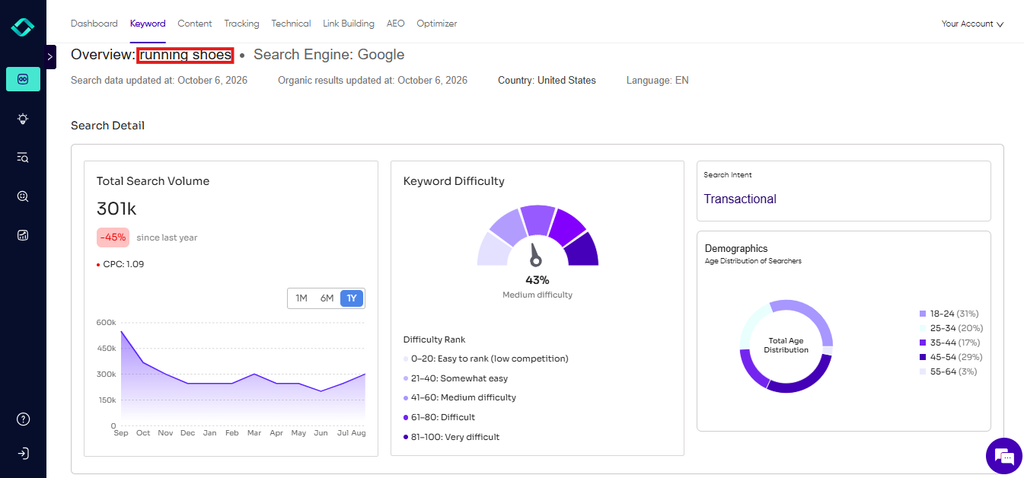
You can use Konvart’s Keyword Overview tool to see the difficulty of a keyword, and some more useful information like search intent, search volume, searchers demographics, and related keywords.
5. Remove the noise
Every competitor keyword list includes terms you’ll never want. Remove:
- Competitor brand names, like “[competitor] login” or “[competitor] pricing”
- Products, services, or locations you don’t offer
- Keywords far beyond your site’s current authority, at least for now
Be ruthless here. It’s normal for most of the list to go.
6. Find the keywords you almost rank for
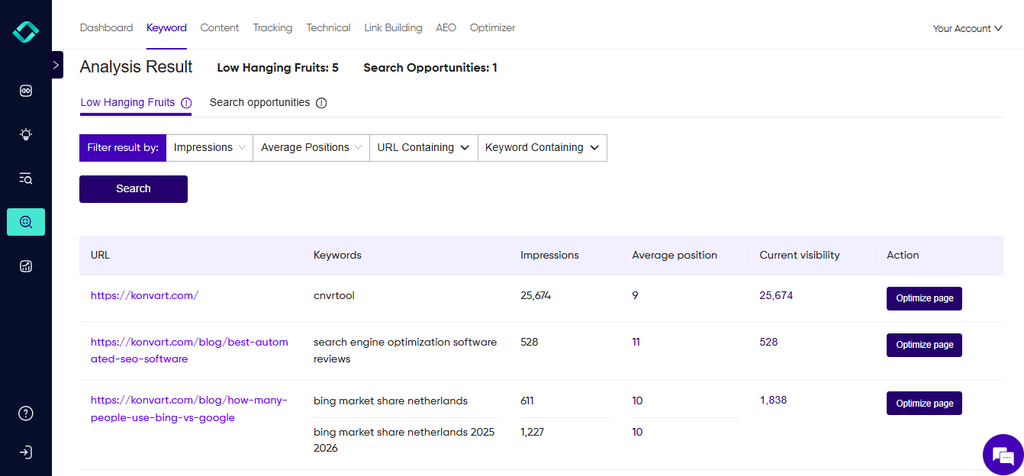
Some of the best opportunities aren’t new keywords at all. They’re keywords you already rank for in positions 11-30, just outside page one.
These pages already have some authority with Google for the topic. Improving the content, adding internal links, or better matching the search intent can move them onto page one much faster than a brand-new page could rank.
In Konvart, Keyword Opportunities surfaces these keywords for you, so you can see which pages are closest to page one and focus your efforts there.
7. Group keywords into topics
If a competitor ranks for 40 keywords around one topic, that isn’t 40 separate opportunities. It’s one topic they’ve covered thoroughly that you haven’t.
Group related keywords together.
A skincare brand might group “niacinamide serum for oily skin,” “how to use niacinamide,” and “niacinamide vs vitamin C” into one topic, then plan a main page plus supporting articles.
This builds topical authority, which helps all the related pages rank better.
Put it All Together
Here’s how these criteria work together across different businesses:
| Keyword | Niche | Relevance | Intent | Volume (from Konvart) | Difficulty | Decision |
| hr software for small business | HRTech | High | Commercial | 1.3k | 8% | Plan for later; build supporting content first |
| how to calculate employee turnover rate | HRTech | Medium | Informational | 1.6k | 8% | Target now as a supporting guide |
| niacinamide serum for oily skin | Skincare | High (if you sell one) | Commercial | 6.6k | 3% | Target now on the product or category page |
| skincare routine for teenagers | Skincare | Low (for an anti-aging brand) | Informational | 720 | Low | Skip: wrong audience |
| invoicing software for freelancers | Fintech | High (if freelancers are your market) | Commercial | 720 | 10% | Target now with a dedicated landing page |
Notice the skincare example. “Skincare routine for teenagers” is easy to rank for, but an anti-aging brand would attract the wrong audience. Easy keywords aren’t always good keywords.
Match each keyword to the right page
The final step is deciding where each keyword belongs. Search intent usually tells you what type of page to create:
| Keyword intent | Example | Best page type |
| Buy, pricing, demo | “HR software pricing” | Product, service, or pricing page |
| Best, top, alternatives, vs | “best business bank account” | Comparison or alternatives page |
| How to, what is, guide | “how to use niacinamide” | Educational article or guide |
| Template, checklist, calculator | “employee onboarding checklist” | Downloadable resource or tool |
| Industry or audience | “invoicing software for freelancers” | Use case or landing page |
Two rules make this work:
- One primary keyword per page: If several pages target the same keyword, they end up competing with each other, and neither ranks as well as it could.
- Improve before you create: If you already have a page that covers the topic, strengthen it before writing something new.
Don’t Forget Competitors’ Paid Keywords
Organic rankings show you what competitors have earned, but paid keywords show you what they’re willing to spend money on.
If a competitor keeps running Google Ads for the same topic month after month, it’s a strong sign those searches bring in paying customers.
That’s worth knowing, even if you have no plans to run ads yourself.
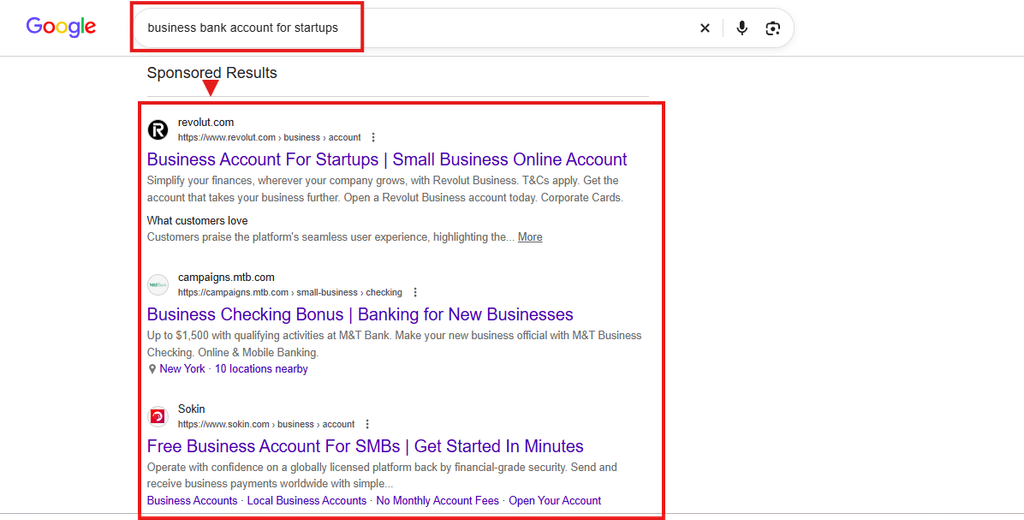
The quickest check is to search your main keywords and note which competitors appear in the sponsored results at the top of the page.
A fintech company might find several competitors bidding on “business bank account for startups.”
For a fuller picture, use the Google Ads Transparency Center.
How to Use The Google Ads Transparency Center
The Google Ads Transparency Center is a free tool from Google that shows the ads any verified advertiser is running. You don’t need an account or a login.
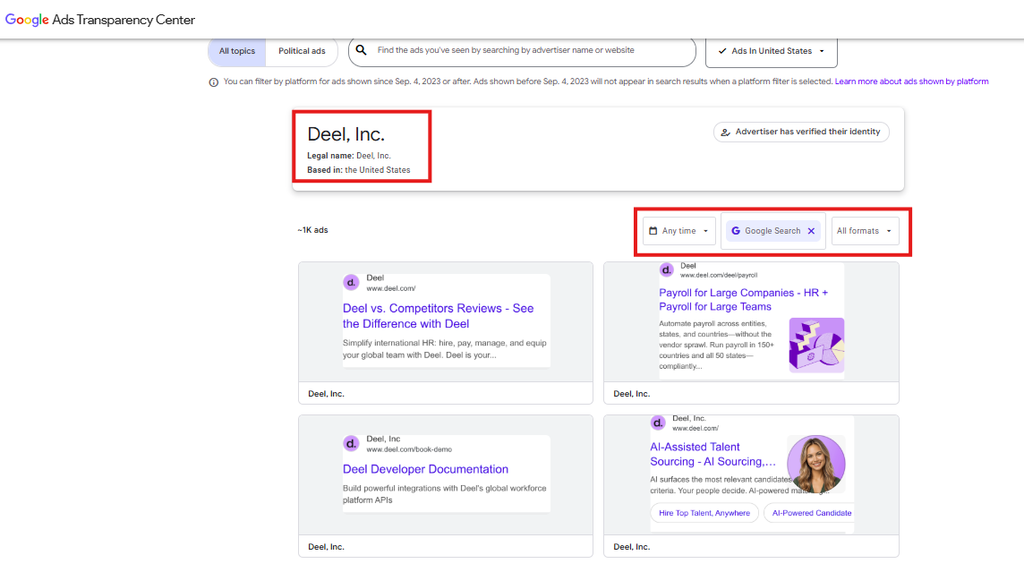
- Go to adstransparency.google.com and search for a competitor’s name or website.
- Filter the results. Set the platform to Google Search, choose your target country, and pick a date range.
- Review their search ads. Each ad shows its headline and text, when it ran, and the website it points to.
Here’s what to look for:
- Repeated words and phrases in headlines: If a fintech competitor’s ads keep mentioning “business bank account for startups” or “no monthly fees,” those are likely the searches and selling points they’re paying for.
- Ads that run for a long time: Advertisers rarely keep paying for ads that don’t work. Long-running ads usually point to profitable keywords.
- Where the ads lead: The landing pages show which products or offers a competitor treats as most valuable.
- Differences between countries: Switching the region can show whether a competitor targets different searches in different markets.
One limitation: the Transparency Center shows the ads, not the exact keywords behind them or how much the competitor spends.
You’ll be reading between the lines from the ad copy, so treat what you find as strong clues, then check the volume and difficulty of those keywords before targeting them.
Paid keywords with strong buying intent are often worth targeting organically too. Because ranking for them means you can reach those buyers without paying for every click.
What to Do Next
By now, you should have a shortlist of competitor keywords that are relevant to your business, match the right search intent, and are realistic for your site to rank for.
Here’s how to turn that list into results:
1. Create or improve the pages: Start with your “almost there” keywords and the existing pages you can strengthen, then plan new pages for the gaps.
A content brief for each page keeps it focused on the right keyword and covers what searchers expect to find.
2. Track your rankings: Add your chosen keywords to a rank tracker so you can see which changes are working.
When you track your rankings alongside your competitors’, you’ll also spot when they start targeting something new.
3. Repeat the analysis every quarter: Your competitors keep publishing, and new gaps appear all the time. So, a quick check every few months keeps your list fresh.
Competitor keyword research doesn’t have to mean days of exporting and cleaning spreadsheets.
In Konvart, you can see the keywords your competitors rank for that you don’t, find the ones you’re closest to winning, and turn them into a plan in a single afternoon.
You can find your competitors’ keywords here. Free for 7 days. No card needed
Frequently Asked Questions
Q: Can I find competitor keywords for free?
A: Yes. You can check competitors’ page titles and meta descriptions, use site: searches on Google, review the “People also ask” box, and look up their ads in the Google Ads Transparency Center, all for free. Free methods work well for a quick look, but SEO tools are faster when you need full keyword lists, search volume, and difficulty.
Q: How many competitors should I analyze?
A: 3 to 5 competitors is usually enough. That’s enough to spot keywords several of them rank for, which is a strong sign of real demand, without burying yourself in data. Choose competitors that rank for the topics you want to own, not just the biggest brands in your industry.
Q: How often should I do competitor keyword research?
A: Every quarter is a good rhythm for most businesses. You should also run a fresh analysis after a big drop in rankings or when a new competitor appears in your search results.
Q: What if my website is brand new?
A: Start with seed keywords instead of your own rankings. Search the main topics you want to rank for, note which sites dominate the results, and analyze their keywords. Focus first on lower-difficulty keywords, since a new site will struggle to compete for the hardest ones right away.
Q: What’s the difference between a keyword gap and a content gap?
A: A keyword gap is a list of specific keywords your competitors rank for, and you don’t. A content gap is the topic or page that’s missing from your site. For example, a skincare brand might find several keywords about niacinamide in its keyword gap. Together, they reveal one content gap: the brand has no page about niacinamide at all.